


2026.R10 (Oct, 2026)
Code Release (incl. bug fixes): October 11, 2026
Feature Release: October 18, 2026
Please see our updates, new capabilities and features in the context of our roadmap themes:

Labs
Labs features are in development and are not generally available. Customers can preview them through a recorded demo video and, where offered, explore them in a dedicated generic customer showcase sandbox for early testing and feedback.
Controlled Availability (CA)
Controlled Availability features are available on request and are not enabled by default. They can be enabled in Sandbox and, where applicable, Production. These features are intended for customers who want early access before broad rollout. To request enablement, please contact your Account Executive, Customer Value Advisor, or Professional Services consultant.
General Availability (GA)
General Availability features are released to all customers and are enabled by default in Sandbox and Production. In some cases, specific features may support an opt-out option. If you have questions about availability or opt-out eligibility, please contact your Account Executive, Customer Value Advisor, or Professional Services consultant.
 Portfolios and Projects
Functional Area |
Feature |
Status |
Modernization |
The new Workplan supports:
|
Labs |
Milestones |
0-Duration MilestoneIntroducing point-in-time gates, which you can place anywhere in the work breakdown structure:
Please note that 0-duration milestones are not yet supported in:
|
CA |


 Resourcing and People
Functional Area |
Feature |
Status |
Modernization |
The new Workload supports:
|
Labs |
Resource Management |
New FTE CalculationAdaptiveWork allows you now to calculate FTE for project assignments used in strategic workforce planning based on your organization’s actual work patterns and calendar exceptions, making daily, weekly, and monthly allocations more accurate across varying schedules, non-working days, and months with different numbers of working days. Read more on legacy vs. new FTE calculation methods and examples here |
CAsince Aug/26
|
New FTE Calculation - Conversion of existing AssignmentsProjects with existing project assignments can now be converted to the new FTE, simply switch the FTE Project Assignment toggle and see the results. Read more on legacy vs. new FTE calculation methods and examples here |
CAsince Sep/26
|

 Planview Anvi

Functional Area |
Feature |
Status |
Anvi Chat |
Anvi side panel now docks, not floatsAnvi now opens as a docked side panel that pushes and condenses the main screen, instead of floating on top of it. This replaces the old pop-up behavior, which covered part of the application and forced users to close the panel — ending their Anvi session — just to interact with the screen underneath. The side panel comes along with the new app switcher & new top navigation bar. |
GAin Sandbox only!!
|
Anvi In-Context Agent |
Portfolio OptimizerThe Portfolio Optimizer introduces Anvi-assisted portfolio analysis in AdaptiveWork, helping users evaluate projects and programs within a single portfolio against objectives, targets, constraints, and available funding budget. After users start the optimization from the portfolio, AdaptiveWork returns a recommended set of investments and shares the results in-product, by email, and in a discussion post for future reference.
Please note: This requires connection to PV Admin & Anvi subscription. Read more here |
CAsince Aug/26 |
 Platform Capabilities
Functional Area |
Feature |
Status |
UI |
New Theme for Details PagesWe have improved the look and feel of various modules' Details page, i.e., Project. Task, etc., by updating the color scheme, fonts, and spacing of detail pages. This promotes legibility and readability, along with making the UI look more modern. Consult your Account Executive or Customer Value Advisor for enablement. |
GAin Sandbox only!!
|
New Top Navigation Bar & App SwitcherAs part of AdaptiveWork modernization, we have released an updated top navigation bar built on the Planview Design System (PVDS) that provides: 1. Enhanced Accessibility – WCAG 2.1 Level AA components 2. Modern React Architecture – Improved performance and consistency 3. Unified Experience – Consistent design across all Planview products with reduced integration friction The app switcher becomes available alongside the new top navigation bar and docked Anvi side panel and allows users to navigate between different Planview application seamlessly. Please Note: The new navigation bar follows Planview Design System (PVDS) standards and does not support custom CSS modifications such as color or font changes. Read more here |
GAin Sandbox only!! |
|
App Switcher & New Top Navigation Bar - Quick LinksQuick Links help you get to the information you need faster by providing direct access to key sections within a details page—no scrolling or searching required. To support this streamlined navigation, the view selector is now positioned on the right side of the page. |
CAsince Aug/26
|
 Other Topics
Functional Area |
Feature |
GA / Labs |
Configuration |
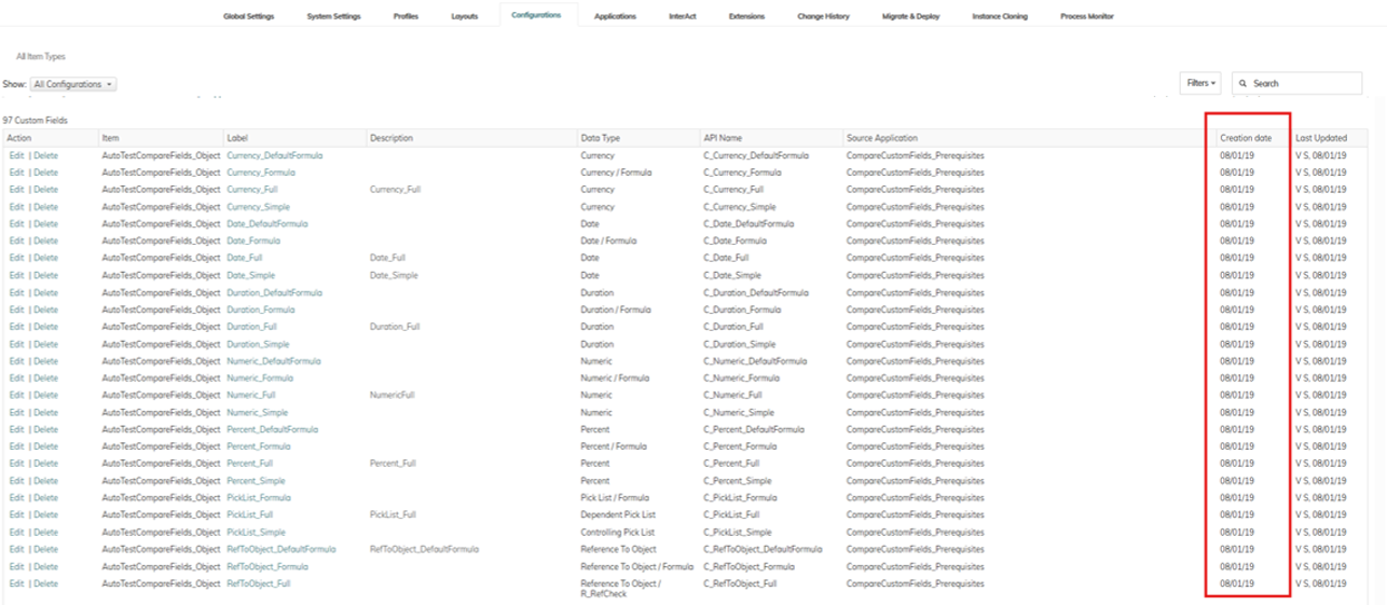
Creation Date for Custom FieldsDid you ever wonder when a custom field was originally created? The Creation Date for custom fields is now displayed in Settings > Configurations:
|
GA |
 Announcements
MS Teams Bot |
Deprecation of Microsoft Teams BotIn line with Microsoft’s deprecation of multi-tenant bots after July 31, 2025, the deprecation of the Microsoft Teams Bot for AdaptiveWork will take effect with Release R26.11 that is due to be released on November 1, 2026. Most capabilities currently provided through the bot are already available natively in AdaptiveWork, without requiring chat integration. We will review how these capabilities can be replaced with Anvi agents going forward. |