



Configure Planview.Me Views: Embedded vs. Standalone
Configure views for your organization
Delivering focused views is key to helping users access the right information at the right time. Planview.Me offers two options, Embedded and Standalone, so you can tailor the experience to different roles and workflows. Choosing the right approach ensures a smoother rollout and better adoption across your organization.
Many organizations use both experiences to meet different needs. They use the embedded experience for Portfolios-focused teams, then use the standalone option for occasional users or users who work across multiple Planview products.
Regardless of which experience you choose, the starting point is Planview Admin. From there, you’ll configure the views and define how they’ll be delivered.
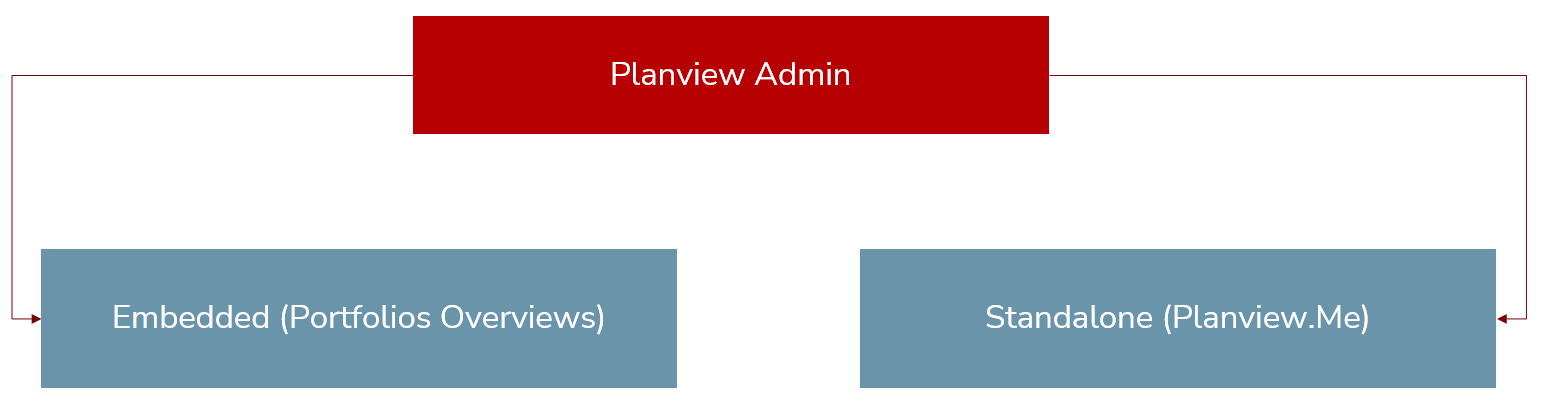
Start in Planview Admin
When deciding how views will be delivered, admins complete three tasks:
-
Create Planview.Me views.
-
Define how each view will be consumed (Embedded or Standalone).
-
Designate which users can access each view.
These three tasks are key to the Embedded vs. Standalone configuration decision. For full setup instructions, including additional steps for enabling Planview.Me, see Setting up Planview.Me (administrators).
Choose your experience
Planview.Me offers two view options:
Embedded experience (Portfolio Overviews)
Embedded views appear directly in Portfolios, making it easy for users to access insights where they already work.
Key features for users
- Portfolios users interact with views shared specifically with them.
- Views are displayed in the Overview tab in My Overview, Work portfolio screen, or Work entity screen. Once set up, there will be a new My Tiles and Reports tab, which contains the previous My Overview screen content.
- Data is filtered automatically based on location context.
Rollout considerations
- Simplifies UX for Portfolios-centric personas.
- Reaches Portfolios users where they already are, with tabs enabled alongside the current ribbon and tiles.
- Less change management.
- Ideal for teams who regularly work in Portfolios.
Standalone experience (Planview.Me)
Standalone views are accessed through a dedicated URL, providing flexibility for users who work across multiple Planview products.
Key features for users
- Users access Planview.Me via a standalone URL or product entry point, similar to Roadmaps.
- Data filters are based on widget configuration, not location context.
Rollout considerations
- Perfect for personas and roles who don’t log into Planview products daily.
- Supports personas and roles that span multiple Planview solutions.
- Reduces onboarding overhead for occasional users.
The following table describes the main differences between the two options:
| Feature | Embedded (Portfolios option) | Standalone (Planview.Me) |
|---|---|---|
| Access point |
Overview tab in Portfolios (My Overview, Work portfolio, Work entity screens) |
Dedicated URL or product entry point
|
| Data filtering |
Based on location context (e.g., portfolio or work item currently viewed by user) |
Based on widget configuration |
| User experience |
Integrated into existing Portfolios workflow; feels native |
Dedicated URL; users access Planview.Me content for multiple Planview products |
| Ideal user |
Users who work daily in Portfolios |
Users who work across multiple Planview products or log in occasionally |
| Change management | Minimal—users see new views alongside familiar ribbons and tiles | Moderate—requires introducing a new access point |
| Rollout benefit | Quick adoption; low disruption | Broader reach; supports cross-product visibility |
TIP
Many organizations use both experiences. Often, they use the embedded experience for core Portfolios users and the standalone experience for cross-product or occasional users.