



Plutora Release Notes for April Release 2025
New Features
Email Notifications – Deployment Plan Conditional Triggering
Navigation: Settings > Customization > Email Notifications > Email Template Wizard.
Personalize your Deployment Plans email notifications with conditional triggering, leveraging all key Deployment Plan fields for filtering. This enhanced feature grants you the ability to tailor notifications precisely to your needs, ensuring you stay informed about the activities that matter most to you.
For more information, see Email Template Wizard Customization.
Email Notifications – trigger an email on date field changes
Navigation: Settings > Customization > Email Notifications > Email Template Wizard.
Receive email notifications whenever the date field is changed in TEBR or TECR. Two new triggers are available: [TECR – Dates updated] and [TEBR – Dates updated]. Both include a conditional triggering feature.
For more information, see Email Template Wizard Customization.
Deployment Plan Activity – any user availability in Responsible field
Navigation: Deployment > Manager.
Add any user as ‘Responsible’ in your Deployment Plan Activity without needing to first add them as a Deployment Plan Stakeholder. Once added as Responsible, the user will automatically be included in the Stakeholders list as well.
For more information, see Manage Deployment Plan Activities.

Deployment Plan Activity – highlight Activities with overdue End Date
Navigation: Deployment > Manager.
Highlight Activities that are running late based on their Planned End Date. Two convenient settings are available in Customization for you to choose from.
For more information, see Deployment Plan Activities Status Customization.
Deployment Plan Activity – Description in HTML format
Navigation: Deployment > Manager.
Format your Deployment Plan Activity Description in HTML, allowing for richer text, links, and structured content to enhance clarity and presentation.
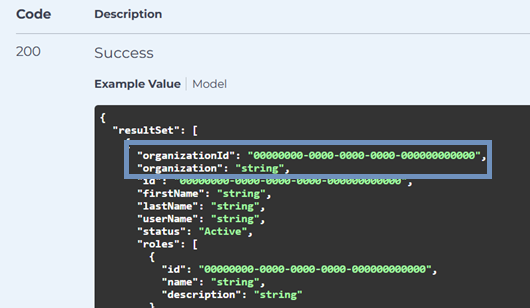
API – Portfolio Association (Organization) ID and Name in GET /Users
Navigation: Swagger UI.
Retrieve the Portfolio Association (Organization) ID and Name via the GET /Users API request and use them in your automated scripts.
Bug Fixes
- 38924: [Deployment Plan] The Actual duration time on the DP Information tab is showing wrong for all plans.
- 866648: [Release] Old/New UI Release Environment Booking throwing error
- 870402: [Release] Owner filter issue & Unable to filter releases using Owner details.
- 870968: [Health Check Dashboard] Page will not load when no environments are selected and when specific environments are selected.
- 876810: [Release] – Error is showing when adding environment.
- 881016: [Environment Requests-TEBR]-Error is showing up when adding an Environment to a booking Request.
Version Number
2.48.0
Regional Release Schedule
| Region | Schedule * |
| Asia-Pacific Release | 15th April 2025 – 7:30pm – 10:00pm (AEDT) |
| Europe Release | 16th April 2025 – 2:00am – 4:30am (BST) |
| Americas Release | 21st April 2025 – 9:00pm – 11:30pm (PDT) |
*Subject to change