



Manage Environment Utilization Report
Environment Utilization Report allows users to see how their Environments and Environment Groups are being used over time.
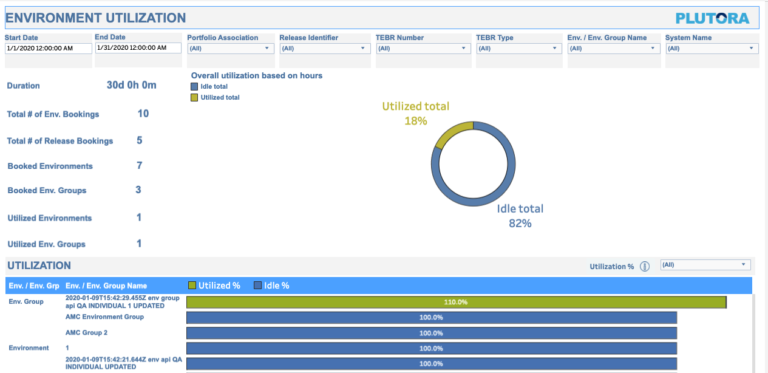
Location
To locate the Environment Utilization Report:
- Go to Reporting > Analytics > Explore > Environments > How are my environments being utilized?
- Click Environment Utilization.
Layout
The Environment Utilization Report displays the following:
- Filters:

- The top section of the Environment Utilization Report allows the user to filter the data in the rest of the report by:
- Date Range:
- Set the Start Date (left) and End Date (right).
- The content of the other filters depends on the dates selected.
- Portfolio Association:
- Select bookings by the Porfolio Association.
- Release Identifier:
- Select bookings by Release ID.
- TEBR Number:
- Select bookings by TEBR Number.
- TEBR Type:
- Select bookings by TEBR Type.
- Env. / Env. Group Name:
- Select bookings by Environment Name or Environment Group Name.
- System Name:
- Select bookings by System Name.
- Date Range:
- The top section of the Environment Utilization Report allows the user to filter the data in the rest of the report by:
- Side Panel:

- Lists utilization data by hours. (Not clickable.)
- Graph:

- Shows use data graphically, blue for idle Environments and Environment Groups and green for in use. (Not clickable.)
- Utilization:
- Lists the Environment Groups, then Environments, and their percent utilization for the selected time period.
- Shared Environments can have a utilization percentage of over 100%.
See How Your Environments and Environment Groups are Used Over Time
To see how your Environment and Environment Groups are used
- Go to Reporting > Analytics > Explore > Environments > How are my environments being utilized?
- Click Environment Utilization.
- Filter for the Start Date and End Date at a minimum.
- View the utilization data.