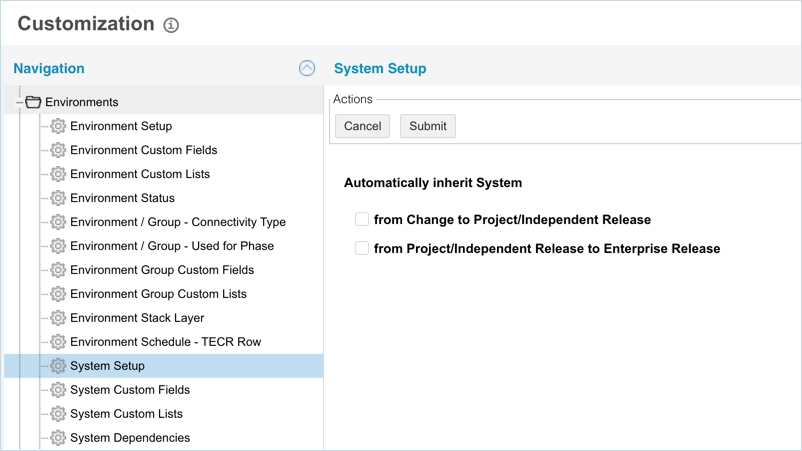
System Setup Customization
Introduction
System Setup Customization gives Release Managers a better understanding of the impacts related to their projects by allowing Systems to be inherited from:
Pre-requisite
To be able to do ‘System Setup Customization’, you must have ‘Access Customizations’ User Permission.
Navigation
Navigation .png?revision=1) > Customization > Environments > System Setup Customization
> Customization > Environments > System Setup Customization
Manage System Setup
To manage System Setup:
- Navigate to Settings > Customization > Environments.
- Click System Setup.
- Select the from Change to Project/Independent Release checkbox to make:
- Project and Independent Releases inherit the Impacted and Regression Systems linked to Changes, when those Changes are added to the Release via the Change tab.
- Linking is one way. Removing the Change later will not remove the inherited Systems.
- The API call PUT /changes/{changeid}/deliveryReleases/{releaseID} will also cause a Change’s Systems to be inherited by Project or Independent Releases.
- Select the from Project/Independent Release to Enterprise Release checkbox to make:
- Parent Enterprise Releases inherit the Impacted and Regression Systems linked to child Project or Independent Releases, when those child Releases are added to the parent via the Release Manifest tab or from the Release Dependency field in the child Release.
- Linking is one way. Removing the child Release later will not remove the inherited System.
- The API call PUT /releases/{id} will also cause a child Release’s Systems to be inherited by a parent Release.
- Click
.png?revision=1) .
.
Deselect the checkboxes to toggle the respective features off.