



7.1q
This document describes the enhancements, corrected issues and new features which have been implemented in ProjectAdvantage 7.1q either in the Core product and in the ProjectAdvantage Default Configuration.
ProjectAdvantage 7.1q is a maintenance release of ProjectAdvantage 7.1.
In the Core product, 11 enhancements have been implemented, and 14 issues have been fixed.
In the ProjectAdvantage Default Configuration, 11 enhancements have been provided and 18 issues have been fixed.
Note: Items with nearly identical features are indicated by an asterisk. For instance, if an issue has been corrected for the Project* Center workspace, it means that the correction has been implemented in the Project Center, Business Case Center, Product Center, Program Center, and Template Center workspaces.
In order to access to the different sections, please click on the following links:
Important Reminders for upgrade
Default Configuration Enhancements
Default Configuration Corrected Issues
Important Reminders for upgrade
- Looking forward to strengthening our Unique Technology Stack, we have decided to focus our quality, testing and support to the English version of Tomcat exclusively. While ProjectAdvantage will continue to work on non-English versions of Tomcat, we will no longer test those versions nor offer support in case issues occur. This decision is transparent for SNet and SVA users. IT departments that have deployed ProjectAdvantage on premise using a non-English version of Tomcat are invited to use an English version.
- As a reminder we only support SAML SSO since January 2019. Consequently we are scheduling to remove "Windows SSO" and "CAS SSO" in the Designer in the list of Authentication type for release 7.1r.
- Since 7.1q there is a new way of managing languages in ProjectAdvantage thanks to the Language Packs feature. As a result of this new feature there is a change in the classpath used to launch API programs : we no longer have PSClient_xx.jar files for our translated language strings and now have new Language Pack jar files. So all PSClient_xx.jar files will now need to be replaced by the appropriate Language Packs. Please read carefully #41025 included in the Release Notes for ProjectAdvantage S7.1q.
Core Product Enhancements
Commands
#41576
The Command “Conditional Group” is now able to be executed entirely on the server if all enclosed commands are server-side commands.
Config Utility / Installation
#41770
The ConfigUtility now only support English as its unique language to be displayed. All other languages (de, fr, jp, sp) are now deprecated in the ConfigUtility resulting in a 404 page if trying to launch it in these languages.
#41764
Backup Database option (CUB zip files) in the Configuration Utility is no longer supported. ProjectAdvantage will now only support Postgres native backup. Postgres native backup and restore is now the recommended approach, since Postgres is the only supported database.
Data Snapshots
#41315
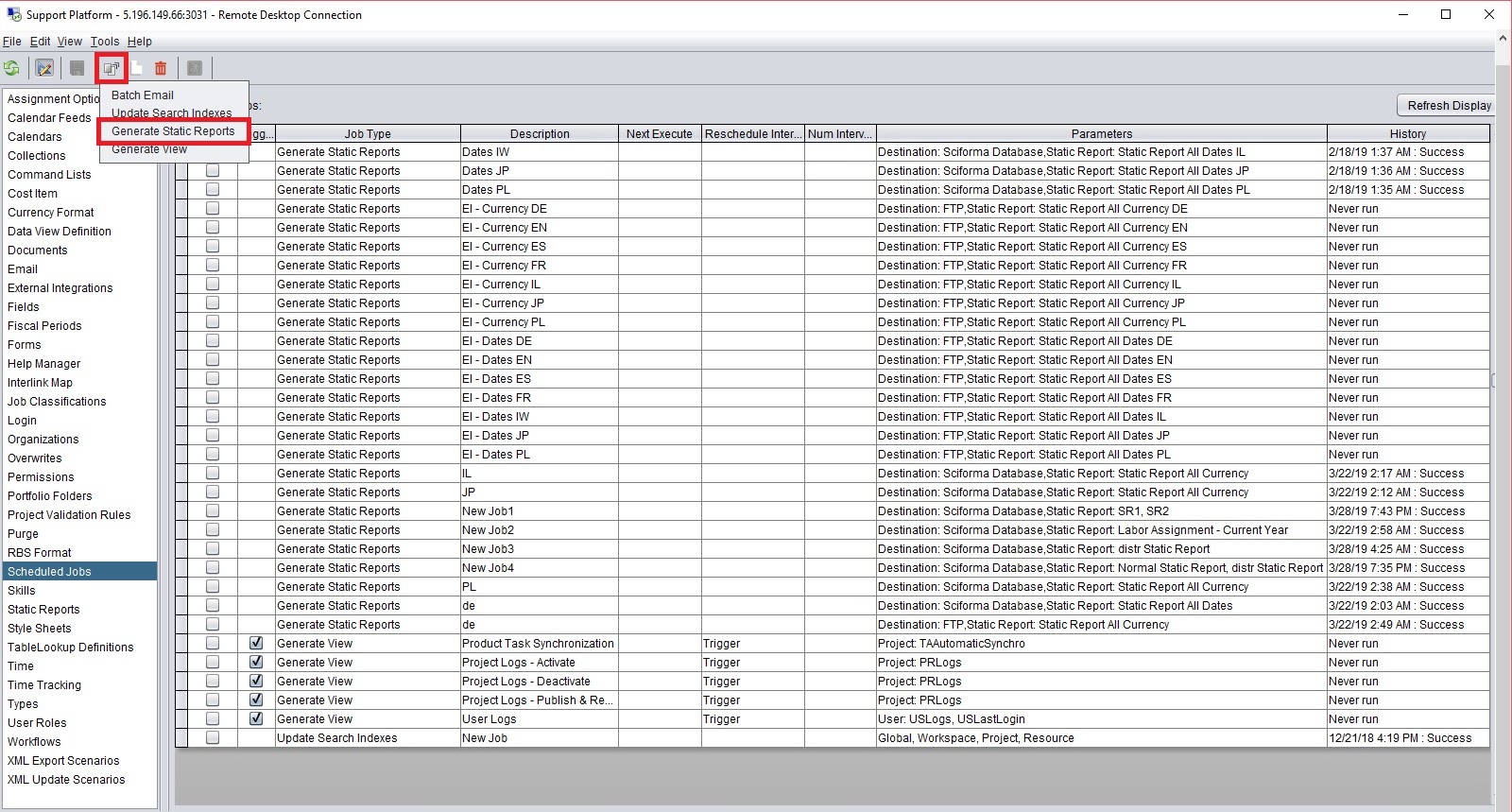
There are two new dropdowns that have been added in the Generate Static Report dialog in the Designer (Scheduled Job view). These new dropdowns allow users to choose locale and currency for the generated static report, wherein the data will be formatted according to the chosen locale or the chosen currency format. The goal was to replicate the behavior of the HTML5 client. Every kind of field is involved such as dates, costs, rates, effort and duration. This will only work if the field format is locale aware (i.e. format using the star *$1.2345, *31/01/03).

Localization
#41025 – Modified on June, 25
A new admin Language Packs workspace is available in the HTML5 Client once it has been added to the User Role. The Language Packs workspace allows languages to be enabled and disabled, replacing the previous Login > Language Setup dialog in the Designer. However, the language that is used to login will not be allowed to be disabled.
Also, Previous JNLP files (WebStart.jnlp) used to launch the Java client (Designer) will no longer be valid since the classpath must now include the appropriate language packs, based on the enabled languages. Generate the WebStart.jnlp again by entering the Designer URL.
With the Language Packs feature comes a change in the classpath used to launch API programs.
We no longer have PSClient_xx.jar files for our translated language strings and now have new Language Pack jar files. So all PSClient_xx.jar files will now need to be replaced by the appropriate Language Packs (ie projectadvantage-language-pack-en_US-71r-7170.jar). These new Language Pack jar files can be found in the web/WEB-INF/plugins directory of the projectadvantage deployment.
#41734
Using the new Language Packs management workspace, the Arabic language can now be enabled and will be included in the list of available languages in the HTML5 login dialog. The Arabic language will not appear in the list of languages in the Designer login, we will only support our legacy languages (en, fr, de, es, ja, iw, and pl). For further information regarding the new Language Packs workspace, please refer to #41025.
Performance
#38805
There was a performance problem that occurred when multiple processes were performing data updates at the same time, resulting in a bottleneck of processes waiting for data from one specific table in the database. This bottleneck has been removed.
Printing
#41268
There is now an option in the Designer to disable Export to Excel for Text Blocks. The checkbox is in the Format tab of the Edit Text Block dialogue, and labeled “Disable Excel export for this block”. The checkbox is only enabled when the “Enable printing for this block” checkbox is selected. When selected, the “Print” option for the Text Block will appear, but the “Export to Excel” option will no longer appear.

UI Blocks
#41598
There is now a new option in the gear menu for Network Blocks, “Export to SVG.” This will produce an SVG with a copy of the Network Block as displayed on the client.
Several styling changes have been made to the PDF export to make the result more like the HTML5 client, which are also reflected in the new SVG feature. The zoom level of the Network Block on the HTML5 client is now honored on the exports, the drop shadows have been removed, the background is now white, and the arrows are now grey. The arrowheads have also been made smaller to accommodate the most zoomed-out level, which also affects Outline and Workflow blocks.
#41682
In the Designer, in the Edit Network Block/ Style tab, we have now removed the drop shadows and override background color options, since neither of those are honored on the HTML5 client, nor the export for SVG or PDF.
#41641
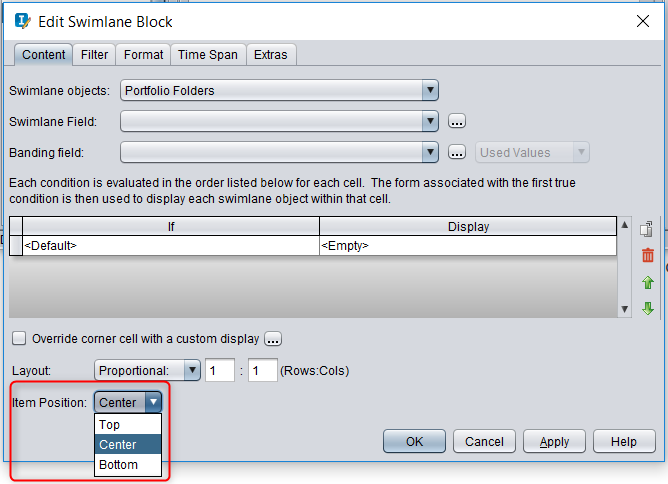
In a Swimlane block, the Banding Field can now be set to blank, wherein there is only one row in the Swimlane block.
There is now a dropdown field option called “Item Position” which specifies the vertical alignment of the Swimlane cells within their column and row. The new option is added in the Swimlane form with three options (Top, Center, Bottom).
Core Product Corrected Issues
Commands
#41534
Due to another recent change in the product, global selections in HTML scriptlets were not always being handled correctly. In some cases, the scriptlets behaved as if there were no global selections.
Additionally, HTML scriptlets were not properly handling a “setValue” call on a “yes/no” field when the second parameter was text (e.g. task.setValue (“Allow Delete”, “yes”)). Typically, this sort of scriptlet call would result in a “Cast Exception” error.
Both of these problems have been fixed.
#41708 - Modified on June, 19th
ProjectAdvantage offers the ability to perform partial reloads, allowing a workspace action to only refresh a portion of the screen to provide better performance and user experience. These partial reloads occurred after a command list was executed or after a selection change from a gantt, grid, or text block. The forms to be reloaded during this partial refresh were defined in the Designer.
Previously, if a partial refresh occurred and none of the specified forms to be reloaded existed on the screen, then the entire workspace was refreshed. In order to improve performance and user experience, ProjectAdvantage changed the behavior for this configuration such that nothing will be reloaded.
In order to prepare for this change, designers should update any partial reload configurations where it’s possible for none of the specified forms to exist on the screen at the time the refresh occurs. In these cases, the designer should add the appropriate form(s) to the partial reload list or change the partial reload into a full reload.
Config Utility / Installation
#41699
ClassCastException error occurred during the Update Tables processing, preventing the upgrade process of older 7.0h database. The ClassCastException error has now been fixed allowing the upgrade process to no longer fail.
Designer
#41365
Customers with large volume of edits to searchable fields may have server performance issue after some time, characterized by periodic spikes in CPU activity. This has been fixed. We strongly recommend to run the Update Search Indexes scheduled job at least once a month.
#41624
Modifying a persistent Global field in the HTML5 client sometimes caused formulas that used the MeetsExposedFieldsFilter function to calculate improperly. This has been fixed.
Field Edits (Field Types)
#41737
Setting a cost field from a string that contained a currency symbol via an HTML Scriptlet (e.g. cost.setValue("Fixed Cost","¥9999")) did not work and no error was reported. This has been fixed.
#41656
When a formula like “if(yes,1,0)” was entered, it caused a “Bad number of arguments for “if” operator” error to be displayed. The parser improperly interpreted the “1,0” portion of the formula as a cost value. The problem could be avoided by adding a space before each individual number in the formula like this: “if(yes, 1, 0)”. This has been fixed.
Object Edits (Data Categories)
#40400
Creating new cost item assignments when the project’s “Default Distribution Type” field was set to “Fixed Effort-Rate” could result in tasks with abnormally long durations (> 80 years). This instance caused the operation to “freeze” the system. This has been fixed.
#39812
After the Object Edit rights of a “child” User Role were modified in the Designer, the value in the “Tokens Used” column (in a User report in the HTML5 client) was inaccurate in some cases. This has been fixed.
Performance
#41700
In 7.1p, it was possible to get into a deadlock condition in the database if two users edited different data at exactly the same time. This has been fixed.
#41549
Maintenance on the Undo Stack in the database (when a user locked additional projects or unlocked one of several locked projects) was done in an inefficient manner, which could lead to long running Lock or Unlock commands. This has been fixed.
Scripts/API
#41173
Over time the ProjectAdvantage server used all RAM due to a memory leak in the software. This has been fixed.
UI Blocks
#39541
Cell text in the selector was overflowing its bounds when the column was used for hierarchical controls (arrows to expand and collapse). This has been fixed so that text is properly truncated with an ellipsis.
#41575
The Cut/Copy/Paste commands (in the right-click menu in the Gantt) were not working properly when the Gantt was in a pop-up. The commands (and their animations) have been improved.
Default Configuration Enhancements
Budget & Cost (Phase 2)
This release focused on developing Mixed Cost Centers support. Previously, organizations had to manage Budget in Cost or in Effort globally; it will now be possible to mix both at the Project, Portfolio, and System levels.
Additionally, the following improvements (among others) have been implemented:
- Support for estimating Labor Forecast in Effort, even when the Budget is managed in Cost
- New Portfolio Dashboard allowing the user to review Project Forecast
- New consolidated Project Advanced Attributes dialog box
Note: Please refer to the Feature Presentation document for more details on the changes made in this release regarding Budget & Cost management.
Project*
#MW-3145
In the Milestone Monitoring dialog box (available in the Project* Center workspace, Key Fact section or in the Project* Scheduler workspace, Planner tab, main toolbar, More button, “Manage Monitored Milestones” command), Data Points sub-tab, the spreadsheet data is now grouped by Reporting Date.
#MW-3140
The "Performing Users" generic user has been added to the following default Project permissions:
- Business Case Permissions
- Product Permissions
- Program Permissions
- Project Permissions
- System Default
The permissions granted are: “Read Published” and “My work add task”.
#MW-3136
In the Milestone Monitoring dialog box, Milestone Trend Analysis sub-tab, a new warning message will be displayed when non completed Monitored Milestones are still planned in the past (meaning Planned Date is prior to last Reporting Date).
#MW-3135
In the Project* Center workspace, Definition tab, Milestone Monitoring dialog box, upon capturing milestones, the completed milestones were not taken into account. As the status and planning of milestones may evolve between the last snapshot and the completion of the milestones, completed milestones will now be considered during capture.
#MW-3105
In the Project* Resources workspace, Project Allocations tab, upon clicking on the “Build Allocation Requests” command, a new option has been added in the Build Allocation Requests popup, allowing the user to update existing Allocation Requests (whose status is "Open") from the Soft Assignments.
#MW-3055
In the Project* Scheduler workspace, Planner and Theater tabs, a new “Dependencies” filter (available in the Scope section) allows the user to only display the Tasks which have a Dependency with another Project and/or Task.
#MW-2678
In the Project* Scheduler workspace, Status Reports tab, when several projects are selected, a new "Print all Reports" button allows the user to print the last Status Reports of all the selected projects sequentially.
Note: Depending on the number of projects selected, the printable version may take a while to generate.
Resource
#MW-3239
In the Resource Allocations workspace, Soft Allocations tab, the display has been optimized to improve loading time.
Portfolio
#MW-3232
In the Portfolio Dashboards workspace, Controlling report, Overview view mode, the "Cost Rolling 5 Years" chart has been replaced by a "Cost Overview" chart. Unlike its predecessor’s, the "Cost Overview" chart values can be defined in the Time Navigation toolbar to avoid any confusion with the spreadsheet below.
Note: This modification was also applied to the corresponding Effort view (displayed when the Budget Type is set to "Effort").
#MW-2122
In the Capacity Planning workspace and in the Simulation view mode of the Portfolio Simulation workspace, the “Forecast Effort” and “Capacity Forecast” series will now be hidden from the relevant charts when the “Enable Organization Center Capacity Forecast” setting (System Settings workspace > Resource Settings folder > Display Preferences tab > Tab options section) is deactivated.
Administration
#MW-3170
In the System Data workspace, Custom Reports tab, the Custom Reports feature has been enhanced as follows:
- A new "User Roles" filter has been added to the reports’ Basic Attributes section, allowing the Administrator to select the User Roles able to access a given Custom Report.
- The “UID field” has been replaced by a "Custom Report ID" field. By default, this field will be filled in with the UID value, but it can now be edited when necessary in order to facilitate the export and import of reports between two environments.
Default Configuration Corrected Issues
Project*
#MW-3248
In the Project* Dashboards workspace, Work Package Overview report, Details view mode, the Work Package card could display a scroll bar when its ID was too long. This issue has been fixed.
#MW-3247
In the Project* Dashboards workspace, the Milestone Trend Analysis report was only available for Working projects. This issue has been fixed; this report is now available from the moment a snapshot has been created, regardless of the project version.
Other aspects of the Milestone Monitoring feature have also been modified:
- The Milestone Monitoring button (accessible from the Project* Center workspace > Definition tab > Info Stack section) is now also available for Published Projects from the moment a snapshot has been created (previously this was only the case for Working Projects).
- In the Milestone Monitoring dialog box, the toolbars and the Task sub-tab are now hidden for Published Projects.
#MW-3236
In the Project* Dashboards workspace, when using the Report Launcher feature, in the Time Distribution options, the user could define an "Intervals" value which did not exist as part of the selected report.
#MW-3196
In the Project* Finance workspace, Costs tab, Forecast view mode, Labor sub-tab, when the "Show Total Cost" display option was activated, the "Total Labor Cost" values took the selected time frame into account, while the “Total Forecast” value did not, preventing the user from making an accurate comparison. This issue has been fixed; both Total values are now independent from the displayed time frame.
#MW-3171
When modifying a Task, a Labor Assignment or a Cost Item Assignment (in the corresponding Details popup), the user could not reset the Calendar attribute. This issue has been fixed.
#MW-3169
In the Project* Scheduler workspace, Tracking tab, Detailed Approval view mode, the sum of Actual Effort available on the Parent Task could be incorrect. This issue has been fixed.
#MW-3156
In the Project* Dashboards workspace, Performance report, Filters popup, new filtering options are now available:
- Monitored: Allows the user to only display Monitored Milestones
- Dependencies: Allows the user to only display Tasks with Dependencies
- Chain Task: Allows the user to only display the selected Task's successors and/or predecessors (depending on the selected option)
Note: These filters have also been added to all the Performance reports at the Consolidated and Portfolio levels.
#MW-3152
In the Status Report Summary popup (accessible from the Project* Scheduler workspace, Status Reports tab, History button, Status Report History dialog box, upon clicking on the Status Report creation date), the indicators were not displayed properly when there were more than four. This issue has been fixed.
#MW-3149
In the Project* Dashboards workspace, Evaluation tab, the user had the ability to attach an Evaluation template even though he/she should not have. This issue has been fixed.
#MW-2675
In the Project Scheduler workspace, Dependencies tab, when selecting a Published project, the synchronization options were available. This issue has been fixed.
Portfolio
#MW-3269
In the Portfolio Dashboards workspace, Roadmap report, the report data could be lost after the user had opened the full screen view of a Project from another workspace (Portfolio Ranking for instance). This issue has been fixed.
#MW-3246
In the Portfolio Dashboards workspace, Phases & Gates report, Gantt view mode, the report data could be lost after the user had opened the full screen view of a Project from another workspace (Portfolio Ranking for instance). This issue has been fixed.
#MW-3193
In the Portfolio Simulation workspace, when playing a scenario, in the Analytics view mode, Charts sub-tab, the "Budget" chart did not take the "Cost Centers" filtering option into account. This issue has been fixed.
#MW-3153
In the Portfolio Dashboards workspace, Status Overview report, when the names of the indicators had been modified by the Administrator, these names were not systematically displayed. This issue has been fixed.
Note: The Administrator can redefine the names of the Status Report Indicators in the System Settings workspace, Project Settings folder, Status Report Options tab, Indicators sub-tab.
#MW-3150
In the Portfolio Center workspace, Budget tab, the user could add the same Parent Cost Center more than once. This issue has been fixed.
#MW-2976
In the Portfolio Dashboards workspace, Phases & Gates report, Gantt view mode, upon accessing the Gate Brief dialog box for a Gate with several submitted Gate Review reports, the descriptions of these previously submitted reports could be displayed. This issue has been fixed; only the latest Gate Review report description will now be displayed.
#MW-2430
In the Portfolio Center workspace, Project Supervision tab, when drilling down to Project level, the user could experience display issues in the Gantt view due to previously selected filters. This issue has been fixed; the Gantt filters will now be reset as soon as the Project full screen view is closed.
Administration
#MW-3182
In the System Settings workspace, Project Settings folder, Display Preferences tab, Project Resources section, the "Enable Project Allocation Requests" setting was still displayed although the "Activate Resource Allocations" meta setting was deactivated. This issue has been fixed.