



7.1m
This document describes the enhancements, corrected issues and new features which have been implemented in ProjectAdvantage 7.1m either in the Core product and in the ProjectAdvantage Default Configuration.
ProjectAdvantage 7.1m is a maintenance release of ProjectAdvantage 7.1.
In the Core product, 3 enhancements have been implemented, and 22 issues have been fixed.
In the ProjectAdvantage Default Configuration, 23 enhancement has been provided and 32 issues have been fixed.
Note: Items with nearly identical features are indicated by an asterisk. For instance, if an issue has been corrected for the Project* Center workspace, it means that the correction has been implemented in the Project Center, Business Case Center, Product Center, Program Center, and Template Center workspaces.
In order to access to the differents sections, please click on the following links:
Important Reminders for upgrade
Default Configuration Enhancements
Default Configuration Corrected Issues
Important Reminders for upgrade
- Looking forward to strengthening our Unique Technology Stack, we have decided to focus our quality, testing and support to the English version of Tomcat exclusively. While ProjectAdvantage will continue to work on non-English versions of Tomcat, we will no longer test those versions nor offer support in case issues occur. This decision is transparent for SNet and SVA users. IT departments that have deployed ProjectAdvantage on premise using a non-English version of Tomcat are invited to use an English version.
- Config Utility Backup files (CUB zip files) are used as a mean to backup a customer's databases into a .zip file so that it could be restored on another system regardless of the database vendor used in the source and target systems. Since January 1st, 2018 ProjectAdvantage exclusively supports Postgres SQL databases and therefore the need for having a capability to exchange data across different database vendors is no longer needed. As a consequence the CUB export capability is now deprecated, it will continue to work but will be removed in a future release. The CUB import capability will continue to be supported as it is a means to “import” databases from customers that are not currently using Postgres.
Core Product Enhancements
UI Blocks
#41044
The Network Diagram now displays much faster especially for large projects.
#40509
There is a new “Attempt to improve performance by considering the context’s date range” checkbox in the Data tab of the Edit Loop dialog box. The main focus of this option is to improve performance when reporting on a particular date range especially when looping through tasks or assignments given a current resource or current organization. This option effectively filters out certain objects based on whether they overlap the active date range.

#38473
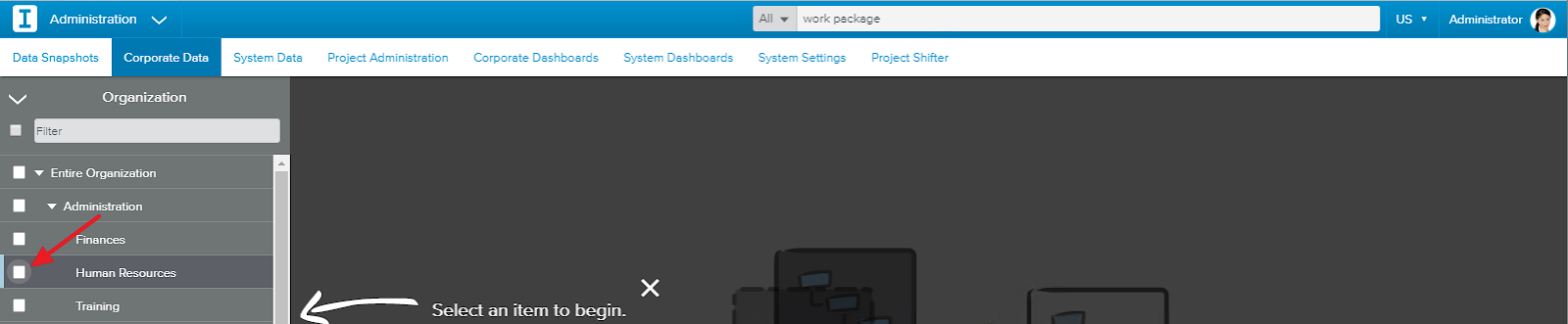
In a multi-select selector, a circular shaded area has been added behind the checkbox to emphasize the checkbox when hovering over the checkbox area. Clicking any place in the checkbox or this shaded circle will toggle the selection, thus increasing the available clickable area and making it easier to toggle selection, as well as emphasizing that clicking the checkbox is a different action than clicking on the other parts of the row.
Multi-select Selector

Pop-up Selector

Multi-level multi-select Selector


Hierarchical Selector
Core Product Corrected Issues
Commands
#40382
Launching from an email link does not open the correct workspace, when logging in via SSO. This has now been fixed.
#41011
Selections were not properly set when the link command was executed to a new perspective (a perspective is a different group of workspaces). This could result in missing or incorrect data in the generated report at the target workspace. This has been fixed.
#40937
When one work package within a particular project was locked, other users could not successfully enter data on tasks within other work packages in the same project. Instead, an error was displayed saying that the project could not be fully locked. This has been fixed.
Config Utility/Installation
#41159
Database upgrade process could fail when Project had bad Workflow data. The Task table conversion process could fail when processing a Project that had bad workflow data and therefore caused the upgrade to fail. This has now been fixed.
#41054
SSO did not work on Internet Explorer 11 due to the Cookie processing on IE 11, which did not work as it does on Chrome and Firefox. The problem has been fixed and SSO should now work properly on IE 11.
#41052
Under some conditions, it was possible to get into an unexpected state with a null value in a form. Consequently, there was an error when performing Create/Update tables when upgrading to a new version of ProjectAdvantage. This has been fixed.
Designer
#41067
If there was a Generate Static Reports scheduled job with at least one static report chosen, and a scheduled job was added to a collection, then these static report(s) were not automatically added. This has been fixed.
#37881
When a filter in the Fields view of the Designer was edited, the wrong name appeared in the “Filter Name:” text box. The “base” field name should appear in that text box, NOT that current alias name. This has been fixed.
Field Edits (Field Types)
#41042
In order to comply both with a security audit and with many customers' limited network access, a request to an external 3rd party content delivery network was changed to an internal request where ProjectAdvantage will support the necessary resource. Prior to this change, the external request could timeout in certain environments and drastically increase loading times.
#41026
Popup buttons from Rich text editor had no effect when clicked if the rich text editor was opened from a popup. This has been fixed.
Gantt
#41180
Gantt column preferences randomly switched from user’s to default and back again during high concurrency. This has been fixed.
#41150
If the user navigated to a different workspace after typing data into a grid cell (without typing the ENTER key), an “Unexpected Exception” error was sometimes encountered. This has
been fixed.
Localization
#41066
The date Picker used for Gantt export was not localized in Hebrew. This has been fixed.
Note: The date picker automatically chooses the Start day of the week, in the format of the logged-in language. It will choose the Start day as follows:
- Monday for French, Spanish, German, Polish
- Sunday for English, Hebrew, Japanese
#41051
Hebrew support for data snapshots and Gantt print dialog wasn't available. This has been fixed.
Object Edits (Data Categories)
#41096
The popup for the User field “Pending Organization” was incorrectly showing the Organization tree rather than the Pending Organization tree. This has been fixed so that the Pending Organization tree is now displayed.
Printing
#41099
There was an issue with the Data View caching feature that caused Data View grids to be missing data if there was too much data to be loaded. This has been fixed.
#40789
Gantt charts exported as SVG in Hebrew had their month names printed out in reverse. This has been fixed.
Scripts/API
#41041
When running the API and accessing project data, a StackOverflow error was encountered. This only happened on projects that contained formula-based permissions that accessed task and assignment data within the project. This has been fixed.
UI Blocks
#38991
When logged in using Internet Explorer 11 and Hebrew language, clicking on a Gantt grid cell that was not fully in horizontal view, the program scrolled the Gantt grid incorrectly wherein the selected cell is not properly displayed. This has been fixed.
#39572
For Right-to-Left languages, the Week, Month, and Year views in the Calendar have several errors:
- The Events in the Month and Year views of the calendar block were displayed from
left to right, instead of right to left. - In the Year view, clicking on a specific month will direct to a wrong month.
- In the Month view, clicking on a specific day to create an event will display a wrong
date in the popup. - In the Week view, clicking on a specific day to create an event will display a wrong
date in the popup.
These have all been fixed.
#39577
For Right-to-Left languages, the hours column header in the Day and Week views in the Calendar block was on the far left, instead of the far right (over the hours column). This has been fixed.
#39576
In Right-to-Left locales, calendar events in both the Day and Week panels were still flowing left to right and were overflowing into the hours column. This has been fixed.
Default Configuration Enhancements
Project*
#MW-2710
In the Project* Scheduler workspace, Planner tab, it is now possible to filter Flagged Tasks in the Scheduler and Task Details view modes. To make it easier, the Flagged ( ) column has been added to the Task Details mode.
#MW-2683
In the Project* Scheduler workspace, Planner tab, Scheduler view mode, the Planning Problems now feature three more potential alerts:
- Billable Task(s) not confirmed with Assignment
- Billable Task(s) not billed in the past
- Billable Task(s) with no Purchase Order
#MW-2658
In the Project* Center workspace, Definition tab, when selecting the "Project.Job Classification" Revenue Rate Source and opening Revenue Parameters popup ( ), the spreadsheet now displays a new column indicating the Job Classification Revenue Rate.
#MW-2626
In the Project* Scheduler workspace, Billing tab, a new Transactions view mode has been added, in which only billable Transactions are displayed. Upon creating new Transactions from this view, they are automatically marked as Billable.
#MW-2520
In the Project* Dashboards, Performance, Finance, and Budget tabs, in the Portfolio Dashboards, Controlling tab, and in the Program/Product Consolidation Dashboards, Controlling and Cash Flow tabs, the user can now choose which value to display for the Effort and/or Cost data, among the following: Total (default), Actual, Remaining, and Baseline (current).
#MW-2391
In the Task Details dialog box, Scheduling & Tracking sub-tab, it is now possible to create a link between two tasks by entering directly the Task number.
#MW-2349
The Gantt filters feature has been enhanced as follows.
Upon clicking on the new Filters ( ) button available in the Gantt toolbar, the user can now:
- Open Filters Dialog
- Pin Filters Panel: Displays the new Filters side panel on the right-hand side of the Gantt chart
- Unpin Filters Panel: Hides the new Filters side panel
- Reset Filters: Deselects all the previously selected filters in both the Filters dialog box and the Filters side panel.
Both the Filters dialog box and the side panel contain the same set of filters in the form of chips. As soon as at least one filter is selected, the Filters button turns blue ( ).
The new Filters side panel allows the user to manage the filters while still having access to the Gantt chart. It also provides a white "More" ( ) icon, which allows the user to Unpin the Filters panel and Reset the filters.
Note: When the Filters panel is open, the user will not be able to have access to the Gantt Project Problems and the Task panels.
In addition, the Administrator can now add a new Custom section to both the Filters panel and the Filters dialog box. The following options are available:
- None: No Custom section is displayed.
- Top: The Custom section will be available in the Filters dialog box and in the upper part of the Filters side panel.
- Bottom: The Custom section will be available in the Filters dialog box and in the lower part of the Filters side panel.
#MW-2306
In the Project* Scheduler workspace, Planner tab, Scheduler view mode, when a filter is active, the Parent tasks of the Tasks matching the filter will now be displayed, whether they meet the filter conditions or not.
#MW-2103
In the Project* Center and the Project* Scheduler workspace, the Project Data Selector has a new filter; upon entering “My Projects” in the Filter field, the selector now only displays projects for which the logged-in user is either Manager 1, 2, or 3.
Note: The “My Projects” filter can be used in all the Project Data Selectors.
#MW-1640
In the Project* Scheduler workspace, Status Reports tab, the Portfolio Folder was not saved with the Status Report. This field has been added to the report and is now displayed in the Summary section of the full report.
Note: If the "Activate Portfolio Folders" meta setting (System Settings workspace, General Settings folder, Meta Settings tab) is disabled, the Portfolio Folder field will not appear.
#MW-1352
In the Project* Dashboards workspace, Performance tab, a new Filters popup has been added, providing the user with the "Scope" and "Outline" filtering options (identical to the ones available in the Gantt Filters dialog box).
Note: A similar modification has been implemented in the Portfolio Dashboards workspace, Performance tab, Project Details popup.
Resource
#MW-2646
In the Resource Commitments workspace, while fulfilling a Resource Request, it is now possible to click on the Resource Request label ( ) to review the details of the corresponding Request.
#MW-2616
In the Resource Commitments workspace and in the Project* Resources workspace, Resource Requests tab, the rule for calculating the "Gap" between what has been requested and what has been committed has been reviewed. The formula is now the following: Request Effort/Rate - Commitments Effort/Rate.
The corresponding colored indicators have been updated accordingly in both the Inbox and the Grid view modes.
Also, in the Grid view mode, the "Show Gap" display option has been removed and the colored indicators representing the gap are now displayed for each time distributed value.
#MW-2409
New "Managed by Logged In User With Parents User" fields in the Organization and Resource categories have been added. They can be used to overwrite the filters (Managed by Logged In User) used in the Organization and Resource Selectors and therefore allow users to see their teams and sub-teams (instead of their direct teams only).
#MW-2251
In the Resource Validation workspace, Calendars tab, Details view mode, the sub-tabs have been replaced by the “More” ( ) button. It provides access to the Resource Brief dialog box, the Calendar Details popup, and the Assignments Details popup. Moreover, in the Calendar Details popup, the user has now the ability to Show/Hide the assignments.
Portfolio
#MW-2424
In the Portfolio Center workspace, Project Supervision tab, new filters are now available to filter the view according to Status Report, Performance, and Quality indicators.
The user will be able to choose the combination rule:
- AND: When selecting filters from several categories, only projects with the selected combination of Status Report, Performance, and Quality indicators will be displayed.
- OR: When selecting filters from several categories, all projects showing at least one of the selected indicators will be displayed.
#MW-2080
In the Portfolio Dashboards workspace, Status Overview tab, Overview view mode, the Budget icon has been modified when the Budget Type is set to Effort.
Note: The Budget Type is set by the Administrator in the System Settings workspace, Administration Settings folder, Global Options tab.
#MW-1080
In the Portfolio Dashboards workspace, Pipeline tab, the legend has been enhanced and now is compliant with the overall legend pattern.
Administration
#MW-2533
In the System Settings workspace, Project Settings folder, Global Options tab, a new “Enable Skip Template Options” setting is available. Upon activating it, the “Insert Template Options” popup will no longer be displayed when inserting a template in the Gantt for instance.
#MW-2434
In the Corporate Data workspace, Users tab, it is now possible to hide Inactive users and to filter by User Role the list of users.
#MW-2411
In the Project* Scheduler and Project* Center workspaces, the Create New Project ( ) button is now managed by the "Enable Project Creation Button Filter" setting (available in the System Settings workspace, Project Settings folder, Project Creation Options tab). It allows the Administrator to hide the Create New Project (
 ) button for specific Project Natures.
Additionally, the "Enable Project Creation Filter" setting has been renamed "Enable Nature Selection Project Creation Filter" for consistency purposes.
#MW-1880
In the Corporate Data workspace, Resources and Cost Items tab, a new set of display options allow the user to define the Status of the Resources and Cost Items that should be displayed. By default, only ACTIVE elements will be displayed until the option gets changed.
Work Management
#MW-2641
In the Project* Work Management, Portfolio Work Management, and Execution Work Items workspaces, when creating a new Issue, Change Request, Action, Deliverable, Risk or Lessons Learned, a Custom section will be available in the popup dialog when the corresponding Custom tab setting has been turned on.
Default Configuration Corrected Issues
Project*
#MW-2743
In the Project Scheduler workspace, when assigning a resource on a Work Package Task, an error could occur if the selected resource was not part of the Performing Resources of the corresponding Work Package. This issue has been fixed. Now, only relevant resources will be displayed in the list.
#MW-2736
In the Project* Dashboards workspace, Billing tab, the amount of Scheduled Cost/Effort was not taking into account the Billable Amount associated to Tasks and Transactions with no Billing Status. This issue has been fixed.
Note: The Scheduled columns have been renamed "Planned" to be consistent with the Billing dashboard at the Portfolio level.
#MW-2733
In the Project* Scheduler workspace, when assigning/replacing/fulfilling Resources from the Gantt toolbar (i.e., with possibly multiple selected Tasks) or when assigning/replacing Cost Items, the Assign/Replace/Fulfill dialog box was not showing any dates for the time-distributed spreadsheets. This issue has been fixed.
#MW-2732
In the Project* Scheduler workspace, Planner tab, while creating or replacing an assignment and fulfilling a soft assignment, it was not possible to review the newly created assignment with the existing published assignments of a given resource. This issue has been fixed. In the Assign/Replace/Fulfill dialog box, for a newly created assignment, one can click on the Resource’s name to access the Resource Brief dialog box, Resource Utilization sub-tab, that will now consider the new assignment in both the spreadsheet and the chart.
#MW-2719
In the Project* Center workspace, Definition tab, Billing section, the object to choose the Billing Mode was not properly displayed when using ProjectAdvantage in Hebrew. This issue has been fixed.
#MW-2713
In the Project* Dashboards and Resource Dashboards workspaces, when using the Report Launcher feature, the “Open Report” button for custom reports was not working properly. This issue has been fixed.
#MW-2704
In the Project Information dialog box and in the Project* Center workspace, Definition tab, Billing section (upon accessing the Revenue Parameters dialog box), the Resource and Job Classification revenue rates names were different from their corresponding fields. This issue has been fixed.
#MW-2700
In the Project* Scheduler workspace, Transactions tab, when creating a new Transaction, the attributes related to the Billing feature were displayed, even if the “Activate Billing” meta setting was off. This issue has been fixed.
#MW-2689
In the Project* Scheduler workspace, Theater tab, in the Gantt toolbar, the zoom icons were not displayed when a CCPM project was selected. This issue has been fixed.
#MW-2684
In the Idea Center workspace, Details view mode, Idea Details view, Connections sub-tab, the user could create a connection between an Idea and a Working Project. This issue has been fixed; the user can now create a connection between an Idea and a Publish Project only.
Note: A similar modification has been implemented for the Business Cases, they can now only be connected to a project’s published version.
#MW-2682
In the Project* Center workspace, Connections tab, previously existing connections to a purged project could be displayed. This issue has been fixed.
#MW-2673
In the Project* Resources workspace, Project Team tab, the tooltip for the "Advanced Options" ( ) button was incorrect. This issue has been fixed.
#MW-2671
In the Project* Scheduler workspace, in the Assign Resources dialog box, when initiating the Project Team by using the button from the Empty State, a refresh issue prevented the changes to be reflected in the Resources list of the Assign Resources dialog box. This issue has been fixed.
#MW-2666
In the Project* Scheduler workspace, in the Assign Cost Items dialog box, the Cost Items list was displayed in the wrong order when sorted by Utilization. This issue has been fixed.
#MW-2657
In the Project* Scheduler workspace, Status Reports tab, the Actual Cost and Baseline Cost values were not updated properly in the Status Report. This issue has been fixed.
#MW-2617
In the Project* Scheduler workspace, Planner tab, Scheduler view mode, Task side panel, Cost Items & Transactions tab, the "Transactions Cost Difference" and "Cost Items Costs" were still displayed when the related Meta Settings (Activate Cost Items and Activate Transactions) were deactivated. This issue has been fixed.
#MW-2602
In the Business Case Center workspace, Definition tab, when the user modified the workflow state of the selected Business Case from "Pre-approved" to "New Project", the user had the opportunity to click away from the prompted popup. This issue has been fixed; the user can no longer leave the popup except by clicking on the "Cancel" button.
Resource
#MW-2716
In the Resource Allocations workspace, Allocation Requests tab, Inbox view mode, the Notes ( ) button located in the top right corner of the Allocation Request Details view was not working properly. This issue has been fixed.
#MW-2715
In the Resource Commitments workspace, Inbox view mode, upon clicking on the Suggested Resources Availability ( ) button, an error could occur. This issue has been fixed.
#MW-2663
In the Resource Commitments workspace, tooltips for the Notes ( ) buttons available in the Resource Requests list were not consistent with the button displayed. This issue has been fixed.
#MW-2662
In the Resource Dashboards workspace, Resource Capacity tab, Details view mode, the tooltips of the colored indicators were wrong. This issue has been fixed.
#MW-2644
In the Resource Validation workspace, Timesheets tab, the Add Assignment button could not work properly after working on the resource's calendar. This issue has been fixed.
#MW-2627
In the Resource Validation workspace, Timesheets tab, when the user activated the custom interval option, two view modes were hidden. This issue has been fixed.
Portfolio
#MW-2717
In the Portfolio Dashboards workspace, Status Overview tab, Overview view mode, the Last Report date displayed in the Project cards could sometimes be wrong. This issue has been fixed.
#MW-2681
In the Portfolio Work Management workspace, Project Monitoring tab, Details view mode, the "Show Closed" display option was not working properly; when activated, it was not showing the closed items, and when deactivated, it was displaying the closed items. This issue has been fixed.
#MW-2638
In the Portfolio Center workspace, Project Supervision tab, in the German language, the "Enable Filters" button was not shown properly because there was not enough space. This issue has been fixed.
#MW-2623
In the Portfolio Ranking workspace, KPI Overview chart, the bubbles were not displayed in the adequate colors. This issue has been fixed.
Administration
#MW-2712
In the System Data workspace, Custom Reports tab, the UID field is now displayed in the Report Details view. This field helps the administrator identify which report his/her custom report must be linked to in the general object from the copied Custom Report Container - Overwritable form.
#MW-2618
In the Corporate Data workspace, Resources tab, the Resource Identification dialog box, the History section was not always displayed. This issue has been fixed; the dialog box has been redesigned for better visibility in small resolutions.
Agile
#MW-2674
In the Backlog Item workspace, Tasks sub-tab, when using the "Convert" capability, the user needed to select a publish project before selecting the task where the conversion would be done. This issue has been fixed; the user is now prompted to select directly a task in the current project.
#MW-2601
In the Backlog Items workspace, the "Move" ( ) button in the main toolbar displayed a popup with all the project’s Iteration, including the ones that were “Completed”. This issue has been fixed.
#MW-2590
In the Project Scheduler workspace, Agile Tracking tab, the exception report indicating that some Team Members were missing was displayed even if the corresponding resource was Inactive. This issue has been fixed.