



2026.05
This document describes the enhancements, corrected issues, and new features that have been implemented in Planview ProjectAdvantage 2026.05, both in the Core product and in the Default Configuration.
Planview ProjectAdvantage 2026.05 is a maintenance release of Planview ProjectAdvantage 2026.
In the Core product, 2 enhancements have been implemented and 12 issues have been fixed.
In the Default Configuration, 4 enhancements have been provided and 6 issues have been fixed.
In order to access the different sections, please click on the following links:
- Important Reminders for upgrade
- Core Product Enhancements
- Core Product Corrected Issues
- Default Configuration Enhancements
- Default Configuration Corrected Issues
- System Requirements
Important Reminders for upgrade
- From the 2023.01 version, the Project Dashboards workspace should be added again in the User Roles section of the Designer as the Dashboards workspace doesn't exist anymore.
- In order to complete the upgrade to newer Planview ProjectAdvantage versions, administrators must update the “Popup” column with the correct Forms in the Designer, Search view, as follows:
- “Global Actions” Category → Popup - Action Card (Briefs)
- “Global Change Requests” Category → Popup - Change Request Card (Briefs)
- “Global Deliverables” Category → Popup - Deliverable Card (Briefs)
- “Global Issues” Category → Popup - Issue Card (Briefs)
- “Global Risks” Category → Popup - Risk Card
- From the 2025.12 version, OpenJDK21 is required to launch the Planview ProjectAdvantage Designer and the Java Legacy APIs. For more information, please refer to the “Move to Java 21” product notice.
Core Product Enhancements
Designer
#SCI-8937 - Close popups settings
In the Designer, Forms view, Edit Chart Block dialog box, Command List tab, a new “Close Popup Type” System setting has been added, in order to trigger the Close Popup action if popups are opened. It offers the following three options:
- Close Current Popup – the command will close the current popup and return the user to the workspace the popup was opened from, even if it was a previous popup.
- Close All Popups – the command will close all popups and return the user to the original workspace.
- Close All But One Popup – the command will close all popups but the first one.


#SCI-8434 - New setting in Edit Text Block dialog box
In the Designer, Forms view, Edit Text Block dialog box, a new “Horizontal layout” checkbox has been added. When selected, child blocks are displayed horizontally instead of vertically. This option is useful when building a form, such as a timeline or breadcrumb.

Core Product Corrected Issues
Authentication
#SCI-8930
In some scenarios, password reset operations were failing for on-premise instances, while the same operation succeeded on AWS-hosted instances. This issue has been fixed.
Designer
#SCI-8834
In the Designer, in some scenarios, pending organization data could become corrupted, causing errors when opening the Designer or the Organizations view. This issue has been fixed.
Health Check
#SCI-7964
In some scenarios, environments would fail to start, leaving containers in an unhealthy state and preventing users from accessing the application. This was due to an error message being thrown during initialization because no connection pool was registered for the domain path, and was causing all dependent services to fail to initialize, and maintenance mode toggles were also rendered non-functional as a result. This issue has been fixed.
Ideas Center
#SCI-7290
In the Ideas Center workspace, Grid view, the names of ideas previously created with a read-only workflow were displayed as “N/A”, even though they were not supposed to be visible to users with read-only permissions. This issue has been fixed.
Language Packs
#SCI-8655
In the HTML5 Client, the application language was sometimes unexpectedly switching to English or French without any user action, while users were actively working in their sessions. Different permission levels (admin and team users) were affected on Chrome and Edge browsers. This issue has been fixed.
Other Tasks
#SCI-8696
In some scenarios, environments could become unavailable and a 500 error was displayed due to a failure during the application startup. This issue has been fixed.
#SCI-8593
When the server’s time zone was changing, the application date and the dated and distributed data were being shifted or altered.This issue has been fixed.
Performance
#SCI-8059
In the Projects Center workspace, performance issues could occur when navigating to the Project Card or performing actions on the project. This issue has been fixed.
Portfolio Center
#SCI-8890
In the Portfolio Center workspace, Custom tab, when a user was triggering the email send action from a specific portfolio folder, the Organization-type field value was correctly retained for that folder but was erroneously deleted for all other portfolio folders. This behavior affected any UDF (User Defined Field) of Organization type on a portfolio folder category, not just the "Responsible Organization" field. This issue has been fixed.
Power BI
#SCI-8647
In some scenarios, when users were connecting to Power BI from ProjectAdvantage, certain UI elements were incorrectly switching from French to English. This issue has been fixed.
Project Administration
#SCI-7483
In the Project Administration workspace, in some scenarios, an error message was displayed when users were attempting to populate the Parent field by copying a value (e.g., from a formula column displaying the Program name) and pasting it into the field. The same issue was also reproducible when copying a Parent value from one project to another in the Projects Center workspace. This issue has been fixed.
Projects Center - Project Card - Evaluation
#SCI-5456
In the Projects Center workspace, Project Card, Evaluation tab, Scoring sub-tab, when users were copying and pasting values from one indicator to another in the Scoring column, the Scoring name was retained, even if it was differing from one indicator to the other. This issue has been fixed.
Default Configuration Enhancements
Attachments
#SCI-9202 - Deactivated Upload file & Link URL buttons for read-only users
In the Work Items Center workspaces, Work Item Cards, Attachments tab, as well as in the Ideas Center workspace, Idea Card, Attachments tab, and in the Projects Center workspace, Project Card, Library Items tab, Attachments sub-tab, for users with read-only permissions to the objects:
→ For files – The Upload File ( ) icons are grayed out, meaning users can only download files, but not replace them.
→ For URL links – The Link URL ( ) icons are grayed out, meaning users can only open URL links, but not replace them.

Projects Center - Project Card - Overview
#SCI-8400 - File name changed for exported PowerPoint reports
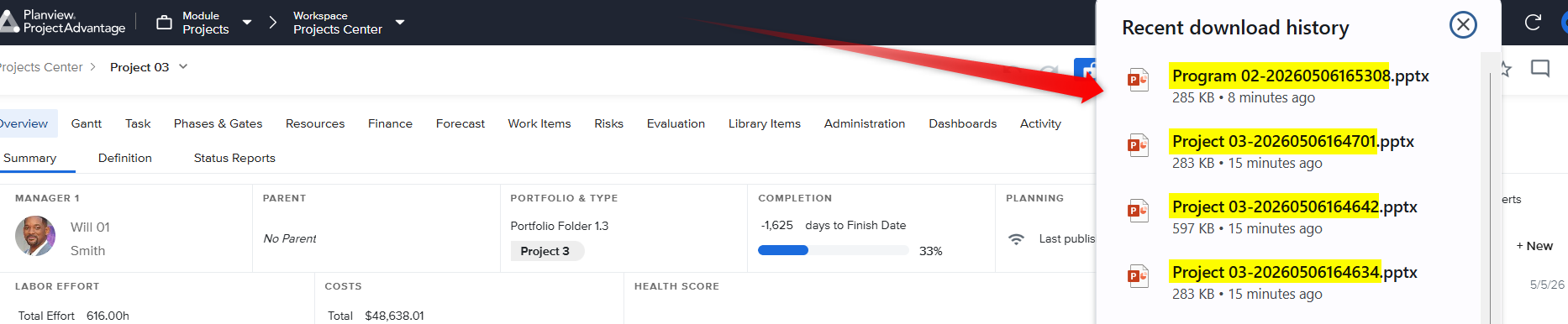
In the Projects Center workspace, Project Card, Overview tab, Status Reports sub-tab, Submitted Status Report Details view, when clicking on the Export PowerPoint ( ) button, then selecting either the “OnePager” or the “Full Report” option, the PowerPoint reports saved in the user’s Downloads folder are uniquely identified using the following structured format:
ProjectName-DateTime (ProjectName-YYYmmdHHmmss)
Resource Forecast
#MIL-6130 - Ability to fulfill request with Commitment rate & new bulk fulfill functionality
In the Resource Forecast workspace, Fulfill request dialog box, Resources sub-section, a new With commitment rate option has been added while committing nominative resources, allowing the user to enter a rate that will be applied to the commitment for the entire duration of the request.
Upon clicking on the Fulfill button:
→ For the first added resource, the user can now select the With commitment rate command.

Upon selecting this command, a popup is displayed, allowing the user to enter the commitment rate at which the resource is to be committed.

→ From the second added resource, the user can now select a third option, the With commitment rate command.
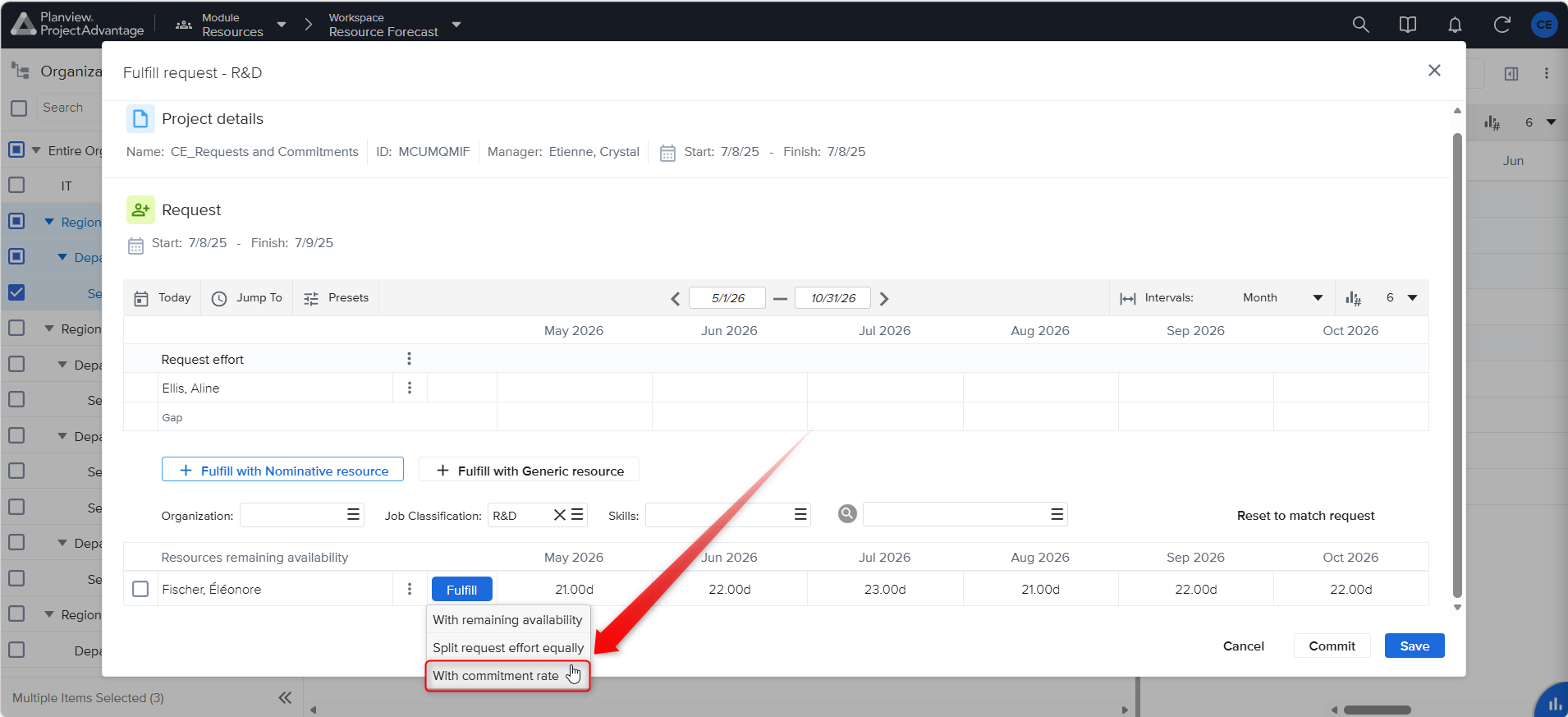
Upon selecting this command, a popup is displayed, allowing the user to enter the commitment rate at which the resource is to be committed.

Note: The format of the commitment rate (hours, FTE, or FTE%) depends on the "Set Requested/Committed Effort Format” setting available in the System Settings workspace, Resource Settings folder, Allocations & Commitments tab, Requests & Commitments Options section.
In addition, in the Resources sub-section, users are now able to select multiple nominative resources at once by ticking the relevant checkbox(es) located in the leftmost column of the grid. Once one or more resource(s) is(are) selected, the Fulfill button is displayed in the Filters sub-section.

Clicking on the Fulfill button provides access to the following commands:

→ With remaining availability – The commitment effort is fulfilled taking into account the remaining availability.
Note: If the commitment effort is less than the remaining availability, the commitment effort fulfillment will be applied in the order of the selected resources. This means that if more resources than necessary are selected, the last resources selected in the list will be assigned a commitment effort of 0, and will be displayed in the Request section of the dialog box.
→ Split request effort equally – The request effort will be split equally between the committed nominative resources.
→ With commitment rate – Upon selecting this command, a popup is displayed, allowing the user to enter the commitment rate at which the resource is to be committed.

#MIL-6129 - New “Duplicate” command
In the Projects Center workspace, Project Card, Forecast tab, Labor sub-tab, a new Duplicate button has been implemented in the main toolbar, allowing users to duplicate the selected requests.

Note: The button is visible only when one or several request(s) is(are) selected in the grid. To select one or several request(s), the user will need to tick the relevant checkbox(es) located in the leftmost column of the grid.
Similarly, clicking on the More ( ) button available on the right hand-side of each resource request field cell provides access to the Duplicate (
 ) command, allowing the user to duplicate the request.

Important: Only requests whose workflow state is "In progress" and that do not have any committed resources can be duplicated.
Default Configuration Corrected Issues
Actions Center
#MIL-6147
In the Actions Center workspace, Action Card, Attachments tab, the Delete ( ) button was incorrectly displayed for files or links, even when the logged-in user only had read-only permissions on the action, meaning links and/or URLs could be deleted. All other work items were affected. This issue has been fixed.
Agile
#MIL-6138
In the Projects Center workspace, Project Card, Agile tab, Full Backlog full screen view, an error message was sometimes displayed when users were selecting a Backlog item in the spreadsheet, then using the Copy command. This issue has been fixed.
Corporate Data
#MIL-6153
In the Corporate Data workspace, Resources tab, Resource Identification dialog box, Resource Utilization sub-tab, the Assignments spreadsheet was not correctly displayed when the “6 Years from today” preset timeframe was selected in the time navigation toolbar. This issue has been fixed.
Projects Center - Project Card - Phases & Gates
#MIL-6157
In the Projects Center workspace, Project Card, Phases & Gates tab, Details tab, Task Card, Workflow Information dialog box, Workflow History section, the “Comments” field was not properly displayed. This issue has been fixed.
Projects Center - Project Card - Work Items
#MIL-6127
In the Projects Center workspace, Project Card, Work Items tab, Work items charts popup, the values displayed in the Work Items Outlook chart were incorrect. This issue has been fixed.
Resource Dashboards
#MIL-6070
In the Resource Dashboards workspace, the tags were not properly displayed in the reports lists. The Portfolio Dashboards and Projects Dashboards workspaces were also affected. This issue has been fixed.
System Requirements
There are frequent changes and additions to the set of specific versions of operating systems, application servers and database servers for which Planview ProjectAdvantage has been tested and certified. Please contact our teams for the latest information in this area.
Note: Users' system clocks must be regularly and accurately synchronized with the internet.
Servers
- Application Server: Apache Tomcat 10.1 with Oracle Java 21 or OpenJDK21
Important: The use of OpenWebStart is mandatory to open the Designer.
- Data Server: PostgreSQL 14, PostgreSQL16
HTML5 Clients
- Display resolution: 1366 x 768 (technical minimum), 1600 x 1050 (minimum recommended), 1920 x 1080 or higher (generally recommended).
- Minimum of 4GB RAM allocated (8GB recommended).
- Browser
- Microsoft Edge
- Google Chrome
- Mozilla Firefox
- Apple Safari
Planview ProjectAdvantage Designer
- Recommended language: English
- Display resolution: 1366 x 768
- Minimum of 4GB RAM allocated
- Disk space: 200MB minimum available for Planview ProjectAdvantage.
- Oracle Java 21 or OpenJDK 21
- Operating Systems:
- Windows 7, 8.1, 10 or 11
- Mac OS X Lion or newer
- Alpine Linux 3.16.1
REST API
- Supported language: English
Timesheets Mobile Application
- Being hosted by Planview ProjectAdvantage
- Product version: 2022.08 and upper versions
Planview ProjectAdvantage platform
Users will need to enable third-party cookies to work within Planview ProjectAdvantage. For more information regarding third-party cookies, please refer to the “How to allow third-party cookies” documentation.
For customers who subscribed only to ProjectAdvantage
- Installation:
- POD 11 is required if hosted by Planview ProjectAdvantage
- An Hydra server is required if on premise
- Product version: 2023.01 and upper versions
For customers who subscribed to ProjectAdvantage and Deliver
- Installation:
- POD 11 is required if hosted by Planview ProjectAdvantage
- An Hydra server is required if on premise
- HPV2 activated on Deliver modules (activated by default for all new Deliver Clients after 2021 Q3)
- Product version: 2023.01 and upper versions
- Users will need to allow third-party cookies in their browser
Limitations
The data connector:
- Does not work in load balanced environments.
- Is not compatible with Cloud Scheduled Jobs.
- Is not compatible with dedicated API servers.
- Is not compatible with the Java API.