



2025.06
This document describes the enhancements, corrected issues, and new features that have been implemented in ProjectAdvantage 2025.06, both in the Core product and in the ProjectAdvantage Default Configuration, in Vantage and in Deliver.
ProjectAdvantage 2025.06 is a maintenance release of ProjectAdvantage 2025.
In the Core product, 3 enhancements have been implemented and 26 issues have been fixed.
In the ProjectAdvantage Default Configuration, 2 enhancements have been provided and 14 issues have been fixed.
In Vantage, 1 issue has been fixed.
In order to access the different sections, please click on the following links:
- Important Reminders for upgrade
- Core Product Enhancements
- Core Product Corrected Issues
- Default Configuration Enhancements
- Default Configuration Corrected Issues
- Vantage Corrected Issues
- System Requirements
Important Reminders for upgrade
- To improve the performance of views displaying the Health Score of multiple projects, we are now using a Health Score that is pre-calculated upon publishing a project as opposed to on the fly. Therefore, upon upgrading to 2021.03 (or higher), please make sure you run once the following Scheduled Job to initialize the project Health Score values: Initialize Project Static Health Score.
Important: For systems with an overwritten Publish command, please make sure to add the new dedicated Command List for the Health Score pre-calculation upon publishing a project: “Project - Publish Project - Continue - Capture Health Score”.
- From the 2023.01 version, to support the implementation of the new Vantage navigation and modules, the Project Dashboards workspace should be added again in the User Roles section of the Designer as the Dashboards workspace doesn't exist anymore.
- In order to complete the upgrade to newer ProjectAdvantage versions, administrators must update the “Popup” column with the correct Forms in the Designer, Search view, as follows:
- “Global Actions” Category → Popup - Action Card (Briefs)
- “Global Change Requests” Category → Popup - Change Request Card (Briefs)
- “Global Deliverables” Category → Popup - Deliverable Card (Briefs)
- “Global Issues” Category → Popup - Issue Card (Briefs)
- “Global Risks” Category → Popup - Risk Card (Briefs)
- “Idea” Category → Popup - Idea Card (Briefs)
Core Product Enhancements
Application bar
#SCI-6498 - New loading cursor
In the HTML5 Client, a loading icon is now displayed instead of the usual cursor when the page is loading.

Data Visualization
#SCI-5936 - New More dropdown menu in the Task Card
In the Task Card, a new More dropdown menu is now available, allowing users to access the non displayed tabs, if the number of tabs is too high. When clicking on the More dropdown menu, the tab names are displayed in the order in which they have been configured to appear, from top to bottom.

Projects - Projects Center
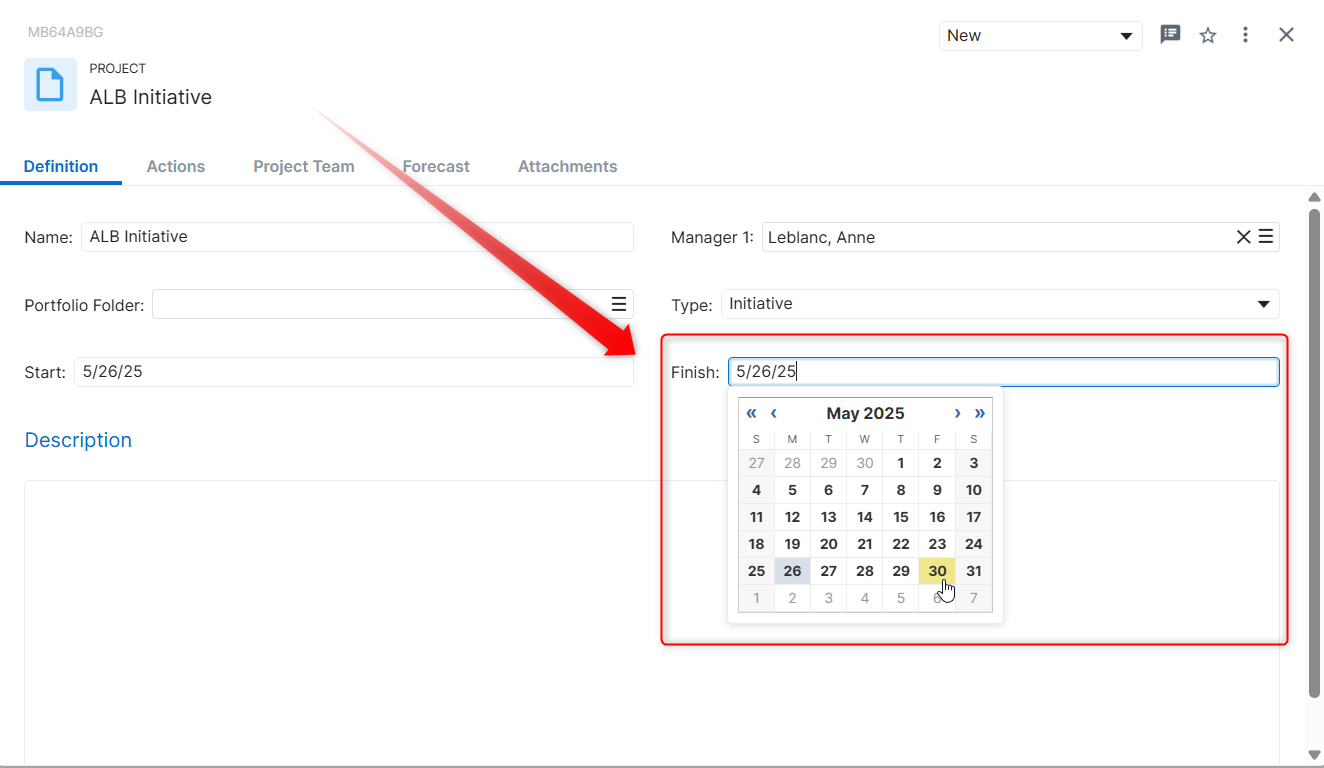
#SCI-5948 - Light display Project Card layout
In the light display Project Card, Definition tab, the “Finish” field is now editable.
Core Product Corrected Issues
Administration - Corporate Data
#SCI-4540
In the Corporate Data workspace, Resources tab, when users were selecting the “Create Resources from Users” command, text was not properly displayed and readable in the confirmation popup when using the Firefox browser. This issue has been fixed.
Build
#SCI-5864
In some scenarios, the “Update Table” operation was failing, preventing the upgrade to newer ProjectAdvantage versions. This issue has been fixed.
Built-in Workspaces - Timesheet
#SCI-6449
The Usage events logged for the Timesheet (built-in) workspace were not displayed in the UTC timezone. This issue has been fixed; the conversion to the server timezone has been removed.
#SCI-6158
In the Timesheet (built-in) workspace, Fridays were incorrectly displayed as non-working days and the Timesheet cards panel was showing an incorrect number of working days for the last period. This issue has been fixed.
Data Visualization
#SCI-1564
In the HTML5 Client, when users were minimizing the selector, the selected Organizations, Projects, Portfolios, etc. were not displayed vertically when connected in Hebrew. This issue has been fixed.
Designer
#SCI-6536
In the Designer, User Roles view, Access tab the tokens from the Visual Collaboration access rights option were taken into account even if Visual Collaboration was deactivated at the server level. This issue has been fixed.
Domain Config
#SCI-5304
In some scenarios, while restoring a dump for om-premise customers, records were incorrectly duplicated in the database. This issue has been fixed.
Health Check
#SCI-6296
In some scenarios, when users were trying to expose a field in the Designer, if the operation was not successful, the server was going down temporarily. This issue has been fixed.
Legacy API
#SCI-2725
In some scenarios, the values retrieved from formulas were inconsistent between the legacy API and the HTML5 Client. This issue has been fixed.
Performance
#SCI-6538 (*Added on 07/02/2025)
In some scenarios, loading performance issues could be observed while users were trying to access the Timesheet (built-in) workspace. This issue has been fixed.
#SCI-5819
Some performance issues could be observed when loading Global Resource Allocations related project details in the legacy API. This issue has been fixed.
Portfolio - Portfolio Center
#SCI-5971
In the Portfolio Center workspace, in some rare cases, an error message stating the user did not have access to the object was displayed. This was caused by permissions not being properly evaluated. This issue has been fixed.
Projects - Projects Center
#SCI-6530
In the Projects Center workspace, projects’ working versions were incorrectly not visible. This issue has been fixed.
#SCI-6195
In the Projects Center workspace, Grid view, users were unable to visualize the projects in the default views when the “Visual Collaboration” option was disabled in the Designer, User roles view, Access tab. This issue has been fixed.
#SCI-6149 (*Added on 07/30/2025)
In the Projects Center workspace, Grid view, when users were modifying a default view, then exporting the view to Excel, the default view was incorrectly exported instead of the modified one. This issue has been fixed.
#SCI-5462
In the Projects Center workspace, Project Card, Gantt tab, data was incorrectly not visible for certain columns at the Project level. This issue has been fixed.
#SCI-5040
In the Projects Center workspace, Project Card, Risks tab, when users were opening a Risk Card, then were copying the URL and pasting it in another browser tab, the Risk Card was incorrectly not displayed anymore. This issue has been fixed.
Resource - Resource Validation
#SCI-4542
In the Resource Validation workspace, Calendars tab, in some scenarios, an error message was displayed when users were trying to approve calendar requests. This issue has been fixed.
#SCI-2525
In the Resource Validation workspace, Timesheets tab, Timesheet Details full screen view, after submitting a timesheet with actual effort, it was not possible to remove the task from the timesheet even if the actual effort was later amended to zero. This issue has been fixed.
REST API
#SCI-6642 (*Added on 07/02/2025)
The “Calendar Status” field was incorrectly not editable via the REST API. This issue has been fixed.
#SCI-6482
In some scenarios, the baseline start and finish dates were not updating through the REST API. This issue has been fixed.
#SCI-2726
In some scenarios, the “parent_category” name appeared as unknown in the REST API response for user defined categories. This issue has been fixed.
Scheduled Jobs
#SCI-6502
In the Designer, Scheduled Jobs view, Cloud scheduled jobs were randomly failing when performing heavy operations on the cache. This issue has been fixed.
#SCI-5865
In some scenarios, numerous “[OpenSearch] - Connection pool exhausted on a ProjectAdvantage environment” alerts were being received due to Cloud scheduled jobs failing continuously, causing projects to load unnecessarily. This issue has been fixed.
Security
#SCI-6278
A vulnerability has been detected with the file upload mechanism. This issue has been fixed with the implementation of a mime type specific restriction.
#SCI-6276
A Cross Site Scripting (XSS) vulnerability has been discovered with the View functionality accessible from several areas of the application, where a valid payload could be injected via the view’s name, such as when using the “Create new view” feature. This issue has been fixed.
Default Configuration Enhancements
Execution
#MIL-5506 - Renaming of the Notes dialog box
In the Actions Center workspace, the Notes dialog box has been renamed Comments for consistency with the new Comments Thread panel.
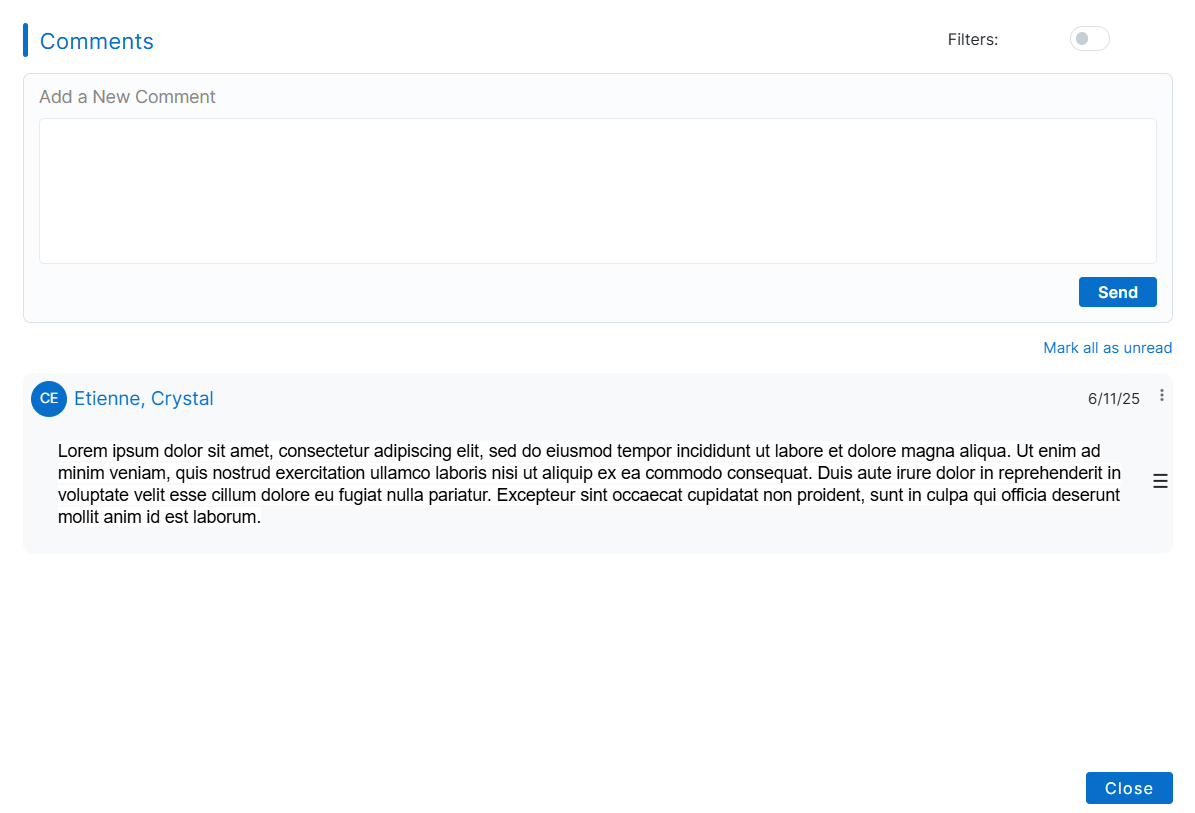
Note: This aforementioned renaming has been rolled for the Notes feature throughout the solution. Tooltips have also been modified. In addition, the following settings have been renamed in the System Settings workspace, General Settings folder, General Options tab, Comments Options section (previously named Notes Options):
- “Enable Delete Notes” → “Enable Delete Comments”
- “Enable Edit Notes” → “Enable Edit Comments”
Projects - Projects Center
#MIL-5514 - Light display Project Card layout
In the Projects Center workspace, light display Project Card, Definition tab, the “Start” field has been renamed “Start Constraint”.

Default Configuration Corrected Issues
Administration - Corporate Data
#MIL-5545
In the Corporate Data workspace, Resources tab, Resource Identification dialog box, Definition tab, the "Should Level" field was truncated in German. This issue has been fixed.
Budget/Finance
#MIL-5520
In the Projects Center workspace, Project Card, Finance tab, Budget dialog box, in some scenarios, the structure of the previously created Cost Centers was not respected. This issue has been fixed.
Note: Cost Centers can be created in the System Data workspace, Cost Centers tab.
Dashboards - Resource Dashboards
MIL-5313
In the Resource Dashboards workspace, Team theme, Resource Capacity report, the "Hide Resources without Project-Specific Capacity" display option was incorrectly available, even when the "Activate Resource Allocations", "Activate Resource & Commitment", or "Enable Dedicated Resources" settings were activated. This issue has been fixed.
Note: The "Activate Resource Allocations", "Activate Resource & Commitment" settings are located in the System Settings workspace, General Settings folder, Meta Settings tab, Meta Settings section, and the "Enable Dedicated Resources" is located in the System Settings workspace, Project Settings folder, Display Preferences tab, Project Resources section.
Execution - Deliverables Center
#MIL-5508
In the Deliverables Center workspace, Deliverable Card, Details tab, the “% Completed” field was incorrectly not displayed. This issue has been fixed.
Execution - My Home Page
#MIL-5521
In the My Home Page workspace, My created Work Objects block, work objects which had previously been assigned to the logged-in user were incorrectly not displayed. This issue has been fixed.
Idea/Business Case
#MIL-5544
In the Ideas Center workspace, Idea Card, the Objectives tab was missing when the "Activate Strategy and Benefits Management" setting was enabled. This issue has been fixed.
Note: The aforementioned setting is located in the System Settings workspace, General Settings folder, Meta Settings tab Meta Settings section.
Portfolio - Portfolio Center
#MIL-5474
In the Portfolio Center workspace, Budget tab, Portfolio Budget view mode, in some scenarios, projects were incorrectly not displayed if negative Project transactions had previously been added in the Project Center workspace, Project Card, Finance tab, Cost Transaction dialog box. This issue has been fixed.
Portfolio Dashboards
#MIL-5494
In the Portfolio Dashboards workspace, Controlling theme, Project Effort Breakdown report and in the Projects Dashboards workspace, Controlling theme, Baseline Comparison report, when launching the report in a new browser tab, the displayed data did not include all the projects or portfolio folders selected. This issue has been fixed.
Projects - Projects Center
#MIL-5517
In the Projects Center workspace, when users were creating a project from a Template, the description was incorrectly not included. This issue has been fixed.
#MIL-5458
In the Projects Center workspace, Project Card, Task tab, Tracking sub-tab, By Tasks view mode, Expanded display, when users were selecting all rows, clicking on the “Apply & Approve” command had no effect and the timesheets were not applied as expected. This issue has been fixed.
#MIL-5421
In the Projects Center workspace, Project Card, Gantt tab, when selecting the “Insert Template” command in the main toolbar, actions from the template were not inserted, even when the “All” option was selected for Actions in the Insert Template Options popup. This issue has been fixed.
#MIL-5413
In the Projects Center workspace, Project Card, Library Items tab, Lessons Learned sub-tab, Lessons Learned Details view, the “Copy” and “Delete” commands were not working properly. This issue has been fixed.
#MIL-5351
In the Projects Center workspace, Project Card, Resources tab, Resources assignments sub-tab, when selecting the “Soft Assignments” pivot, data could take a long time to load if the “Show Parent Tasks” filter had previously been enabled. This issue has been fixed.
Projects Legacy - Work - Gantt
#MIL-5515
In the Work workspace, the Task List tab was incorrectly displayed in first position instead of the Gantt tab, even when the “Gantt” option was selected in the Project Administration dialog box, Setup folder, Activity Management section. This issue has been fixed.
Vantage Corrected Issues
Data Connector
#VAN-1288 (*Added on 07/04/2025)
In Vantage, an issue causing abnormal session consumption by the data connector, leading to increased database size, has been identified. This issue has been fixed.
System Requirements
There are frequent changes and additions to the set of specific versions of operating systems, application servers and database servers for which ProjectAdvantage has been tested and certified. Please contact our teams for the latest information in this area.
Note: Users' system clocks must be regularly and accurately synchronized with the internet.
Servers
- Application Server: Apache Tomcat 9 with Oracle Java 8 or OpenJDK
- Data Server: PostgreSQL 14, PostgreSQL16
HTML5 Clients
- Display resolution: 1366 x 768 (technical minimum), 1600 x 1050 (minimum recommended), 1920 x 1080 or higher (generally recommended).
- Minimum of 4GB RAM allocated (8GB recommended).
- Browser
- Microsoft Edge
- Google Chrome
- Mozilla Firefox
- Apple Safari
ProjectAdvantage Designer
- Recommended language: English
- Display resolution: 1366 x 768
- Minimum of 4GB RAM allocated
- Disk space: 200MB minimum available for ProjectAdvantage.
- Oracle Java 8 or OpenJDK 8
- Operating Systems:
- Windows 7, 8.1, 10 or 11
- Mac OS X Lion or newer
- Alpine Linux 3.16.1
REST API
- Supported language: English
Timesheets Mobile Application
- Being hosted by ProjectAdvantage
- Product version: 2022.08 and upper versions
Vantage platform
Users will need to enable third-party cookies to work within Vantage. For more information regarding third-party cookies, please refer to the “How to allow third-party cookies” documentation.
For customers who subscribed only to Plan
- Installation:
- POD 11 is required if hosted by ProjectAdvantage
- An Hydra server is required if on premise
- Product version: 2023.01 and upper versions
For customers who subscribed to Plan and Deliver
- Installation:
- POD 11 is required if hosted by ProjectAdvantage
- An Hydra server is required if on premise
- HPV2 activated on Deliver modules (activated by default for all new Deliver Clients after 2021 Q3)
- Product version: 2023.01 and upper versions
- Users will need to allow third-party cookies in their browser
Limitations
The data connector:
- Does not work in load balanced environments.
- Is not compatible with Cloud Scheduled Jobs.
- Is not compatible with dedicated API servers.
- Is not compatible with the Java API.