



2025.03
This document describes the enhancements, corrected issues, and new features that have been implemented in ProjectAdvantage 2025.03, both in the Core product and in the ProjectAdvantage Default Configuration and in Deliver.
ProjectAdvantage 2025.03 is a maintenance release of ProjectAdvantage 2025.
In the Core product, 5 enhancements have been implemented and 15 issues have been fixed.
In the ProjectAdvantage Default Configuration, 5 enhancements have been provided and 13 issues have been fixed.
In Deliver, 6 issues have been fixed.
In order to access the different sections, please click on the following links:
- Important Reminders for upgrade
- Core Product Enhancements
- Core Product Corrected Issues
- Default Configuration Enhancements
- Default Configuration Corrected Issues
- Deliver Corrected Issues
- System Requirements
Important Reminders for upgrade
- To improve the performance of views displaying the Health Score of multiple projects, we are now using a Health Score that is pre-calculated upon publishing a project as opposed to on the fly. Therefore, upon upgrading to 2021.03 (or higher), please make sure you run once the following Scheduled Job to initialize the project Health Score values: Initialize Project Static Health Score.
Important: For systems with an overwritten Publish command, please make sure to add the new dedicated Command List for the Health Score pre-calculation upon publishing a project: “Project - Publish Project - Continue - Capture Health Score”.
- From the 2023.01 version, to support the implementation of the new Vantage navigation and modules, the Project Dashboards workspace should be added again in the User Roles section of the Designer as the Dashboards workspace doesn't exist anymore.
Core Product Enhancements
Build
#SCI-5161 - Creation of new Nature built-in fields in Project category
In the Designer, Fields view, Fields tab, a new Nature built-in field has been created in the Project category. This category contains two built-in fields: Name, and Visible.

In addition, a new “Project Nature” built-in picklist has been created, which contains the following values: Business Case, Product, Program, and Project.

The Project Nature field now uses the Project Nature picklist by default.
Important: After upgrading to the 2025.03 collections, data will be modified if the Project Nature picklist had been previously overwritten. In this case, the natures will need to be created in the 2025.03 version prior to importing the 2025.03 collections.
Built-in Workspaces - Data Snapshots
#SCI-5715 - Data Snapshots workspace performance
In the Data Snapshots workspace, the loading time performance has been improved when the number of data snapshots is relatively high.
Performance
#SCI-5786 - Various improvements on server
Several optimizations on startup and object loading (especially Projects) have been implemented.
Projects - Projects Center
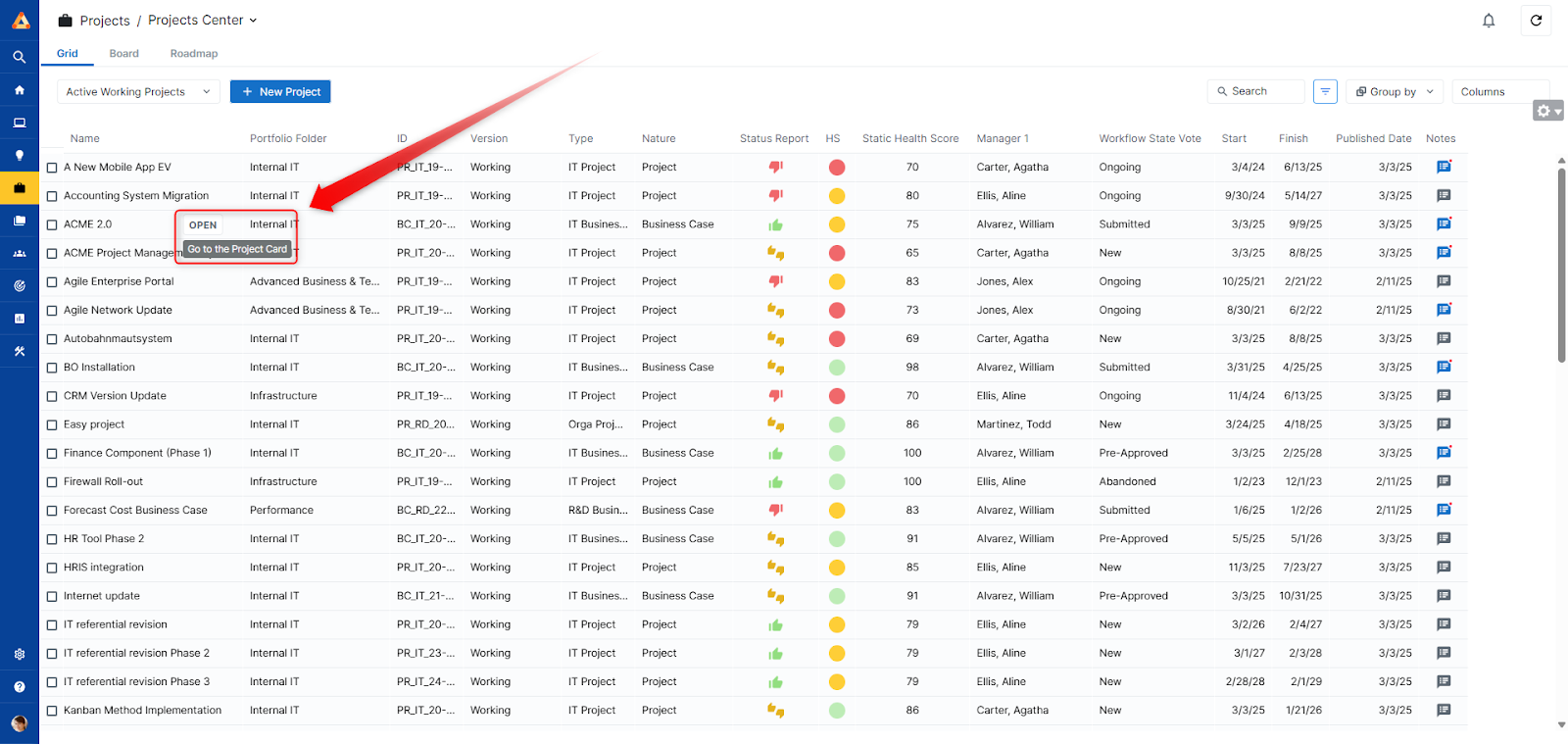
#SCI-5259 - Display of the “Go to the Project Card” tooltip
In the Projects Center workspace, Grid view, the “Go to the Project Card” tooltip is now only displayed when users are hovering their mouse over the “OPEN” button on the right-hand side of the Project Name.
Visual Collaboration
#SCI-5689 - New setting to activate Visual Collaboration on premise
A new property has been added for "PSServer.properties" to set the Visual Collaboration flag: "VisualCollaboration" (which can be "true" or "false"), allowing the activation of Visual Collaboration for on-premise customers. Previously, it was only possible to set this via an environment variable.
Core Product Corrected Issues
Application bar
#SCI-5822
In some scenarios, the notifications sync was occurring even when sessions had expired. This issue has been fixed.
Built-in Workspaces - Timesheet
#SCI-5162
In some scenarios, users were unable to log out when they were in the Timesheet (built-in) workspace. This issue has been fixed.
Data Visualization
#SCI-4760 (Added on 04/07/2025)
In the Resource Validation workspace, Timesheets tab, the “Applied” flag was not properly working when users had previously applied timesheets with zero effort only in the Timesheet Details full screen view, making it impossible to properly apply timesheets. This issue has been fixed.
#SCI-3946
In the HTML5 Client, an error message was sometimes displayed when users were selecting the Export to Excel command, if the export operation was taking too much time to complete. This issue has been fixed; the command timeout has been extended from 15 to 30 minutes across the product to accommodate long-running commands.
#SCI-3819
In the Corporate Data workspace, Users and Resources tabs, when users were clicking on the Hamburger ( ) button to edit the Organization History details, dates were incorrectly updating. This issue has been fixed.
Designer
#SCI-5763
In the Designer, Forms view, when the Honor Overwrites button was activated, the form name displayed in the Edit General Object dialog box, Form tab, was not the overwritten form but the original form. This issue has been fixed.
Import/Export CFG
#SCI-5760
In the Designer, Command Lists view, Edit Command dialog box, field values could be incorrectly missing after users had imported a patch file. This issue has been fixed.
Portfolio - Portfolio Dashboards
#SCI-5716 (Added on 04/09/2025)
In the Portfolio Dashboards workspace, an error message was sometimes displayed when users were using the Export to Excel command on custom reports. This issue has been fixed.
Projects - Projects Center
#SCI-5484
In the Projects Center workspace, Project Card, Library Items tab, Attachments sub-tab, for URL links added prior to the deployment of the new Attachments feature (October 2024), the Name field was incorrectly displaying the URL and the URL field was empty. This issue has been fixed.
#SCI-5314
In the Projects Center workspace, Project Card, Task tab, XML update sub-tab, an error message was sometimes displayed when users were selecting the Export XML command, then trying to open the exported file using the MS Edge browser. This issue has been fixed.
#SCI-4969
In the Projects Center workspace, when creating a project using the Create from XML ( ) option, an error message was sometimes displayed when users were trying to upload an XML file. This issue has been fixed.
Projects Legacy - Work - Work Items
#SCI-5709
In the Work workspace, Work Items tab, Work Items full screen view, Grid tab, in some scenarios, all the work items from all projects were visible. This issue has been fixed.
Resource - Resource Validation
#SCI-5720
In the Resource Validation workspace, Timesheets tab and Timesheet Details full screen view, Non-Project actual effort data and Calendar entries were not displayed as expected when a Month pivot was selected. This issue has been fixed.
REST API
#SCI-5704 (Added on 03/04/2025)
When users were using the API to retrieve the list of collaborators, the end date format was not identical and therefore not working as expected. This issue has been fixed.
#SCI-5215
Some performance issues could be observed with the Data Snapshots REST API endpoint, causing some high response time or errors while downloading data snapshots. This issue has been fixed.
Scheduled Jobs
#SCI-5588
In the Designer, Scheduled Jobs view, Data Snapshots were sometimes not fully generated when the Data Connector was enabled. This issue has been fixed.
Default Configuration Enhancements
Administration - System Data
#MIL-5111 - Flexible Project Natures
A new Project Natures tab has been implemented in the System Data workspace, enabling users to create new custom Project Natures in addition to the four built-in natures already existing (Business Case, Product, Program, and Project), displayed by default.
The Project Natures tab is made of a toolbar and the Project Natures spreadsheet, which displays the following attributes:
- Name – The name of the nature
Note: The names of the custom natures defined by the administrator will be displayed in the language in which they are imputed and are not localizable – for instance, if the newly created nature is named “New Nature” (English) and the user is logged in a language other than English, the nature will be displayed as “New Nature”, in English and not his/her language.
- Visible
- Upon activating this switch button, the Nature will be available for selection in all Nature drop down lists throughout the solution, as well as for the "Enabled Natures" fields in the System Settings workspace.
- Upon deactivating this switch button, the Nature will not be available for selection in all Nature drop down lists throughout the solution, nor for the "Enabled Natures" fields in the System Settings workspace.
Note: All projects to which the Nature has been attached will still have the Nature attached to them.

Important: Built-in Natures (Business Case, Product, Program, and Project) cannot be deleted, while Custom Natures can only be deleted if they are not attached to any project.
For more information, please refer to the Natures documentation.
Administration - System Settings
#MIL-5357 - Fiscal Period Management
In the Designer, Fiscal Periods view, new fiscal calendars have been created and are now used in all time distributed screens throughout the solution when the “Default Time Distribution” setting is set to “Fiscal Period” or “Both”.


Note: The aforementioned setting is located in the System Settings workspace, General Settings folder, General Options tab, Format Controls section.
#MIL-5307 - Activity Options restrictions based on user roles
In the System Settings workspace, General Settings folder, General Options tab, Activity Options section, the ability to display/hide the Activity tab/folder for Projects and Activities is now conditioned by a User Roles setting.

Execution
#MIL-5321 - New Card Layout (*Amended 06/18/2025)
The Work Item (Action, Change Request, Deliverable, and Issue), Risk, and Idea Cards have been redesigned to include a common layout, thus improving the overall user experience. Specifically, information is now organized in the form of tabs, which have been implemented to simplify the navigation.
In accessing the Work Item (Action, Change Request, Deliverable, or Issue), Risk, or Idea Card, the user is able to define and edit the attributes of a given Work Item (Action, Change Request, Deliverable, or Issue), Risk, or Idea. The Card is made up of:
- A header, which provides the Work Item (Action, Change Request, Deliverable, or Issue), Risk, or Idea's key information and commands,
- A series of tabs, which further categorize and organize information and tools.
Important: The tabs displayed in the Card are managed by the administrator in:
- The System Settings workspace, Work Management Settings folder, Work Items tab, Actions section (for the Action Card), Change Requests section (for the Change Request Card), Deliverables section (for the Deliverable Card), and Issues section (for the Issue Card).
- The System Settings workspace, Work Management Settings folder, Risks tab, Risks section (for the Risk Card).
- The System Settings workspace, Project Settings folder, Display Preferences tab, Idea Center section (for the Idea Card).
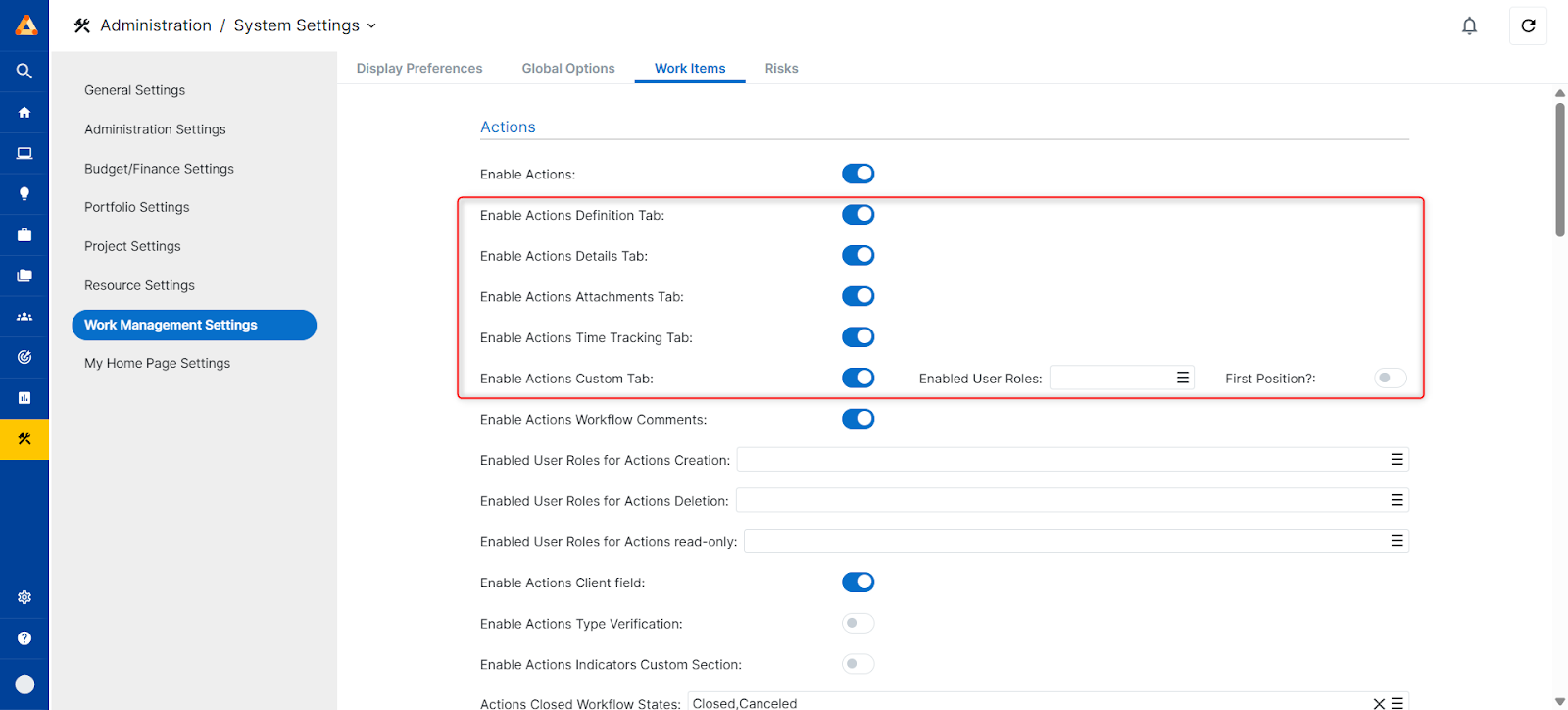
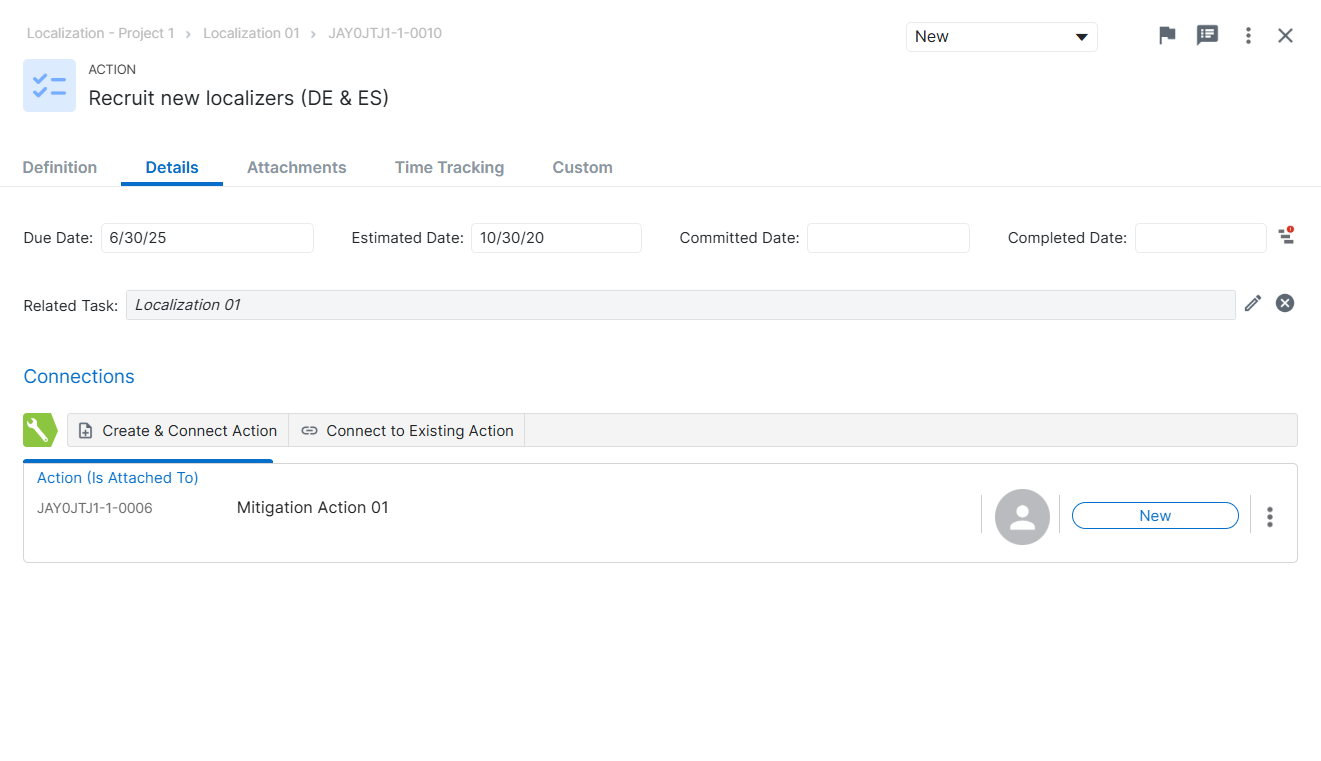
The Action Card, Change Request Card, Deliverable Card and Issue Card are made up of the following tabs:
- Definition
- Details
- Attachments
- Time Tracking



The Risk Card is made up of the following tabs:
- Definition
- Details
- Risk Evaluation
- Risk Factors
- Attachments


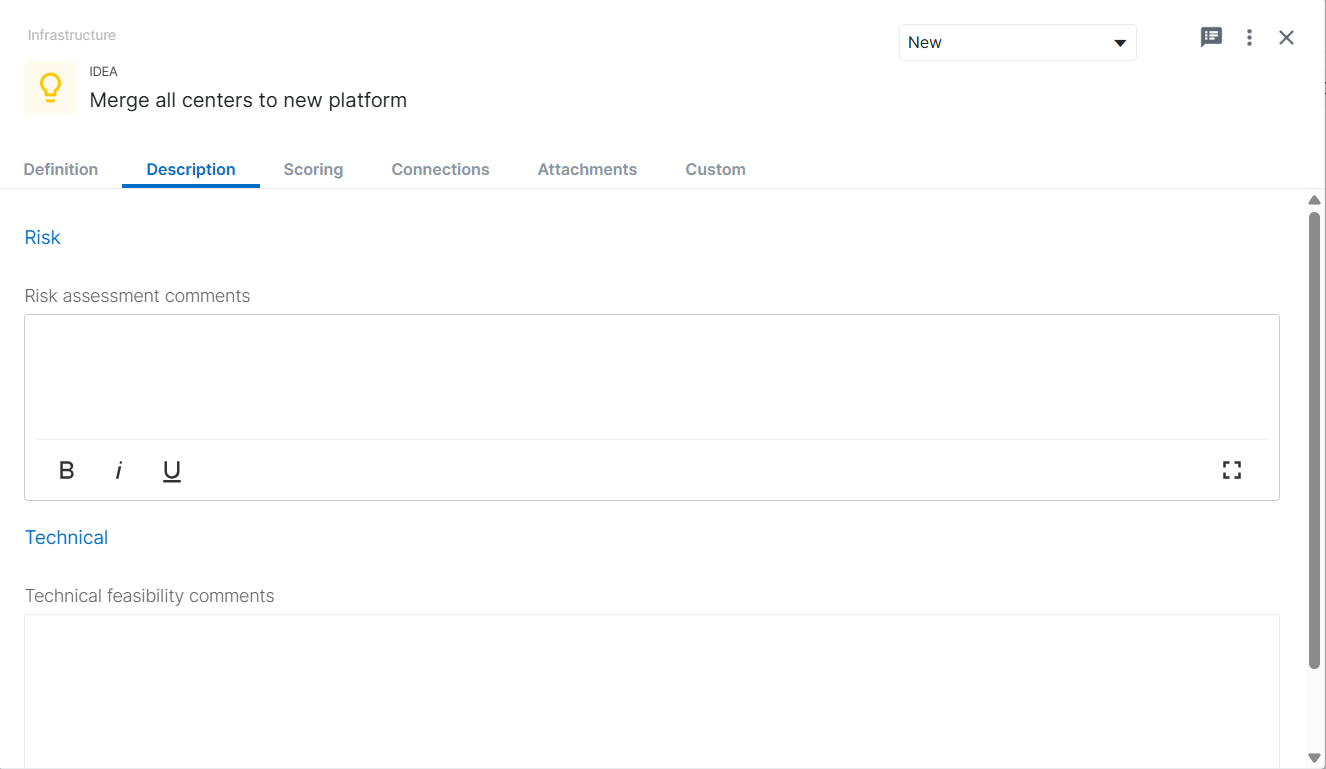
The Idea Card is made up of the following tabs:
- Definition
- Description
- Scoring
- Connections
- Attachments


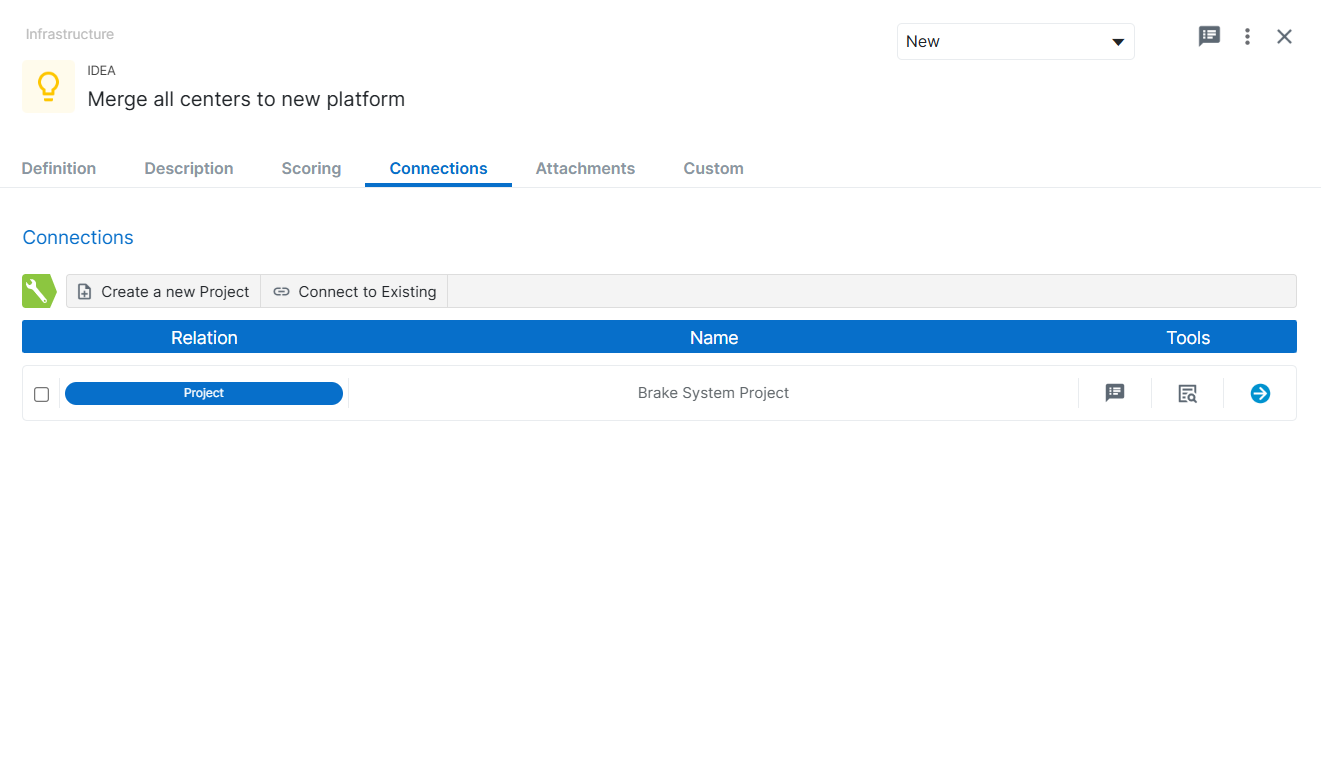

Note: A Custom tab can be added in all Cards; it can be displayed in first position by activating the First position? setting.

Deactivating this setting will display the Custom tab in the last position.

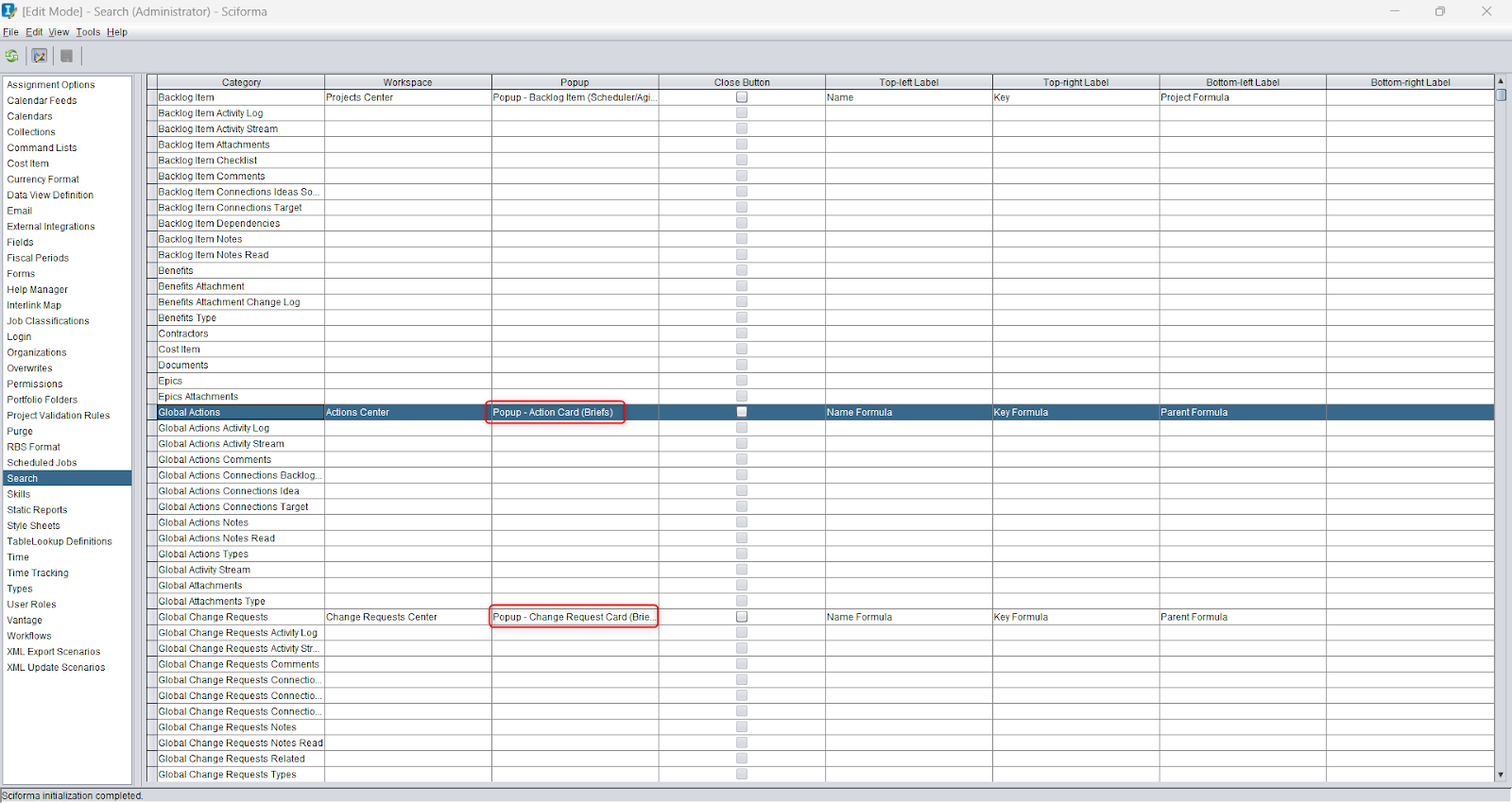
Caution: In order to complete the upgrade to ProjectAdvantage version 2025.03, administrators must update the “Popup” column with the correct Forms in the Designer, Search view, as follows:
- “Global Actions” Category → Popup - Action Card (Briefs)
- “Global Change Requests” Category → Popup - Change Request Card (Briefs)
- “Global Deliverables” Category → Popup - Deliverable Card (Briefs)
- “Global Issues” Category → Popup - Issue Card (Briefs)
- “Global Risks” Category → Popup - Risk Card (Briefs)
- “Idea” Category → Popup - Idea Card (Briefs)
For more information, please refer to the Action Card, Change Request Card, Deliverable Card, Issue Card, Risk Card, and Idea Card documentation.
Projects - Projects Center
#MIL-5305 - New “Parent” custom filter in the Filters popup
In the Projects Center workspace, a new custom filter has been added in the Filters popup: the “Parent” filter. It allows users to filter the projects by Parent.

Default Configuration Corrected Issues
Administration
#MIL-5373
In the Projects Center workspace, Project Card, Administration tab, Setup sub-tab, Resource Management section, Default View sub-section, the tabs’ order selected was not honored in the Resources workspace. This issue has been fixed.
Note: The Project Resources sub-tab has been moved to the last position in order to manage the priority defined in the Administration tab, Setup sub-tab more effectively.
Budget/Finance
#MIL-5355
In the Projects Center workspace, Project Card, Finance tab, Cost Transactions dialog box, the Spreadsheet button was not correctly displayed. This issue has been fixed.
Execution - Issues Center
#MIL-5344
In the Issues Center workspace, Grid view, the default views’ names were still displayed in English when users were connected in other languages. This issue has been fixed.
Execution - My Home Page
#MIL-5225
In some scenarios, the My Home Page workspace was taking a long time to load. This issue has been fixed.
Portfolio - Portfolio Work Management
#MIL-3699
In the Portfolio Work Management workspace, Project Monitoring tab, Risks pivot, not all Mitigation Actions were visible in the Mitigation Actions full screen view, Inbox tab. In addition, not all Contingency Actions were visible in the Contingency Actions full screen view, Inbox tab. These issues have been fixed.
Projects - Projects Center
#MIL-5362
In the Projects Center workspace, Project Card, Dashboards tab, Finance theme, Budget report, the last cumulated Cost value displayed in the Budget vs Cost chart could differ from the Key Facts' Total Cost value. This issue has been fixed.
#MIL-5353
In the Projects Center workspace, some performance issues could be observed when users were trying to open projects. This issue has been fixed.
#MIL-5310
In the Projects Center workspace, Roadmap view, the + New Project button was still displayed when the "Enable Project Creation Button Filter" setting was activated and filtered by user role. This issue has been fixed.
Note: The aforementioned setting is located in the System Settings workspace, Project Settings folder, Project Creation Options tab, Nature Options section.
Projects - Projects Dashboards
#MIL-5370
In the Dashboards module, in some cases, performance issues could be observed and custom reports containing the “Cash Flow Finish” field could take a long time to load. This issue has been fixed.
Projects Legacy - Home Page - Evaluation
#MIL-5369
In the Projects Center workspace, Project Card, Evaluation tab, Scoring sub-tab, when users were clicking on any Question Mark ( ) icon to view the information about the indicator, it was not possible to scroll inside of the popup. This issue has been fixed.
Resource - Resource Allocations
#MIL-5311
In the Resource Allocations workspace, Resource Allocations full screen view, Hard Allocations tab, Resource Details sub-tab, Resource Allocation Details view, allocations with effort could still be displayed if recently created when the “Display Projects” display option was set to "Without Effort in the period". This issue has been fixed.
Resource - Resource Dashboards
#MIL-5019
In the Resource Dashboards workspace, Time Tracking theme, Overview report, the displayed data was not updated when users were selecting a different interval in the time navigation toolbar. This issue has been fixed.
Status Report
#MIL-5035
In the Projects Center workspace, Project Card, Overview tab, Status Reports sub-tab, when users were clicking on the More ( ) button to open the full report popup, custom sections were sometimes not visible. This issue has been fixed.
Deliver Corrected Issues
APM
#DELIVER-1402
In Deliver, in some scenarios, it was not possible to reactivate users that had been deactivated. This was due to a fix previously provided to allow a unique email for the habilitation creation. This issue has been fixed.
#DELIVER-627
In the APM, when users were generating reports in .rtf format through the Talend Job trigger, the columns displayed were not respected. This issue has been fixed.
Gridboard
#DELIVER-873
In Deliver, some of the system blocks’ names were not translated into Spanish. This issue has been fixed.
O3 Admin
#DELIVER-1149
In the O3 Admin, in some scenarios, the header name translated value was not displayed for the Photo Name column. This issue has been fixed.
Spawner
#DELIVER-1331
Previously, the ‘If’ formulas on Spawner evaluated all the clauses first before choosing which was the correct one. This issue has been fixed; from now on, only the clause that matches the 'if' statement is evaluated.
Synchro V3
#DELIVER-1422
In some scenarios, newly created users were not able to visualize projects in Tempus. This issue has been fixed.
System Requirements
There are frequent changes and additions to the set of specific versions of operating systems, application servers and database servers for which ProjectAdvantage has been tested and certified. Please contact our teams for the latest information in this area.
Note: Users' system clocks must be regularly and accurately synchronized with the internet.
Servers
- Application Server: Apache Tomcat 9 with Oracle Java 8 or OpenJDK
- Data Server: PostgreSQL 14, PostgreSQL16
HTML5 Clients
- Display resolution: 1366 x 768 (technical minimum), 1600 x 1050 (minimum recommended), 1920 x 1080 or higher (generally recommended).
- Minimum of 4GB RAM allocated (8GB recommended).
- Browser
- Microsoft Edge
- Google Chrome
- Mozilla Firefox
- Apple Safari
ProjectAdvantage Designer
- Recommended language: English
- Display resolution: 1366 x 768
- Minimum of 4GB RAM allocated
- Disk space: 200MB minimum available for ProjectAdvantage.
- Oracle Java 8 or OpenJDK 8
- Operating Systems:
- Windows 7, 8.1, 10 or 11
- Mac OS X Lion or newer
- Alpine Linux 3.16.1
REST API
- Supported language: English
Timesheets Mobile Application
- Being hosted by ProjectAdvantage
- Product version: 2022.08 and upper versions
Vantage platform
Users will need to enable third-party cookies to work within Vantage. For more information regarding third-party cookies, please refer to the “How to allow third-party cookies” documentation.
For customers who subscribed only to Plan
- Installation:
- POD 11 is required if hosted by ProjectAdvantage
- An Hydra server is required if on premise
- Product version: 2023.01 and upper versions
For customers who subscribed to Plan and Deliver
- Installation:
- POD 11 is required if hosted by ProjectAdvantage
- An Hydra server is required if on premise
- HPV2 activated on Deliver modules (activated by default for all new Deliver Clients after 2021 Q3)
- Product version: 2023.01 and upper versions
- Users will need to allow third-party cookies in their browser
Limitations
The data connector:
- Does not work in load balanced environments.
- Is not compatible with Cloud Scheduled Jobs.
- Is not compatible with dedicated API servers.
- Is not compatible with the Java API.