



2025.02
This document describes the enhancements, corrected issues, and new features that have been implemented in ProjectAdvantage 2025.02, both in the Core product and in the ProjectAdvantage Default Configuration, in Vantage and in Deliver.
ProjectAdvantage 2025.02 is a maintenance release of ProjectAdvantage 2025.
In the Core product, 1 enhancement has been implemented and 26 issues have been fixed.
In the ProjectAdvantage Default Configuration, 2 enhancements have been provided and 27 issues have been fixed.
In Vantage, 1 issue has been fixed.
In Deliver, 5 issues have been fixed.
In order to access the different sections, please click on the following links:
- Important Reminders for upgrade
- Core Product Enhancements
- Core Product Corrected Issues
- Default Configuration Enhancements
- Default Configuration Corrected Issues
- Vantage Corrected Issues
- Deliver Corrected Issues
- System Requirements
Important Reminders for upgrade
- To improve the performance of views displaying the Health Score of multiple projects, we are now using a Health Score that is pre-calculated upon publishing a project as opposed to on the fly. Therefore, upon upgrading to 2021.03 (or higher), please make sure you run once the following Scheduled Job to initialize the project Health Score values: Initialize Project Static Health Score.
Important: For systems with an overwritten Publish command, please make sure to add the new dedicated Command List for the Health Score pre-calculation upon publishing a project: “Project - Publish Project - Continue - Capture Health Score”.
- From the 2023.01 version, to support the implementation of the new Vantage navigation and modules, the Project Dashboards workspace should be added again in the User Roles section of the Designer as the Dashboards workspace doesn't exist anymore.
Core Product Enhancements
Build
#SCI-5581 - New toggle for Hebrew UI
In the Designer, Style Sheets view, a new toggle has been implemented, allowing users to enable or disable the new Vantage UI Hebrew Style Sheets, i.e. to activate or deactivate the new Cascading Style Sheets (CSS) containing Hebrew-specific fixes.
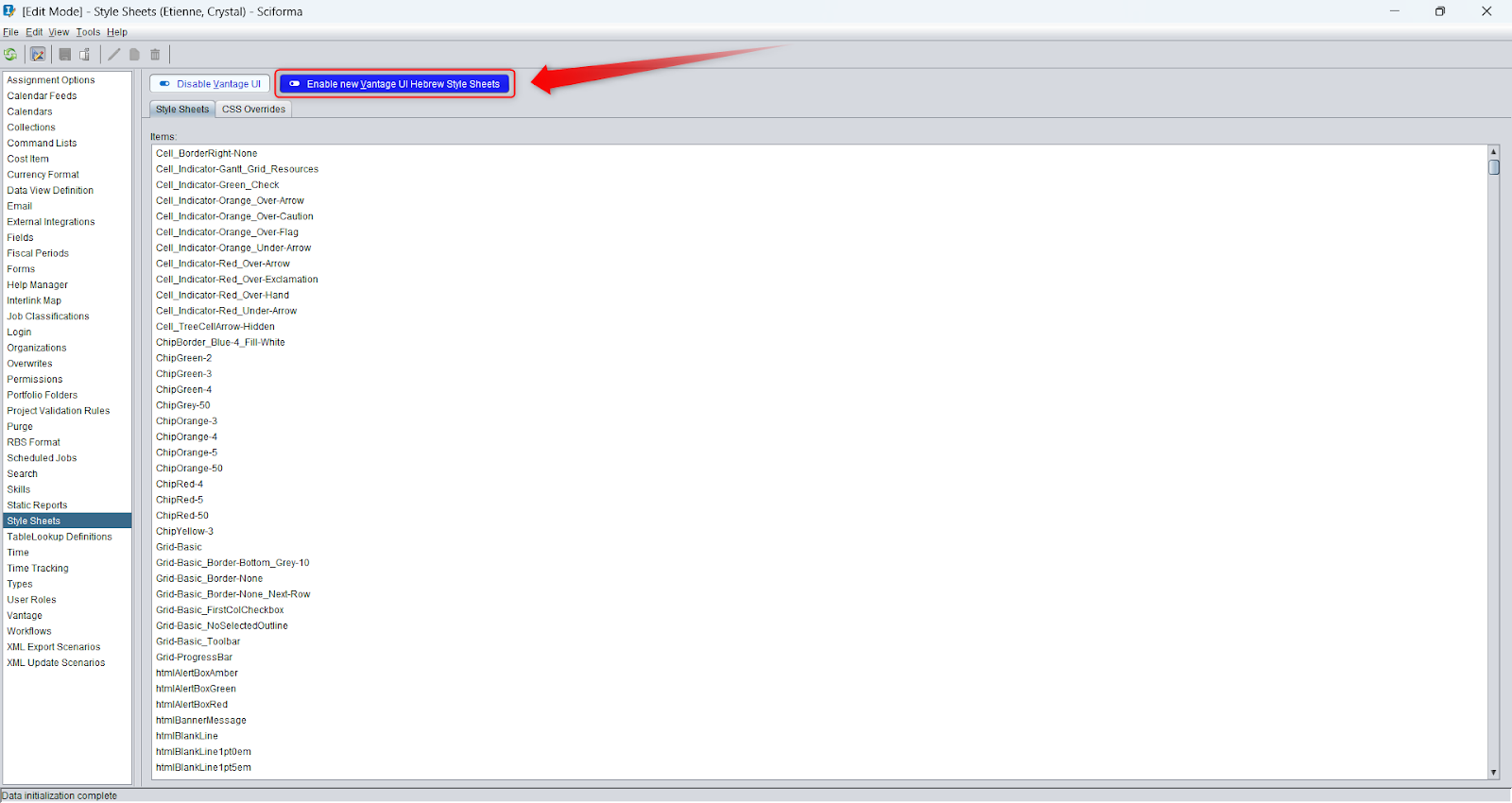
Note: This toggle is conditioned by the activation of the Hebrew language in the Language Packs workspace.

Core Product Corrected Issues
Administration - System Data
#SCI-5573
In the System Data workspace, News Page tab, General folder, when the Background Picture option selected was “Custom Picture”, after the user had selected an image to upload, clicking on the “Upload” button had no effect. This issue has been fixed.
Authentication
#SCI-5674
In the Settings, when users were clicking on the “Save all settings” button, the currency, profile picture and profile email address were considered as modified even if they had not been amended. This issue has been fixed.
#SCI-5673
In the HTML5 Client, if the login page was in a language and if the user’s default language was another (for instance when using the “New incognito window” feature), an unnecessary user save occurred on login. This issue has been fixed.
Built-in Workspaces - Timesheet
#SCI-5678
In the Timesheet (built-in) workspace, entire weeks were incorrectly displayed as non-working days for future dates. This issue has been fixed.
Data Visualization
#SCI-5593
In some environments, when expired master sessions were purged, the associated subsessions were not deleted and an error message could be displayed. This issue has been fixed; the associated subsessions are now also deleted regardless of their individual expiry status.
#SCI-5585
In the Projects Center workspace, Project Card, Gantt tab, Manage Baselines dialog box, when users were clicking on the Details ( ) button, the Baseline Cost was incorrect, i.e. it was equal to the Remaining Cost instead of the Total Cost. This issue has been fixed.
#SCI-5473
In the Projects Center workspace, Project Card, Gantt tab, the horizontal scroll bar was incorrectly not displayed in the Gantt spreadsheet after the user had selected the horizontal grid lines option in the Designer, Forms view, Edit Gantt Block dialog box, Task spreadsheet tab. This issue has been fixed.
#SCI-3170
In the Resource Validation workspace, Timesheets tab, Timesheet Details full screen view, an error message was sometimes displayed when users were entering actuals in the Details section. This issue has been fixed.
Designer
#SCI-5460
In the Designer, Collections view, an error message was displayed when users were trying to upgrade the Default Configuration to build version 2024.12. This issue has been fixed.
#SCI-5011
In the Designer, Fields view, Fields tab, in some scenarios, for load-balanced instances, the Alias (en) and Alias (fr) could be blank after users had imported a CFG file including aliases. This issue has been fixed.
Designer - Object/Field Edits
#SCI-5572
In the Designer, Fields view, Fields tab, when users were creating a new field, then were selecting the “Image” Data Type, the selected data type was not retained and it was no longer possible to select the “Image” Data type. This issue has been fixed.
#SCI-5115
In Designer, Fields view, Fields tab, if an Initial Value was set for the “Closed” field and if users were granted Read only permissions for the field, the initial value displayed was incorrect in the Projects Center workspace, Gantt tab. This issue has been fixed.
Domain Config
#SCI-5586
In certain scenarios, when users were creating/updating tables, the “Update View Pref” database conversion was failing with NPE. This issue has been fixed.
Execution Legacy - Work Items
#SCI-5660
In some scenarios, users were unable to access their work items. This was due to the reparsing of fields in user-defined categories, which was not working properly. This issue has been fixed.
Import/Export CFG
#SCI-5253
In the Designer, after users had imported a patch in the Collections view, Initial Values were not selected in the Command Lists view, Parameters dialog box, if the patch did not contain the field. This issue has been fixed.
Legacy API
#SCI-5494
In certain scenarios, the API Resource Data Create operation was failing for some resources. This issue has been fixed.
Localization
#SCI-4970
In the Resource Allocations workspace, the Hard Allocations tile was still displayed in English instead of German when users had previously overridden the form in the Designer, Localizable CFG Items dialog box. This issue has been fixed.
#SCI-4603
In the Projects Center workspace, Project Card, Overview tab, Definition sub-tab, the name of the Stakeholders section was not correctly updated when users had previously overridden the form in the Designer, Localizable CFG Items dialog box. This issue has been fixed.
#SCI-1118
In the Work workspace, Work Items tab, Work Items full screen view, the Parent Object the Work Item is attached to was not updated when users had previously overridden the form in the Designer, Localizable CFG Items dialog box. This issue has been fixed.
Performance
#SCI-5633
In some scenarios, after upgrading to ProjectAdvantage version 2024.12, the production server was crashing. This was caused by excessive memory usage on the homepage. This issue has been fixed.
Projects - Projects Center
#SCI-5638
In the Projects Center workspace, Project Card, Gantt tab, when users were adding a nominative resource to a task, the assigned user was not displayed in the Gantt chart. This issue has been fixed.
#SCI-5598
In the Projects Center workspace, Grid view, when users were clicking on the More ( ) button of a particular view, then selecting the Delete option, the view was not successfully deleted. This issue has been fixed.
#SCI-5499
In the My Home Page workspace, My favorite views block, Projects tab, users were unable to visualize their favorite views, even though they had previously added one or several view(s) to their favorites in the Projects Center workspace. This issue has been fixed.
#SCI-5270
In the Projects Center workspace, Project Card, Gantt tab, Manage Baselines dialog box, when users were trying to overwrite a baseline by selecting the “Capture on Selected Project” command, the baseline was not overwritten and no changes were displayed in the Gantt chart. This issue has been fixed.
#SCI-5262
In the Projects Center workspace, Project Card, Phases & Gates tab, Details sub-tab, when users were updating the workflow state to “Approved”, the Gate Approval popup could be incorrectly closed without selecting any Gate actual date by pressing the “Esc” key or clicking anywhere outside out the popup. This issue has been fixed.
#SCI-4342
In the Projects Center workspace, when users were opening a Project Card, then clicking on the Refresh ( ) button located in the top right-hand side of the screen, the previously selected page was incorrectly displayed instead of the current one. This issue has been fixed.
Default Configuration Enhancements
Projects - Projects Center
#MIL-5274 - Cards improved loading time in the Center workspaces
In the Center workspaces, Board view, the loading time of the objects cards has been reduced, thus offering a better performance.
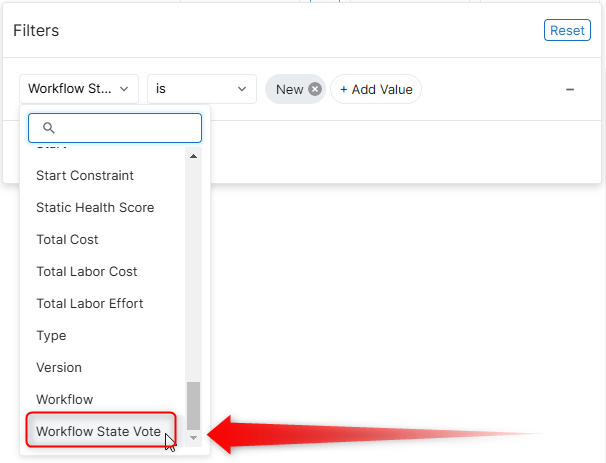
#MIL-5261 - New “Workflow State Vote” custom filter in the Filters popup
In the Projects Center workspace, a new custom filter has been added in the Filters popup: the “Workflow State Vote” filter. It allows users to filter the projects by Workflow State Vote.
Default Configuration Corrected Issues
Administration - System Settings
#MIL-5299
In the System Settings workspace, for certain folders, the settings were truncated and not correctly displayed. This issue has been fixed.
Agile
#MIL-3757
In the Projects Center workspace, Project Card, Agile tab, Project Structure full screen view, Iterations tab, Planning of Iterations dialog box, Iteration dialog box, Backlog Items tab, newly created Backlog items were not visible. This issue has been fixed.
Dashboards - Resource Dashboards
#MIL-5153
In the Resource Dashboards workspace, Workload theme, Resource Utilization report, users were able to view the Project Brief even when they did not have the required permissions on the project. This issue has been fixed.
Designer
#MIL-5271
In the Designer, Fields view, Fields tab, User Logs category, External tab, certain fields were not indexed and caused performance issues. This issue has been fixed.
Note: The “<Org_IID>”, “Created Date” and “Modified Date" fields have been indexed.
Execution - My Home Page
#MIL-5260
In the My Home Page workspace, My Portfolio Folders block, some unwanted text was displayed when users were connected in a language other than English. This issue has been fixed.
#MIL-5219
In the My Home Page workspace, in small resolution and when using the Windows recommended scale, the vertical scrollbar was incorrectly not displayed. This issue has been fixed.
#MIL-5194
In the My Home Page workspace, My pending time off block, the See All button was sometimes incorrectly available. This issue has been fixed.
General
#MIL-5246
In the HTML5 Client, the “Scroll Into View” command was not working as expected. This issue has been fixed.
Performance
#MIL-5290
Some performance issues could be observed when users were navigating to the Portfolio Center workspace, Home tab. This issue has been fixed.
Portal - Ideas Center
#MIL-5215
In the Ideas Center workspace, Grid view, Idea Card, Evaluation Trend dialog box, Evaluation History Details dialog box, Descriptions and Scoring sub-tabs, the interactive Gear icon allowing access to the Print and Export to Excel commands was not needed. These issues have been fixed.
Portfolios - Portfolio Simulation
#MIL-4247
In the Portfolio Simulation workspace, after playing a scenario, Analytics view mode, Workload sub-tab, the Organization filter was not working as expected when one or several Job Classification(s) was/were selected. This issue has been fixed.
Project Scheduler
#MIL-3862
In the Projects Center workspace, Project Card, Gantt tab, an error message was displayed when users were trying to fulfill a soft assignment on a task that had required labor. This issue has been fixed.
Projects legacy - Resources - Resources
#MIL-5240
In the Projects Center workspace, Project Card, Resources Tab, Resources assignments sub-tab, Assignment Details full screen view, the total effort displayed could be incorrect when users were switching from one resource to another. This issue has been fixed.
Projects - Projects Center
#MIL-5296
In the Projects Center workspace, Project Card, Gantt tab, an error occurred when users were assigning a cost item if the "Default Time Distribution" setting was set to "Calendar". This issue has been fixed.
Note: The aforementioned setting is located in the System Settings workspace, General Settings folder, General Options tab, Format Controls section.
#MIL-5289
In the Projects Center workspace, Project Card, Resources tab, Project Resources sub-tab, Cost Items sub-tab, the "Not Assigned yet" alert was still displayed, even when a cost item was assigned to a task. This issue has been fixed.
#MIL-5256
In the Projects Center workspace, Project Card, Gantt tab, the toolbar was truncated when one or several Gantt Preferences setting(s) was/were activated. This issue has been fixed.
Note: The "Enable Gantt Preferences 1", "Enable Gantt Preferences 2", and "Enable Gantt Preferences 3" settings are located in the System Settings workspace, Project Settings folder, Global Options tab, Gantt Preferences sub-tab.
#MIL-5255
In the Projects Center workspace, Board view, when a zoom out was applied on the browser page, some unwanted scroll bar could appear on the Project cards. This issue has been fixed.
#MIL-5230
In the Projects Center workspace, Project Card, Gantt tab, the "Task(s) behind schedule", "Work Object(s) marked as closed" and "Work Object(s) not marked as closed" filters' translations were incorrect and not consistent in German in the Filters dialog box and the Filters side panel. This issue has been fixed.
#MIL-5213
In the Projects Center workspace, some performance issues could be observed when users were clicking on the Open button to open the Project Card. This issue has been fixed.
#MIL-5187
In the Projects Center workspace, Project Card, Resources tab, Project Allocations sub-tab, Project Allocations full screen view, Allocations tab, Resource Details sub-tab, Resource Allocation Details view, when users were selecting the Quick Assign command, the displayed flash message was unclear. This issue has been fixed.
#MIL-5135
In the Projects Center workspace, when a business case when converted into a new project, some cells were sometimes duplicated in the Project Card, Evaluation tab, Description sub-tab. In addition, some scoring names could be duplicated in the Scoring sub-tab. These issues have been fixed.
Resource - Resource Allocations
#MIL-5276
In the Projects Center workspace, Project Card, Resources tab, Project Allocations sub-tab, Project Allocations full screen view, Requests tab, Requests Inbox sub-tab, users were incorrectly able to create and edit requests on published projects. This issue has been fixed.
#MIL-5275
In the Resource Allocations workspace, Resource Allocations full screen view, Assignments tab, when users were clicking on the “Update” button for a specific resource, the allocated effort was not properly updated. This issue has been fixed.
#MIL-5243
In the Resource Allocations workspace, Resource Allocations full screen view, Requests tab, Requests Inbox sub-tab, when users were fulfilling a request with multiple resources, the effort was not correctly split between the resources when the "Split Effort Equally" option was selected. This issue has been fixed.
Resource Assignments
#MIL-5277
In the Projects Center workspace, Project Card, Resources tab, Project Resources sub-tab, Project Team sub-tab, planned resources were not displayed unless the "Show Inactive Resources" filter was activated in the Filters popup. In addition, in the Resources assignments tab, only inactive resources were displayed in the chart when the filter was activated. These issues have been fixed.
Risk Management
#MIL-4449
In the Projects Center workspace, Project Card, Risks tab, Risk dialog box, Risk Factors popup, Current display option, an error message was displayed when users were clicking on the Copy to Current button to copy the consolidated values in the Current Risk Level fields when connected in French. This issue has been fixed.
Work Items
#MIL-4686
In the Projects Center workspace, Project Card, Administration tab, Connections sub-tab, Contract Details dialog box, newly created deliverables were not displayed in the Deliverables section. This issue has been fixed.
Vantage Corrected Issues
Administration
#VAN-1319
On Deliver’s side, it was possible to create two users with the same email address. This issue has been fixed.
Deliver Corrected Issues
APM
#DELIVER-1125
In the APM, administrators were able to delete object models even if they were used in a relationship. This issue has been fixed; from now on, an error message is displayed advising administrators that the object model is used in a relationship.
Gridboard
#DELIVER-1323
In the O3, in some scenarios, command forms were not visible and they were impossible to find via Elasticsearch. This issue has been fixed.
#DELIVER-1252
In the Gridboards, an error message was sometimes displayed when users were trying to export all columns. This issue has been fixed.
Slideboard
#DELIVER-651
Previously, when users were adding values to filters, the number of values returned by the Gridboard was limited to 500 maximum. This issue has been fixed; the limit has been increased to 1,000 (the maximum number of cards displayed on the board is set to 1,000), regardless of the filter value.
Spawner
#DELIVER-1344
In some scenarios, some Spawner error logs contained an “empty.error” message field, making it difficult to diagnose issues. This issue has been fixed by updating the logging mechanism when the message was missing. All errors are now properly logged with relevant messages to facilitate debugging.
System Requirements
There are frequent changes and additions to the set of specific versions of operating systems, application servers and database servers for which ProjectAdvantage has been tested and certified. Please contact our teams for the latest information in this area.
Note: Users' system clocks must be regularly and accurately synchronized with the internet.
Servers
- Application Server: Apache Tomcat 9 with Oracle Java 8 or OpenJDK
- Data Server: PostgreSQL 14, PostgreSQL16
HTML5 Clients
- Display resolution: 1366 x 768 (technical minimum), 1600 x 1050 (minimum recommended), 1920 x 1080 or higher (generally recommended).
- Minimum of 4GB RAM allocated (8GB recommended).
- Browser
- Microsoft Edge
- Google Chrome
- Mozilla Firefox
- Apple Safari
ProjectAdvantage Designer
- Recommended language: English
- Display resolution: 1366 x 768
- Minimum of 4GB RAM allocated
- Disk space: 200MB minimum available for ProjectAdvantage.
- Oracle Java 8 or OpenJDK 8
- Operating Systems:
- Windows 7, 8.1, 10 or 11
- Mac OS X Lion or newer
- Alpine Linux 3.16.1
REST API
- Supported language: English
Timesheets Mobile Application
- Being hosted by ProjectAdvantage
- Product version: 2022.08 and upper versions
Vantage platform
Users will need to enable third-party cookies to work within Vantage. For more information regarding third-party cookies, please refer to the “How to allow third-party cookies” documentation.
For customers who subscribed only to Plan
- Installation:
- POD 11 is required if hosted by ProjectAdvantage
- An Hydra server is required if on premise
- Product version: 2023.01 and upper versions
For customers who subscribed to Plan and Deliver
- Installation:
- POD 11 is required if hosted by ProjectAdvantage
- An Hydra server is required if on premise
- HPV2 activated on Deliver modules (activated by default for all new Deliver Clients after 2021 Q3)
- Product version: 2023.01 and upper versions
- Users will need to allow third-party cookies in their browser
Limitations
The data connector:
- Does not work in load balanced environments.
- Is not compatible with Cloud Scheduled Jobs.
- Is not compatible with dedicated API servers.
- Is not compatible with the Java API.