



2025.01
This document describes the enhancements, corrected issues, and new features that have been implemented in ProjectAdvantage 2025.01, both in the Core product and in the ProjectAdvantage Default Configuration, in Vantage and in Deliver.
ProjectAdvantage 2025.01 is a maintenance release of ProjectAdvantage 2025.
In the Core product, 5 enhancements have been implemented and 23 issues have been fixed.
In the ProjectAdvantage Default Configuration, 4 enhancements have been provided and 24 issues have been fixed.
In Vantage, 1 enhancement has been implemented.
In Deliver, 1 enhancement has been implemented and 2 issues have been fixed.
In order to access the different sections, please click on the following links:
- Important Reminders for upgrade
- Core Product Enhancements
- Core Product Corrected Issues
- Default Configuration Enhancements
- Default Configuration Corrected Issues
- Vantage Enhancements
- Deliver Enhancements
- Deliver Corrected Issues
- System Requirements
Important Reminders for upgrade
- To improve the performance of views displaying the Health Score of multiple projects, we are now using a Health Score that is pre-calculated upon publishing a project as opposed to on the fly. Therefore, upon upgrading to 2021.03 (or higher), please make sure you run once the following Scheduled Job to initialize the project Health Score values: Initialize Project Static Health Score.
Important: For systems with an overwritten Publish command, please make sure to add the new dedicated Command List for the Health Score pre-calculation upon publishing a project: “Project - Publish Project - Continue - Capture Health Score”.
- From the 2023.01 version, to support the implementation of the new Vantage navigation and modules, the Project Dashboards workspace should be added again in the User Roles section of the Designer as the Dashboards workspace doesn't exist anymore.
Core Product Enhancements
Built-in Workspaces - Timesheet
#SCI-5500
In the Timesheet (built-in) workspace, when the "Allow Actions on Future Assignments (Projects)" and/or "Allow Actions on Future Assignments (Non-Projects)" (previously named “Allow Future Assignments (Projects)” and “Allow Future Assignments (Non-projects)”, respectively) settings are activated, users are not able to update project and non-project assignments on future intervals.
Note: The aforementioned settings are located in the System Settings workspace, Project Settings folder, Time Tracking Options tab, Timesheet Options section.

Documents
#SCI-5013
In the Projects Center workspace, Project Card, Library Items tab, Attachments sub-tab, it is now possible to upload multiple files at once, either by clicking on the + Add Attachment button or by using the drag & drop functionality. The multiple files’ upload is also available for Work Items in the Attachments section in the Action Card, Change Request Card, Deliverable Card, Issue Card, and Risk Card, as well as in the Idea Card.
Note: A new setting has been added in the System Settings workspace, General Settings folder, General Options tab, Attachments section: the “Attachment Settings” setting. This setting allows the Administrator to define which attachments types users will be allowed to add and modify:
- Only External Link – When the "Attachment Settings" is set to "Only External Link", users will only be able to attach URL links.
- Only Internal Attachments – When the "Attachment Settings" is set to "Only Internal Attachments", users will only be able to attach documents.
- Both – When the "Attachment Settings" is set to "Both", users will be able to attach URL links and documents.

Projects - Projects Center
#SCI-5291
A new Activity tab has been implemented in the Project Card. It allows Project Managers to track all changes made to objects (e.g. creation, deletion and field updates) and therefore maintain accountability and traceability.

In addition, a new Activity folder has been added in the Task Details dialog box, in which users are able to view a detailed history of the modifications applied to a task.

A new Activity folder has also been implemented in the Project Brief dialog box, allowing users to track the modifications applied to a project.
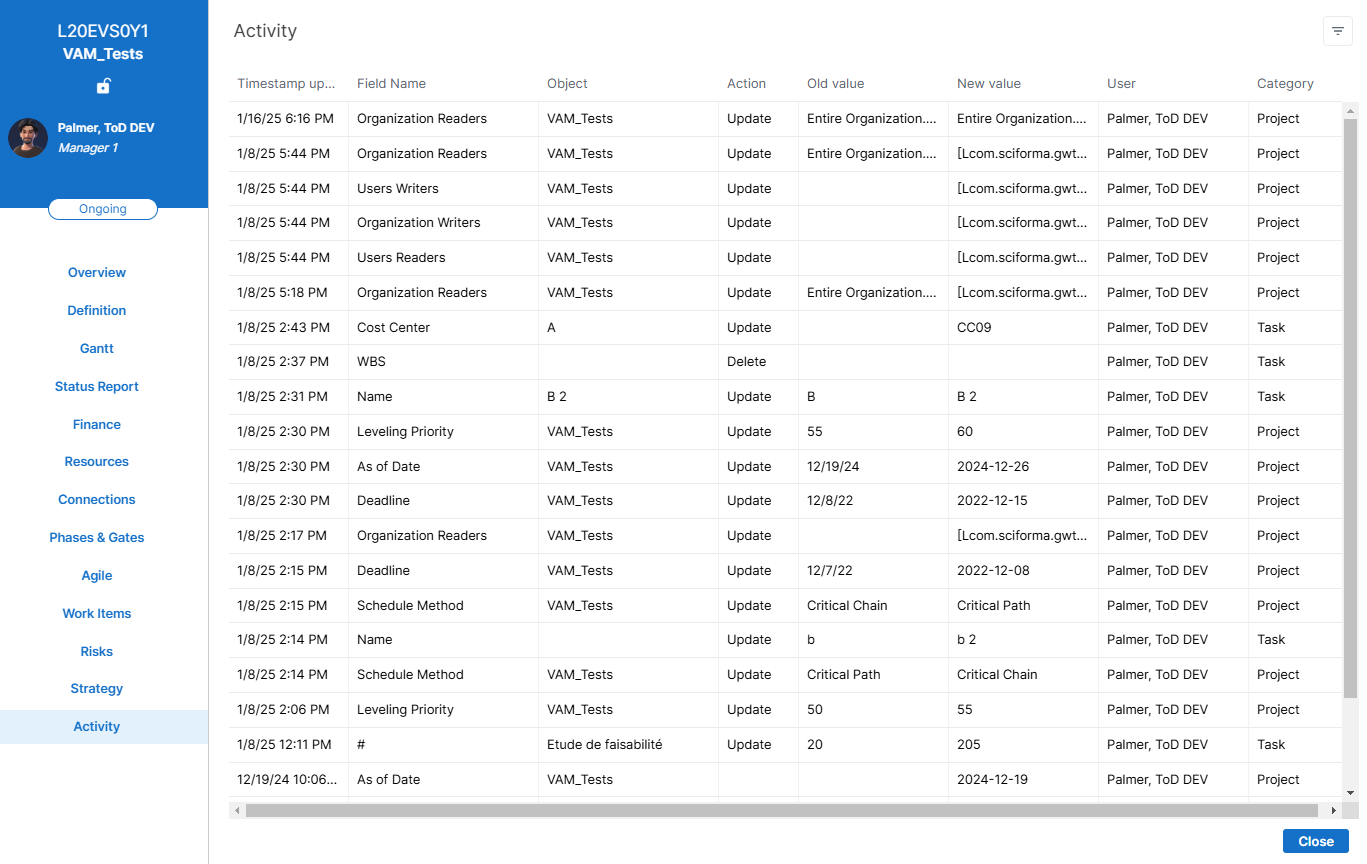
Note: For the Activity tab to be displayed in the Project Card and for the Activity folder to be displayed in the Task Details and Project Brief dialog boxes, the “Enable Task Activity” and “Enable Project Activity” settings must be enabled in the System Settings workspace, General Settings folder, General Options tab, Activity Options section.

The Activity tab and Activity folders are made of a toolbar and a grid.
The toolbar contains the Filters display option, which opens the Filters popup, offering the capability to filter according to various criteria. Clicking on the + Add Filter button displays a dropdown list, enabling users to select all fields on which they can filter the object. By default, the following filters are available:
- Action
- Category
- Field Name
- New value
- Object
- Old value
- Timestamp update
- User

The logic between the fields and values is the following:
- OR operator between the values
- AND operator between the fields
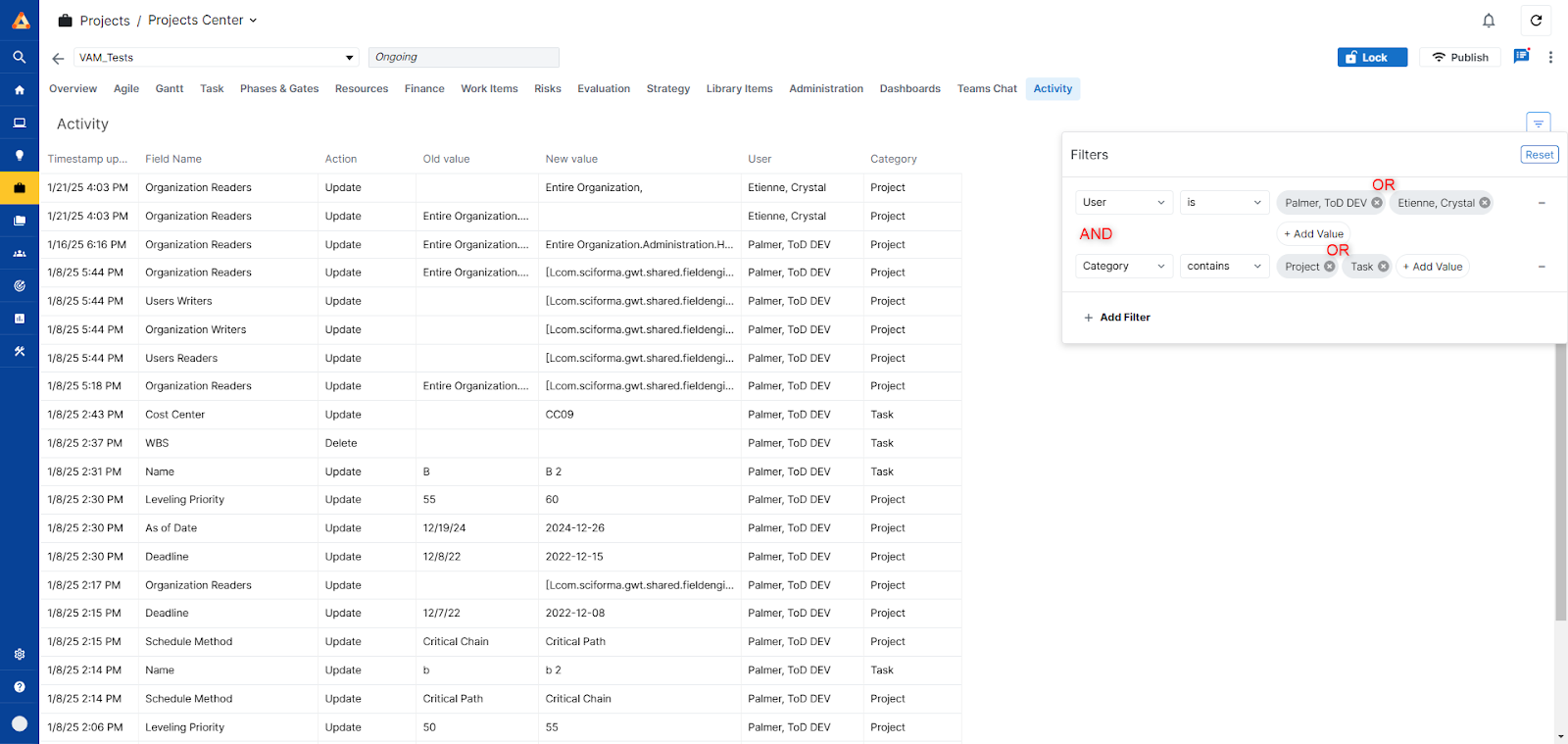
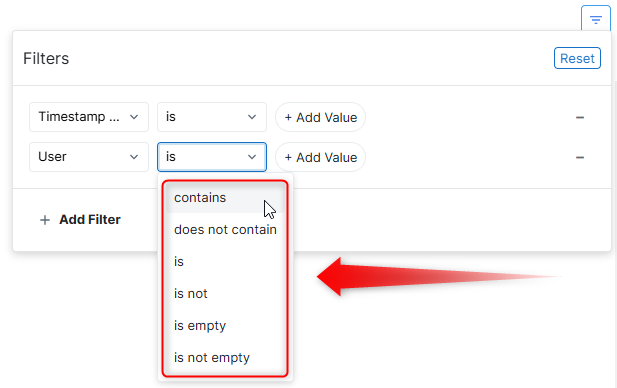
Depending on the field that is selected, different operators are accessible, as illustrated below.

A Search box is available to ease the selection of a field or a value.

Note: All filters can be cleared at once by clicking on the Reset button available in the top right corner of the Filters popup.
By default, the grid available in the Activity tab and the Activity folders provides a spreadsheet in which the following columns are displayed: Timestamp update, Field Name, Action, Old value, New value, User, and Category.
Clicking on the More ( ) button available on the right-hand side of each column’s header provides access to the following options to optimize the display of the grid:
| Icon | Command | Action |
|---|---|---|
 | Sort Ascending | Sorts by ascending order |
 | Sort Descending | Sorts by descending order |
 | Hide in view | Hides the column in the view |
To reset the grid, users will need to click on the Gear ( ) icon available on the upper right-hand side of the screen and select the “Reset Column Display” option, then click OK in the prompted popup.
The Gear ( ) icon also offers access to the following commands:
- Print – opens the Activity grid in a new browser’s tab and displays the browser's Print dialog box in which users navigate and specify a printer.
- Export to Excel – download the Activity grid in Excel format.
For more information, please refer to the Activity documentation.
Important: This version is the first release of the Audit log feature. Further enhancements will be added in future releases. For now, the following is out of scope:
- Project
- Connections, Dependencies, Contracts, etc.
- Library Items
- Evaluation
- Finance
- Work Items and Risks
- Resources
- Phases & Gates
- Tasks
- Predecessors, Successors
- Assignments
- Costs
- Transactions
- Work Objects
- Steps
- Tags
- Indent/Outdent
- Tracking
- Flag
Refactoring
#SCI-4166
PostgreSQL16 is now supported.
Visual Collaboration
#SCI-5530
A new Object Edit Rights option is now available in the Designer, User Roles view, Access tab, Object Edit Rights sub-tab: the Visual Collaboration option.
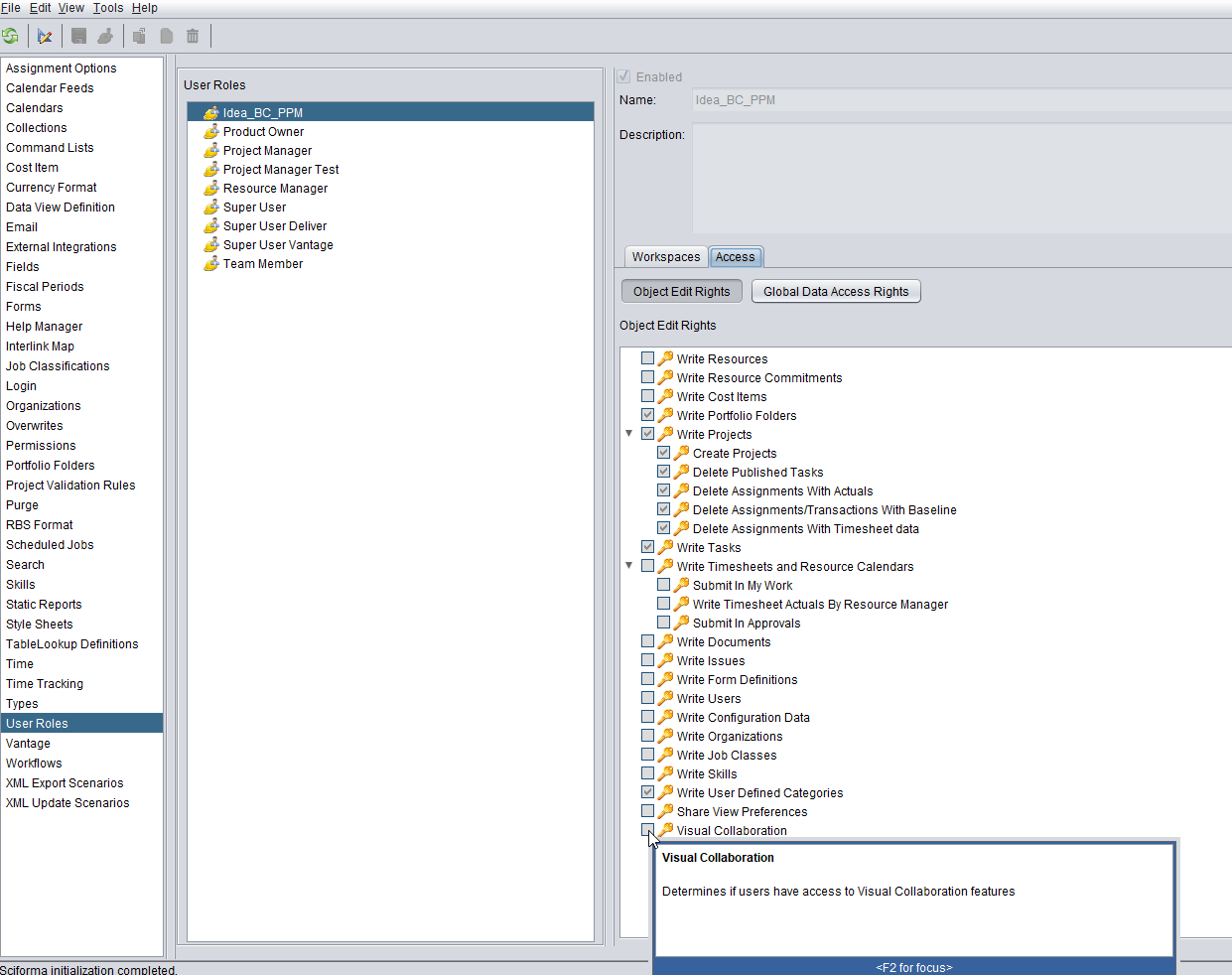
When selected, the value per user role is 4 tokens, and the user role will be able to access the Visual Collaboration features, i.e. the Board view in all of the Center workspaces (Projects Center, Ideas Center, Actions Center, Deliverables Center, Change Requests Center, Issues Center, and Risks Center).
Note: This option is disabled by default.
Core Product Corrected Issues
Administration - Corporate Data
#SCI-5490
In the Corporate Data workspace, Cost Items tab, Cost Item Identification dialog box, an error message was displayed when users were trying to update cost items. This issue has been fixed.
Authentication
#SCI-4826
In some scenarios, on premise customers could face issues while trying to log in: an error message was displayed and they were unable to log in if the difference between the server time and the client time was over 15 seconds. This issue has been fixed.
Build
#SCI-5523
In some scenarios, due to a connection leak, the server was going down if the “Enable Projects Workflow Changes”, “Enable Ideas Workflow Changes”, “Enable Work Objects Workflow Changes”, “Enable Backlog Items Assignees”, and/or “Enable Work Objects Assignees” settings were enabled and if users were performing some operations, such as changing a workflow. This issue has been fixed.
Note: The aforementioned settings are located in the System Settings workspace, General Settings folder, Notifications tab, Notification settings section.
Built-in Workspaces - Timesheet
#SCI-4985
In the Timesheet (built-in) workspace, the “Submit” button was not displayed when the “Allow Actuals on Non-Working Days” setting was disabled. This issue has been fixed.
Note: The aforementioned setting is located in the System Settings workspace, Project Settings folder, Time Tracking Options tab, Timesheet Options section.
Data Visualization
#SCI-5529
In the Projects Center workspace, Project Card, Gantt tab, Manage Baselines dialog box, when users were saving a new baseline, then were clicking on the Details ( ) icon, the Baseline Cost data was incorrect, i.e. it was equal to the Remaining Cost instead of the Total Cost. This issue has been fixed.
#SCI-4916
In the System Data workspace, Custom Reports tab, Custom Reports sub-tab, Custom Report Details, Basic Attributes section, user roles were still displayed in English even when users were connected in another language. This issue has been fixed.
#SCI-4304
In the Designer, Overwrites view, Workflows tab, when users were overriding a workflow to a new workflow, the workflow displayed in the Workflow column in the Work workspace, Work Items tab, Work Items full screen view, Grid tab, was still the previously set workflow and not the overwritten one. This issue has been fixed.
Designer
#SCI-5474
In the Designer, Fields view, Fields tab, Formulas sub-tab, the fields’ alias were incorrectly displayed in the language set for the computer system. This issue has been fixed; from now on, the Alias will be displayed in the language selected in the Designer’s connection popup.
#SCI-5398
In the Designer, Command Lists view, an error message was displayed when users were trying to create, edit, or delete a command list. This issue has been fixed.
Designer - Object/Field Edits
#SCI-5461
In the Projects Center workspace, Project Card, Finance tab, Budget dialog box, only the “Month” interval was available in the time navigation toolbar, even though some other interval values were set in the Designer, Fields view, Fields tab, Global category, Formatting tab, “intervals” field. This issue has been fixed.
Execution - Issues Center
#SCI-4705
In the Issues Center workspace, Board view, when users were clicking on the Refresh ( ) button located in the top right-hand side of the screen, the Grid view was displayed instead of the Board view. This issue has been fixed.
Execution - Timesheet
#SCI-5492
In the Designer, Calendars view, when users were updating the calendar in the Edit Calendar dialog box by marking some days as non-working days, the Total displayed in previously approved timesheets was incorrectly including hours for those non-working days in the legacy Timesheet workspace. This issue has been fixed.
Legacy API
#SCI-3320
In some scenarios, an error was occurring when users were trying to retrieve data views records through the legacy API. This issue has been fixed.
Mobile Timesheets
#SCI-5531
An error message was displayed when users were trying to log in to the ProjectAdvantage mobile application on Android and iOS devices. This issue has been fixed.
Projects Legacy - Work - Gantt
#SCI-4839
In the Work workspace, Gantt tab, an error message was displayed when users were trying to paste multiple lines from an Excel file to the Gantt spreadsheet. This issue has been fixed.
Projects - Projects Center
#SCI-5445
In the Projects Center workspace, Project Card, Gantt tab, Manage Baselines dialog box, when users were selecting the Shift command to shift the baseline to a specific date, then were repeating the Shift operation, selecting the same date, the Baseline Start date was modified to the original date before any changes had been applied. This issue has been fixed.
#SCI-5415
In the Projects Center workspace, Project Card, Resources tab, Project Resources sub-tab, when users were trying to add new team members to the project team, an error message was displayed if they selected the “Entire Organization” option. This issue has been fixed.
#SCI-5336
In the Projects Center workspace, Project Card, Resources tab, Resource assignments sub-tab, Grid view, when users were using the Export to Excel command, the exported Excel file contained only one row with some data if the grid contained some custom fields. This issue has been fixed.
#SCI-5113 (*Added on 02/06/25)
In the Projects Center workspace, Project Card, Library Items tab, Attachments sub-tab, an error message was displayed when users were trying to add attachments. This issue has been fixed.
#SCI-4879
In the Projects Center workspace, Project Card, Resources tab, Project Resources sub-tab, an error message was displayed when Resource Managers were trying to create new allocation requests. This issue has been fixed.
Resource - Resource Dashboards
#SCI-5533
In the Resource Dashboards workspace, when users were launching any report in a new browser tab, the report was not loading and it was not possible to view it. This issue has been fixed.
REST API
#SCI-4295
In some scenarios, in the REST API, users were unable to create assignments in the Timesheet workspace when the “TaskID” or “ProjectID” fields were passed as strings. This issue has been fixed.
Scheduled Jobs
#SCI-4844
In the Designer, Scheduled Jobs view, an error could be encountered when users were running Cloud Scheduled Jobs and Weekly or Monthly reports could not be generated. This issue has been fixed.
Default Configuration Enhancements
Administration
#MIL-5200
To be consistent with the grids in the Center workspaces, the columns are now not automatically resized proportionately when extra space is available in the following views:
- Corporate Data workspace
- Resources tab
- Users tab
- Cost Items tab
- System Data workspace
- Organizations tab
- Job Classifications tab
- Skills tab
- Portfolio Folders tab
- Project Administration workspace
Execution - Timesheet
#MIL-5226
In the legacy Timesheet workspace, users are not able to enter actuals or submit a future timesheet anymore, even if the tasks had been added prior to deactivating the "Allow Actions on Future Assignments (Projects)" (previously named “Allow Future Assignments (Projects)”) and/or "Allow Future Assignments (Non-Projects)" (previously named “Allow Future Assignments (Non-projects)”) settings or if they were pinned.

Note: The aforementioned settings are located in the System Settings workspace, Project Settings folder, Time Tracking Options tab, Timesheet Options section.

Resource - Resource Allocations
#MIL-5204
In the Resource Allocations workspace, Resource Allocations full screen view, Assignments tab, only the Assignments data is displayed when the “Allocations Unit” setting is set to “FTE” or “FTE%”.

Note: The aforementioned setting is located in the System Settings workspace, Resource Settings folder, Allocations & Commitments tab, Allocations Options section.

#MIL-5160
In the Projects Center workspace, Project Card, Resources tab, Project Allocations sub-tab, Project Allocations full screen view, Allocations tab, Resources Overview sub-tab, when users select the Quick Assign or the Assign/Fulfill from Allocation command, the pre-selected Effort distribution option is now aligned with the option selected in the Administration tab, Setup sub-tab, Assignment Options section.


Default Configuration Corrected Issues
Administration
#MIL-4802
In the Corporate Data workspace, Resources tab, when users were grouping the resources by organization, the organization’s name displayed in the top row was unreadable. This issue has been fixed.
Administration - System Settings
#MIL-5217
In the System Settings workspace, My Home Page Settings folder, Global Options tab, Quick Actions Block section, the translation of the "Enable Fill in timesheet" setting was incorrect in German. This issue has been fixed.
Execution - Timesheet
#MIL-5201
In the Timesheet workspace, the warning message specifying the timesheet’s modifiable period was not displayed if the timesheet modifiable period’s start date was in the middle of the timesheet view range. This issue has been fixed.
#MIL-4381
In the Projects Center workspace, Project Card, Task tab, Tracking sub-tab, By Resources view mode, Collapsed and Expanded display options, when multiple projects were selected, the notes were not correctly displayed in the Timesheet Daily Notes popup when users were clicking on the Notes ( ) icon. This issue has been fixed.
Portal - Ideas Center
#MIL-5196
In the Ideas Center workspace, Grid view, Idea Card, Connections section as well as in the Idea Center workspace, Details mode, Idea Details view, Connections section, the Link button’s tooltip was not visible. These issues have been fixed.
Portfolio - Portfolio Center
#MIL-5233
In the Portfolio Center workspace, Project Supervision tab, Focus Mode full screen view, Work Items tab, the data displayed in the Work Items full screen view was not consistent with the data displayed in the Projects Center workspace, Project Card, Work Items tab, Work Items full screen view. In addition, the Portfolio Center workspace, Project Supervision tab, Focus Mode full screen view, Risks tab, the “Time & Cost Impact” data displayed in the Project Information left panel was differing from the “Time & Cost Impact” data displayed in the Projects Center workspace, Project Card, Risks tab. These issues have been fixed.
#MIL-5232
In the Portfolio Center workspace, Project Supervision tab, Focus Mode full screen view, Finance tab, when users were closing the Dashboards full screen view, both the Focus Mode and the Dashboards full screen views were closed. This issue has been fixed.
Projects - Multi-projects Gantt
#MIL-5110
In the Multi-projects Gantt workspace, when users were selecting a task and creating a dependency or performing a Sync operation, the page was not refreshing. This issue has been fixed.
Projects - Projects Center
#MIL-5247
In the Projects Center workspace, Project Card, Gantt tab, Manage Baselines dialog box, when users were clicking on the Details ( ) icon, the spreadsheet listing the project’s task was taking a long time to load. This issue has been fixed.
#MIL-5218
In the Projects Center workspace, Grid and Board views, Filters popup, the translation for the "is not empty" operator was incorrect in German. This issue has been fixed.
#MIL-5212
In the Projects Center workspace, Project Card, Gantt tab, parent tasks could not be tagged. This issue has been fixed.
#MIL-5209
In the Projects Center workspace, Project Card, Gantt tab, Task Link dialog box, when users were selecting a calendar with a long name, an unwanted scrollbar was displayed and the calendar name could not be viewed properly. This issue has been fixed.
#MIL-5208
In all time distributed screens throughout the solution, the intervals could be incorrect when the “Default Time Distribution” setting was set to “Fiscal Period” or “Both”. This issue has been fixed.
Note: The aforementioned setting is available in the System Settings workspace, General Settings folder, General Options tab, Format Controls section.
#MIL-5198
In the Projects Center workspace, Project Card, Work Items tab, Work Items full screen view, Inbox tab, the “Sort By” display option was not consistent for all work items. This issue has been fixed.
#MIL-5192
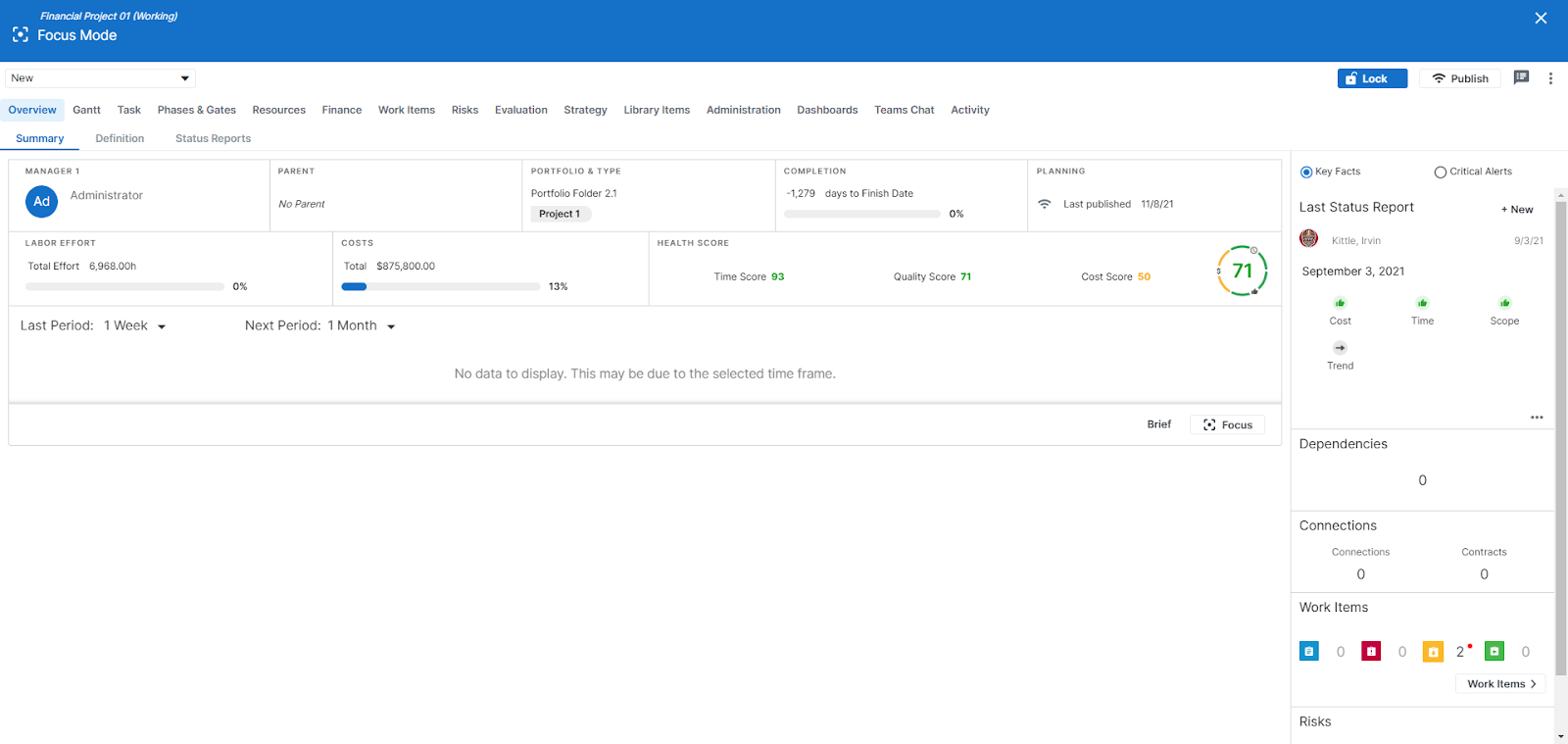
The tabs and sub-tabs displayed in the Focus Mode were different from the Project Card. This issue has been fixed. The content of the Focus Mode is now aligned with the Project Card, and is conditioned by the same System Settings.
#MIL-5191
In the Projects Center workspace, Evaluation tab, Idea Connections sub-tab, the Link button’s tooltip was incorrect. In addition, in the Home Page workspace, Evaluation tab, Idea Connections sub-tab, the Link button was not redirecting to the Idea Center workspace. These issues have been fixed.
#MIL-5105
In the Projects Center workspace, Grid view, the Status Report icon was not visible if the project was closed. This issue has been fixed.
Projects Legacy - Resources - Resources
#MIL-4678
In the Projects Center workspace, Project Card, Resources tab, Resources assignments sub-tab, the indicators displayed on the distributed Total Effort rows were incorrect. This issue has been fixed.
Projects Legacy - Work - Gantt
#MIL-5163
In the Work workspace, Gantt tab, Theater view mode, when users were activating the Tag colors option in the Display Options side panel, the applied tag colors were not visible. This issue has been fixed.
Resource - Resource Allocations
#MIL-5133
In the Resource Allocations workspace, Resource Allocations full screen view, Hard Allocations tab, Resources Overview sub-tab, the Details button was cropped when the browser’s zoom was set to 100%. This issue occurred while using full intervals, with the left panel closed. This issue has been fixed.
#MIL-5115
In the Resource Allocations workspace, Resource Allocations full screen view, Hard Allocations tab, Resources Overview sub-tab, some performance issues could be observed when users were clicking on the Spreadsheet button. This issue has been fixed.
#MIL-4872
In the Resource Allocations workspace, Resource Allocations full screen view, Hard Allocations tab, Resources Overview and Project Allocations tabs, the breakdown by project was not visible if the Resource Manager had entered some allocated effort for a specific period outside of the allocation request. This issue has been fixed.
Risk Management
#MIL-5149
In the Projects Center workspace, Project Card, Risk tab, Risk Card, users were able to edit the risk’s type, even when the “Enable Risks Type Verification” setting was disabled. This issue has been fixed.
Note: The aforementioned setting is located in the System Settings workspace, Work Management Settings folder, Risks tab, Risks section.
Work Package - Work Package Scheduler
#MIL-5231
In the Work Package Scheduler workspace, Gantt tab, Scheduler view mode, Gantt toolbar, the “Assign, Replace or Fulfill on the selected Task(s)” option was not working properly, even when the task selected was not a parent.This issue has been fixed.
Vantage Enhancements
Login
#VAN-1343
The theme/fonts have been updated on the Auth0 Universal Login page.
Deliver Enhancements
Talend component
#DELIVER-1223
The Talend Deliver component (based on the Deliver API) was not able to read data in real time: only the data pushed by the delta synchronization was accessible, and a long delay could be observed after any update. An API improvement has been implemented to solve this issue: data is now read from Hot DNZ and Hot Elastic.
Deliver Corrected Issues
APM
#DELIVER-1094
In the APM, in some scenarios, performance issues could be observed when users were opening the Costs sub-tab in the IP tab, Linked objects tab. This issue has been fixed.
General
#DELIVER-1243
In certain scenarios, a blank page and an error message could be displayed when users were navigating within the product. This issue has been fixed.
System Requirements
There are frequent changes and additions to the set of specific versions of operating systems, application servers and database servers for which ProjectAdvantage has been tested and certified. Please contact our teams for the latest information in this area.
Note: Users' system clocks must be regularly and accurately synchronized with the internet.
Servers
- Application Server: Apache Tomcat 9 with Oracle Java 8 or OpenJDK
- Data Server: PostgreSQL 14, PostgreSQL16
HTML5 Clients
- Display resolution: 1366 x 768 (technical minimum), 1600 x 1050 (minimum recommended), 1920 x 1080 or higher (generally recommended).
- Minimum of 4GB RAM allocated (8GB recommended).
- Browser
- Microsoft Edge
- Google Chrome
- Mozilla Firefox
- Apple Safari
ProjectAdvantage Designer
- Recommended language: English
- Display resolution: 1366 x 768
- Minimum of 4GB RAM allocated
- Disk space: 200MB minimum available for ProjectAdvantage.
- Oracle Java 8 or OpenJDK 8
- Operating Systems:
- Windows 7, 8.1, 10 or 11
- Mac OS X Lion or newer
- Alpine Linux 3.16.1
REST API
- Supported language: English
Timesheets Mobile Application
- Being hosted by ProjectAdvantage
- Product version: 2022.08 and upper versions
Vantage platform
Users will need to enable third-party cookies to work within Vantage. For more information regarding third-party cookies, please refer to the “How to allow third-party cookies” documentation.
For customers who subscribed only to Plan
- Installation:
- POD 11 is required if hosted by ProjectAdvantage
- An Hydra server is required if on premise
- Product version: 2023.01 and upper versions
For customers who subscribed to Plan and Deliver
- Installation:
- POD 11 is required if hosted by ProjectAdvantage
- An Hydra server is required if on premise
- HPV2 activated on Deliver modules (activated by default for all new Deliver Clients after 2021 Q3)
- Product version: 2023.01 and upper versions
- Users will need to allow third-party cookies in their browser
Limitations
The data connector:
- Does not work in load balanced environments.
- Is not compatible with Cloud Scheduled Jobs.
- Is not compatible with dedicated API servers.
- Is not compatible with the Java API.