



2024.10
This document describes the enhancements, corrected issues, and new features that have been implemented in ProjectAdvantage 2024.10, both in the Core product and in the ProjectAdvantage Default Configuration, in Vantage and in Deliver.
ProjectAdvantage 2024.10 is a maintenance release of ProjectAdvantage 2024.
In the Core product, 5 enhancements have been implemented and 32 issues have been fixed.
In the ProjectAdvantage Default Configuration, 5 enhancements have been implemented and 28 issues have been fixed.
In Vantage, 6 issues have been fixed.
In Deliver, 2 issues have been fixed.
In order to access the different sections, please click on the following links:
- Important Reminders for upgrade
- Core Product Enhancements
- Core Product Corrected Issues
- Default Configuration Enhancements
- Default Configuration Corrected Issues
- Vantage Corrected Issues
- Deliver Corrected Issues
- System Requirements
Important Reminders for upgrade
- To improve the performance of views displaying the Health Score of multiple projects, we are now using a Health Score that is pre-calculated upon publishing a project as opposed to on the fly. Therefore, upon upgrading to 2021.03 (or higher), please make sure you run once the following Scheduled Job to initialize the project Health Score values: Initialize Project Static Health Score.
Important: For systems with an overwritten Publish command, please make sure to add the new dedicated Command List for the Health Score pre-calculation upon publishing a project: “Project - Publish Project - Continue - Capture Health Score”.
- From the 2023.01 version, to support the implementation of the new Vantage navigation and modules, the Project Dashboards workspace should be added again in the User Roles section of the Designer as the Dashboards workspace doesn't exist anymore.
Core Product Enhancements
All Centers
#SCI-4344
A new Board view has been implemented in all of the Center workspaces (Projects Center, Ideas Center, Actions Center, Change Requests Center, Deliverables Center, Issues Center, and Risks Center). It provides a convenient way for users to visualize/update the objects within the selected view. Columns can be collapsed or expanded, so that only the information relevant to the logged-in user is displayed.

The Board view is made up of the following sections:
- Main toolbar
- Objects Board (made up of the Object cards and a columns view)
By default, the columns are displayed by Workflow State Vote.
By simply dragging & dropping an Object card, the user is able to update the object's attribute.
Please note this feature is only available with the Visual Collaboration module.
For more information, please refer to the Board view documentation for each of the Center workspaces.
Data Visualization
#SCI-4863
The Document Management feature has been implemented in ProjectAdvantage reusing the Attachments feature already available for all the Work Items and the Projects. In addition to the ability to create an attachment by providing a URL, users are now able to upload documents.

In the Projects Center workspace, Project Card, Library Items tab, Attachments sub-tab, clicking on the “+ Add Attachment” button opens the Add Attachment popup, allowing the user to either upload a file from his/her computer, or to add a URL link.
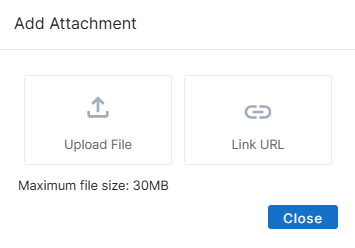
Once a document has been uploaded, users are able to update the document. They can also drag & drop a document from their computer to create the attachment.
This feature has been rolled out for Work Items in the Attachments section in the Action Card, Change Request Card, Deliverable Card, Issue Card, and Risk Card, as well as in the Idea Card.


The ability to add URL links and/or documents is managed at the Organization level through the “Attachment Settings” setting, located in the System Settings workspace, General Settings folder, General Options tab, Attachments section.

Note: Documents are stored on Amazon S3. Consequently, uploading documents is only available for customers with Saas environments. On premise customers will not be able to upload documents, they will be able to add URL links only.
#SCI-4381
In the Designer, Fields view, Fields tab, Task category, Formatting sub-tab, a new "Outline Index" field has been created. It represents the task's index in the list of tasks when the list is in its "natural" order (otherwise known as outline order).

Designer
#SCI-4865
In the Designer, Fields view, Fields tab, Global category, a new “[All View Preference]” field has been created. It provides access to all the View Preference objects associated with the logged-in user.

Timesheet (built-in)
#SCI-4905
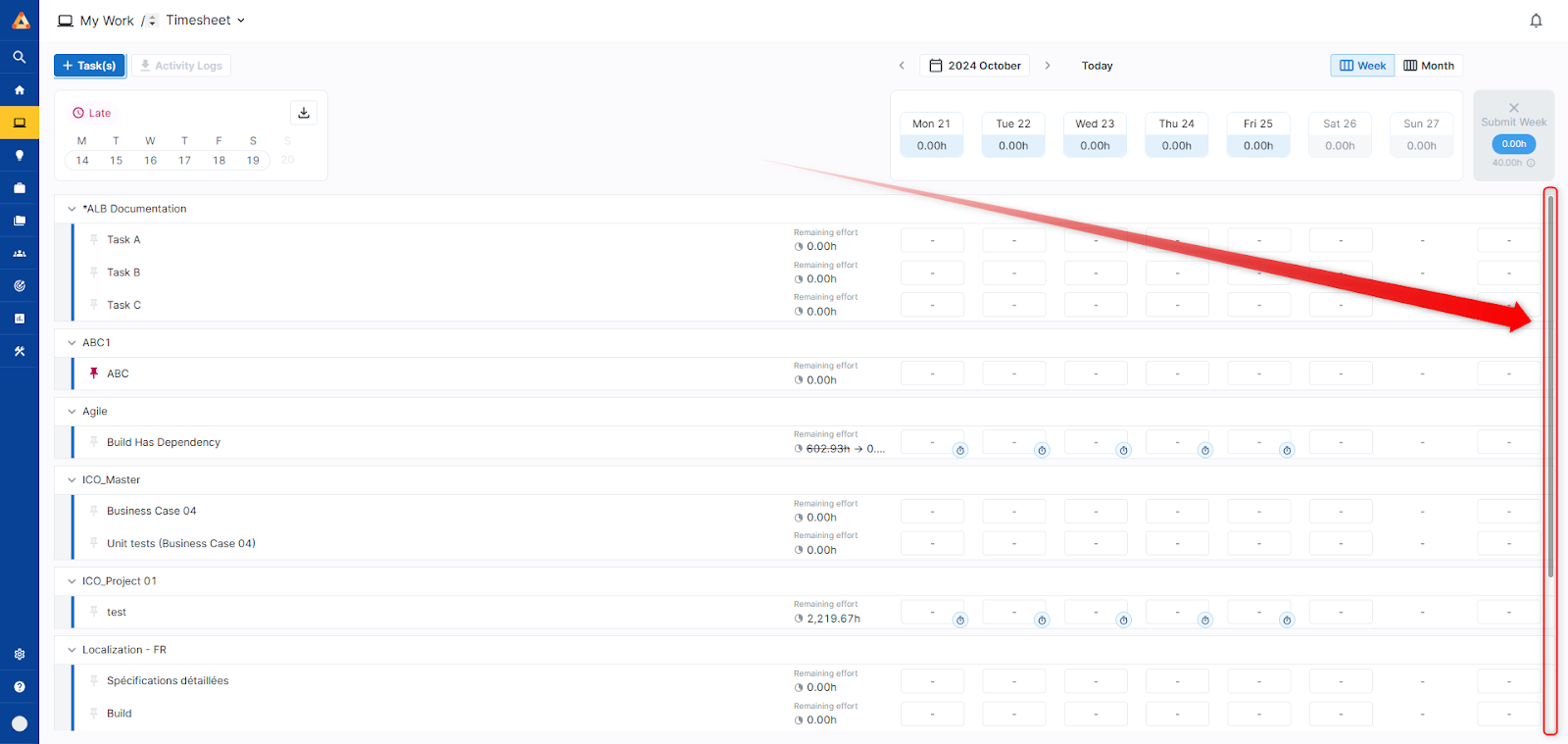
In the Timesheet (built-in) workspace, a scrollbar has been added to the Tasks panel, allowing the user to scroll through the assignments if there are too many.
Core Product Corrected Issues
Authentication
#SCI-4961
In the HTML5 Client, in certain circumstances, users were unable to log in to their environment after their password had been modified. This issue has been fixed.
Build
#SCI-5523 (*Added on 01/31/25)
In some scenarios, due to a connection leak, the server was going down if the “Enable Projects Workflow Changes”, “Enable Ideas Workflow Changes”, “Enable Work Objects Workflow Changes”, “Enable Backlog Items Assignees”, and/or “Enable Work Objects Assignees” settings were enabled and if users were performing some operations, such as changing a workflow. This issue has been fixed.
Note: The aforementioned settings are located in the System Settings workspace, General Settings folder, Notifications tab, Notification settings section.
#SCI-4855
In some scenarios, the “Update Tables” operation was failing while users were upgrading to ProjectAdvantage version 2024.09. This issue has been fixed.
Data Visualization
#SCI-5529 (*Added on 01/31/25)
In the Projects Center workspace, Project Card, Gantt tab, Manage Baselines dialog box, when users were saving a new baseline, then were clicking on the Details ( ) icon, the Baseline Cost data was incorrect, i.e. it was equal to the Remaining Cost instead of the Total Cost. This issue has been fixed.
#SCI-4946
In the Work workspace, Gantt tab, Project Administration dialog box, users were sometimes not able to close the dialog box by clicking on the “Close” button. This issue has been fixed.
#SCI-4936
In the Projects Center workspace, the Open button available on the right-hand side of the Project Name was not working and the Project Card could not be opened. All the Center workspaces were also affected. This issue has been fixed.
#SCI-4932
In the Projects Center workspace, Project Card, Overview tab, in some scenarios, when users were modifying the project name, then were clicking on the Undo command, the edited name was still displayed in the selector dropdown. This issue has been fixed.
#SCI-4922
In the HTML5 Client, when users were navigating to the Corporate Data workspace, no organization could be selected in the selector on the left hand-side. This issue has been fixed.
#SCI-4789
In the HTML5 Client, in some scenarios, an error message was displayed when users were navigating to the Corporate Data workspace, Users tab. This issue has been fixed.
#SCI-4750
In the Projects Center workspace, the width of the project selector was not wide and readable enough. This issue has been fixed; to offer better readability, the width of the project selector is now 350 px.
#SCI-4721
In the Work workspace, an error message was displayed when users with read access only were trying to open projects. This issue has been fixed.
#SCI-4647
In the HTML5 Client, the Projects module was displayed in the Vantage navigation bar, even if the logged-in user did not have the appropriate rights to access it in accordance with his/her user role. This issue has been fixed.
#SCI-4512
In the Projects Center workspace, Project Card, Gantt tab, the Hamburger ( ) icon was not correctly displayed when users were indenting tasks in the Gantt spreadsheet. This issue has been fixed.
#SCI-4511
In the Corporate Data workspace, Resources tab, resources that had been previously purged in the Designer, Purge view, were still displayed. This issue has been fixed.
#SCI-4474
In the Projects Center workspace, Filters dialog box, the operators were not properly populated and displayed when users were adding the “Start” filter. This issue has been fixed.
#SCI-4396
In the Projects Center workspace, Filters dialog box, when users were selecting a User Defined Field filter, no option could be selected when clicking on the "+ Add Value" button. This issue has been fixed.
#SCI-4001
In the Portfolio Ranking workspace, in certain scenarios, the data was disappearing when users were switching to a different language. This issue has been fixed.
#SCI-3428
In the Projects Center workspace, Project Card, Gantt tab, if the project had previously been locked by the logged-in user, an incorrect error message was displayed when users were clicking on the Undo or Redo commands. This issue has been fixed.
Designer
#SCI-2520
In the Designer, Login view, Session Data section, in some scenarios, modifying the “HTML5 Client session timeout” did not have any effect. This issue has been fixed.
Import/Export CFG
#SCI-4898
In the Designer, in certain scenarios, an error message was displayed when users were importing a CFG file. This issue has been fixed.
#SCI-4215
In the Designer, Collections view, in some scenarios, an error message was sometimes displayed when users were trying to import patches. This issue has been fixed.
Object/Field Edits
#SCI-4290
In the Projects Center workspace, in some scenarios, a different view than the one previously selected was displayed when users were switching languages. This issue has been fixed.
Performance
#SCI-4223
In load balanced environments, in certain scenarios, some users were not able to sign in while others were experiencing interruption and slowdown. This issue has been fixed.
REST API
#SCI-4687
For /transactions endpoints, an incorrect 500 status code was returned in the response message instead of a 404 status code for requests with valid code and invalid id. This issue has been fixed.
#SCI-4584
In the REST API, Working versions of projects were incorrectly updated when users were performing Patch requests on Published versions. This issue has been fixed.
#SCI-3461
Users were unable to create new organizations through the REST API using POST requests. This issue has been fixed.
#SCI-2573
In the REST API, an incorrect 500 status code was returned in the response message for POST requests when User Defined Categories records contained invalid data. This issue has been fixed.
Timesheet (built-in)
#SCI-4941
In the Timesheet (built-in) workspace, in some scenarios, tasks were not displayed in the Tasks panel. In addition, some days could incorrectly be displayed as non-working days, and it was sometimes not possible to add tasks. These issues have been fixed.
#SCI-4926
In the Timesheet (built-in) workspace, in some scenarios, users were unable to submit their timesheets. This issue has been fixed.
#SCI-4702
In the Timesheet (built-in) workspace, when users were entering their actuals in the Tasks panel, they were not updated to the nearest quarter hour, as set in the Designer, Time Tracking view. This issue has been fixed.
#SCI-4454
In the Timesheet (built-in) workspace, the “Submit week”, “Submit month” and “Submit period” buttons were overflowing when users were connected in French or German. This issue has been fixed; the text has been shortened.
#SCI-4125
In the Timesheet (built-in) workspace, in certain scenarios, the More ( ) button, normally available on the right-hand side of the Time Navigation panel, was not visible, even when the “Enable Interval Selection for Timesheets" setting is activated in the System Settings workspace, Project Settings folder, Time Tracking Options tab, Timesheet Options section. This issue has been fixed.
Default Configuration Enhancements
My Home Page
#MIL-5045
In the My Home Page workspace, some improvements, such as a new design of the Quick Actions block and a hover effect of the articles in the Company News block, have been applied in order to offer better visibility to users.

#MIL-5041
A new My favorite views block has been implemented in the My Home Page workspace. It displays all the views the logged-in user added to his/her favorites either in the Grid or the Board view in the Center workspaces (Projects Center workspace, Ideas Center workspace, Actions Center workspace, Change Requests workspace, Deliverables Center workspace, Issues Center workspace, and Risks Center workspace).

Projects Center
#MIL-5064
In the Project Center workspace, Project Card, Gantt tab, Resource Panel, the Gear ( ) icon, has been added for better visibility when the "Selected & Published Projects" is selected. It is displayed when hovering over the distributed grid (as illustrated below).

#MIL-5048
In the Projects Center workspace, Project Card, Gantt tab, Resource Panel, Generic Resources and Team Members are now sorted alphabetically in the Resource spreadsheet.


Resource Allocations
#MIL-5053
A new Custom section has been implemented in the Projects Center workspace, Resources tab, Project Allocations sub-tab, Project Allocations full screen view, Requests tab, Requests Inbox sub-tab, Create Allocation Request dialog box.

It is managed with the "Enable Requests Pop-up Custom Section" setting located in the System Settings workspace, Resource Settings folder, Allocations & Commitments tab, Requests & Commitments Options section.

Note: The same Custom section has been implemented in the Edit Allocation and View Allocation Details dialog boxes. It is managed by the "Enable Allocation Pop-up Custom Section" setting located in the System Settings workspace, Resource Settings folder, Allocations & Commitments tab, Allocations Options section.
Default Configuration Corrected Issues
Administration
#MIL-5023
In the Corporate Data workspace, Resources tab, Resource Identification dialog box, Definition tab, the “Time Entry Set” attribute was not properly displayed. This issue has been fixed.
CCPM
#MIL-5025
In the Projects Center workspace, Project Card (multi project), CCPM tab, Chain Analysis sub-tab, when users were activating the “Show Resource Conflict” toggle, the data was taking a lot of time to load. This issue has been fixed.
General
#MIL-5071
In the Project Portal workspace, Planning tab, soft assignments labels were not displayed in the Gantt chart even when the “Enable Gantt Labels Soft Assignments” setting was activated. This issue has been fixed.
Note: The aforementioned setting is available in the System Settings workspace, Project Settings folder, Display Preferences tab.
Idea/Business Case
#MIL-5038
In the Ideas Center workspace, when users were creating a new idea, the Idea Folder could not correctly be set if the selected Idea Folder name had a duplicate located in a different parent Idea Folder in the hierarchy. This issue has been fixed.
#MIL-4972
In the Ideas Center workspace, in some scenarios, when users were connecting an idea to a work item, the Connection button and section, normally displayed in the Work Item Card once the process was completed, were not active. This issue has been fixed.
Localization
#MIL-5022
In the Timesheet (built-in) workspace, the German, French and Spanish translations were overflowing for the "Recall Week" and "Recall Period" buttons. This issue has been fixed.
My Home Page
#MIL-5059
In the My Home Page workspace, My Assigned Tasks block, the tasks list displayed was restricted to the project’s manager only. This issue has been fixed.
#MIL-5051
In the My Home Page workspace, the performance was not optimal. This issue has been fixed.
Portfolio Center
#MIL-5028
In the Portfolio Center workspace, Budget tab, Portfolio Budget mode, inactive projects were taken into account when users were using the “Update Cost Centers from Projects” command. This issue has been fixed.
#MIL-5027
In the Portfolio Center workspace, Budget tab, Project Budget mode, the Cost Centers display option was not properly working. This issue has been fixed.
Project Scheduler
#MIL-5009
In the Projects Center workspace, Project Card, Gantt tab, Project Problems panel, Project Attributes section, when a Master Planning was selected, the toggle allowing to display either the Problems or Dependencies was incorrectly displayed in German. This issue has been fixed.
#MIL-5005
In the Projects Center workspace, Project Card, Gantt tab, when several tasks were selected in the Gantt spreadsheet, there was a display issue in the Quick Assign section when users were connected in German. This issue has been fixed.
Projects Center
#MIL-5062
In the Projects Center workspace, Grid view, the “Active Working Projects” view option was misspelled. This issue has been fixed.
#MIL-5044
In the Projects Center workspace, Project Card, Gantt tab, when users were clicking on the “Manage Baselines” button, an error message was displayed if the selected project was in read only mode. This issue has been fixed.
#MIL-5040
In the Projects Center workspace, the "Locked" and "No Note" filters were missing from the Predefined Filters. This issue has been fixed.
Resource Allocations
#MIL-5079
In the Resource Allocations workspace, Resource Allocations full screen view, Hard Allocations tab, Resource Details sub-tab, for any given resource, the “Show Assignments” display option was not correctly displayed when the user was connected in German. This issue has been fixed.
#MIL-5065
In the Resource Allocations workspace, some performance issues could be observed and the data was taking a long time to load. This issue has been fixed.
#MIL-5030
In the Resource Allocations workspace, Resource Allocations full screen view, Hard Allocations tab, Resources Overview sub-tab, when users were clicking on the “Spreadsheet” button”, the Allocation Details dialog box could take a long time to be displayed. This issue has been fixed.
Note: This performance issue occurred for all spreadsheets in the Resource Allocations full screen view. The "Spreadsheet" buttons are available when the "Enable Allocations Detailed Spreadsheets" setting is activated in the System Settings workspace, Resource Settings folder, Allocations & Commitments tab.
#MIL-4923
In the Resource Allocations workspace, Resource Allocations full screen view, Hard Allocations tab, Resource Details sub-tab, when users were creating new allocations, they were not displayed in the Resource Allocation Details view. This issue has been fixed.
Resource Assignments
#MIL-5082
In the Projects Center workspace, Project Card, Resources tab, Resources assignments sub-tab, when users were deleting an assignment, the screen was not properly refreshed. This issue has been fixed.
#MIL-4913
In the Resources workspace, Resources tab, the Total Available Effort was not correct and not reflecting the sum of the distributed Available Effort. This issue has been fixed.
Resource Dashboards
#MIL-5074
In the Project Dashboards workspace, Finance theme, Billing report, the Total displayed at the Portfolio Folder level was sometimes incorrect. This issue has been fixed.
Resource Management
#MIL-5070
In the Projects Center workspace, Project Card, Gantt tab, Task panel, Assignments tab, Labor Assignment dialog box, project managers were able to change the resource even when some Actual Effort had been entered. This issue has been fixed.
Resource Validation
#MIL-5072
In the Resource Validation workspace, some performance issues could occur when a large number of organizations was selected. This issue has been fixed.
#MIL-5020
In the Projects Center workspace, Project Card, Task tab, Tracking sub-tab, the “Approve & Apply” command was not working. This issue has been fixed.
#MIL-4903
In the Resource Validation workspace, Timesheet tab, the “Submit” button was sometimes incorrectly not displayed for certain resources. This issue has been fixed.
Strategy Execution
#MIL-5029
In the Strategy workspace, the number of contributing projects was not aligned with the number of projects attached to the objective in the Objectives workspace, Projects tab. This issue has been fixed.
Note: From now on, the number of contributing projects is limited to active projects in the Strategy workspace. Furthermore, the Filters button is now displayed as active when the "Status" filter is set to "Active Only" or "Inactive Only" in order to avoid confusion.
Work Items
#MIL-5068
In the Action Center, Change Requests Center, Deliverables Center, and Issues Center workspaces, when users were opening an object card, the card was incorrectly read only. This issue has been fixed.
Vantage Corrected Issues
Data Connector
#VAN-1278
In certain scenarios, an error message was displayed when users were trying to open projects or scroll in the selector. In addition, updates could sometimes not be processed from Deliver to Plan. These issues have been fixed.
#VAN-1262
When users were creating projects containing around 100 tasks in Deliver, some performance issues could be encountered and the project could take a few minutes before being created in Plan. This issue has been fixed.
#VAN-1201
When users were updating a project Workflow State, the change was not reflected in the Workflow State history in Plan. This issue has been fixed.
Login
#VAN-1198
In Vantage, an error message was sometimes displayed when users were logging in or refreshing their browser. This issue has been fixed.
Vantage navigation
#VAN-1292
In Vantage, an error message was sometimes displayed when users were navigating to the Work workspace, Gantt tab. This issue has been fixed.
Vantage SSO
#VAN-184
In Vantage, in certain scenarios, an error message was displayed when users were logging in or out using the Single Sign On. This issue has been fixed.
Deliver Corrected Issues
Cockpits
#DELIVER-501
The APM search bar was sometimes not displayed in the Cockpit module. This issue has been fixed.
Gridboard
#DELIVER-1068
In the Gridboard, when users were selecting the “One criterion only” option in the Filters dialog box, then were exporting the view to Excel, there could be a discrepancy between the results displayed on screen and those exported to the Excel file. This issue has been fixed.
System Requirements
There are frequent changes and additions to the set of specific versions of operating systems, application servers and database servers for which ProjectAdvantage has been tested and certified. Please contact our teams for the latest information in this area.
Note: Users' system clocks must be regularly and accurately synchronized with the internet.
Servers
- Application Server: Apache Tomcat 9 with Oracle Java 8 or OpenJDK
- Data Server: PostgreSQL 12, PostgreSQL 14
HTML5 Clients
- Display resolution: 1366 x 768 (technical minimum), 1600 x 1050 (minimum recommended), 1920 x 1080 or higher (generally recommended).
- Minimum of 4GB RAM allocated (8GB recommended).
- Browser
- Microsoft Edge
- Microsoft Internet Explorer 10 or 11
- Google Chrome
- Mozilla Firefox
- Apple Safari
ProjectAdvantage Designer
- Recommended language: English
- Display resolution: 1366 x 768
- Minimum of 4GB RAM allocated
- Disk space: 200MB minimum available for ProjectAdvantage.
- Oracle Java 8 or OpenJDK 8
- Operating Systems:
- Windows 7, 8.1, 10 or 11
- Mac OS X Lion or newer
- Alpine Linux 3.16.1
REST API
- Supported language: English
Timesheets Mobile Application
- Being hosted by ProjectAdvantage
- Product version: 2022.08 and upper versions
Vantage platform
Users will need to enable third-party cookies to work within Vantage. For more information regarding third-party cookies, please refer to the “How to allow third-party cookies” documentation.
For customers who subscribed only to Plan
- Installation:
- POD 11 is required if hosted by ProjectAdvantage
- An Hydra server is required if on premise
- Product version: 2023.01 and upper versions
For customers who subscribed to Plan and Deliver
- Installation:
- POD 11 is required if hosted by ProjectAdvantage
- An Hydra server is required if on premise
- HPV2 activated on Deliver modules (activated by default for all new Deliver Clients after 2021 Q3)
- Product version: 2023.01 and upper versions
- Users will need to allow third-party cookies in their browser
Limitations
The data connector:
- Does not work in load balanced environments.
- Is not compatible with Cloud Scheduled Jobs.
- Is not compatible with dedicated API servers.
- Is not compatible with the Java API.