



2024.09
This document describes the enhancements, corrected issues, and new features that have been implemented in ProjectAdvantage 2024.09, both in the Core product and in the ProjectAdvantage Default Configuration, in Vantage and in Deliver.
ProjectAdvantage 2024.09 is a maintenance release of ProjectAdvantage 2024.
In the Core product, 7 enhancements have been implemented and 39 issues have been fixed.
In the ProjectAdvantage Default Configuration, 2 enhancements have been provided and 8 issues have been fixed.
In Vantage, 6 issues have been fixed.
In Deliver, 1 enhancement has been implemented and 3 issues have been fixed.
For Integrations, 1 enhancement has been implemented.
In order to access the different sections, please click on the following links:
- Important Reminders for upgrade
- Core Product Enhancements
- Core Product Corrected Issues
- Default Configuration Enhancements
- Default Configuration Corrected Issues
- Vantage Corrected Issues
- Deliver Enhancements
- Deliver Corrected Issues
- System Requirements
Important Reminders for upgrade
- To improve the performance of views displaying the Health Score of multiple projects, we are now using a Health Score that is pre-calculated upon publishing a project as opposed to on the fly. Therefore, upon upgrading to 2021.03 (or higher), please make sure you run once the following Scheduled Job to initialize the project Health Score values: Initialize Project Static Health Score.
Important: For systems with an overwritten Publish command, please make sure to add the new dedicated Command List for the Health Score pre-calculation upon publishing a project: “Project - Publish Project - Continue - Capture Health Score”.
- From the 2023.01 version, to support the implementation of the new Vantage navigation and modules, the Project Dashboards workspace should be added again in the User Roles section of the Designer as the Dashboards workspace doesn't exist anymore.
Core Product Enhancements
Build
#SCI-4621
A new Roadmap view has been implemented in the Projects Center workspace. It provides a high level view of the projects’ timeline.

The grid available on the left-hand side provides a spreadsheet listing the projects and some of their attributes (Name, HS, Start, and Finish), while the chart available on the right-hand side provides a chart view with one single row per project, where key elements of the project timeline (milestones/gates, baselines and completion) are displayed. Upon hovering over a milestone/gate, a tooltip displays the milestone’s/gate’s name and start date.
By default, the Roadmap view displays all the active Working projects for which the logged-in user has read or write access.
This version is the first release of the roadmap view. Further enhancements will be added in future releases, notably the ability to customize information such as in the Grid view (filtering options, possibility to save views, etc.).
Note: The Roadmap view is read-only.
#SCI-2998
In all of the Center workspaces (Projects Center, Ideas Center, Actions Center, Change Requests Center, Deliverables Center, Issues Center, and Risks Center), Main toolbar, Views field, new options are now available when clicking on the More ( ) button of a particular view, allowing users to select the following commands:
- Rename – Allows the user to rename the selected view.
- Add to favorites – Allows the user to indicate whether the view is marked as “Favorite”. Once a view has been marked as favorite, a gray star (
 ) icon is added after the view name in the list.
- Remove from favorites – Allows the user to remove the view from the favorites.
- Share – Allows the user to share the view with the whole company. Once a view has been shared, a share (
 ) icon is added after the view name in the list.
- Unshare – Allows the user to unshare the view with the whole company.
- Delete – Allows the user to delete the selected view.

Data Visualization
#SCI-4299 (*Added 12-03-2024)
In the Projects Center workspace, an indicator is now displayed in the header when a column is sorted in ascending or descending order, making it easier for users to visually recognize the column is sorted.

#SCI-4178
In the HTML5 Client, the new My Home Page workspace has been introduced. My Home Page is typically the first page that users see when they connect to ProjectAdvantage. Its purpose is to serve as the main entry point to the application.
The My Home Page workspace enables users to review the main information related to their user role in a single place, access their main workspaces in one click, and proceed to quick actions.
The My Home Page workspace is made up of:
- A Quick Actions block
- A series of blocks of information

The blocks displayed in the My Home Page workspace are customizable by the Administrator – the available settings allow him/her to choose which blocks should be displayed per user role.
For more information, please refer to the My Home Page documentation.
Note: The My Home Page content is managed by the Administrator in the System Settings workspace, My Home Page Settings folder, Global Options tab.
Designer
#SCI-4554
In the Designer, Forms view, Edit Gantt Block dialog box, Gantt tab, when the “Show all tasks on the project row” option is ticked, the Change Color command, available when right-clicking on a Gantt bar in the Projects Center workspace, Project Card, Gantt tab, is not displayed.

Object/Field Edits
#SCI-3931
Project transactions can now be transferred from a template to a project when the “Insert Project Transaction” option is ticked in the Designer, Command Lists view for the “Project Creation - New Project Template Insert Template - Continue” item.

Timesheet (built-in)
#SCI-4483
In the Timesheet (built-in) workspace, the expected effort of the active period is now displayed in the “Submit” button.

Core Product Corrected Issues
Application bar
#SCI-4574
In the Projects Center workspace, when clicking on the Views selection dropdown, users were unable to scroll down to view all the available options. This issue has been fixed.
#SCI-4478
In the Designer, Forms view, modifying the fields associated with a grid column in the "Fields by Category" dialog box could cause an internal inconsistency where the fields displayed in the HTML5 Client client did not correspond to the field specified in the dialog box. This issue has been fixed.
Note: The issue can be prevented in previous versions by specifying the primary field in the main "Edit" dialog box, then using the "Fields by Category" dialog box to only specify the field for the non-primary category.
#SCI-3852
In the Projects Center workspace, when clicking on the Columns button in the main toolbar, users were unable to benefit from the auto-scroll when they were trying to move columns to the extreme top or extreme bottom position of the columns list. This issue has been fixed.
Data Visualization
#SCI-4746
In the Projects Center workspace, Grid view, when users were applying filters in the Filters dialog box, the data was not properly filtered. This issue has been fixed.
#SCI-4721 (Added on 10/04/24)
A NullPointerException error occurred on projects if the user had only read access. This issue has been fixed.
#SCI-4719
In the System Settings workspace, Work Management Settings folder, Work Items tab, some settings were not working properly. This issue has been fixed.
#SCI-4675
In the Projects Center workspace, after users had completed the project creation process, the loading bar was incorrectly displayed at the bottom of the page, even though the Project Card had loaded. This issue has been fixed.
#SCI-4663
In the Projects Center workspace, Project Card, Dashboards tab, Overview theme, CDA Report, Description popup, an error message was displayed when users were trying to change the name of the report. This issue has been fixed.
#SCI-4655
In the Corporate Data workspace, Resources tab, Availability popup, when users were entering a new date, the date was automatically changed to the preceding day if they had previously amended their system’s time zone. This issue has been fixed.
#SCI-4651
In the Projects Center workspace, in some scenarios, an error message was displayed when users were clicking on the “Open” button available on the right-hand side of any Project Name and they were unable to access the Project Card. This issue has been fixed.
#SCI-4577
In the Designer, Forms view, if the number of fields included in a “Sort” or “Group” View Control was too big, no scroll bar was displayed in the dropdown list when using the “Sort by” or “Group by” options in the HTML5 Client. This issue has been fixed.
#SCI-4572
In some scenarios, when users were bookmarking a page in the application, the selections were not restored when using the bookmarked page if they were using the Vantage UI. This issue has been fixed.
#SCI-4571
In the Work workspace, Gantt tab, when users were selecting the “Insert Left” or “Insert Right” commands to insert columns in the Gantt spreadsheet, a white background was displayed instead of the list of fields. This issue has been fixed.
#SCI-4527
The Projects Center workspace was intermittently missing when using the Vantage UI. This issue has been fixed.
#SCI-4511 (Added on 10/04/24)
After purging users or resources from the Designer Purge view, the same users or resources were not immediately disappearing. This issue has been fixed.
#SCI-4504
Due to some issues, View Based fields are now read-only to prevent HTML form edits.
#SCI-4490
In the Filters dialog box, the “contains” operator was misspelled when the user was connected in German. This issue has been fixed.
#SCI-4444
In the Work workspace, Gantt tab, Update Progress dialog box, when a user tried to select a date from the date picker for the “Progress Date” field, the previous day was incorrectly selected. This issue has been fixed.
#SCI-4439
In some scenarios, when users were sending a Plan URL containing tab names to another Plan user (using a different language), the URL link was not working correctly. This issue has been fixed.
#SCI-4435
In the Projects Center workspace, Project Card, Gantt tab, Gantt spreadsheet, it was not possible to drag unselected tasks and drop them to the top of the spreadsheet. This issue has been fixed.
#SCI-4395
In the Project Dashboards workspace, when applying a filter based on Portfolio Folders from the Project Selector, users were sometimes unable to view any of the projects. This issue has been fixed.
Designer
#SCI-4754
In certain scenarios, when users were launching the Designer, an error message was displayed and certain Field formulas seemed to be incorrect for the “Task” category. This issue has been fixed.
#SCI-4647 (Added on 10/04/24)
The Project Card workspace was displayed in the Vantage Navigation Bar even if the User Role didn't have any access to it. This issue has been fixed.
#SCI-4638
The "Max records" option in grids was not working as expected. This issue has been fixed.
#SCI-4626
When closing a popover, if there were two tabs with the same name, the wrong tab was displayed. This issue has been fixed.
#SCI-4576
In the Designer, User Roles view, when users were editing access rights, the server needed to be restarted for the changes to take effect. This issue has been fixed.
#SCI-4568
After changing the command lists, the overwrites were NOT considered for some time. This issue has been fixed.
Legacy API
#SCI-4671
In the HTML5 Client, some performance issues could be encountered when users were creating users/resources or updating the calendar. This issue has been fixed; the execution time has been optimized.
Commands
#SCI-4713
Workspaces from a link command could be displayed even if the workspace was not part of the user role. This issue has been fixed.
Object/Field Edits
#SCI-4686
When scrolling down in a dropdown selector, the selector contents may have started blinking, or not rendering at all. This issue has been fixed.
#SCI-4660
In the Projects Center workspace, an error message was sometimes displayed when users were creating a new project while selecting the “Upload XML” option. This issue has been fixed.
#SCI-4597
In the Multi-projects Gantt workspace, an error message was sometimes displayed when users were selecting projects and the projects were not loading. This issue has been fixed.
#SCI-4579
In some scenarios, users could face some issues when accessing user-defined category records that were already locked by the execution of another command. This issue has been fixed.
#SCI-4432
In the Project Scheduler workspace, an error message was sometimes displayed when users were selecting a project. This issue has been fixed.`
Performance
#SCI-4441
In some scenarios, when starting the environment, an error message was displayed when the Vantage UI was enabled. This issue has been fixed.
Scheduled Jobs
#SCI-2504
In some scenarios, scheduled tasks were automatically canceled after their next scheduled run in the Designer, Scheduled Jobs view. This issue has been fixed.
Timesheet (built-in)
#SCI-4855 (Added on 10/04/24)
Update tables failed while upgrading to 2024.09 version.This issue has been fixed.
#SCI-4563
In the Timesheet (built-in) workspace, the “Submit week”, “Submit month” and “Submit period” buttons were overflowing when users were connected in French. This issue has been fixed; the text has been shortened.
Localization
#SCI-4724
In formulas, concatenation of Strings didn't take into account the localization. This issue has been fixed.
Default Configuration Enhancements
Projects Center
#MIL-4996
In the Project Center workspace, Project Card, Gantt tab, Resource Panel, the Gear ( ) icon, previously displayed when hovering over the distributed grid (as illustrated below), has been removed for better visibility.

#MIL-4860
The Project Card has been enhanced to enable the multi-project selection and display the various tabs (for instance Gantt, Work Items, Resources, etc.) in multi-project view.
The Project Card (multi project) is designed to streamline project management; it gives details about several projects and makes the modules and workspaces navigation simpler. It constitutes a central point for project management activities, providing project managers with easy access to projects’ information, tools, and actions necessary for a successful projects’ execution.
The Project Card (multi project) is accessible directly from the Projects Center workspace. Upon selecting two or more projects in the Projects Center workspace, Grid view, the Open selection ( ) button, available on the left-hand side of the Main toolbar, is displayed.

Clicking on it opens the Project Card (multi project), Overview tab, Summary sub-tab (multi project), with the selected projects displayed.
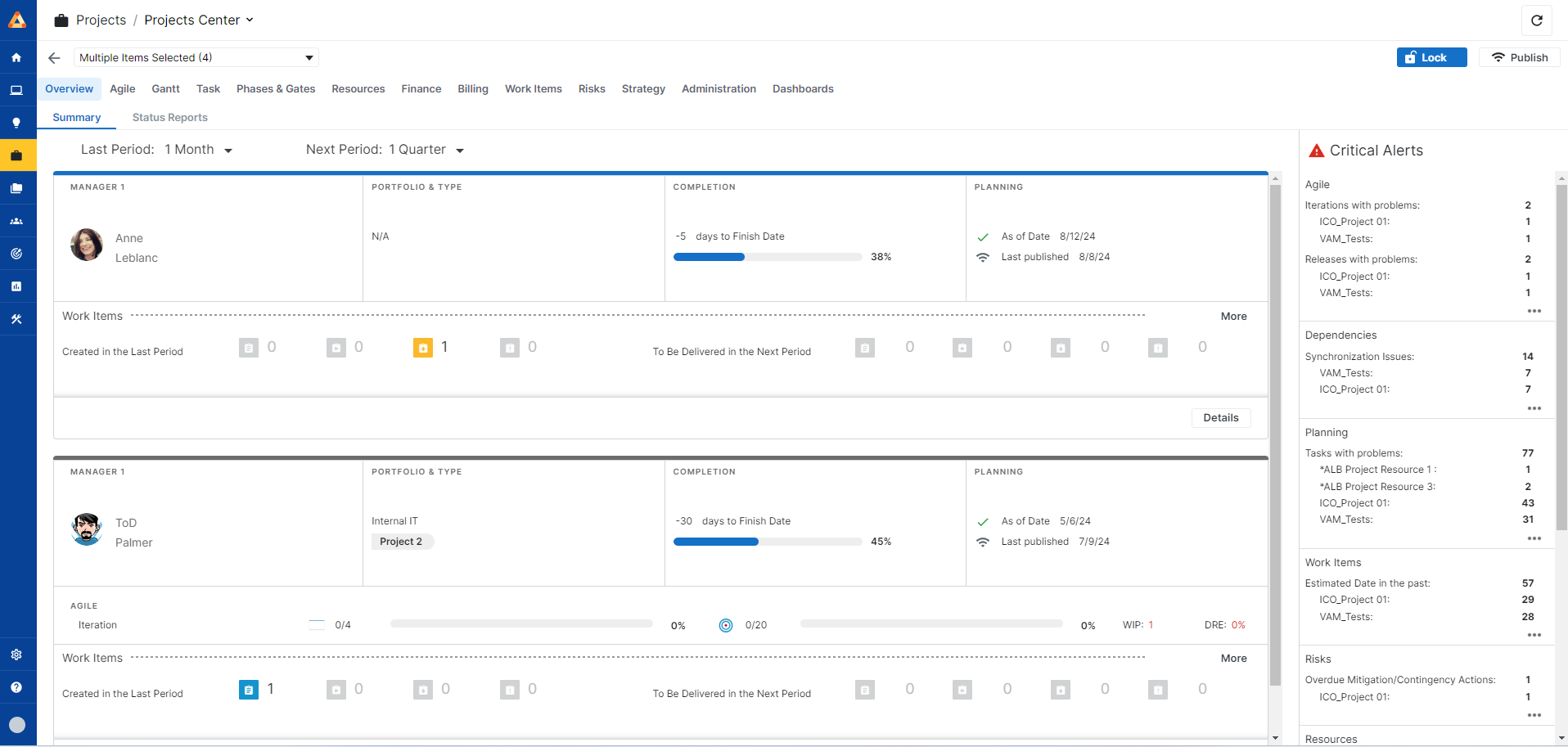
The other tabs available in the Project Card have also been enhanced to offer multi-project views, for instance the Gantt or Work Items tabs, as illustrated below.
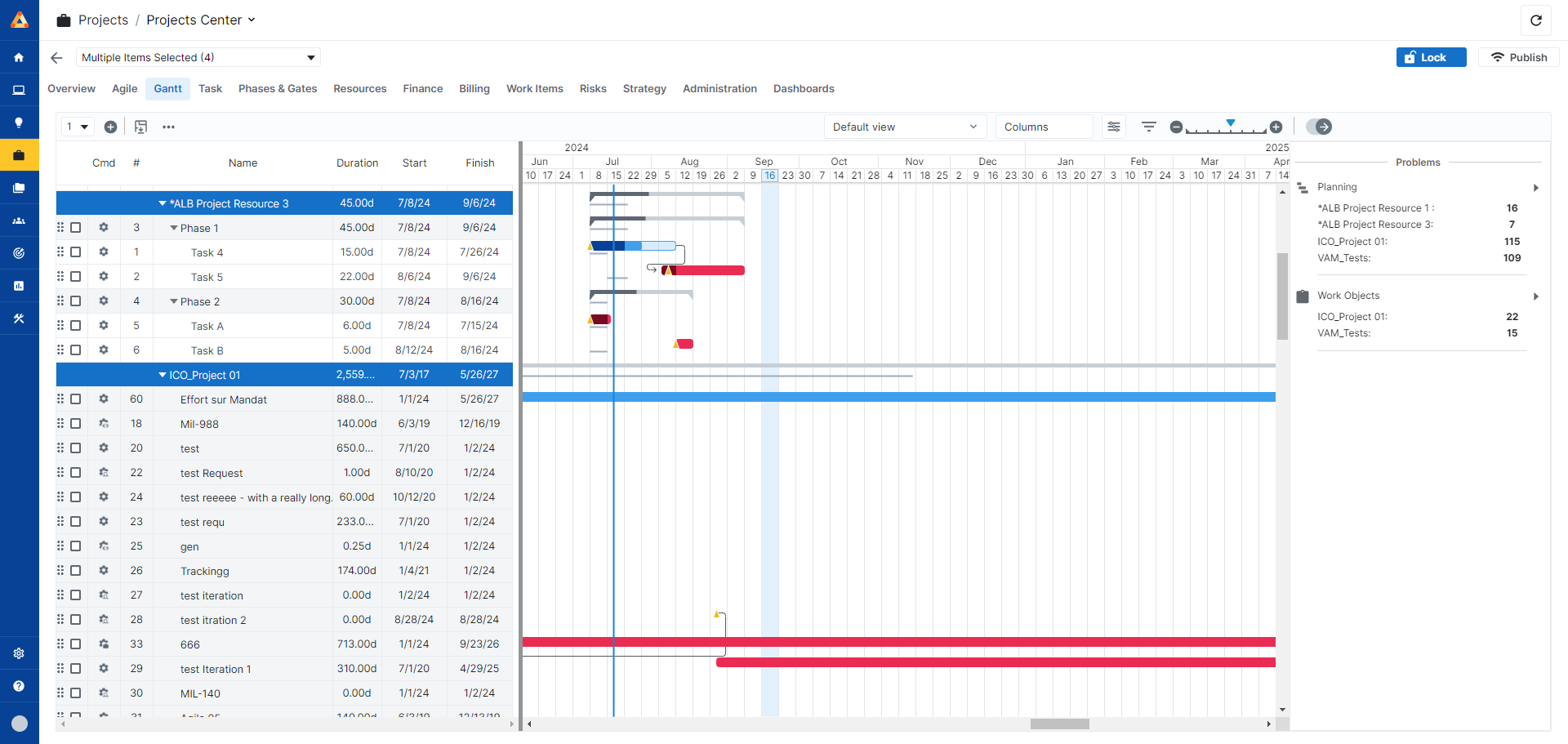

For more information, please refer to the Project Card (multi project) and the various multi project topics.
Default Configuration Corrected Issues
Agile
#MIL-4197
In the Work workspace, Agile tab, Iteration Details full screen view, Overview tab, Iteration Details panel, when users were clicking on the “Only” label of a card, all Backlog Items were still displayed in the Remaining Backlog Items section instead of the Backlog Items whose Assignee is the selected user only. This issue has been fixed.
Budget/Finance
#MIL-4970
In the Projects Center workspace, Project Card, Finance tab, Forecast dialog box, Update Forecast from Total Cost popup, the German translation for the "All Period" and "Custom" options was incorrect. This issue has been fixed.
#MIL-4945
In the Projects Center workspace, Project Card, Finance tab, the “Create Snapshot” and “Manage Snapshots” buttons were not working as expected. This issue has been fixed.
Execution
#MIL-4675
In the Timesheet workspace, when the “Show Parent” display option was activated, the names of tasks were not visible for certain projects. This issue has been fixed.
General
#MIL-5000
In the System Settings workspace, Work Management Settings folder, Global Options tab, the translation for the "Work Objects Alert Granularity" option was incorrect in German. This issue has been fixed.
Project Management
#MIL-4386
In the Projects Center workspace, Project Card, Gantt tab, Project Brief dialog box, Finance folder, the Time Distribution toolbar was not correctly working according to the selected Preset options. This issue has been fixed.
Work Items
#MIL-4999
In the Projects Center workspace, Project Card, Work Items tab, Work Items full screen view, Inbox tab, Work Item Details view, Types popup, the "Global Issues Types" translation was incorrect in German. This issue has been fixed.
#MIL-4979
In the Projects Center workspace, Project Card, Work Items tab, all charts displayed in the main view were affected when users had previously activated the “Show Closed” display option in the Work Items full screen view. This issue has been fixed.
Vantage Corrected Issues
Data Connector
#VAN-1257
In Vantage, in some scenarios, projects created in Deliver were not showing in Plan. This was due to the Data Connector not working from Deliver to Plan. This issue has been fixed.
#VAN-1233
In Vantage, when users were updating tasks in Deliver, the tasks order was incorrect in Plan. This was due to a silent update of the “parent_task”, causing the tasks to be moved in the wrong position. This issue has been fixed.
#VAN-751
In Vantage, in some scenarios, tasks created in Deliver were not displayed in Plan. This issue has been fixed.
Project Management
#VAN-1213
In the Work workspace, Custom tab, some cells were incorrectly displayed as empty or zero value in the Requested Resources spreadsheet. This issue has been fixed.
#VAN-1167
In the Work workspace, Gantt tab, when users were updating some tasks or the project’s details, the tasks were disappearing from the project. This issue has been fixed.
Talend
#SCI-1230
When users were running Talend jobs to update tasks, in some scenarios, some of the projects were losing all their tasks.
Deliver Enhancements
O3 Admin
#DELIVER-855
In Deliver, users are now able to manage user fields' access range in O3admin through a constraint field. Applying a constraint on user fields in the O3 administration allows to choose between two options regarding the user fields drop-down menu:
- Show users with read access on the object.
- Show all users in the directory.
For more information, please refer to the "How to apply a constraint on a user field" documentation.
Deliver Corrected Issues
ARM Integration
#DELIVER-1035
In Deliver, some allocations could be missing for all users on certain projects. This issue has been fixed by an increase of the timeout.
Gridboard
#DELIVER-1113
In Deliver, there was a bug in the spacing of ‘Normal’ text, where the line-height of paragraphs was too big in the whiteboard block of the card. This issue has been fixed. The line-height has been reduced, making it easier to differentiate the paragraphs.
#DELIVER-1067
In Deliver, in some scenarios, some attachments were disappearing from tasks. This issue has been fixed; all documents have been retrieved.
Integrations Enhancements
Plan API
#INT-797
A new endpoint has been introduced to delete calendar work ranges for a specific resource.
System Requirements
There are frequent changes and additions to the set of specific versions of operating systems, application servers and database servers for which ProjectAdvantage has been tested and certified. Please contact our teams for the latest information in this area.
Note: Users' system clocks must be regularly and accurately synchronized with the internet.
Servers
- Application Server: Apache Tomcat 9 with Oracle Java 8 or OpenJDK
- Data Server: PostgreSQL 12, PostgreSQL 14
HTML5 Clients
- Display resolution: 1366 x 768 (technical minimum), 1600 x 1050 (minimum recommended), 1920 x 1080 or higher (generally recommended).
- Minimum of 4GB RAM allocated (8GB recommended).
- Browser
- Microsoft Edge
- Microsoft Internet Explorer 10 or 11
- Google Chrome
- Mozilla Firefox
- Apple Safari
ProjectAdvantage Designer
- Recommended language: English
- Display resolution: 1366 x 768
- Minimum of 4GB RAM allocated
- Disk space: 200MB minimum available for ProjectAdvantage.
- Oracle Java 8 or OpenJDK 8
- Operating Systems:
- Windows 7, 8.1, 10 or 11
- Mac OS X Lion or newer
- Alpine Linux 3.16.1
REST API
- Supported language: English
Timesheets Mobile Application
- Being hosted by ProjectAdvantage
- Product version: 2022.08 and upper versions
Vantage platform
Users will need to enable third-party cookies to work within Vantage. For more information regarding third-party cookies, please refer to the “How to allow third-party cookies” documentation.
For customers who subscribed only to Plan
- Installation:
- POD 11 is required if hosted by ProjectAdvantage
- An Hydra server is required if on premise
- Product version: 2023.01 and upper versions
For customers who subscribed to Plan and Deliver
- Installation:
- POD 11 is required if hosted by ProjectAdvantage
- An Hydra server is required if on premise
- HPV2 activated on Deliver modules (activated by default for all new Deliver Clients after 2021 Q3)
- Product version: 2023.01 and upper versions
- Users will need to allow third-party cookies in their browser
Limitations
The data connector:
- Does not work in load balanced environments.
- Is not compatible with Cloud Scheduled Jobs.
- Is not compatible with dedicated API servers.
- Is not compatible with the Java API.