



2024.08
This document describes the enhancements, corrected issues, and new features that have been implemented in ProjectAdvantage 2024.08, both in the Core product and in the ProjectAdvantage Default Configuration, in Vantage and in Deliver.
ProjectAdvantage 2024.08 is a maintenance release of ProjectAdvantage 2024.
In the Core product, 1 enhancement has been implemented and 21 issues have been fixed.
In the ProjectAdvantage Default Configuration, 4 enhancements have been provided and 31 issues have been fixed.
In Vantage, 4 issues have been fixed.
In Deliver, 1 enhancement has been implemented and 5 issues have been fixed.
In order to access the different sections, please click on the following links:
- Important Reminders for upgrade
- Core Product Enhancements
- Core Product Corrected Issues
- Default Configuration Enhancements
- Default Configuration Corrected Issues
- Vantage Corrected Issues
- Deliver Enhancements
- Deliver Corrected Issues
- System Requirements
Important Reminders for upgrade
- To improve the performance of views displaying the Health Score of multiple projects, we are now using a Health Score that is pre-calculated upon publishing a project as opposed to on the fly. Therefore, upon upgrading to 2021.03 (or higher), please make sure you run once the following Scheduled Job to initialize the project Health Score values: Initialize Project Static Health Score.
Important: For systems with an overwritten Publish command, please make sure to add the new dedicated Command List for the Health Score pre-calculation upon publishing a project: “Project - Publish Project - Continue - Capture Health Score”.
- From the 2023.01 version, to support the implementation of the new Vantage navigation and modules, the Project Dashboards workspace should be added again in the User Roles section of the Designer as the Dashboards workspace doesn't exist anymore.
Core Product Enhancements
Data Visualization
#SCI-4458
In the HTML5 Client, users can now set the % Completed to be displayed in green instead of a darker color in the Gantt chart.
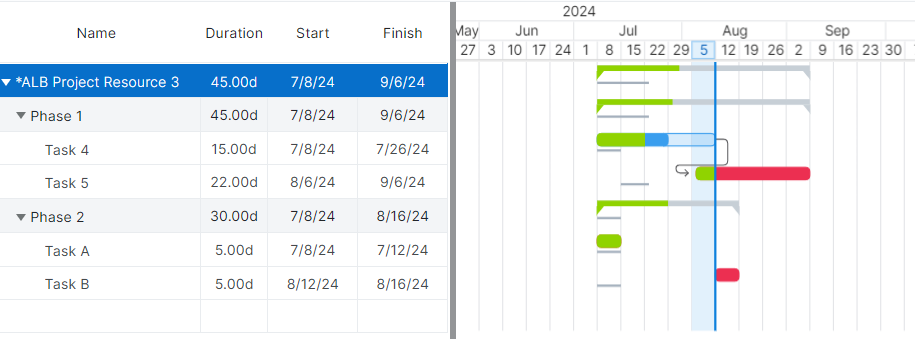
To do so, users will need to activate the “Set the % Completed in green” setting in the System Settings workspace, Project Settings folder, Global Options tab, Miscellaneous sub-tab, Gantt section.

Note: The aforementioned setting is deactivated by default.
Core Product Corrected Issues
Application bar
#SCI-4508
In the HTML5 Client, when the user was navigating to a workspace from somewhere other than the navigation menu, the current module/workspace displayed in the navigation bar was not up to date. This issue has been fixed.
Data Snapshots
#SCI-4372
In the Data Snapshots workspace, the “Work Package Status” report was generated with incorrect Baseline Effort and Baseline Cost values. This issue has been fixed.
Data Visualization
#SCI-4551
In the Projects Center workspace, when users were adding or removing columns in/from the Grid view, then selecting the “Reset Column Display” command available from the Gear ( ) icon, all projects were disappearing from the view. This issue has been fixed.
#SCI-4543
In the HTML5 Client, in some scenarios, when users were trying to select a date from any date picker, the previous day was incorrectly selected. This issue has been fixed.
#SCI-4523
In the Projects Center workspace, Project Card, Gantt tab, when users were capturing a baseline by selecting the “Capture on Selected Task(s)” scope, the “Baseline Start” and “Baseline Finish” dates were not showing in the Manage Baselines dialog box. This issue has been fixed.
#SCI-4444
In the Work workspace, Gantt tab, Update Progress dialog box, when a user tried to select a date from the date picker for the “Progress Date” field, the previous day was incorrectly selected. This issue has been fixed.
#SCI-4437
In the Timesheet workspace, in certain scenarios, when users were accessing their timesheets, some days were incorrectly marked as non-working days. This issue has been fixed.
#SCI-4032
In the Projects Center workspace, Project Card, Gantt tab and in the Work workspace, Gantt tab, when users were adding columns to the Gantt spreadsheet, the Project row cells could be blank. This issue has been fixed.
#SCI-3667
In the External Applications workspace, it was not possible to scroll in the main block. This issue has been fixed.
#SCI-2399
In the Project Dashboards workspace, Analytics theme, Labor Assignments report, in some scenarios, the Total Effort was not distributed according to the date range defined in the Designer, Forms view. This issue has been fixed.
Object/Field Edits
#SCI-4503
In the System Data workspace, Job Classifications and Skills tabs, the “Outdent” command was not working. This issue has been fixed.
#SCI-4360
In the Projects Center workspace, Project Card, Task tab, XML Updates sub-tab, when users were updating projects’ data using the “Update from XML” command, all tasks were overridden in the project. This issue has been fixed; from now on, only matching tasks in the project and the XML file are updated, and new tasks are created for the previously non existing ones.
#SCI-4157
In the Resource Dashboards workspace, when the Vantage UI was activated, users were unable to print reports or to launch them in a new browser tab. This issue has been fixed.
#SCI-3715
In the Work workspace, when users were deleting an assignment from a task with a baseline, the baseline values were deleted in the baseline details spreadsheet. This issue has been fixed.
#SCI-2591
In the Work Package Center workspace, Definition tab, whenever a user tried to edit a work package whose organization was listed as the Work Package Org Writer, he was unable to do so as the information was in read only mode. This issue has been fixed.
Performance
#SCI-4249
In the HTML5 Client, in some cases, some performance issues could be observed when users were publishing projects, downloading reports or approving actuals. This issue has been fixed.
REST API
#SCI-4421
In certain scenarios, the offset and limit parameters were returning incorrect results for the user defined categories endpoints in the REST API. This issue has been fixed.
#SCI-4271
When users were passing Double, Effort, Unit, Unit Rate, Rate, Cost, Cost Rate, or Cost per Unit data types as Integer/Long values in the REST API, the values were not saved for User Defined Fields. This issue has been fixed.
#SCI-4126
Users could encounter issues when using values in English from picklists in PATCH calls via the REST API. This issue has been fixed.
Timesheet (built-in)
#SCI-4457
In the Timesheet (built-in) workspace, when users were entering their actuals, values were incorrectly updated to the nearest half hour even though the “Actual time entry units” selected was “Quarter hours” in the Designer, Time Tracking view. This issue has been fixed.
#SCI-3468
In the Timesheet (built-in) workspace, users were able to perform operations (for instance, Rework or Approve timesheets), even if they did not have the relevant Write Edit Rights and if the “Tokens per user for this role” was 0 in the Designer, User Roles view. This issue has been fixed.
Default Configuration Enhancements
Designer
#MIL-4896
In the Designer, Fields view, Baseline formulas have been updated to take the Cost and Effort integrated fields into account.
Idea/Business Case
#MIL-4271
In the Ideas Center workspace, a new workflow is now available to use, allowing users to create new work items or backlog items from the idea, or to connect the idea to existing work items or backlog items.
Note: The new feature is available through the new “Workflow with objects” workflow, that has been created in the Designer in the Workflows view, Idea category.

After having submitted their ideas, users will have the opportunity to turn them into other objects (“New object” workflow state).
To benefit from the new enhancement, Administrators need to associate the new “Workflow with objects” to Idea Folders or Idea Types in the System Data workspace, Ideas tab, Idea Folders sub-tab AND/OR Idea Types sub-tab. The workflow associated with a Type will always take precedence over the workflow associated with the Idea Folder.


Project Scheduler
#MIL-4919
In the System Settings workspace, Project Settings folder, Global Options tab, Miscellaneous sub-tab, Gantt section, a new setting has been created to allow users to display the % Completed in green instead of a darker color.

Note: The aforementioned setting is deactivated by default.
Work Items
#MIL-2710
In the Deliverables Center workspace, Deliverable Card, the “% Completed” field is now 100% if the Completed Date has been set prior to today’s date.

Default Configuration Corrected Issues
Administration
#MIL-4900
In the System Data workspace, Cost Centers tab, when users were adding new cost centers, the filtering options were incorrectly displayed in the main toolbar. This issue has been fixed.
Agile
#MIL-4422
In the Projects Center workspace, Project Card, Gantt tab, an error message could be displayed when users were clicking on the “Update” button located in the Project Problems panel, Agile Synchronization Problems for Iterations, Epics, or Releases object. This issue has been fixed.
All Centers
#MIL-4948
In the Projects Center workspace, Filters dialog box, both the “New Notes” and “Unread Notes” predefined filters were filtering the view to display the projects with new notes. This issue has been fixed; only the “Unread Notes” predefined filter has been kept.
Designer
#MIL-4886
In the Designer, Command Lists view, the "Scheduler - Delete Assignment Resources - Delete" command lists formula was incorrectly set. This issue has been fixed.
Idea/Business Case
#MIL-4926
In the Ideas Center workspace, the Indicators view was still displayed when the “Enable Ideas Center Indicators” setting was deactivated. In addition, the Scoring section was still displayed in the Idea Card when the “Enable Scoring Section” setting was deactivated. These issues have been fixed.
Note: The aforementioned settings are located in the System Settings workspace, Project Settings folder, Display Preferences tab, Idea Center section.
Portfolio Simulation
#MIL-4927
In the Portfolio Simulation workspace, when users were capturing a new scenario, the scenario description was not saved. This issue has been fixed.
#MIL-4901
In the Portfolio Simulation workspace, Manage Scenarios dialog box, users could not edit the Description when multiple portfolios were selected. This issue has been fixed.
Project Management
#MIL-4932
In the Resources workspace, Project Allocations tab, Project Allocations full screen view, Allocations tab, Resource Details sub-tab, a redundant extra row with incorrect values was displayed above the “Remaining Usable Effort” row. This issue has been fixed.
#MIL-4916
In the Home Page workspace, Home tab, the Time Score value displayed in the Health Score section was incorrect if the project was finishing before the Baseline Finish date. This issue has been fixed.
#MIL-4801
In the Work workspace, in the Ideas Center workspace, in the Resource Allocations workspace, and in the Resource Commitments workspace, the red dot was not displayed on the Notes blue icon, even if there were some unread notes. This issue has been fixed.
#MIL-4577
In the Work workspace, Tracking tab, By Resources view mode, when the timesheet was locked, an error message was displayed when users were selecting the “Approve & Apply” command. This issue has been fixed; from now on, users are only able to select the “Apply” command.
#MIL-4434
In the Work workspace, Tracking tab, By Resources view mode, users were able to approve and apply timesheets, even when they did not have the relevant access rights. This issue has been fixed.
#MIL-3650
In the Work workspace, Tracking tab, an error message was displayed when users were applying timesheets with the “Working” status if the resource was not part of the project team. This issue has been fixed.
Projects Center
#MIL-4936
In the Projects Center workspace, when creating a new project, an error occurred after the creation as the project was automatically published. A new "Enable Auto Publish After Creation" setting has been implemented to activate the automatic publication.
Note: The aforementioned setting is located in the System settings workspace, Project Settings folder, Project Creation Options tab, Project Mode section. It is set to “Yes” by default.
#MIL-4910
In the Projects Center workspace, Project Card, Work Items tab, Work Item card, the Workflow State was incorrectly displayed using the old UI. This issue has been fixed.
#MIL-4908
In the Projects Center workspace, Project Card, Gantt tab, the Assignment label was displayed even if no Gantt chart label preference was selected in the Gantt chart preferences dialog box. This issue has been fixed.
#MIL-4906
In the Projects Center workspace, Project Card, Gantt tab, when a CCPM project was selected, the view was not correctly displayed when switching from the Tracking to the Planning mode. This issue has been fixed.
#MIL-4905
In the Projects Center workspace, Project Card, Gantt tab, the Resource Panel could be empty when the Generic Resources pivot was selected even though some Generic Resources had been added. This issue has been fixed.
#MIL-4895
In the Projects Center workspace, Project Card, Gantt tab, the Resource Panel was not updated in real time when tasks were modified. This issue has been fixed.
Projects Dashboards
#MIL-4829
In the Projects Dashboards workspace, Controlling theme, Performance report,when a single project was selected, the “Baseline Effort” values were not updated when users were switching from one baseline to another. This issue has been fixed.
Resource Allocations
#MIL-4474
In the Resource Allocations workspace, Resource Allocations full screen view, Assignments tab, the distributed “Allocated” cells were empty. This issue has been fixed.
#MIL-4347
In the Resource Allocations workspace, Resource Allocations full screen view, Hard Allocations tab, Resource Details sub-tab, the Allocation vs Total Effort indicator displayed was sometimes incorrect when the “Show Assignments” display option was enabled. This issue has been fixed.
Resource Assignments
#MIL-4890
In the Work workspace, Gantt tab, Assign Resources dialog box, the Remaining Usable Effort displayed was incorrect if there was no Planned Effort in the selected period. This issue has been fixed.
Resource Dashboards
#MIL-4930
In the Resource Dashboards workspace, Workload theme, Resource Utilization report, when users were filtering the report by “Project Natures” or selecting an option other than “Total Effort” to display the Effort Values, the data was not filtered or displayed accordingly. This issue has been fixed.
#MIL-4918
In the Resource Dashboards workspace, when users were launching the Team Status, Timesheets and Project Actuals reports in a new browser tab, the Zoom button was not available. This issue has been fixed.
#MIL-4819
In the Resource Dashboards workspace, Workload theme, Resource Utilization report, the Availability data were incorrect when the “Display Resources” option was set to “With effort in period”. This issue has been fixed.
Resource Management
#MIL-4388
In the Resource Fulfillment workspace, Overview spreadsheet, assignments were sometimes not sorted in the same order as in the Gantt chart. This issue has been fixed.
Resource Validation
#MIL-4915
In the Resource Validation workspace, Timesheets tab, Timesheets Details full screen view, Reworks Comments History popup, when clicking on the Link ( ) button, the user was redirected to his timesheet instead of the Timesheet view to the time period corresponding to the comment. This issue has been fixed.
Status Report
#MIL-4722
In the Home Page workspace, Status Reports tab, Phases/Gates view mode, the “Last Approved Gate” displayed in the Last Submitted Report view could be incorrect and differing from the last approved gate displayed in the Work workspace, Phases & Gates tab, Phases/Gates view mode, if multiple tasks had the same finish date. This issue has been fixed; from now on, the “Last Approved Gate” is based on the Finish date, then the Gantt order.
Work Items
#MIL-4836
In the Projects Center workspace, Project Card, Work Items tab, Work Items full screen view, Inbox tab, Work Item Details view, when users were adding other assignees to the Work Item, the selected assignee(s) was/were not displayed in Other Attributes section. This issue has been fixed.
Work Package
#MIL-4433
In the Work Package Scheduler workspace, Gantt tab, an error message was sometimes displayed when users were creating Soft Assignments from the Task panel, Assignments tab. This issue has been fixed.
Vantage Corrected Issues
Data Connector
#VAN-1212
In Vantage, clicking on the “Refresh” button after assigning some resources could result in the loss of some project’s tasks. This issue has been fixed.
#VAN-1211
In Vantage, when users were updating parent tasks in Deliver, the update was not reflected in Plan. This issue has been fixed.
#VAN-1209
In Vantage, in some scenarios, Deliver projects were not created in Plan when users were using the data connector. This issue has been fixed.
Vantage navigation
#VAN-1218
In some scenarios, when users were trying to access the Work workspace, an error message was displayed and the workspace could not be accessed. This issue has been fixed.
Deliver Enhancements
Administration
#DELIVER-1005 (*Added on 30/08/2024)
In Deliver, the “Remove” and “Delete” button has been inverted in the toolbar to avoid confusion.
Deliver Corrected Issues
APM
#DELIVER-138 (*Added on 30/08/2024)
In Deliver, an error message was displayed when users whose login contained special characters tried to connect. This issue has been fixed; the following special characters are now authorized:
- ampersand &
- asterisk *
- braces { }
- brackets [ ]
- comma ,
- equal sign =
- hyphen -
- parenthesis ( )
- period .
- plus sign +
- single quotation mark '
- slash /
- at sign @
- dollar sign $
- pound sign #
- à, è, ì, ò, ù, À, È, Ì, Ò, Ù
- á, é, í, ó, ú, ý, Á, É, Í, Ó, Ú, Ý
- â, ê, î, ô, û, Â, Ê, Î, Ô, Û
- ä, ë, ï, ö, ü, ÿ, Ä, Ë, Ï, Ö, Ü, Ÿ
- ã, ñ, õ, Ã, Ñ, Õ
- å, Å
- æ, Æ
- œ, Œ
- ç, Ç
- ð, Ð
- ø, Ø
- ¿
- ¡
- ß
Gridboard
#DELIVER-994 (*Added on 30/08/2024)
In Deliver, when users were creating an object via the board, the default value for the field was taken from the board query, whereas it was not when creating from an Excel import. This issue has been fixed; from now on, both the Excel import and board creation use the board query to set the default value for the field.
#DELIVER-683 (*Added on 30/08/2024)
In Deliver, when users were opening deliverable objects linked to cards, the number of documents and discussions was not updated in the tooltip. This issue has been fixed.
Home Page
#DELIVER-1012 (*Added on 30/08/2024)
In Deliver, when users were adding a new view to the “Favorite views” section, one of the previously saved views was disappearing from the list. This issue has been fixed.
O3 Card
#DELIVER-1013 (*Added on 30/08/2024)
In Deliver, in certain scenarios, the Whiteboard styles (such as table formatting, text color, etc.) were not showing anymore. This issue has been fixed.
System Requirements
There are frequent changes and additions to the set of specific versions of operating systems, application servers and database servers for which ProjectAdvantage has been tested and certified. Please contact our teams for the latest information in this area.
Note: Users' system clocks must be regularly and accurately synchronized with the internet.
Servers
- Application Server: Apache Tomcat 9 with Oracle Java 8 or OpenJDK
- Data Server: PostgreSQL 12, PostgreSQL 14
HTML5 Clients
- Display resolution: 1366 x 768 (technical minimum), 1600 x 1050 (minimum recommended), 1920 x 1080 or higher (generally recommended).
- Minimum of 4GB RAM allocated (8GB recommended).
- Browser
- Microsoft Edge
- Microsoft Internet Explorer 10 or 11
- Google Chrome
- Mozilla Firefox
- Apple Safari
ProjectAdvantage Designer
- Recommended language: English
- Display resolution: 1366 x 768
- Minimum of 4GB RAM allocated
- Disk space: 200MB minimum available for ProjectAdvantage.
- Oracle Java 8 or OpenJDK 8
- Operating Systems:
- Windows 7, 8.1, 10 or 11
- Mac OS X Lion or newer
- Alpine Linux 3.16.1
REST API
- Supported language: English
Timesheets Mobile Application
- Being hosted by ProjectAdvantage
- Product version: 2022.08 and upper versions
Vantage platform
Users will need to enable third-party cookies to work within Vantage. For more information regarding third-party cookies, please refer to the “How to allow third-party cookies” documentation.
For customers who subscribed only to Plan
- Installation:
- POD 11 is required if hosted by ProjectAdvantage
- An Hydra server is required if on premise
- Product version: 2023.01 and upper versions
For customers who subscribed to Plan and Deliver
- Installation:
- POD 11 is required if hosted by ProjectAdvantage
- An Hydra server is required if on premise
- HPV2 activated on Deliver modules (activated by default for all new Deliver Clients after 2021 Q3)
- Product version: 2023.01 and upper versions
- Users will need to allow third-party cookies in their browser
Limitations
The data connector:
- Does not work in load balanced environments.
- Is not compatible with Cloud Scheduled Jobs.
- Is not compatible with dedicated API servers.
- Is not compatible with the Java API.