



2024.07
This document describes the enhancements, corrected issues, and new features that have been implemented in ProjectAdvantage 2024.07, both in the Core product and in the ProjectAdvantage Default Configuration, in Vantage and in Deliver.
ProjectAdvantage 2024.07 is a maintenance release of ProjectAdvantage 2024.
In the Core product, 6 enhancements have been implemented and 21 issues have been fixed.
In the ProjectAdvantage Default Configuration, 8 enhancements have been provided and 34 issues have been fixed.
In Vantage, 1 enhancement has been implemented and 6 issues have been fixed.
In Deliver, 2 enhancements have been implemented and 2 issues have been fixed.
In order to access the different sections, please click on the following links:
- Important Reminders for upgrade
- Core Product Enhancements
- Core Product Corrected Issues
- Default Configuration Enhancements
- Default Configuration Corrected Issues
- Vantage Enhancements
- Vantage Corrected Issues
- Deliver Enhancements
- Deliver Corrected Issues
- System Requirements
Important Reminders for upgrade
- To improve the performance of views displaying the Health Score of multiple projects, we are now using a Health Score that is pre-calculated upon publishing a project as opposed to on the fly. Therefore, upon upgrading to 2021.03 (or higher), please make sure you run once the following Scheduled Job to initialize the project Health Score values: Initialize Project Static Health Score.
Important: For systems with an overwritten Publish command, please make sure to add the new dedicated Command List for the Health Score pre-calculation upon publishing a project: “Project - Publish Project - Continue - Capture Health Score”.
- From the 2023.01 version, to support the implementation of the new Vantage navigation and modules, the Project Dashboards workspace should be added again in the User Roles section of the Designer as the Dashboards workspace doesn't exist anymore.
Core Product Enhancements
Data Visualization
#SCI-4289
In the Projects Center, Actions Center, Deliverables Center, Change Requests Center, Issues Center, Risks Center, and Ideas Center workspaces, the Search box has been removed for operators in the Filters dialog box.
#SCI-4285
Previously, the list of “Predefined Filters” available in the Filters dialog box was not dynamic. The list was either made of all the filters in a particular data category (e.g task) or, in the case of Project category, all the filters that were “Selector Enabled” (in the “Fields” view in the designer). This way, every Filters dialog box associated with a task grid (including the Gantt) had exactly the same set of “Predefined Filters” available.
This has been changed to give more control to designers and administrators. They now need to specify a field set for “Filters” in the View Control definition, that allow to control the set of “Predefined Filters” available. For instance, specifying a task field set that contains Name, Duration, Finish, Critical, and Parent will result in three fields (Name, Duration, and Finish) being available for the “normal” filter rows (in the Filters dialog box) and two filters (Critical and Parent) being available as “Predefined Filters”.
#SCI-4071
In the Projects Center, Actions Center, Change Requests Center, Deliverables Center, Issues Center, and Risks Center workspaces, when a currently selected user view is deleted, the selected view is now replaced with the default view.
#SCI-4060
In the Projects Center workspace, Project Card, Gantt tab, the “Show critical path” option available in the Gantt chart preferences dialog box has been modified to “Show critical path/critical chain” in order to make it clearer to CCPM managers.

Designer
#SCI-4301
In the Designer, Forms view, when defining a Preference Set for a View Control block, it is now possible to specify a descending sorting by unticking the “Ascending” checkbox.

#SCI-3374
There is a new option in the Update Progress dialog box that allows the user to use the "Start No Earlier Than" field to move the task forward to the progress date.

Core Product Corrected Issues
Authentication
#SCI-3767
In some scenarios, an error message was displayed when users were trying to log out from the HTML5 Client, preventing them from logging out successfully. This issue has been fixed.
Data Visualization
#SCI-4367
In the Projects Center workspace, Project Card, Gantt tab, Update Progress dialog box, the Calendar popup displayed when users were clicking on the “Progress date” field did not include buttons allowing them to scroll to the previous or the next year. This issue has been fixed.
#SCI-4366
In the Projects Center workspace, Project Card, Gantt tab, users were able to use the "Start Delay" or "Start No Earlier Than" update method in the Update Progress dialog box, even if the project was being scheduled in reverse. This issue has been fixed.
#SCI-4324
In the Capacity Planning workspace, Resources tab, Charts section, stepped charts were not properly displayed. This issue has been fixed.
Note: Stepped style charts can be set in the Designer, Forms view, Edit Chart Block dialog box.
#SCI-4314
In the Project Plan workspace, Gantt tab, Task dialog box, when users were clicking on the “New Resource Selector” button, it was impossible to find some resources even if they were part of the Performing Organizations. This issue has been fixed.
#SCI-4312
In the Users workspace, only the organization child was displayed in the “Organization Full Path” column. This issue has been fixed.
#SCI-4116
In the HTML5 Client, in certain scenarios, an error message was displayed when users when trying to access their projects. This was due to lock issues while accessing the user defined cache, preventing users to access data from one workspace to another. This issue has been fixed.
#SCI-4095
In the Projects Center workspace, users were incorrectly able to enter empty and duplicate view preference names. This issue has been fixed.
#SCI-3923
In the HTML5 Client, when users were navigating from the Project Card to the Projects Center workspace, then were refreshing their browser page, only the selected project was displayed. This issue has been fixed.
#SCI-3892
In the HTML5 Client, data views cache issues were preventing organization’s full names to be displayed in custom data views. The data was incorrect after the server had been restarted. This issue has been fixed.
#SCI-3663
In the System Data workspace, Organizations tab, in some scenarios, users were unable to copy/paste from/to fields containing a Hamburger ( ) icon. This issue has been fixed.
#SCI-2360
In the Work workspace, Gantt tab, the “Summarize at level” command was not working properly at all levels. This issue has been fixed.
#SCI-1869
In the Corporate Data workspace, Cost Items tab, Rate Cost History popup, the displayed currency was incorrect. This issue has been fixed.
Designer
#SCI-4316
In the Projects Center workspace, Project Card, Gantt tab, the Gantt chart preferences ( ) button was still displayed, even when the “Gantt Preference” View Control display was not activated in the Designer, Forms view, Edit View Control dialog box. This issue has been fixed.
Legacy API
#SCI-4343
Some performance issues could be observed for the "saveCalendarData" operation on the Legacy API. This issue has been fixed.
Object/Field Edits
#SCI-4256
In the Ideas Center workspace, Filters dialog box, some filters and operators were not working properly. This issue has been fixed.
#SCI-4172
In the Projects Center workspace, when users were clicking on the “Reset” button in the Filters dialog box, only a portion of the filters were cleared at once; the other filters were only disappearing after a few seconds. This issue has been fixed.
#SCI-4083
In the Projects Center workspace, when users were editing the name of a user created view which was currently selected, the new name did not reflect in the display. This issue has been fixed.
#SCI-3864
In the Projects Center workspace, Filters dialog box, when users were entering a “Duration” value without a time scale (e.g. “8”), the time scale displayed was hours instead of the “Time Scale” specified in the Designer, Fields view, Default Formats tab (if set to any option other than “<No override>”). This issue has been fixed.
#SCI-344
In the Corporate Data workspace, Resources tab, an error message was displayed when users were trying to modify a resource. This issue has been fixed; a clearing method has been added in the create/update table process.
Scheduled Jobs
#SCI-4291
Hourly based Scheduled Jobs having a number of intervals superior to 1 were incorrectly moved forward with the DST. This issue has been fixed.
Default Configuration Enhancements
Administration
#MIL-4837
In the Designer, User Roles view, the Super User role no longer displays the legacy workspaces.
Designer
#MIL-4839
In the Designer, Fields view, Fields tab, the Field Sets have been modified for the Idea and Global Work Objects categories.
#MIL-4835
In the Designer, Email view, Template Lists tab, the Global Work Items email templates have been updated to add a new mechanism allowing to open ProjectAdvantage directly from the email received by the end-user.


Project Scheduler
#MIL-4808
In the Projects Center workspace, Project Card, Gantt tab, the Gantt selection ( ) button, allowing users to access the Gantt Selection popup, is now displayed in the Gantt toolbar as soon as at least one of the “Enable Gantt Preferences” settings is activated. For more information, please refer to the “Custom Gantt Display” section: https://success.sciforma.com/en/2024.07/topics/user/cost-items-scheduling/gantt-tab#Custom_Gantt_Display.

Note: The aforementioned settings are displayed in the System Settings workspace, Project Settings folder, Global Options tab, Gantt Preferences sub-tab.

Projects Center
#MIL-4843
In the Projects Center workspace, Project Card, Administration tab, Setup sub-tab, Activity Management section, a new setup has been created to manage the “Must Start On” field at the project level when dragging in the Gantt.

If the set up is set to yes, the “Must Start On” will not be honored when dragging a child task having a “Must Start On”, or a Parent task with children tasks having some “Must Start On”.
If the set up is set to no, the “Must Start On” will be honored when dragging a child task having a “Must Start On”, or a Parent task with children tasks having some “Must Start On”. Tasks will be anchored and will not be shifted.
#MIL-4809
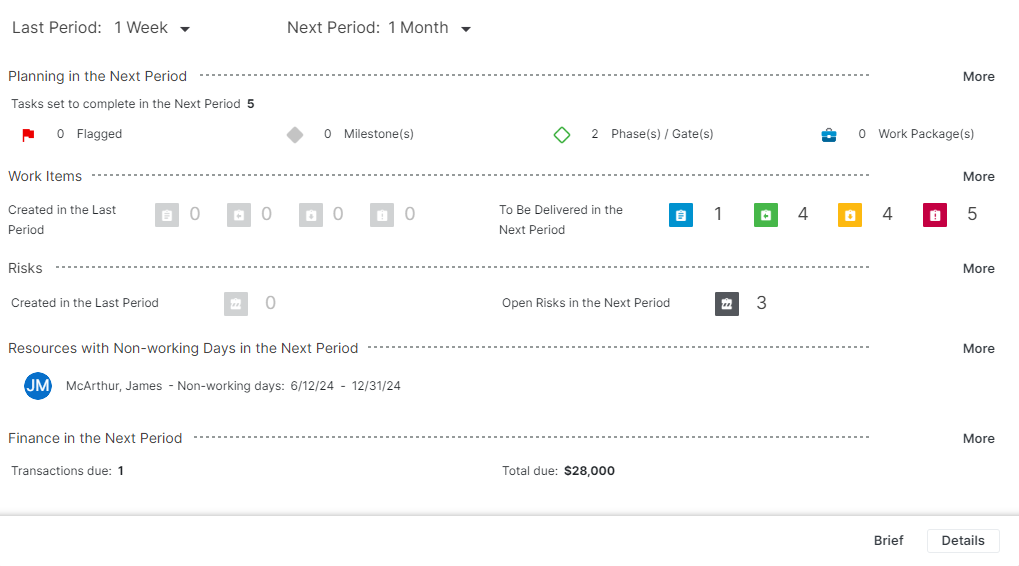
In the Projects Center workspace, Project Card, Overview tab, a new Summary sub-tab has been implemented. It lists the main feed events of a selected project for a given period.

#MIL-4806
In the Project Center workspace, the Project Card is now displayed when the user is creating a new project if no other project is selected.
#MIL-4772
A new set of settings has been created to allow administrators to display or hide the Finance, Resources or Administration tabs in the Projects Center workspace, Project Card.

Note: The aforementioned settings are located in the System Settings workspace, Project Settings folder, Display Preferences tab, Projects Center section.
Default Configuration Corrected Issues
Administration
#MIL-4902
In the Administration workspace, Definition tab, the Workflow header was not correctly displayed. This issue has been fixed.
#MIL-4816
In the Master Planning workspace, Project Administration dialog box, Setup folder, Home Page Features section, it was possible to deactivate the “Connections” and “Dependencies”. This issue has been fixed.
Agile
#MIL-4436
In the Project Portal workspace, Agile tab, Iteration Details full screen view, Backlog tab, the views were not updated when users were switching from one display option to another. This issue has been fixed.
Budget/Finance
#MIL-4884
In the Projects Center workspace, Project Card, Finance tab, Forecast dialog box, Transactions sub-tab, the toolbar was not properly readable when users were connected in German. This issue has been fixed.
Note: The toolbar display has also been corrected in the Finance workspace, Forecast dialog box, Transactions sub-tab.
CCPM
#MIL-4892
In the Projects Center workspace, Project Card, Gantt tab, Gantt chart preferences dialog box, Gantt chart labels section, the “Assignment” field was not available in the Right label dropdown list for CCPM projects. This issue was also observed in the Multi-projects CCPM workspace. These issues have been fixed.
#MIL-4873
In the Projects Center workspace, Project Card, Gantt tab, no indicator was displayed when the CCPM project was in “Planning” or “Tracking” mode. This issue has been fixed.
#MIL-4814
In the Multi-projects CCPM workspace, the wrong empty state was displayed when one or multiple non-CCPM projects were selected. This issue has been fixed.
Note: If the current selection of projects contains one or more non-CCPM projects, a new "Reset selection" button is now available. It allows clearing non-CCPM projects from the selection.
Idea/Business Case
#MIL-4881
In the Ideas Center workspace, Idea Card, Connections section, when users were clicking on the Link ( ) button to switch the view to the Project Card, the legacy Home Page workspace was selected. This issue has been fixed.
Note: The legacy link has been preserved if the end-user is using the Idea Center workspace, Details view mode, Connections section.
Portfolio Center
#MIL-4755
In the Portfolio Center workspace, Project Supervision tab, Project Brief dialog box, Definition folder, the Gear ( ) icon was displayed even though there was no data to print/export to Excel. This issue has been fixed.
Portfolio Dashboards
#MIL-4489
In the Portfolio Dashboards workspace, Controlling theme, Capacity Planning report, Detailed Workload chart, the Available Effort values were incorrect. This issue has been fixed.
#MIL-3181
In the Portfolio Dashboards workspace, Agile theme, Roadmap report, when the iteration selected did not have any Backlog items, no information indicating there are no Backlog items was displayed in the right-hand side panel. This issue has been fixed.
Project Management
#MIL-4813
When users were creating new projects, the “Permissions Management” section was still available in the Project Definition popup when the "Enable Project Permissions" setting was deactivated. This issue has been fixed.
Note: The aforementioned setting is located in the System Settings workspace, Projects Settings folder, Display Preferences tab, Project Administration section.
#MIL-4447
In the Template Scheduler workspace, Gantt tab, Task Details dialog box, Work Objects folder, when users were creating new deliverables, the Connections section was incorrectly available in the Work Item dialog box. This issue has been fixed.
Project Scheduler
#MIL-4787
In the Work Workspace, in some cases, the Tracking tab was not displayed even though the "Enable Tracking Tab" setting was activated for the enabled nature. This issue has been fixed.
Note: The aforementioned setting is located in the System Settings workspace, Project Settings folder, Display Preferences tab, Project Work section.
#MIL-4775
In the Projects Center workspace, Project Card, Gantt tab, the project’s setup and tags from the template were not inserted when the "Skip Template Options" setting was activated. This issue has been fixed.
Note: The aforementioned setting is located in the System Settings workspace, Project Settings folder, Global Options tab, Miscellaneous sub-tab, Templates section.
Projects Center
#MIL-4885
In the Projects Center workspace, the “Non-Project” project was incorrectly displayed. This issue has been fixed.
#MIL-4855
In the Projects Center workspace, Project Card, Resources tab, Project Resources sub-tab, Project Team tab, for any given resource, the “Total Effort” displayed in the Team Member Details dialog box was not aligned with the “Total Effort” displayed in the Labor Assignment dialog box. This issue has been fixed.
#MIL-4845
In the Projects Center workspace, “Active Working Project” view, after removing the “Active Working Project” filter in the Filters dialog box, it was not possible to select it again from the “Predefined Filters” popup. This issue has been fixed.
#MIL-4827
In the Projects Center workspace, Project Card, the Library Items tab was still displayed when users were disabling the “Enable Portfolio Attachments”, “Enable Portfolio Lessons Learned”, and “Enable Portfolio Monitoring” settings. This issue has been fixed.
Note: The aforementioned settings are located in the System Settings workspace, Work Management Settings folder, Display Preferences tab, Portfolio Work Management section.
#MIL-4823
In the Projects Center workspace, Project Card, Task tab, Task List sub-tab, the “Flag” icon was not changing color when users were clicking on it. This issue has been fixed.
#MIL-4776
In the Work workspace, Gantt tab, Manage Baselines dialog box, users were not able to access commands through the More ( ) button option in accordance with their user role. This issue has been fixed.
Note: Enabled user roles can be set in the System settings workspace, Project Settings folder, Global Options tab, Baselines sub-tab, Enable Options section.
#MIL-4773
In the Projects Center workspace, Project Card, Finance tab, Snapshot History dialog box, when users were capturing new snapshots, only the last project cost center's values were captured and displayed in the Snapshot Details popup. This issue has been fixed.
Projects Dashboards
#MIL-4804
In the Projects Dashboards workspace, multi-projects selection, Controlling theme, Baseline Comparison report, when users were selecting new baselines in the "Reference Baseline" and "Compared To" fields, the report’s content was not changing. This issue has been fixed.
#MIL-4097
In the Projects Dashboards workspace, Controlling theme, Baseline Comparison report, when multiple projects were selected, the “Gap” between the “Reference” and “Comparison” dates were incorrect for Start and Finish data. These issues have been fixed.
Resource Allocations
#MIL-4831
In the Resource Allocations workspace, Resource Allocations full screen view, Requests tab, Requests Overview sub-tab, users were still able to edit allocations even if the associated request was under review by a project manager or was closed. This issue has been fixed.
#MIL-4408
In the Resource Allocations workspace, Resource Allocations full screen view, Hard Allocations tab, Resource Details sub-tab, it was not possible to replace a hard allocation if two resources from different organizations had the same name. This issue has been fixed.
#MIL-4400
In the Resources workspace, Project Allocations tab, Project Allocations full screen view, Requests tab, Requests Overview sub-tab, when users were clicking on the "Submit the selected requests" command, an error message was displayed when the requested allocation was in “Rework” state. This issue has been fixed.
#MIL-3679
In the Resource Allocations workspace, Resource Allocations full screen view, Hard Allocations tab, Resource Details sub-tab, the allocated effort was not taken into account in the “Total Allocation” row. This issue has been fixed.
Resource Assignments
#MIL-4739
In the Work workspace, Gantt tab, multi-project selection, Assign Resources dialog box, all the assignable resources from the selected projects were displayed instead of the common resources. This issue has been fixed.
#MIL-3957
In the Projects Center workspace, Project Card, Resources tab, Resources assignments sub-tab, the resource's default rate was not honored when users were adding new hard assignments to a task when the "Assignment Use Resource Default Rate" setting was activated. This issue has been fixed.
Note: The aforementioned setting is located in the System Settings workspace, Project Settings folder, Global Options tab, Miscellaneous sub-tab, Assignments section.
Resource Dashboards
#MIL-4853
In the Resource Dashboards workspace, Team theme, Resource Capacity report, the “Hide Resources without Project-Specific Capacity” button was not working when the “Activate Requests & Commitments”, the “Activate Resource Allocations” and the “Enable Dedicated Resources” settings were deactivated. This issue has been fixed.
Note: The aforementioned settings are located in the System Settings workspace, General Settings folder, Meta Settings tab and in the Project Settings folder, Display Preferences tab, Project Resources section.
#MIL-4648
In the Resource Dashboards workspace, Time Tracking theme, Overview report, a row with no resource name was incorrectly displayed. When users were clicking on this row to display the Timesheet Details full screen view, the Resource Name was empty in the Summary section. These issues have been fixed.
Resource Management
#MIL-4833
In the Organization Center workspace, Overview tab, Submitted Timesheets section, the “Start Date” could sometimes incorrectly display the day preceding the actual first submitted timesheet start date of a resource. This issue has been fixed.
Work Items
#MIL-4815
In the Work workspace, Work Items tab, Deliverables full screen view, when users enabled a filter, the Filters button was not displayed as active. This issue has been fixed.
Vantage Enhancements
Data Connector
#VAN-1162
When tasks were created from Deliver using the Data Connector, the tasks order from the Gantt in Plan was not respected. From now on, in order to reorder or move a task, users can set the "previous task"(previous_sibling_id) in Deliver - an "insert after" the specified task in the Gantt will be performed. Users can also set the “next task” (next_sibling_id) in Deliver - an “insert before” the specified task in the Gantt will be performed. Users can finally move groups of tasks ( parent/child) using the next_sibling_id.
Vantage Corrected Issues
Data Connector
#VAN-1200
When users were creating tasks in Deliver with the “next_sibling_id” field, the task created in Plan was incorrectly added at the end of the tasks list in the Gantt spreadsheet regardless of the sibling set. This issue has been fixed; from now on, when tasks are created in Deliver with the “next_sibling_id” field, the task is created next to the defined sibling in Plan.
#VAN-749
In Vantage, when users were changing a project’s status in Plan, the status change was not updated in Deliver. This issue has been fixed.
#VAN-483
In Vantage, in some cases, when users were activating projects in Deliver, the activation was not reflected in Plan. This issue has been fixed.
#VAN-392
In the Work workspace, Work Items tab, Work Items full screen view, Grid tab, the “Workflow” was incorrect for newly created Issues if it had previously been overwritten in the Designer, Overwrites view, Workflows tab, Global Issues category. This issue has been fixed.
Vantage SSO
#VAN-1196
In some cases, the SSO login button was not working. This issue has been fixed.
#VAN-1190
In some scenarios, SSO users were not able to login to Vantage instances with Plan only enabled. This issue has been fixed.
Deliver Enhancements
Gridboard
#DELIVER-980
Rich text fields no longer show HTML tags in the Gridboard cells.
Homepage
#DELIVER-937
In Deliver, the Homepage layout now adapts properly to avoid overflowing on small devices.
Deliver Corrected Issues
Gridboard
#DELIVER-708
In Deliver, the sorting order indicator displayed was too difficult to spot on some background colors. This issue has been fixed; it now offers a better contrast.
Gridboard/Slideboard
#DELIVER-971
In Deliver, when users were doing a search in the list of views or were clicking on a view from the list, the item was flickering. This issue has been fixed.
System Requirements
There are frequent changes and additions to the set of specific versions of operating systems, application servers and database servers for which ProjectAdvantage has been tested and certified. Please contact our teams for the latest information in this area.
Note: Users' system clocks must be regularly and accurately synchronized with the internet.
Servers
- Application Server: Apache Tomcat 9 with Oracle Java 8 or OpenJDK
- Data Server: PostgreSQL 12, PostgreSQL 14
HTML5 Clients
- Display resolution: 1366 x 768 (technical minimum), 1600 x 1050 (minimum recommended), 1920 x 1080 or higher (generally recommended).
- Minimum of 4GB RAM allocated (8GB recommended).
- Browser
- Microsoft Edge
- Microsoft Internet Explorer 10 or 11
- Google Chrome
- Mozilla Firefox
- Apple Safari
ProjectAdvantage Designer
- Recommended language: English
- Display resolution: 1366 x 768
- Minimum of 4GB RAM allocated
- Disk space: 200MB minimum available for ProjectAdvantage.
- Oracle Java 8 or OpenJDK 8
- Operating Systems:
- Windows 7, 8.1, 10 or 11
- Mac OS X Lion or newer
- Alpine Linux 3.16.1
REST API
- Supported language: English
Timesheets Mobile Application
- Being hosted by ProjectAdvantage
- Product version: 2022.08 and upper versions
Vantage platform
Users will need to enable third-party cookies to work within Vantage. For more information regarding third-party cookies, please refer to the “How to allow third-party cookies” documentation.
For customers who subscribed only to Plan
- Installation:
- POD 11 is required if hosted by ProjectAdvantage
- An Hydra server is required if on premise
- Product version: 2023.01 and upper versions
For customers who subscribed to Plan and Deliver
- Installation:
- POD 11 is required if hosted by ProjectAdvantage
- An Hydra server is required if on premise
- HPV2 activated on Deliver modules (activated by default for all new Deliver Clients after 2021 Q3)
- Product version: 2023.01 and upper versions
- Users will need to allow third-party cookies in their browser
Limitations
The data connector:
- Does not work in load balanced environments.
- Is not compatible with Cloud Scheduled Jobs.
- Is not compatible with dedicated API servers.
- Is not compatible with the Java API.