



2024.05
This document describes the enhancements, corrected issues, and new features that have been implemented in ProjectAdvantage 2024.05, both in the Core product and in the ProjectAdvantage Default Configuration, In Vantage and in Deliver.
ProjectAdvantage 2024.05 is a maintenance release of ProjectAdvantage 2024.
In the Core product, 4 enhancements have been implemented and 13 issues have been fixed.
In the ProjectAdvantage Default Configuration, 7 enhancements have been provided and 34 issues have been fixed.
In Vantage, 4 issues have been fixed.
In Deliver, 1 enhancement has been implemented and 5 issues have been fixed.
In order to access the different sections, please click on the following links:
- Important Reminders for upgrade
- Core Product Enhancements
- Core Product Corrected Issues
- Default Configuration Enhancements
- Default Configuration Corrected Issues
- Vantage Corrected Issues
- Deliver Enhancements
- Deliver Corrected Issues
- System Requirements
Important Reminders for upgrade
- To improve the performance of views displaying the Health Score of multiple projects, we are now using a Health Score that is pre-calculated upon publishing a project as opposed to on the fly. Therefore, upon upgrading to 2021.03 (or higher), please make sure you run once the following Scheduled Job to initialize the project Health Score values: Initialize Project Static Health Score.
Important: For systems with an overwritten Publish command, please make sure to add the new dedicated Command List for the Health Score pre-calculation upon publishing a project: “Project - Publish Project - Continue - Capture Health Score”.
- From the 2023.01 version, to support the implementation of the new Vantage navigation and modules, the Project Dashboards workspace should be added again in the User Roles section of the Designer as the Dashboards workspace doesn't exist anymore.
Core Product Enhancements
Commands
#SCI-3769
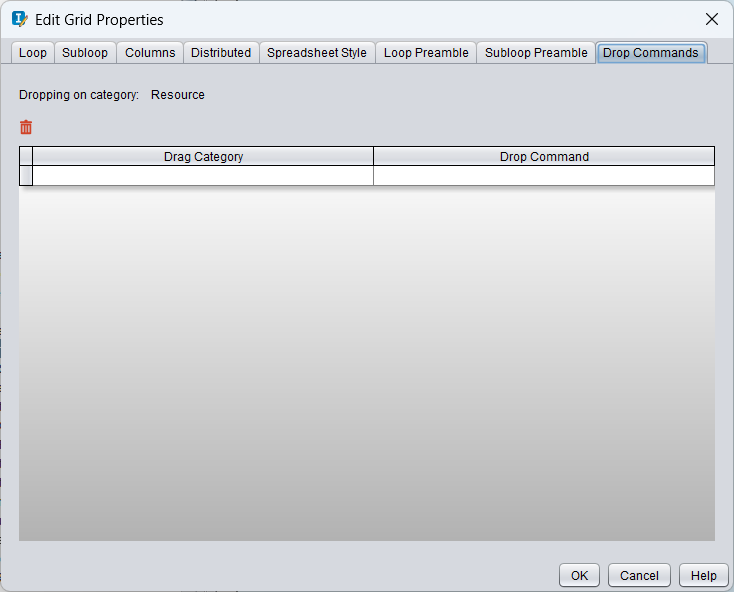
Administrators can now specify the command which will be executed during a drag/drop operation at the Grid level (e.g. in the Edit Grid Properties dialog box, Drop Commands tab). They can also specify “Drag Category” and the associated “Drop Command” which should be executed when an object from the specified “Drag category” is dropped onto the grid.
#SCI-3241
In the Designer, Command Lists view, Edit Command dialog box, a new "Project Management" command is now available: "Copy Baseline". This command allows users to copy the information of the selected baseline to another baseline of their choice.

Data Visualization
#SCI-3779
In the Designer, Scheduled Jobs view, Data Snapshot Scheduled Jobs have been enhanced to handle a maximum of 20,000,000 cells.
REST API
#SCI-3995
Input data type validations have been added for User defined fields on Projects, Task and User Defined Category endpoints.
Core Product Corrected Issues
Data Visualization
#SCI-4002
In the Projects Center workspace, Project Card, Gantt tab, in some cases, when users were defining customized colors in the Gantt chart preferences dialog box, those customized colors were not correctly applied in the Gantt chart. This issue has been fixed.
#SCI-3989
In REST API sessions, when users were running scheduled jobs or executing command lists, results were in some cases not displayed in the right language in the HTML5 Client and could be empty. This issue has been fixed.
#SCI-3921
In the Projects Center workspace, Project Card, Risks tab, Risk Card, the Workflow State was still displayed with the former UI. This issue has been fixed.
#SCI-3920
In the Actions Center workspace, Grid view, the “Name” column was not editable. This issue has been fixed.
Note: This issue was also affecting the Change Requests Center, Deliverables Center, Issues Center and Risks Center workspaces.
#SCI-3641
In the Projects Center workspace, when users were clicking on the Columns button in the main toolbar, the "Hidden Columns" section of the list was not instantly appearing. This issue has been fixed.
Domain Config
#SCI-3246
In some cases, it was not possible to launch the config utility in command line with the latest version of java. This issue has been fixed.
Object/Field Edits
#SCI-3926
In the Work workspace, Manage Baselines dialog box, the “Remove” command was not properly working and baselines were not deleted. This issue has been fixed.
#SCI-1964
In the Template Work Management workspace, Deliverables tab, Grid view mode, in certain scenarios, users were not able to copy/paste information in the grid. This issue has been fixed.
#SCI-1130
In the Work Package Scheduler workspace, Gantt tab, incorrect error messages were displayed when users were trying to modify the work package. This issue has been fixed.
REST API
#SCI-3275
In some cases, when users were submitting PATCH/project requests using the REST API, there could be an unexpected behavior. This issue has been fixed; input data type validations have been added for User defined fields on Projects, Task and User Defined Category endpoints.
Scheduled Jobs
#SCI-3130
In the Designer, Scheduled Jobs view, subsequent executions after the first execution of the “Execute Command List” Job Type no longer updated the progress of eligible projects’ tasks. This issue has been fixed.
#SCI-2739 (*Amended 11/06/2024)
In load balanced environments, scheduled jobs were taking much more time to complete when they were scheduled from a dedicated Scheduled Job server than when they were being run manually. This issue has been fixed. The fix also allows to clean the user defined categories (Data Views) related cache when the server memory usage is reaching 90%.
Security
#SCI-3882
For on premise installations, the Host verification filter was not working in some environments. This issue has been fixed; logs have been added to check the Host header.
Default Configuration Enhancements
Budget/Finance
#MIL-4383
In the Finance workspace, Cost Transactions dialog box, an “Overall Amount” column has been added in the Transactions spreadsheet to display the total amount of the project as well as the task transactions.

CCPM
#MIL-4725
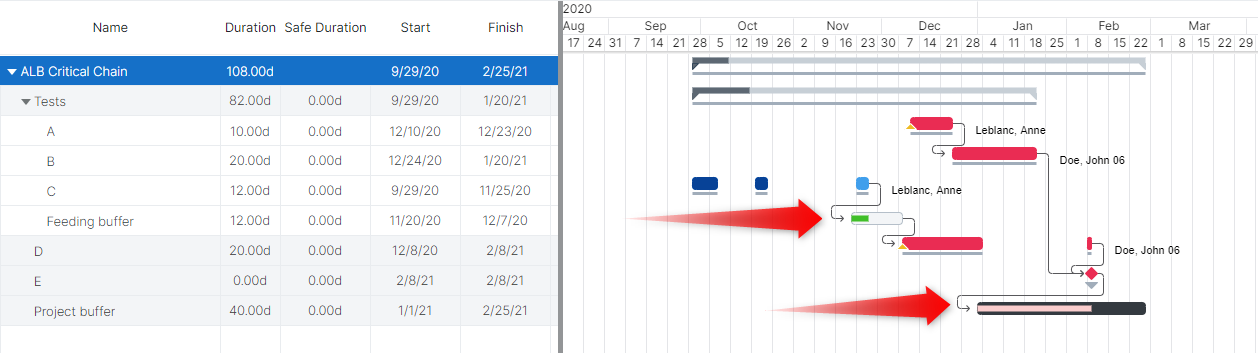
In the Projects Center workspace, Project Card, Gantt tab, when a CCPM project is selected, the Baseline saved for the project is not displayed on Buffer tasks.
Project Scheduler
#MIL-4749
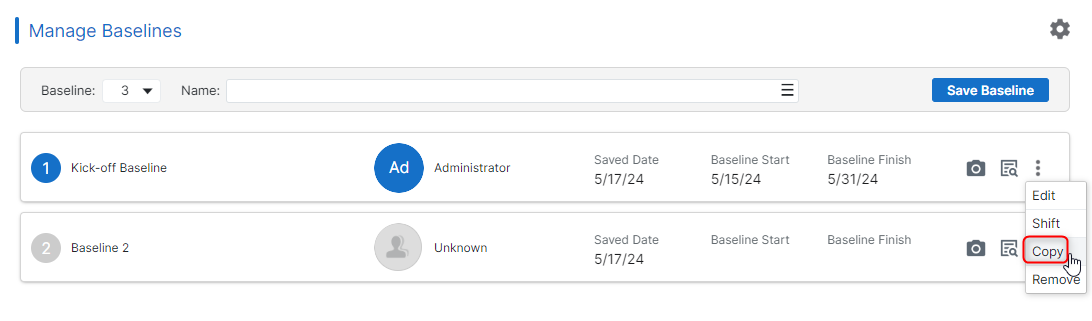
In the Projects Center workspace, Project Card, Gantt tab, Manage Baselines dialog box, a new "Copy" option is now available to allow users to copy the information of the selected baseline to another baseline of their choice. If the target baseline already exists, a dialog box is prompted to let users know that it will be overwritten.
#MIL-4732
In the Projects Center workspace, Project Card, Gantt tab, the former Filters dialog box has been reimplemented in the Gantt toolbar. It is displayed upon clicking on the Filters ( ) button.

Note: The same dialog box has been implemented in the Projects Center workspace, Task tab, Task List sub-tab and XML updates sub-tab, as well as in the Multi-projects Gantt workspace.
Resource Management
#MIL-4698
In the Projects Center workspace, Project Card, Gantt tab, the Resource Panel now includes a pivot to switch the view from team members to generic resources, allowing users to easily assign generic resources using the drag & drop capability.

Note: The Administrator can enable the display of the “Generic Resources” option by activating the “Generic Resources” feature in the Project Card, Administration tab, Setup sub-tab, Resource Management section.
Styling
#MIL-4733
In the Projects Center workspace, Project Card, Gantt tab, Gantt spreadsheet, the implicit and explicit task selections have been enhanced to allow users to get a better understanding of the differences between the two types:
- Implicit selection:

- Explicit selection:

Note: This modification has also been applied in the Projects Center workspace, Grid view:
- Implicit selection:

- Explicit selection:

Work Items
#MIL-4466
In the Client Portal workspace, Work Items full screen view, Inbox tab, Work Item Details view, Other Attributes section, the "Other Assignees" field now allows to select either all users or users coming from the project team only.
Note: This new mechanism can be activated with the "Enable Other Assignees From Project Team Only" setting available in the System Settings workspace, Work Management Settings folder, Global Options tab.
Default Configuration Corrected Issues
Agile
#MIL-4735
In the Work workspace, Agile tab, Project Structure full screen view, Releases tab, the Assigned Points were not properly retrieved if the release attached to Backlog Items were set by default to the release from the assigned Iteration. This issue has been fixed.
Budget/Finance
#MIL-4719
In the Projects Center workspace, Project Card, Finance tab, the "Transactions outside Task boundaries" alert was not correctly triggered. This issue has been fixed.
#MIL-4718
In the Projects Center workspace, Project Card, Finance tab, no Custom sub-tab was displayed when the "Enable Project Finance Custom Tab" setting was activated. This issue has been fixed.
Note: The aforementioned setting is located in the System Settings workspace, Project Settings folder, Display Preferences tab, Project Finance section.
#MIL-4424
In the Finance workspace, the Cost and Budget colors were different in the Overall Project Cost & Budget graph, in the Budget dialog box’s chart and in the Dashboards full screen view’s chart. This issue has been fixed.
Connections
#MIL-4616
In the Home Page workspace, Connections tab, when connected in French and creating new connections using the “Create and Connect” command, the options to create a new project were grayed out and users were not able to select any option. This issue has been fixed.
Execution
#MIL-4471
In the Calendar workspace, users were still able to submit their calendar even when its status was “Approved”. This issue has been fixed.
General
#MIL-4741
In the System Settings workspace, Project Settings folder, Time Tracking Options tab, Timesheet Options section, the “Enable Non-Project Project” setting was not correctly worded. This issue has been fixed; it has been renamed "Enable Non-Project Assignments".
Idea/Business Case
#MIL-4716
In the Projects Center workspace, Project Card, the Evaluation tab was incorrectly displayed when the "Enable Project Evaluation" setting was deactivated. This issue has been fixed.
Note: The aforementioned setting is located in the System Settings workspace, Project Settings folder, Display Preferences tab, Project Home Page section.
Localization
#MIL-4745
In the Timesheet workspace, the French localization was incorrect in the Partial Submit popup when the "Enable Timesheet Individual Submit" setting was deactivated. This issue has been fixed.
Note: The aforementioned setting is located in the System Settings workspace, Project Settings folder, Time Tracking Options tab, Timesheet Options section.
Portfolio Center
#MIL-3502
In the Portfolio Center workspace, Budget tab, Portfolio Budget mode, the Total Budget was displayed in cost instead of effort for Effort Cost Centers when the "Enable Mixed Budget Type" setting was deactivated and the "Set Budget Type" setting was set to “Effort”. This issue has been fixed.
Note: The aforementioned settings are located in the System Settings workspace, Budget/Finance Settings folder, Global Options tab, Budget section.
Project Dashboards
#MIL-4748
In the Projects Dashboards workspace, Analytics theme, Risks report, the naming of the “Probability” and “Severity” columns could be misleading. This issue has been fixed; the columns have respectively been renamed “Risk Level Probability” and “Risk Level Severity”.
#MIL-4734
In the Projects Dashboards workspace, Finance theme, Cost Breakdown report, the values displayed were affected by the “Cost Value” set in other reports. This issue has been fixed; a "Cost Value" selector field has been added, allowing users to choose to display either “Total”, “Actual”, “Remaining”, or “Baseline” Cost Values.
#MIL-4712
In the Projects Dashboards, Resource Dashboards and Portfolio Dashboards workspaces, Most frequently used options panel, when users were connected in French, dates were truncated and not correctly displayed. This issue has been fixed.
Project Management
#MIL-4747
In the PMO Supervision workspace, Project Supervision tab, Focus Mode full screen view, Project Administration dialog box, Attachments folder, newly created attachments were attached to the selected Portfolio Folder instead of the selected project. This issue has been fixed.
#MIL-4738
In the Home Page workspace, Create New popup, Project Definition popup, text was not correctly displayed and could be truncated. A similar issue could occur in the Finance workspace, Transaction dialog box, where Tasks names were not visible if they were too long. These issues have been fixed.
Project Scheduler
#MIL-4727
In the Work workspace, Gantt tab, Scheduler view mode, Gantt toolbar, the Gantt Selection ( ) button was displayed even when the "Enable Gantt Toolbar Custom Button" setting was deactivated. This issue has been fixed.
Note: The aforementioned setting is located in the System Settings workspace, Project Settings folder, Display Preferences tab, Project Work section, Gantt & Task List sub-section.
#MIL-4720
In the Work workspace, Gantt tab, XML Updates view mode, the tooltip for the Import XML ( ) command was not matching the project creation functionality offered when clicking on the button. This issue has been fixed; the tooltip has been renamed “Create a new project from XML”.
#MIL-4515
In the Work workspace, Gantt tab, Scheduler view mode, some special characters were not correctly displayed and were truncated. This issue has been fixed.
#MIL-3102
In the Work workspace, Tracking tab, By Resources view mode, Collapsed and Expanded display options, the “Applied %” was sometimes over 100%. This issue has been fixed.
Project Team
#MIL-4378 (*Amended on 04/06/2024)
In the Projects Center workspace, Project Card, Resources tab, Filters popup, when clicking on the “Resources” filtering field’s Hamburger ( ) button, users were able to select any existing resource and not those allocated to the project only. This issue has been fixed.
Projects Center
#MIL-4753
In the Multi-projects Gantt workspace, the Gantt toolbar as well as the “Lock” and “Publish” buttons were incorrectly displayed when at least one published project was selected. This issue has been fixed.
#MIL-4740
In the Projects Center workspace, the Status Reports indicators’ colors were incorrect and not reflecting the actual state of the project (based on the Cost, Time, Scope and Trend indicators). This issue has been fixed.
Resource Assignments
#MIL-3415
In the Work workspace, Gantt tab, Assign Resources dialog box, when users were assigning resources to a task, inactive resources were not visible, even though the “Show Inactive Resources” option had previously been enabled in the Filters popup. This issue has been fixed.
Resource Dashboards
#MIL-4502
In the Resource Dashboards workspace, Time Tracking theme, Timesheets report, the colored indicators were not consistent with those appearing in the Timesheet workspace. This issue has been fixed.
Note: Colored Indicators can be set in the System Settings workspace, General Settings folder, Colored Indicators tab, Timesheet Preferences section.
Resource Management
#MIL-4736
In the Resources workspace, Resources tab, the Total values displayed were incorrect when multiple versions of the same project were selected. This issue has been fixed.
Resource Validation
#MIL-4617
In the Resource Validation workspace, Timesheets tab, Timesheet Details full screen view, the display options labels were not matching the behavior in the interface when certain options were activated or deactivated. This issue has been fixed.
#MIL-4295
In the Resource Validation workspace, Timesheet Details full screen view, when a resource's timesheet contained both “Submitted” and “Rework” statuses timesheets, the three commands (“Rework”, “Review” and “Submit”) displayed on the right-hand side of the Timesheet summary were not correctly displayed nor aligned. This issue has been fixed.
Risk Management
#MIL-4731
In the Risks Center workspace, Notes dialog box, when the Filters switch button was activated in the upper right corner, the user was not getting any warning if the time range’s end date was prior to the time range’s start date. This issue has been fixed.
Status Report
#MIL-4742
In the Projects Center workspace, Project Card, Overview tab, Status Reports sub-tab, Status Report History full screen view, Status Report Details view, in certain cases, deliverables’ “Estimated Date" could be incorrect. This issue has been fixed.
#MIL-4351
In the Home Page workspace, Status Report tab, Submitted Status Report Details view, when users were creating a project’s first status report then clicking on the “Print” command, the content of additional descriptions was missing. This issue has been fixed.
Note: Additional descriptions can be created in the System Data workspace, Status Report tab, Additional Descriptions sub-tab.
Work Items
#MIL-4754
In the Actions Center workspace, no tooltip was displayed when users were hovering their cursor over the Notes icon. This issue has been fixed.
Note: This issue was also affecting the Change Requests Center, Deliverables Center, Issues Center and Risks Center workspaces. They have all been updated accordingly.
#MIL-4537
In the Work Items workspace, Work Items full screen view, Inbox, Grid and Board tabs, users were not able to filter the work items by project status. This issue has been fixed.
#MIL-3461
In the Work Items workspace, Work Items cards, the date was not entirely visible. This issue has been fixed.
Work Package
#MIL-4514
In the Work Package Work Management workspace, Risks tab, Risk dialog box, when users were closing a risk then creating a connected issue, the created issue was incorrectly connected to the Project instead of the Work Package. This issue has been fixed.
Note: The aforementioned behavior has been rolled out for Change Requests when creating a connected Issue or Action.
Vantage Corrected Issues
Data Connector
#VAN-993
In some cases, there could be an issue with the Data Connector’s Initialization command list and the mapped objects were not sent from Plan to Deliver. This issue has been fixed; a sandbox update has been added to the Data Connector’s initialization command list to ensure all the mapped objects from Plan are retrieved before being sent to Deliver.
Vantage Navigation
#VAN-781 (*Added on 31/05/2024)
In some scenarios, users could encounter a session timeout error even though they are active in the HTML5 Client. This issue has been fixed.
#VAN-592
In Vantage, when users were navigating from one workspace to another, the Vantage UI was sometimes disappearing to be incorrectly replaced by the Plan UI. This issue has been fixed.
Vantage SSO
#VAN-873
In some cases, when users were navigating from one workspace to another, an error message indicating that the connection was lost could be displayed. This issue has been fixed.
Deliver Enhancements
APM
#DELIVER-725
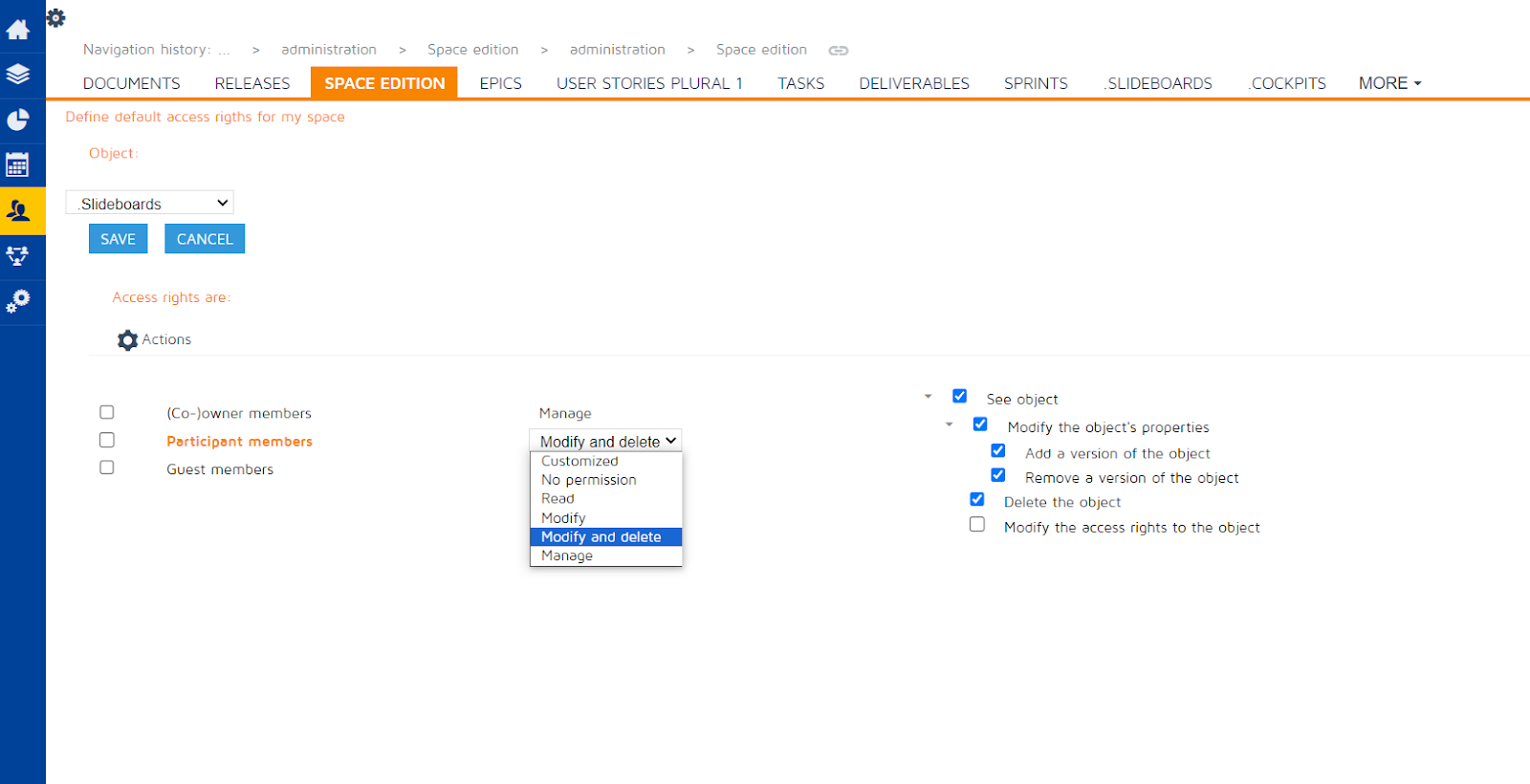
In the APM, a new “Modify and delete” option is available when editing the space access rights. When this option is selected, the group of users have the following rights on the selected objects:
- See the object
- Modify the object’s properties
- Add a version of the object
- Remove a version of the object
- Delete the object
Deliver Corrected Issues
Gridboard
#DELIVER-795
In some cases, when users were importing projects from Excel files in the Gridboards, some were not correctly imported due to a timeout during the import operation. This issue has been fixed; the timeout has been increased for Excel processing.
#DELIVER-714
In Deliver, in some cases, users were not able to save views if a filter containing the value (-) was in use. This issue has been fixed.
O3 Admin
#DELIVER-218
In some cases, the function "@is_date_within_current_month(field,x,y)" was not properly working and objects from the last day of the selected period were not displayed. This issue has been fixed.
O3 Card
#DELIVER-563
In Deliver, when navigating in the cards, tooltips were sometimes still displayed even when users were not hovering their mouse over fields. This issue has been fixed.
Synchro V2
#DELIVER-786
In certain cases, following the refresh of the sandbox, the nightly synchronization was failing and the operation could not be completed. This issue has been fixed.
System Requirements
There are frequent changes and additions to the set of specific versions of operating systems, application servers and database servers for which ProjectAdvantage has been tested and certified. Please contact our teams for the latest information in this area.
Servers
- Application Server: Apache Tomcat 9 with Oracle Java 8 or OpenJDK
- Data Server: PostgreSQL 12
HTML5 Clients
- Display resolution: 1366 x 768 (technical minimum), 1600 x 1050 (minimum recommended), 1920 x 1080 or higher (generally recommended).
- Minimum of 4GB RAM allocated (8GB recommended).
- Browser
- Microsoft Edge
- Microsoft Internet Explorer 10 or 11
- Google Chrome
- Mozilla Firefox
- Apple Safari
ProjectAdvantage Designer
- Display resolution: 1366 x 768
- Minimum of 4GB RAM allocated
- Disk space: 200MB minimum available for ProjectAdvantage.
- Oracle Java 8 or OpenJDK 8
- Operating Systems:
- Windows 7, 8.1, 10 or 11
- Mac OS X Lion or newer
- Alpine Linux 3.16.1
Timesheets Mobile Application
- Being hosted by ProjectAdvantage
- Product version: 2022.08 and upper versions
Vantage platform
Users will need to enable third-party cookies to work within Vantage. For more information regarding third-party cookies, please refer to the following links:
- Firefox: https://support.mozilla.org/en-US/kb/third-party-cookies-firefox-tracking-protection
- Chrome: https://support.google.com/accounts/answer/61416?hl=en&co=GENIE.Platform%3DDesktop
- Brave: https://sigmaos.com/tips/browsers/how-to-manage-cookies-on-brave-browser
- Safari: https://help.apple.com/safari/mac/8.0/en.lproj/sfri11471.html
For customers who subscribed only to Plan
- Installation:
- POD 11 is required if hosted by ProjectAdvantage
- An Hydra server is required if on premise
- Product version: 2023.01 and upper versions
For customers who subscribed to Plan and Deliver
- Installation:
- POD 11 is required if hosted by ProjectAdvantage
- An Hydra server is required if on premise
- HPV2 activated on Deliver modules (activated by default for all new Deliver Clients after 2021 Q3)
- Product version: 2023.01 and upper versions
- Users will need to allow third-party cookies in their browser
Limitations
The data connector does not work in load balanced environments.