



2024.04
This document describes the enhancements, corrected issues, and new features that have been implemented in ProjectAdvantage 2024.04, both in the Core product and in the ProjectAdvantage Default Configuration, in Vantage and in Deliver.
ProjectAdvantage 2024.04 is a maintenance release of ProjectAdvantage 2024.
In the Core product, 8 enhancements have been implemented and 23 issues have been fixed.
In the ProjectAdvantage Default Configuration, 2 enhancements have been provided and 29 issues have been fixed.
In Vantage, 3 issues have been fixed.
In Deliver, 5 enhancements have been implemented and 12 issues have been fixed.
In order to access the different sections, please click on the following links:
- Important Reminders for upgrade
- Core Product Enhancements
- Core Product Corrected Issues
- Default Configuration Enhancements
- Default Configuration Corrected Issues
- Vantage Corrected Issues
- Deliver Enhancements
- Deliver Corrected Issues
- System Requirements
Important Reminders for upgrade
- To improve the performance of views displaying the Health Score of multiple projects, we are now using a Health Score that is pre-calculated upon publishing a project as opposed to on the fly. Therefore, upon upgrading to 2021.03 (or higher), please make sure you run once the following Scheduled Job to initialize the project Health Score values: Initialize Project Static Health Score.
Important: For systems with an overwritten Publish command, please make sure to add the new dedicated Command List for the Health Score pre-calculation upon publishing a project: “Project - Publish Project - Continue - Capture Health Score”.
- From the 2023.01 version, to support the implementation of the new Vantage navigation and modules, the Project Dashboards workspace should be added again in the User Roles section of the Designer as the Dashboards workspace doesn't exist anymore.
Core Product Enhancements
Commands
#SCI-3811
In the Projects Center workspace, when several projects are selected in the Grid view, the “Synchronize Projects” button is now displayed in the main toolbar. When multiple CCPM projects are selected, clicking on this button will open the Synchronize Projects dialog box, allowing users to configure options for how ProjectAdvantage synchronizes multiple Critical Chain projects.

Note: The Administrator can enable the display of the “Synchronize Projects” button by using the “Enable Synchronize CCPM Projects” setting available in the System Settings workspace, Projects Settings folder, Display Preferences tab, Projects Center section.
#SCI-3810
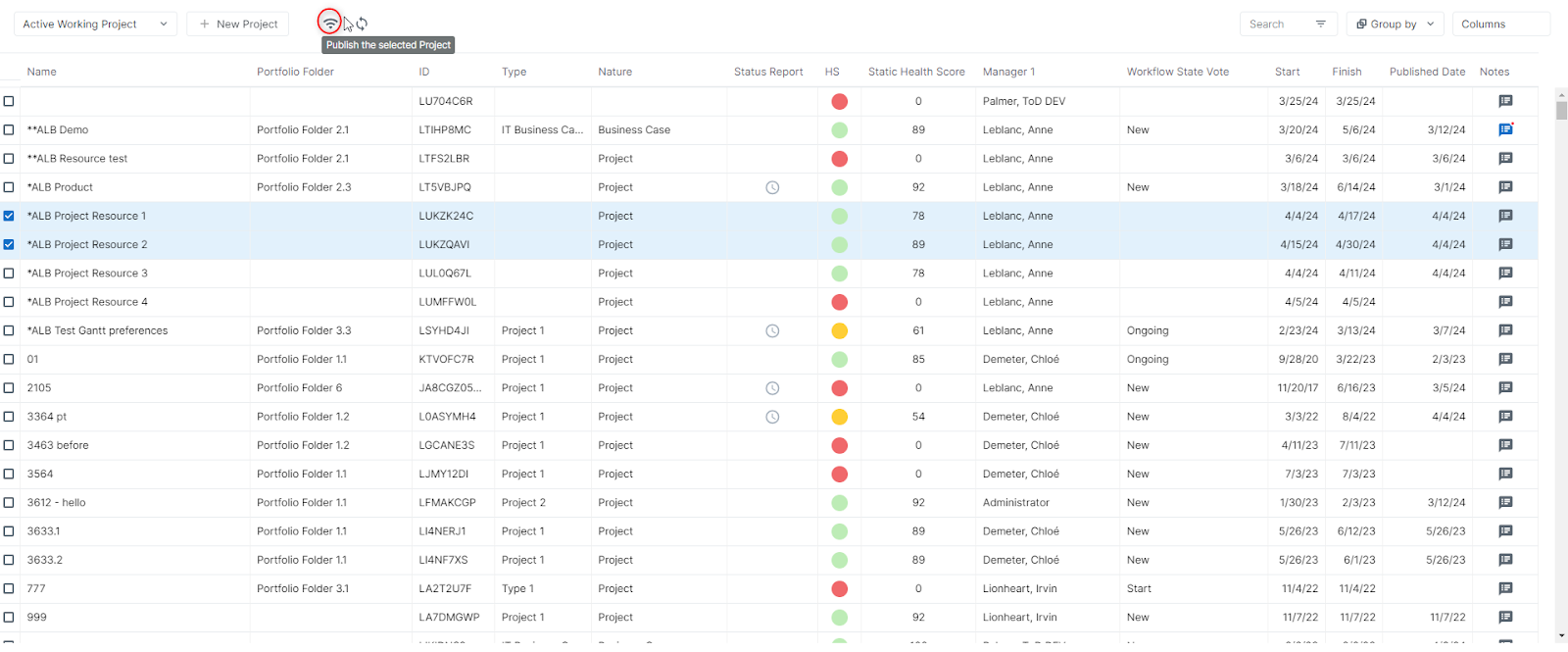
In the Projects Center workspace, when one or several project(s) is/are selected in the Grid view, the “Publish” button is now displayed in the main toolbar.
#SCI-3809
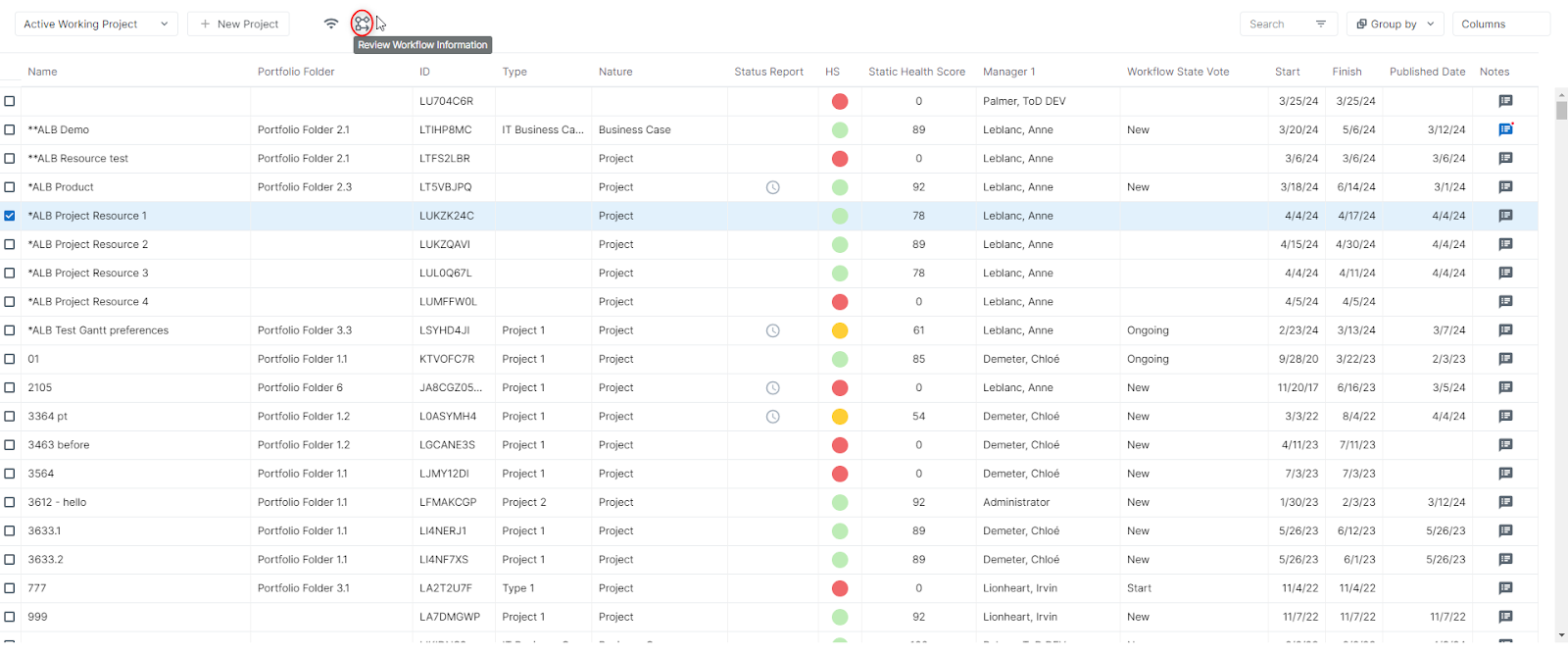
In the Projects Center workspace, when one project is selected in the Grid view, the “Review Workflow Information” button is now displayed in the main toolbar.
Data Visualization
#SCI-3441
In the Projects Center workspace, Project Card, Gantt tab, when the Resource Panel is displayed and the “Selected & Published Projects” option is selected, it is now possible to fold/unfold the resources to see the details per project.

#SCI-3737
A new Multi-projects Gantt workspace has been implemented, allowing users to display several projects in the Gantt chart.

Designer
#SCI-3801
In the HTML5 Client, an outer margin has been added to dialog boxes when they are opened from the Search bar, whether or not the “Close Button” option is activated or deactivated in the Designer, Search view.

#SCI-3480
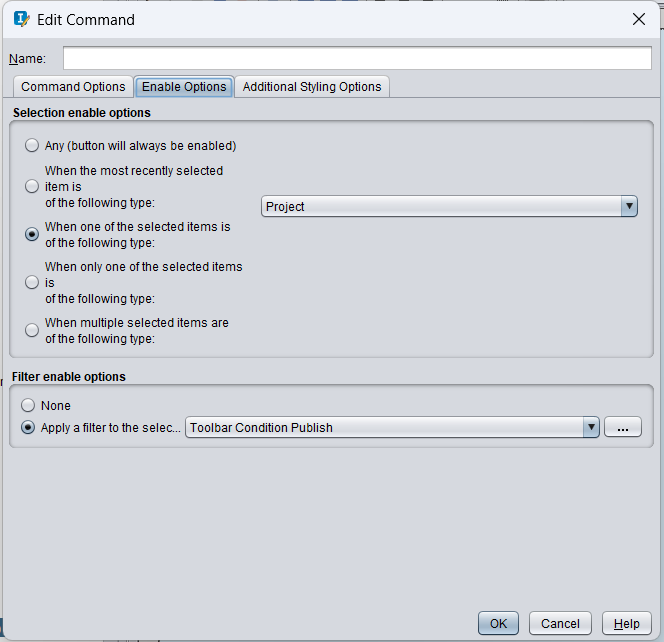
In the Designer, Forms view, Edit Command dialog box, two new options are now available in the Enable Options tab:
- When only one of the selected items is of the following type;
- When multiple selected items are of the following type.
Timesheet (built-in)
#SCI-3818
A proper logout system has been implemented to allow Timesheet users on Microsoft Teams to securely log out.
Core Product Corrected Issues
Authentication
#SCI-3930
Some users were experiencing a session timeout earlier than the configured time in load-balanced environment setups. This issue has been fixed.
#SCI-3485
An error message was displayed when users were trying to change their password from the ProjectAdvantage login page. This issue has been fixed.
Commands
#SCI-2850
In the Home Page workspace, Status Reports tab, Status Report History full screen view, New Status Report popup, users were able to create duplicate status reports by clicking twice on the “Submit” button. This issue has been fixed.
Data Visualization
#SCI-3937
In the HTML5 Client, in some cases, the error message “User does not have access to the requested workspace” was displayed when users were trying to access workspaces which they should have been able to access according to their permissions. This issue has been fixed.
#SCI-3924
In the Projects Center workspace, Project Card, Overview tab, in certain scenarios, the page could be blank when users were navigating to the General sub-tab. This issue has been fixed.
#SCI-3896
In the Project Dashboards workspace, multi-projects selection, Project Monitoring theme, Status Overview report, when the “Show Projects without Status Reports” option was activated, some projects without status reports could be missing. This issue has been fixed.
#SCI-3870
In the Projects Center workspace, Project Card, Gantt tab, when users were adding or removing resources to a task from the Task Details dialog box, the Gantt chart was not updated and the resource was not added or removed from the specific task. This issue has been fixed.
#SCI-3845
In the Resources workspace, Resources tab, Grid view, when users were selecting the “Export to Excel” command, some values were missing in the exported file if the “Show Distribution” display option was activated. This issue has been fixed.
#SCI-3844
In the Projects Center workspace, Project Card, Gantt tab, Resource Panel, the vertical scroll positions could become misaligned when users were scrolling to the very bottom of the grid. This typically occurred when the left-hand pane did not have a horizontal scroll bar while the right-hand pane did. Different scrollable heights (due to different horizontal scroll bars) could cause the misalignment of the vertical scroll positions. This issue has been fixed.
#SCI-3757
In the HTML5 Client, an error message was displayed when users users were navigating from the Home Page to the Work workspace. This issue has been fixed.
#SCI-3732
In the Ideas Center workspace, in certain scenarios, the content of the page was disappearing when the user was navigating from one tab to the other. This issue has been fixed.
#SCI-3695
In the Projects Center workspace, Project Card, Gantt tab, the Gantt chart preferences icon displayed in the Gantt toolbar was too small and not clear enough. This issue has been fixed.
#SCI-1520
In the Work workspace, Gantt tab, in certain cases, when users were logged in any language other than English and were creating tasks, their duration was automatically converted to days. This issue has been fixed.
Designer
#SCI-3906
In the Projects Center workspace, when users were trying to open a Project Card, the loading time could be very long after they had applied changes to the configuration in the Designer, Forms view. This issue has been fixed.
#SCI-3885
In certain circumstances, an error message was returned when users were trying to launch the Designer. This issue has been fixed.
Object/Field Edits
#SCI-3807
In the Work workspace, Tracking tab, By Resources view mode, when users were selecting the “Apply Actuals” command, the Timesheet % Applied displayed could sometimes be incorrect. This issue has been fixed.
#SCI-3166
In the Work workspace, Gantt tab, Task panel, Assignments tab, when users were trying to delete hard assignments with no submitted Actual Effort, an error message was displayed and they were not able to delete the assignment. This issue has been fixed.
#SCI-2718
In the Portfolio Dashboards workspace, for any report under the Analytics theme, the labeling of certain filters was incorrect (Yes/Yes instead of Yes/No). This issue has been fixed.
Performance
#SCI-3602
When users were trying to log out of ProjectAdvantage, the page displayed was blank and the logout operation was unsuccessful. This issue has been fixed.
REST API
#SCI-3897
In the REST API, when timesheet data was retrieved from Plan to Deliver, some could be missing. This issue has been fixed; a validation mechanism has been implemented to ensure that assignments with effort in the other weeks are still taken into consideration in Month view mode, even if data was deleted for a particular week.
#SCI-3719
In the REST API, the “Get Projects” endpoint was sometimes not retrieving the correct project data (if the database had too many projects) due to the permissions check. This issue has been fixed.
Scheduled Jobs
#SCI-3481
In the Designer, Scheduled Jobs view, the execution time of certain scheduled jobs could take more time on a newer ProjectAdvantage version than the previous one. This issue has been fixed; the data view cache has been optimized during the scheduled jobs generation.
Timesheet (built-in)
#SCI-3872
In the Timesheet (built-in) workspace, an error message was displayed when users were trying to submit their timesheets for custom periods. This issue has been fixed.
Default Configuration Enhancements
Administration
#MIL-4704
In the Projects Center workspace, Project Card, a new Custom tab is now displayed next to the Dashboards tab.
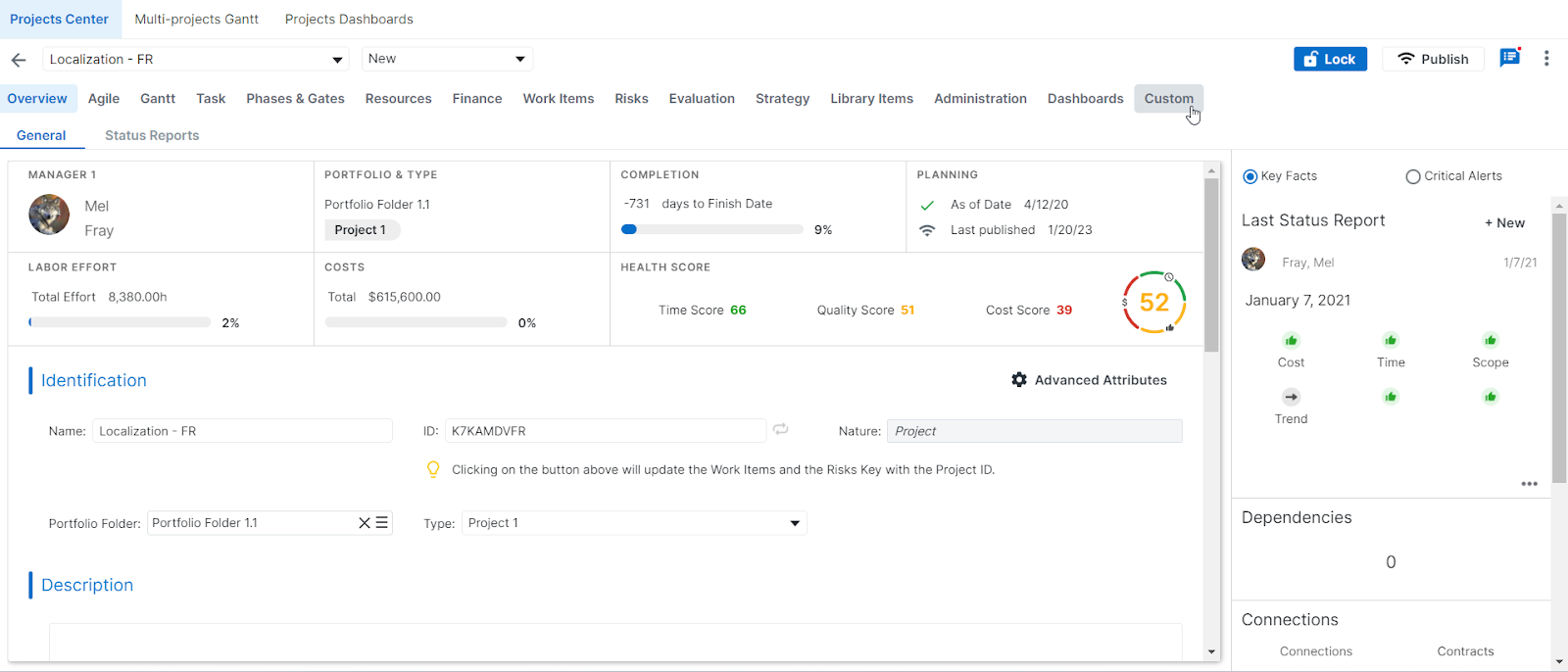
Note: The aforementioned tab can be activated using the new "Enable Projects Center Custom Tab" setting, located in the System Settings workspace, Project Settings folder, Display Preferences tab, Projects Center section.
CCPM
#MIL-4724
The CCPM sub-tab, previously available in the Projects Center workspace, Project Card, Task tab, has been moved and is now available as a tab in the Projects Center workspace, Project Card, located between the Task tab and the Phases & Gates tab.

Default Configuration Corrected Issues
Administration
#MIL-4708
In the Administration workspace, multi-projects selection, Supervision tab, Filters dialog box, when users were selecting a Workflow State as filter then were closing the Filters dialog box, some projects were still displayed, even though they did not match the selected filter. This issue has been fixed.
#MIL-4701
In the Projects Center workspace, the Custom sub-tab was displayed under the Library Items tab instead of the Administration tab. This issue has been fixed.
Agile
#MIL-4579
In the Work workspace, Agile tab, Project Dashboards full screen view, a popup was incorrectly prompted when users were clicking on any cell in the Release tab, Epic column and in the Epic tab, Iteration column. These issues have been fixed.
Designer
#MIL-4709
In the Designer, Forms view, an incorrect Vantage module attribute was defined for the Project Card. This issue has been fixed.
Execution
#MIL-4691
In the Overview workspace, the empty state message under the Pending Timesheets section was not grammatically correct in German. This issue has been fixed.
#MIL-4478
In the Timesheet workspace, it was possible to import Activity Logs, even though the project had never been previously published. This issue has been fixed.
Idea/Business Case
#MIL-4703
When users were accessing an idea using the search bar, the Idea Card was still displayed using the old design. The same issue was observed for the Work Items (Actions, Deliverables, Change Requests and Issues) and Risk cards. This issue has been fixed.
#MIL-4700
In the Ideas Center workspace, Ideas Grid, the Total Score displayed did not include the score from the Strategic Assessment. This issue has been fixed.
#MIL-4681
In the Idea Center workspace, Analytics view mode, Full Report tab, the scoring descriptions were not sorted alphabetically. This issue has been fixed.
#MIL-3643
In the Home Page workspace, Evaluation tab, Evaluation Trend dialog box, when users were creating a project from another object (either an Idea or a Business Case), the new project’s Evaluation History spreadsheet could be empty, even though some snapshots had been captured for the object from which the project had been created. This issue has been fixed.
Portfolio Dashboards
#MIL-4479
In the Portfolio Dashboards workspace, Project Monitoring theme, Pipeline report, when the user was connected in German, the “Project Total Score ≥” cell was not wide enough and the displayed value was truncated. This issue has been fixed.
#MIL-4464
In the Portfolio Dashboards workspace, Phases & Gates theme, Supervision report, the tooltip displayed when users were hovering over the OTD cells was sometimes incorrect. This issue has been fixed.
Portfolio Management
#MIL-4689
In the Portfolio Work Management workspace, Lessons Learned tab, Grid view mode, the view was empty. This issue has been fixed.
Project Management
#MIL-4702
In the Projects Center workspace, all the project versions were displayed in the Grid view and in the Filters popup. This issue has been fixed; from now on, only project versions inferior to version 6 will be displayed.
Project Scheduler
#MIL-4687
In the Projects Center workspace, Project Card, Gantt tab, when the view was set to “Default Preference”, the <No Filter> filter was applied simultaneously. This issue has been fixed.
#MIL-4684
In the Work workspace, Tracking tab, Timesheet Details full screen view, Legend popup, the descriptions were truncated in the Notifications & Alerts section. This issue has been fixed.
#MIL-4679
In the Projects Center workspace, Project Card, Task tab, XML Updates sub-tab, the critical path and baselines were still displayed when users were deactivating the "Show Critical Path" and the "Show Baselines" options in the Gantt chart preferences dialog box. This issue has been fixed.
#MIL-4641
In the Work workspace, Agile tab, Full Backlog full screen view, Backlog Item dialog box, the Checklist and Attachments sections' buttons were not available on the right-hand side of the dialog box, even though both sections included some existing items. This issue has been fixed.
#MIL-4026
In the Work workspace, Gantt tab, Project Problems panel, Dependency Synchronization category, the Task Brief could be empty for task to task dependencies. This issue has been fixed.
Resource Allocations
#MIL-4421
In the Resources workspace, Tasks tab, Assign Resources dialog box, the Available Resources Remaining Capacity section was empty when users were creating a new hard assignment using the Add ( ) button available on the Hard Assignments row. This issue has been fixed.
#MIL-3929
In the Resources workspace, Project Allocations tab, Project Allocations full screen view, Allocations tab, Resources Overview sub-tab, the Remaining Usable Effort values could be incorrect. This issue has been fixed.
Resource Dashboards
#MIL-4296
In the Resource Dashboards workspace, the "Reset Filters" button was systematically displayed, even when no filters were enabled. This issue has been fixed.
Resource Validation
#MIL-3482
In the Organization Center workspace, Overview tab, Submitted Timesheets section, timesheets could still be displayed in the Submitted Timesheets spreadsheet, even though they were beyond the scope of the “Timesheet Retrieval Time Frame”. This issue has been fixed.
Note: The “Timesheet Retrieval Time Frame (days)” can be set in the System Settings workspace, Resource Settings folder, Global Options tab, Organization Center Options section.
Status Report
#MIL-4688
In the Projects Center workspace, Project Card, Overview tab, Status Reports sub-tab, Status Report Creation view, the tag could not be modified if it had previously been defined in the New Status Report popup. This issue has been fixed.
Work Items
#MIL-4690
In the Actions Center workspace, Action Card, when users were clicking on the “CLOSE” button, the Actions Grid was filtered out and only displayed the action whose Action Card had just been closed. This issue has been fixed.
#MIL-4642
In the Portfolio Work Management workspace, Project Monitoring tab, Dashboards full screen view, for any Work Items tab, the Grid view was empty even if some work items had previously been created for the selected portfolio folder. This issue has been fixed.
#MIL-4566
In the Work workspace, Work Items tab, Work Items full screen view, Grid tab, the wrong buttons were available in the bottom right section of the Work Item dialog box when users were creating a new Work Item or when they were clicking on the Edit ( ) button. This issue has been fixed.
#MIL-4286
In the Work Items workspace, Work Item dialog box, Workflow Information dialog box, Work Item tab, for any Work Item, the default date format set in the Designer, Fields view, Default Formats tab, was not honored. This issue has been fixed.
Work Package
#MIL-3349
In the Work Package Scheduler workspace, Gantt tab, Task panel, Work Objects tab, the total number of items was incorrect for all Work Objects categories. This issue has been fixed.
Vantage Corrected Issues
Data Connector
#VAN-951
When users were synchronizing data from Plan to Deliver using the Data Connector, all objects were sometimes not synchronized and some could be missing in Deliver. This issue has been fixed.
#VAN-921
In certain cases, duplications could occur in Deliver if the Data Connector Initialization command was still running during Deliver's nightly synchronization. This issue has been fixed.
Vantage navigation
#VAN-824 (*Added on 22/05/2024)
In the Designer, User Roles view, when users were adding a new workspace to a user role, the workspace was only visible in the HTML5 Client after a server reboot. This issue has been fixed; from now on, if logged in without SSO, users only need to refresh the page to make the new workspace visible and if logged in with SSO, they only need to log out then log in again.
Deliver Enhancements
Filters
#DELIVER-727
In Deliver, two options (“Before” and “After”) have been implemented for the filters’ date range queries.
#DELIVER-359
In Deliver, users are now able to specify the date range to be before or after a specific date.
#DELIVER-39
A new option is now available in the Filters dropdown list: “Empty”, allowing users to filter all the objects that have an empty field (including (-) as the only value entered in fields). This criterion applies to all fields.
#DELIVER-38
Two new options are now available in the Filters dropdown list: “Contains” and “Does not contain”, allowing users to filter using those criteria.
O3
#DELIVER-40
Administrators no longer need to specify the .name field as a parameter when creating a category on a document field in the O3 Admin.
Deliver Corrected Issues
APM
#DELIVER-718
In the APM, the indexation was not working for the creation of objects due to an incorrect configuration. This issue has been fixed.
Cockpits
#DELIVER-589
In Deliver, some users were unable to export data from cockpits using a filter. This issue has been fixed.
Login
#DELIVER-773
In Deliver, users were unable to log in using the dual login when the external SSO was selected. This issue has been fixed.
#DELIVER-785
In certain cases, users were not able to log out from Deliver. This issue has been fixed.
Login page
#DELIVER-596
In some cases, when users were logging in to Deliver, there was an unwanted scrollbar on the right-hand side of the login page. This issue has been fixed.
O3 Card
#DELIVER-787
In Deliver, users were sometimes unable to create new cards. This issue has been fixed.
#DELIVER-700
In Deliver, when users were opening a card and using the text block to type a comment, the text block incorrectly displayed a green border. This issue has been fixed.
Plannings
#DELIVER-699
In the Planning module, some plannings were not correctly loading. This issue has been fixed.
#DELIVER-696
An error message was displayed when users were navigating to the Planning module and no data was loading. This issue has been fixed.
#DELIVER-668
In the Planning module, users were not able to download pages in PDF format and an error message was displayed. This issue has been fixed.
Slideboard
#DELIVER-731
In Deliver, in some cases, users were not able to change the order of columns and the Group by functionality was not working. This issue has been fixed.
#DELIVER-682
In the Slideboard module, there was an issue with the Filters and Group by functionalities. This issue has been fixed.
System Requirements
There are frequent changes and additions to the set of specific versions of operating systems, application servers and database servers for which ProjectAdvantage has been tested and certified. Please contact our teams for the latest information in this area.
Servers
- Application Server: Apache Tomcat 9 with Oracle Java 8 or OpenJDK
- Data Server: PostgreSQL 12
HTML5 Clients
- Display resolution: 1366 x 768 (technical minimum), 1600 x 1050 (minimum recommended), 1920 x 1080 or higher (generally recommended).
- Minimum of 4GB RAM allocated (8GB recommended).
- Browser
- Microsoft Edge
- Microsoft Internet Explorer 10 or 11
- Google Chrome
- Mozilla Firefox
- Apple Safari
ProjectAdvantage Designer
- Display resolution: 1366 x 768
- Minimum of 4GB RAM allocated
- Disk space: 200MB minimum available for ProjectAdvantage.
- Oracle Java 8 or OpenJDK 8
- Operating Systems:
- Windows 7, 8.1, 10 or 11
- Mac OS X Lion or newer
- Alpine Linux 3.16.1
Timesheets Mobile Application
- Being hosted by ProjectAdvantage
- Product version: 2022.08 and upper versions
Vantage platform
Users will need to enable third-party cookies to work within Vantage. For more information regarding third-party cookies, please refer to the following links:
- Firefox: https://support.mozilla.org/en-US/kb/third-party-cookies-firefox-tracking-protection
- Chrome: https://support.google.com/accounts/answer/61416?hl=en&co=GENIE.Platform%3DDesktop
- Brave: https://sigmaos.com/tips/browsers/how-to-manage-cookies-on-brave-browser
- Safari: https://help.apple.com/safari/mac/8.0/en.lproj/sfri11471.html
For customers who subscribed only to Plan
- Installation:
- POD 11 is required if hosted by ProjectAdvantage
- An Hydra server is required if on premise
- Product version: 2023.01 and upper versions
For customers who subscribed to Plan and Deliver
- Installation:
- POD 11 is required if hosted by ProjectAdvantage
- An Hydra server is required if on premise
- HPV2 activated on Deliver modules (activated by default for all new Deliver Clients after 2021 Q3)
- Product version: 2023.01 and upper versions
- Users will need to allow third-party cookies in their browser
Limitations
The data connector does not work in load balanced environments.