



7.1y
This document describes the enhancements, corrected issues and new features which have been implemented in ProjectAdvantage 7.1y either in the Core product and in the ProjectAdvantage Default Configuration.
ProjectAdvantage 7.1y is a maintenance release of ProjectAdvantage 7.1.
In the Core product, 2 enhancements have been implemented, and 11 issues have been fixed.
In the ProjectAdvantage Default Configuration, 17 enhancements have been provided and 50 issues have been fixed.
Note: Items with nearly identical features are indicated by an asterisk. For instance, if an issue has been corrected for the Project* Center workspace, it means that the correction has been implemented in the Project Center, Business Case Center, Product Center, Program Center, and Template Center workspaces.
In order to access to the different sections, please click on the following links:
Important Reminders for upgrade
Default Configuration Enhancements
Default Configuration Corrected Issues
Important Reminders for upgrade
- Since 7.1q there is a new way of managing languages in ProjectAdvantage thanks to the Language Packs feature. As a result of this new feature there is a change in the classpath used to launch API programs: we no longer have PSClient_xx.jar files for our translated language strings and now have new Language Pack jar files. So all PSClient_xx.jar files will now need to be replaced by the appropriate Language Packs. Please read carefully #41025 included in the Release Notes for ProjectAdvantage S7.1q.
Core Product Enhancements
Built-in HTML5 Client
#42361
Upon login to ProjectAdvantage, those who are using Internet Explorer will receive a flash message with the following text: “ProjectAdvantage support for Internet Explorer has ended. Please upgrade to a supported browser.” The flash message will be hidden upon successful login.
Designer
#42202
This enhancement provides the ability to set a default format, timescale, and precision for a particular Field type (e.g. date Fields). The set format, timescale, and precision will be used as the default (also known as “*” choice) for formatting options when selecting Field formats, timescales, or precisions.

If no non-default formatting option has been selected for a particular Field, the set format, timescale, and precision will be used for formatting of the data for that Field. Chosen default Field type format, timescale, and precision will be shown in the Fields workspace under each Field’s formatting option for that Field type as the default (“*use default (<preview>)”) formatting option.
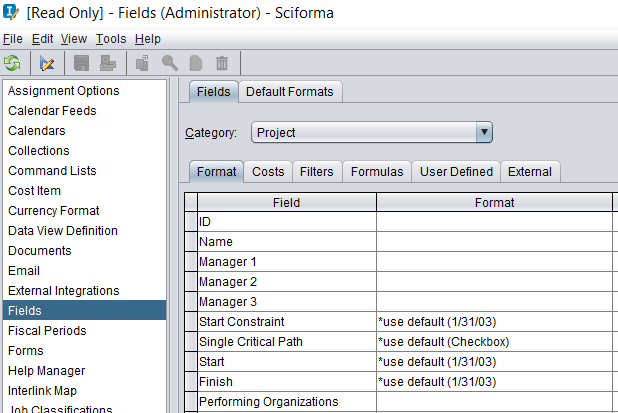
Configuration Import will not overwrite existing default choices. The field types included will be all basic (non DataView) Field types (except text, calendar, fiscal period, cost, costrate, cost per unit, unit, and unit rate).
The default default format will be the existing product default format for the particular field type (e.g. "1/31/03" for date type). These defaults can still be overwritten per Field by selecting a new format/timescale/precision.
As a reminder, the display of Actual Effort data in the Timesheet is controlled by Actual Effort's format (if left as default the default format is honored). The Time Tracking Units are only used for rounding in how the data is stored.
Core Product Corrected Issues
Commands
#42604
The link command was not working properly if the target workspace is the same (current) workspace. This has been fixed
Config Utility / Installation
#42581
A NullPointerException occurred during upgrade for conversion processing of “Correcting chart label formats”. This has now been fixed.
Designer
#42471
Some incoming data was lost due to improper internal mapping of the internal IDs, this happened during CFG import. This has been fixed.
Field Edits (Field Types)
#42393
A “Data format error” occured after editing certain "form cells" without an associated label (on the top, bottom, left, or right). This happened even when the data entered was valid. This has been fixed.
#42391
The workspace was not refreshing properly after entering a value into a "form cell" (wherein the “form cell” has no associated label on the top, bottom, left or right). This has been fixed.
Localization
#42233
The “Super User” built-in User Role was not translated into the proper language when it appeared in a UDF. This occurred when a user logged in using a different language than English. This has been fixed.
Object Edits (Data Categories)
#42613
An ArrayOutOfBounds exception was occasionally occurring when users were accessing workspaces whose components contained one or more fields (with an Overwrite). This would only appear when more than one user was accessing a workspace or workspaces involving the same field, and only if the timing was right. This has been fixed.
Performance
#42458
A large number of database connections were being used to update many sets of cached permissions all at once. This has been fixed so that the number of simultaneous cached permissions save actions was limited to 30.
#42360
The transaction management library attempted to recover the associated transactions for 24 hours, even after a server restart. This happened after a database error and caused the log file to be filled with many messages.
The failed transaction messages time frame has been reduced to one hour but could possibly extend to more than one hour as the Atomikos library does not immediately recognize some failed transactions as “orphaned”. This issue could be resolved by a server restart. This has been fixed.
UI Blocks
#42572
The Hierarchical reports that displayed the same item (tasks, resources, etc.) on multiple rows may have the wrong data on some of those rows or on rows that were indented beneath those rows (in the Gantt workspace). This has been fixed.
#41845
The Selector refreshes incorrectly wherein several rows were displayed as a blank or as a check-box with no label, when there were more than 200 Organizations and several level-one Organizations have been collapsed. This has been fixed.
Default Configuration Enhancements
Project*
#MW-4372
In the Project* Scheduler workspace, Planner tab, Task Details view mode, when multiple projects are selected, the Gantt spreadsheet now displays an additional column with the project's Name.
#MW-4360
In the Project* Scheduler workspace, Roadmap tab, Phases & Gates view mode, Charts section, the Roadmap chart now displays the Phases and Gates in chronological order.
#MW-4052
In the Project* Dashboards workspace, a new “Deliverable Supervision” report is now available. It is meant to help Managers keep control over their Deliverables and their completion. More specifically, it offers the following views:
- The Overview view mode provides graphic visualizations of the key Deliverable statistics.
- The Deliverables view mode provides a spreadsheet listing the Deliverables and optionally their Actions with the ability to zoom within a specific period of time.
- The Estimated vs Completed view mode shows a S-Curve like view of the Deliverables, their Estimated date and their completion.
#MW-3965
In the Project* Dashboards workspace, when using the Report Launcher feature, Report Details view, it is now possible to launch a Report in a new, separate browser tab upon clicking on the “Launch in New Tab” button available in the upper right corner for the view.
Note: This enhancement has also been provided for the Portfolio and Resource Report Launchers.
#MW-3921
In the Idea Center workspace, a new “Idea Analytics” ( ) view mode has been added. It offers the following sub-tabs:
- Key Attributes: Spreadsheet listing all the Ideas of the selected Folder with their main attributes
- Full Report: Print-friendly view to print out Idea cards
- Indicator Matrix: Matrix showing Ideas (rows) and their Indicator values (columns)
Portfolio
#MW-4438
The Portfolio Ranking workspace has been optimized for better performance.
#MW-4206
In the Portfolio Work Management workspace, Project Monitoring tab, a new filter is available to only display projects with Work Items that are flagged.
Work Management
#MW-4402
The Work Item dialog boxes have been enhanced for all the Work Item categories; from now on, the Definition section will be scrollable.
Note: The Backlog Item dialog box has been updated as well.
#MW-4057
In the Project* Work Management workspace, Work Items tab, Work Items full screen view, a new “Time Frame” filtering option has been added to the Filters left panel, allowing the user to only display Work Items whose Estimated Date falls in a specific Time Frame (Past Month, Current Month, or Next Month).
Note: The same addition has been provided in the Risks tab, Risks full screen view.
Resource
#MW-4100
In the Resource Validation workspace, Timesheets tab, Overview view mode, the Resource Manager has now the ability to Submit a Timesheet whose Status is “Working” or “Rework”.
Note: The Details column has been removed. To drill-down to the Details view mode, the user can now click on a Resource's Name.
Execution
#MW-4351
In the Timesheet workspace, the “Show Parent” display option is now off by default.
Administration
#MW-4474
The Gantt Filters dialog box and side panel Custom sections have been enhanced to become more overwrite-friendly. The following modifications have been provided:
- New placeholders (formulas, command lists) so that all the features (Reset filters, section activation) can be overwrite-friendly
- Styling adjustments, to be in sync with the current Design
Note: Similar modifications have been provided to the Portfolio workspaces Filters dialog box as well.
#MW-4214
In the Corporate Data workspace, Resources, Users, and Cost Items tabs, the “New” ( ) commands have been enhanced to be overwrite-friendly.
#MW-4115
In the System Settings workspace, Resource Settings folder, Global Options tab, a new “Timesheet Retrieval Time Frame” option has been added, allowing the Administrator to define how far in the past (in days) the Submitted Timesheets are retrieved in the Organization Center workspace, Overview tab.
#MW-4101
In the System Settings workspace, Project Settings folder, Global Options tab, Gantt Preferences sub-tab, each Custom Gantt Preference can now be Enabled for User Roles.
#MW-3966
In the Corporate Data workspace, Resources tab, Resource Identification dialog box, the user can now reset the User Role of an Inactive Resource to “No Rights” by clicking on the dedicated button ( ). In addition, the “Reset User Roles from Inactive Resources” command is available upon clicking on the main toolbar’s More (
 ) button as soon as at least one Inactive Resource has been selected in the spreadsheet.
#MW-3458
In the System Data workspace, Custom Reports tab, upon activating the “Use Time Distribution” option for a specific Custom Report, the Administrator is now able to set default values for the following fields: Start Date, Intervals, and Number of Intervals.
Default Configuration Corrected Issues
Project*
#MW-4532
In the Project* Dashboards workspace, Project Dashboard report, Risks section, Risks with a “High” Risk Level did not have the background color as they should have. This issue has been fixed.
#MW-4519
In the Project* Brief dialog box, Resources folder, the End Date indicated for each Resource was showing the Start date of their latest Assignment instead of the Finish date. This issue has been fixed.
#MW-4486
In the Project* Center workspace, Connections tab, when the Idea card Type name was too long, an unwanted scrollbar was displayed. This issue has been fixed.
#MW-4476
In the Project* Scheduler workspace, Planner tab, when fulfilling Generic Resources from the Gantt toolbar command, if the selected Tasks had other assignments before the fulfillment, these assignments could be wrongly deleted during the process. This issue has been fixed.
#MW-4472
In the Project* Scheduler workspace, Status Reports tab, in the Full Report popup, Basic Information section, Gate data could be displayed instead of the selected Project data. This issue has been fixed.
#MW-4453
In the Project* Scheduler workspace, Agile tab, Full Backlog full screen view, when selecting multiple Backlog Items, then clicking on the “Move” ( ) command and selecting the “Move Project” option, only the last selected Backlog Item was moved to the selected project. This issue has been fixed.
#MW-4444
In the Project* Finance workspace, Costs tab, Overview view mode, upon activating the “Cost Centers” ( ) display option, the “Direct Budget” data were also displayed in the “No Budget” section of the spreadsheet. This issue has been fixed.
#MW-4443
In the Project* Finance workspace, Costs tab, Overview view mode, upon activating the “Cost Centers” ( ) display option, the costs by Cost Center were not retrieved properly. This issue has been fixed.
#MW-4442
In the Project Resources workspace, Project Allocations tab, if the allocations were set in FTE, after capturing snapshots, the data were not saved properly. This issue has been fixed.
#MW-4431
In the Project* Scheduler workspace, Billing tab, Purchase Order view mode, it was impossible to create a new purchase order if the project did not have any yet. This issue has been fixed.
#MW-4419
In the Project* Scheduler workspace, Resources tab, Resource Utilization Overview view mode, the Labor Assignments at the lowest level were not sorted correctly. This issue has been fixed.
#MW-4404
In the Project* Scheduler workspace, Tracking tab, when the Time Navigation toolbar “Intervals” option was empty, the spreadsheet was disrupted. This issue has been fixed.
Note: From now on, if the “Intervals” option is empty, the values will be displayed as if the Month interval was selected; similarly, if the Number of Intervals is empty (as available in the Cost Items tab for example), it will be treated as 6 number of intervals.
#MW-4388
In the Project* Scheduler workspace, Tracking tab, Detailed Approval view mode, the view was not reloaded when using the “Approve & Apply” ( ) command. This issue has been fixed.
#MW-4366
In the Project* Scheduler workspace, Planner tab, Scheduler view mode, Work Objects tab of the Gantt side panel, when creating a Work Object while selecting a Task, then clicking on the “Done & New” button of Work Item dialog box, the Work Item created next was no longer related to the selected Task. This issue has been fixed.
#MW-4302
In the Project* Finance workspace, Budget tab, Details view mode, when clicking on the “Update from Forecast” command, the Forecast entries that were not related to a Cost Center (if the chosen pivot was “Cost Center”) were not created. This issue has been fixed; from now on, ProjectAdvantage will automatically create a new row in the spreadsheet with an empty Cost Center.
#MW-4256
In the Project* Work Management workspace, Dashboards full screen view, Activity Stream tab, there was no indication that there was no entry for the last seven days (which is the default time period for this view). This issue has been fixed; a new empty state has been provided.
#MW-4211
In the Project* Center workspace, Definition tab, Key Facts section, the Workflow State name was not readable when too long. This issue has been fixed.
#MW-3940
In the Project* Scheduler workspace, Tracking tab, when a Task had multiple Timesheet assignments, some issues could occur upon applying the timesheets. This issue has been fixed.
#MW-3795
In the Project* Scheduler workspace, Planner tab, Scheduler view mode, Gantt side panel, Dependencies tab, it was not possible to synchronize the dependency if the source project Start date fell before the Start Constraint of the selected project. This issue has been fixed.
Resource
#MW-4433
In the Resource Dashboards workspace, Resource Utilization report, the chart's “Available Effort” data series did not respect the option selected in the “Display Resources” field. This issue has been fixed.
#MW-4429
In the Resource Dashboards workspace, Resource Utilization report, when the “Group by” ( ) display option is set to “Organization”, the Soft Assignments header displayed the name of the Job Classification instead of the Organization. This issue has been fixed.
#MW-4427
In the Resource Allocations workspace, Allocation Requests tab, Grid view mode, when the “Show Allocations” display option is activated, clicking on a Resource Gear ( ) icon and then selecting the “Open Resource Brief” command did not display the Resource Brief dialog box as it was supposed to. This issue has been fixed.
#MW-3462
In the Resource Dashboards workspace, Resource Utilization report, when using the “Resources” filtering option (available in the Filters popup), Soft Assignments were taken into account in the “Total” row while they should not have. This issue has been fixed.
Portfolio
#MW-4495
In the Portfolio Center workspace, Budget tab, Portfolio Budget view mode, when setting the “Project Data” display option to “Total Cost/Effort”, Projects with Total Cost/Effort associated with a Portfolio Cost Center but with no corresponding budget were not displayed. This issue has been fixed.
#MW-4483
In the Portfolio Dashboards workspace, Phases & Gates report, the Legend (accessible upon clicking on the bottom right corner button ( )) was not always relevant to the selected view mode. This issue has been fixed.
#MW-4482
In the Portfolio Dashboards workspace, Milestone Trend Analysis report, the “Start” and “Finish” date fields were not correctly taken into account when the “Custom” option of the Time Navigation toolbar was activated. This issue has been fixed.
#MW-4480
In the Portfolio Dashboards workspace, Status Overview report, Filters popup, the Cost indicator was not displayed properly. This issue has been fixed.
#MW-4479
In the Portfolio Dashboards workspace, Filters popup, the size of the popup up was too narrow to be properly displayed in small resolutions. This issue has been fixed.
#MW-4478
In the Portfolio Dashboards workspace, Status Overview report, Filters popup, the Indicator Status section could display multiple unwanted scrollbars when all the chips were activated. This issue has been fixed.
#MW-4424
In the Portfolio Simulation workspace, Compare Projects dialog box (accessible upon clicking on the Review Scenario Projects ( ) button, available before playing a scenario), the Charts section was not updated immediately after editing a project. This issue has been fixed.
#MW-4421
In the Portfolio Simulation workspace, when running a simulation on multiple Portfolio Folders, the Budget line of the “Budget” chart was not retrieved correctly. This issue has been fixed.
#MW-4399
In the Portfolio Dashboards workspace, Controlling report, Earned Value view mode, the ACWP and BCWP were not aligned as the Earned Value did not include Transactions. Also, the variance indicators were incorrect. This issue has been fixed.
#MW-4369
In the Portfolio Simulation workspace, when a scenario did not include any project, an error occurred when hovering the Gantt chart's header. This issue has been fixed.
Work Management
#MW-4456
In the Risk dialog box, Snapshot History popup (accessible upon clicking on the “Manage Snapshot” button), the “Quality Impact” field displayed the value of the “Cost Impact” field. This issue has been fixed.
#MW-4455
In the Risk dialog box, the “Probability” field was not wide enough for the German values. This issue has been fixed.
#MW-4441
In the Project* Work Management workspace, values entered in the Estimated Effort and Remaining Effort fields of new Change Requests and Issues were not correctly stored in the database. This issue has been fixed.
#MW-4440
In the Project* Work Management workspace, Work Items tab, Homepage view, when accessing the Change Requests full screen view (by clicking on the “Open” label of the Change Request category card), and then closing the full-screen view by clicking on the Close ( ) icon located in the top right corner, the view switched the Execution Work Items workspace. This issue has been fixed.
#MW-4439
In the Work Item dialog box, Connections section, when creating a Backlog Item by using the “Create & Connect” button, the Backlog Item was not created correctly. This issue has been fixed.
#MW-4428
In the Work Items workspace, the “Change Request Type”, “Deliverable Type”, and “Issue Type” filters, as well as the “Workflow State” filters of those objects, did not work. This issue has been fixed.
#MW-4426
After upgrading to 7.1x, the Risk Level values shown in the Risks section of the Status Reports for Risks created before the upgrade were not correct. This issue has been fixed.
Administration
#MW-4508
The placeholders for Custom Filters in the Portfolio, Project, and Resource Report Launchers were not properly linked with the Reset Custom Filters placeholder. This issue has been fixed.
Note: In addition, the Custom Reset Filters command lists have been plugged behind the “Reset Filters” buttons for a more overwrite-friendly integration.
#MW-4469
In the System Settings workspace, General Settings folder, Meta Settings tab, when deactivating the “Activate Work Management” setting, some Work Objects views and elements were still displayed throughout the solution. This issue has been fixed.
#MW-4468
In the System Settings workspace, Project Settings folder, Display Preferences tab, Project Scheduler - Other section, the “Enable Agile Tracking” setting was still available when the “Enable Agile Legacy” setting (available in the General Settings folder, Meta Settings tab) was deactivated. This issue has been fixed.
#MW-4467
In the Project* Finance workspace, Costs tab, Key Facts section, the “Transactions” tile was available when the “Activate Transactions” meta setting was disabled. This issue has been fixed.
Note: The aforementioned setting is available in the System Settings workspace, General Settings folder, Meta Settings tab.
#MW-4435
In the System Data workspace, Portfolio Folders tab, it was possible to create a Portfolio Folder with an empty name, which is not allowed in the Designer. This issue has been fixed.
#MW-4432
In the System Settings workspace, Project Settings folder, Display Preferences tab, Project Scheduler - Right Panel section, the “Set Right Panel Default Tab” options were not up-to-date with the current tabs available in the Task side panel of the Project* Scheduler workspace, Planner tab, Scheduler view mode. This issue has been fixed.
#MW-4412
In the Corporate Dashboards workspace, User Statistics tab, Users by User Roles pie chart, the “No Rights” User Role was not displayed where it should have, leaving a blank label instead. This issue has been fixed.
#MW-4407
In the System Settings workspace, Project Settings folder, Global Options tab, Work Package Contract section, when deactivating the “Enable Work Package Contract” setting, Work Package contract information was still available throughout the solution. This issue has been fixed.
#MW-4393
In the System Data workspace, Job Classifications tab, none of the commands had an immediate effect on the spreadsheet; a reload was needed. This issue has been fixed.
#MW-4339
In the System Data workspace, Cost Centers tab, the spreadsheet was conditioned by the “Set Dashboard Details Max. Records” setting, which made it difficult for the Administrator to maintain the list of Cost Centers. This issue has been fixed.
Note: The aforementioned setting is available in the System Settings workspace, General Settings folder, Display Controls tab.