



2025.09
This document describes the enhancements, corrected issues, and new features that have been implemented in ProjectAdvantage 2025.09, both in the Core product and in the ProjectAdvantage Default Configuration, as well as for the Integrations.
ProjectAdvantage 2025.09 is a maintenance release of ProjectAdvantage 2025.
In the Core product, 6 enhancements have been implemented and 21 issues have been fixed.
In the ProjectAdvantage Default Configuration, 2 enhancements have been provided and 19 issues have been fixed.
For Integrations, 1 enhancement has been implemented and 5 issues have been fixed.
In order to access the different sections, please click on the following links:
- Important Reminders for upgrade
- Core Product Enhancements
- Core Product Corrected Issues
- Default Configuration Enhancements
- Default Configuration Corrected Issues
- Integrations Enhancements
- Integrations Corrected Issues
- System Requirements
Important Reminders for upgrade
- To improve the performance of views displaying the Health Score of multiple projects, we are now using a Health Score that is pre-calculated upon publishing a project as opposed to on the fly. Therefore, upon upgrading to 2021.03 (or higher), please make sure you run once the following Scheduled Job to initialize the project Health Score values: Initialize Project Static Health Score.
Important: For systems with an overwritten Publish command, please make sure to add the new dedicated Command List for the Health Score pre-calculation upon publishing a project: “Project - Publish Project - Continue - Capture Health Score”.
- From the 2023.01 version, to support the implementation of the new Vantage navigation and modules, the Project Dashboards workspace should be added again in the User Roles section of the Designer as the Dashboards workspace doesn't exist anymore.
- In order to complete the upgrade to newer ProjectAdvantage versions, administrators must update the “Popup” column with the correct Forms in the Designer, Search view, as follows:
- “Global Actions” Category → Popup - Action Card (Briefs)
- “Global Change Requests” Category → Popup - Change Request Card (Briefs)
- “Global Deliverables” Category → Popup - Deliverable Card (Briefs)
- “Global Issues” Category → Popup - Issue Card (Briefs)
- “Global Risks” Category → Popup - Risk Card (Briefs)
- “Idea” Category → Popup - Idea Card (Briefs)
Core Product Enhancements
Data Visualization
#SCI-7105 - New loading icon when saving changes in settings
In the HTML5 Client, when users apply changes in the settings (for instance when selecting a different default language), then click on the “Save all settings” button, a loading icon is now displayed and interactions are disabled until the changes are saved and the page refreshes.

#SCI-6490 - Ability to select the primary tab to display when opening a popup
In the Designer, Forms view, Edit Popup dialog box, Form tab, an option is now available allowing to select the primary tab displayed when opening a popup.

GenAI
#AI-131 - New GenAI option in Create New popup
In the Create New popup, when enabled, a new GenAI option is available to allow users to generate a new project and tasks plan using GenAI to suggest tasks that should be completed for their projects.

Upon selecting the GenAI option, the user will need to fill in the Project Content field, which allows defining the content of the project. This field is mandatory.

Once the Project Content field is filled in, the user can create the project by clicking on the Create Project button located in the lower right corner of the Create New popup.
Clicking on the Cancel button aborts the project creation process and closes the popup.
Note: The GenAI option is available in the Create New popup only when the “Enable Creation from GenAI” setting, located in the System Settings workspace, Project Settings folder, Project Creation Options tab, Project Mode section, is enabled.

Important: If the aforementioned setting is not available, please reach out to your Account Manager.
#AI-49 - New GenAI option to create Risks
In the Project Card, Risks tab, when enabled, a new Identify Risks button is available in the Project Information panel, Project Risks section, to allow users to use GenAI to generate risks for their projects.

Upon clicking on the Identify Risks button, the AI Generated Risks section is displayed in the upper part of the Risks section.

The AI Generated Risks section can be collapsed or expanded using the arrows located on the top right-hand side. For each risk, the following attributes are displayed: Name, and Description.
Clicking on the Create Risk button allows the user to create the risk. Once created, the risk is displayed in the form of a Risk card.
Clicking on the Delete button deletes the AI generated risk.

Note: The Identify Risks button is available in the Risks tab, Project Information panel, Project Risks section only when the “Enable Risks Creation from GenAI” setting, located in the System Settings workspace, Work Management Settings folder, Risks tab, Risks section, is enabled.

Important: If the aforementioned setting is not available, please reach out to your Account Manager.
Other Tasks
#SCI-7133 - Improved synchronization with Microsoft Projects
The synchronization with Microsoft Projects has been improved by leveraging the GUID (Global Unique Identifier) from the MS Project XML. This identifier is now used as the “exchangeUID” during updates, ensuring a more accurate mapping of tasks between systems. This enhancement reduces the risk of mismatches, improves reliability in cross-system updates, and provides a smoother integration experience.
Self-Service Reports
#SCI-7110 - Value aggregation options removed for Date fields
In the Reports workspace, when using the Group by functionality, if the user tries to do a value aggregation on date fields, the “Average”, “Count” and “Sum” options have been removed as they make no sense in this context.

Core Product Corrected Issues
Administration - Corporate Data
#SCI-7006
In the Corporate Data workspace, Resources tab, in some scenarios, “NaN” was displayed instead of the actual value for some resources for the Actual Cost field This issue has been fixed.
#SCI-6761
In the Corporate Data workspace, Resources tab, Resource Identification dialog box, when the “Email Address 1”, “Email Address 2”, and “Email Address 3” fields are filled in, the application incorrectly sends notifications using the logged-in user's email address instead of the designated Administrator email address configured in the system designer. This issue has been fixed; from now on, all system-generated emails will now be sent exclusively from the designated administrator email address (e.g., noreply@sciforma.com) instead of individual user email addresses.
#SCI-3992
After a reorganization, in the Corporate Data workspace, Resources tab, an error message was sometimes displayed when users were clicking on the Gear ( ) icon to open the Resource Identification dialog box. This issue has been fixed.
Built-in Workspaces - Timesheet
#SCI-5345
In the Timesheet (built-in) workspace, when removing tasks from the Tasks panel, users were not able to add them again when the “Enable Timesheet Add Assignment” setting was disabled, even if they were assigned to them and they had entered some planned effort. This issue has been fixed; the “Remove” option is not available anymore when the “Enable Timesheet Add Assignment” setting is disabled.
Note: The aforementioned setting is located in the System Settings workspace, Project Settings folder, Time Tracking Options tab, Timesheet Options section.
Data Visualization
#SCI-6874
In the HTML5 Client, in some scenarios, the Baseline Costs for projects and tasks were differing in summary and distributed views. This issue has been fixed.
Designer
#SCI-7171
In the Designer, Command Lists view, an error message was sometimes displayed when users were editing the “Reports - New Report - Create - Continue” command. This issue has been fixed.
#SCI-4835
When users were applying a reorganization in the Designer, Organizations view, the changes were not visible in the Corporate Data workspace, Resources tab, Resource Identification dialog box, History section. This issue has been fixed.
Other tasks
#SCI-7134
In the HTML5 Client, when creating a project from an XML file, the start date defined in the XML was not respected. This issue has been fixed.
#SCI-6499
Due to a technical limitation on the infrastructure, a restriction has been added to limit the names of attachment files to 150 characters.
Performance
#SCI-6951
In the HTML5 Client, some performance issues could be observed when navigating to the Projects Center or the Actions Center workspaces. This issue has been fixed.
#SCI-6741
In some scenarios, databases were inexplicably growing and performance issues could be observed in certain customer environments. This issue has been fixed.
#SCI-4488
In the HTML5 Client, when the user was logging in after the environment had been woken up, some loading performance issues could be observed while navigating to the Resource Dashboards workspace, Workload theme, Resource Utilization report. This issue has been fixed.
Projects - Projects Center
#SCI-7700 (*Added on 11/28/2025)
Following an upgrade to a newer version, the actual effort displayed in the Projects Center workspace, Project Card, Gantt tab, Labor Assignment dialog box, Cost/Effort section, was differing from the actual effort displayed in the previous version, even when the “Actuals from Tracking Source Only“ was activated. This issue has been fixed.
Note: The aforementioned setting is located in the Projects Center workspace, Project Card, Administration tab, Work Features section, Tracking Advanced Attributes popup.
#SCI-7219
In production environments, in some scenarios, users were unable to update project data via the API. This issue has been fixed.
#SCI-6831
In the Projects Center workspace, Project Card, Gantt tab, in some scenarios, an error message was displayed when users were adding the Cost Center column in the Gantt spreadsheet, then were performing some actions, such as insert a template, assign resources from the Resource Panel, or clicking on the Gear ( ) icon to access commands. This issue has been fixed.
Projects Legacy - Work
#SCI-4362
In the Work workspace, Gantt tab, Gantt spreadsheet, it was not possible to modify the names of tasks by double-clicking in the corresponding cells using the Firefox browser. This issue has been fixed.
Resource - Resource Validation
#SCI-7097
In the Resource Validation workspace, Timesheets tab, Timesheet Details full screen view, when selecting the “Specific Month” pivot, the interval was incorrectly set and displayed. This issue has been fixed.
#SCI-7051
In the Resource Validation workspace, Timesheets tab, when a Custom time frame was selected, the Edit ( ) icon available after the date range was not displayed anymore, preventing users from editing the selected custom range. This issue has been fixed.
#SCI-7037
In the Resource Validation workspace, Timesheets tab, when the user was selecting a Custom time frame, the start date displayed was not matching the date selected in the Custom time frame selection popup. This issue has been fixed.
REST API
#SCI-7165
In the REST API, a 400 "Null" error status was returned on the first attempt in the response message when users were retrieving data from the Project Die Cost Category. It applied for UDF if the cost was wrongly stored with the currency symbol instead of currency code. This issue has been fixed.
#SCI-3273
In the REST API, the “previous_sibling_id” and “next_sibling_id” parameters were incorrectly ignored, causing new Organization, Job Classification, Portfolio and skills to be added at the end of the list instead of their correct position. This issue has been fixed.
Default Configuration Enhancements
Resource - Resource Allocations
#MIL-5668 - Activity logs on Ideas & Allocations
The Activity Logs feature has been rolled out for Ideas with the implementation of a new Activity option available under the More ( ) button in the upper section of the Idea Card.

When selecting the Activity option, the Activity dialog box is displayed, in which users are able to view a detailed history of the modifications applied to an idea.

Note: The aforementioned setting is located in the System Settings workspace, General Settings folder, General Options tab, Activity Options section.

In addition, in the Projects Center workspace, Resources tab, Project Allocations sub-tab, Project Allocations full screen view, Allocations tab, Resource Details sub-tab, Allocation Details dialog box, when the “Enable Allocations Activity” setting is enabled, a More ( ) button is displayed in the upper right corner, allowing users to access the Activity logs of the resource allocation.

Note: The aforementioned setting is located in the System Settings workspace, General Settings folder, General Options tab, Activity Options section.

Styling
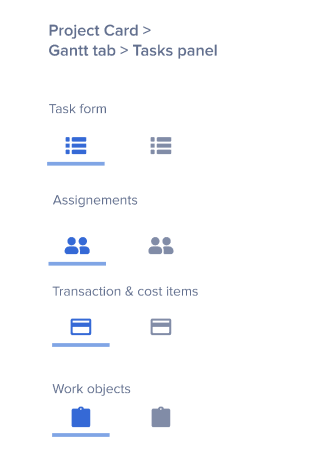
#MIL-5662 - New icons for Tasks panel & View Modes
In the HTML5 Client, enhancements have been made to the Tasks panel and View Modes icons to deliver a more visually appealing and intuitive user experience in ProjectAdvantage, as illustrated with the examples below.

Default Configuration Corrected Issues
Idea/Business Case
#MIL-5621
In the Ideas Center workspace, Idea Card, when the user was changing the Workflow State from "Submitted" to "Connected", then was cancelling the operation, the Workflow State was still incorrectly displayed as "Connected". This issue has been fixed.
Localization
#MIL-5672
In the Resource Forecast workspace, for requests whose workflow state is "To be committed", the Fulfill request, Commit, and To rework commands were incorrectly not displayed when connected in German. This issue has been fixed.
Portal - Ideas Center
#MIL-5679
In the Ideas Center workspace, Idea Card, Workflow Information dialog box, the “Comments” column was not properly displayed. This issue has been fixed.
#MIL-5678
In the Ideas Center workspace, Idea Card, when the user was changing the Workflow State from "New" to "Duplicated" or from "Submitted" to any other Workflow State, there was no “Cancel” button to cancel the operation. This issue has been fixed.
Projects - Projects Center
#MIL-5683
In the Projects Center workspace, Project Card, Gantt tab, Resource Panel, all buttons were not displayed when the project was managed based on the "Performing Organization". This issue has been fixed.
#MIL-5671
In the Projects Center workspace, Project Card, Gantt tab, Task Card, Assignments tab, when connected in French, the “+ New Assignment” button was not properly displayed. This issue has been fixed.
#MIL-5665
In the Projects Center workspace, Project Card, Administration tab, the Administration sub-tab was missing when multiple projects were selected. This issue has been fixed.
#MIL-5610
In the Projects Center workspace, Project Card, Finance Tab, Cost Transactions, Work Packages, Forecast and Savings dialog boxes, the distributed Date header format was not correctly displayed when a custom fiscal period was selected. This issue has been fixed.
#MIL-5592
In the Projects Center workspace, Project Card, Resources tab, Project Allocations tab, Project Allocations full screen view, Allocations tab, My Allocated Resources sub-tab, Direct Allocations were incorrectly non editable in working versions of projects, while they could be edited in published versions. This issue has been fixed.
#MIL-5431
In the Projects Center workspace, Project Card, Dashboards tab, Finance theme, Budget report, upon activating the “Cost Centers” and the "As Defined" display options, data was incorrectly displayed in effort for Cost type cost centers. This issue has been fixed.
#MIL-5359
In the Projects Center workspace, Project Card, Finance Tab, Budget dialog box, when activating the "Show Total Cost/Effort" display option, the “Project Total Cost” summary row was not honoring the filters selected in the Filters popup. This issue has been fixed.
Projects Dashboards
#MIL-5632
In the Projects Dashboards workspace, the time frame selected in the Most frequently used options panel was not honored in the Allocations theme, Allocations vs Assignments and the Requests vs Allocations reports. This issue has been fixed.
Resource - Organization Center
#MIL-5693
In the Organization Center workspace, Cost Items List tab, New Cost Item popup, the Calendar name was not fully visible when a calendar with a long name was selected. This issue has been fixed.
Resource - Resource Dashboards
#MIL-5670
In the Resource Dashboards workspace, the “Managed By” filter was only filtering based on the Manager 1 instead of all Managers of the organizations. This issue has been fixed.
#MIL-5454
In the Resource Dashboards workspace, Workload theme, Organization Statistics report, Overview tab, when the “Hide Inactive Resources” switch button was activated in the Filters popup, the number of external resources displayed in the Key Facts section was incorrect and was not taking into account the selected filter. This issue has been fixed.
Resource - Resource Validation
#MIL-5708
In the Resource Validation workspace, when a Custom time frame was selected, the current dates were not retrieved when using the Edit ( ) icon to modify the custom period. This issue has been fixed.
#MIL-5680
In the Resource Validation workspace, Timesheets tab, Timesheet Details full screen view, when users were selecting a monthly pivot (for instance, “Current Month”), the zoom option was not displayed for languages other than English. This issue has been fixed.
#MIL-5630
In the Resource Validation workspace, Timesheets tab, Timesheet Details full screen view, when users were selecting a weekly pivot (for instance, “Current Week”), eight days were displayed instead of seven. This issue has been fixed.
#MIL-5603
In the Resource Validation workspace, when users were selecting the “Custom” pivot and selecting dates in the Custom time frame selection popup, the displayed Finish Date was incorrectly set one day prior to the selected one. This issue has been fixed.
Integrations Enhancements
#INT-2028 - New Legacy API endpoint to save Rich Text fields
A new legacy API has been created to allow the upload of embedded images with rich text into ProjectAdvantage, to help migrate rich text data for integrations.
Integrations Corrected Issues
REST API
#INT-2125
In the REST API, UDC patch requests on date fields were not accepting field names, but only aliases. This issue has been fixed.
#INT-2117
In the REST API, a 500 error status was returned in the response message when users were creating children tasks. This issue has been fixed.
#INT-2070
In the REST API, queries returned empty responses when string field values (such as Name Exposed) contained special characters (e.g., hyphens). This issue has been fixed. The filter logic now uses case-insensitive ILIKE matching, ensuring correct results across all string-based fields.
#INT-2056
In the Portfolio REST API, PATCH requests to update the "Finance Controllers" field returned a 500 error. This issue has been fixed. The mapping logic has been corrected to properly handle string-based lists (e.g., user arrays), ensuring PATCH updates work consistently for the "Finance Controllers" field and similar ones.
#INT-2002
In the REST API, a 500 error status was returned in the response message after users had created tasks related to parent tasks. This issue has been fixed.
System Requirements
There are frequent changes and additions to the set of specific versions of operating systems, application servers and database servers for which ProjectAdvantage has been tested and certified. Please contact our teams for the latest information in this area.
Note: Users' system clocks must be regularly and accurately synchronized with the internet.
Servers
- Application Server: Apache Tomcat 9 with Oracle Java 8 or OpenJDK
- Data Server: PostgreSQL 14, PostgreSQL16
HTML5 Clients
- Display resolution: 1366 x 768 (technical minimum), 1600 x 1050 (minimum recommended), 1920 x 1080 or higher (generally recommended).
- Minimum of 4GB RAM allocated (8GB recommended).
- Browser
- Microsoft Edge
- Google Chrome
- Mozilla Firefox
- Apple Safari
ProjectAdvantage Designer
- Recommended language: English
- Display resolution: 1366 x 768
- Minimum of 4GB RAM allocated
- Disk space: 200MB minimum available for ProjectAdvantage.
- Oracle Java 8 or OpenJDK 8
- Operating Systems:
- Windows 7, 8.1, 10 or 11
- Mac OS X Lion or newer
- Alpine Linux 3.16.1
REST API
- Supported language: English
Timesheets Mobile Application
- Being hosted by ProjectAdvantage
- Product version: 2022.08 and upper versions
Vantage platform
Users will need to enable third-party cookies to work within Vantage. For more information regarding third-party cookies, please refer to the “How to allow third-party cookies” documentation.
For customers who subscribed only to Plan
- Installation:
- POD 11 is required if hosted by ProjectAdvantage
- An Hydra server is required if on premise
- Product version: 2023.01 and upper versions
For customers who subscribed to Plan and Deliver
- Installation:
- POD 11 is required if hosted by ProjectAdvantage
- An Hydra server is required if on premise
- HPV2 activated on Deliver modules (activated by default for all new Deliver Clients after 2021 Q3)
- Product version: 2023.01 and upper versions
- Users will need to allow third-party cookies in their browser
Limitations
The data connector:
- Does not work in load balanced environments.
- Is not compatible with Cloud Scheduled Jobs.
- Is not compatible with dedicated API servers.
- Is not compatible with the Java API.