



2022.05
This document describes the enhancements, corrected issues, and new features that have been implemented in ProjectAdvantage 2022.05 both in the Core product and in the ProjectAdvantage Default Configuration.
ProjectAdvantage 2022.05 is a maintenance release of ProjectAdvantage 2022.
In the Core product, 8 enhancements have been implemented and 42 issues have been fixed.
In the ProjectAdvantage Default Configuration, 4 enhancements have been provided and 35 issues have been fixed.
In order to access the different sections, please click on the following links:
- Important Reminders for upgrade
- Core Product Enhancements
- Core Product Corrected Issues
- Default Configuration Enhancements
- Default Configuration Corrected Issues
- System Requirements
Important Reminders for upgrade
- Since 7.1q there is a new way of managing languages in ProjectAdvantage thanks to the Language Packs feature. As a result of this new feature, there is a change in the classpath used to launch API programs: we no longer have PSClient_xx.jar files for our translated language strings and now have new Language Pack jar files. So all PSClient_xx.jar files will now need to be replaced by the appropriate Language Packs. Please read carefully #41025 included in the Release Notes for ProjectAdvantage S7.1q.
- To improve the performance of views displaying the Health Score of multiple projects, we are now using a Health Score that is pre-calculated upon publishing a project as opposed to on the fly. Therefore, upon upgrading to 2021.03 (or higher), please make sure you run once the following Scheduled Job to initialize the project Health Score values: Initialize Project Static Health Score.
Important: For systems with an overwritten Publish command, please make sure to add the new dedicated Command List for the Health Score pre-calculation upon publishing a project: “Project - Publish Project - Continue - Capture Health Score”.
Core Product Enhancements
Data Visualization
#SCI-1073
In the Edit Event Source dialog box accessible from the Edit Calendar Block dialog box, there is now a new option [Current Resource Calendar] in the Filter Calendar list.
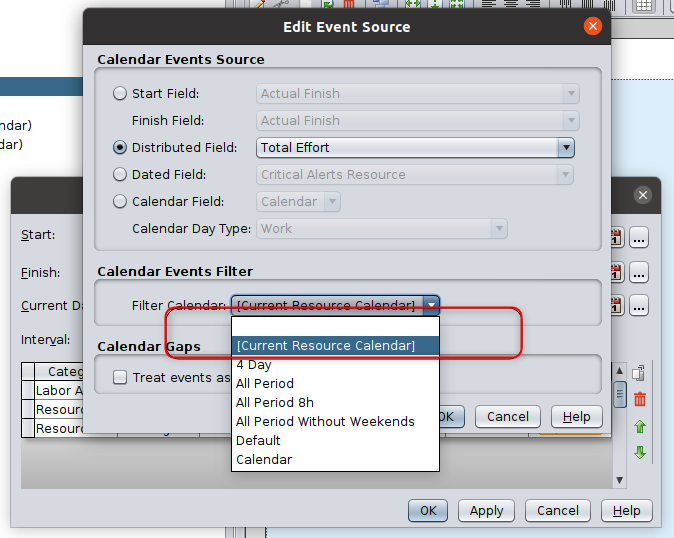
This [Current Resource Calendar] option calendar will take into account the Base calendar of the current resource that is defined in the Designer Calendars view and assigned to the Resource in the Corporate Data workspace > Resources tab, as well as all Calendar requests.
From now on, when rendering the calendar in the HTML5 client, the resource calendar filter currently associated with the logged in user will be factored and could be different from what has been configured in the Designer.
#SCI-1026
In Smart Grids, Duration and Effort fields could only be displayed in hours or days. This was due to other time scales not being implemented yet for the Smart Grid.
This issue has been fixed. Effort and Duration fields can be now displayed in seconds, minutes, hours, days, weeks, months,quarters, and years.
Commands
#SCI-895
Previously, when an action was going on (i.e. command list was executed), users were able to logout from the application without any warning. From now on, a warning message will be displayed allowing users to choose if they still want to sign out.
#SCI-259
Long-running commands caused a connection timeout and the command would not complete successfully. From now on, long-running commands use the connection at least once every 30 seconds, thus preventing a connection timeout.
REST API
#SCI-813
Added parent_id, previous_sibling_id, and next_sibling_id properties to tasks so the parent and sibling tasks can be manipulated with a POST or a PATCH.
For example, to add a new task as a sibling task after a task with InternalID "7881" the REST API request would look like:
{
"external_id": "new task",
"name": "new task name",
"next_sibling_id": "7881"
}
#SCI-593
The description of the get projects endpoint has been updated to note that only exposed fields can be requested.
#SCI-187
The currency code returned in ProjectAdvantage REST API did not respect ISO4217 currency format.
Only 2 characters projectadvantage code was returned instead of 3 characters (ISO4217). This issue has been fixed. From now on, the API endpoint will return an ISO4217 currency code.
Build
#SCI-1132
Data view records were being removed from the cache after 2 hours of inactivity. That time limit has now been changed to 8 hours.
Core Product Corrected Issues
Authentication
#SCI-1086
When users were trying to log in to the HTLM5 Client using SSO ADFS (Active Directory Federation Services) and SSO Google, an error message was displayed. This issue has been fixed.
#SCI-1018
In load balanced environments, there was an issue in SSO Login. This issue occurred while reading the session related data from the database. This issue has been fixed.
#SCI-889
SSO processing randomly encountered a java.lang.NullPointerException during the request setAttribute call. This issue has been fixed.
Commands
#SCI-1054
Users encountered the following error: "ClassCastException: com.sciforma.psnext.fieldengine.DummyField cannot be cast to com.sciforma.psnext.fieldengine.DefaultField" when executing certain commands. This was due to an invalid internal state unrelated to any particular command and has now been fixed.
#SCI-659
When moving a work package from one project to another, the performing organizations were not properly copied. This issue has been fixed.
#SCI-512
Under certain circumstances, an error was displayed when trying to create projects from XML files. This issue has been fixed.
Data Visualization
#SCI-1046
Under certain circumstances, cells that should have been editable were read-only instead. This happened on cells in a text block that also contained form cells. This issue has been fixed.
#SCI-1043
Running a REST API application could potentially temporarily corrupt project selectors in the HTML5 Client. This has been fixed.
#SCI-998
If users had selected US no decimal currency, an error was displayed when scrolling to the right of the Project Dashboards > Risks tab in the smart grid.
Smart Grids have known limitations for cost data and currencies. Indeed, they do not support custom formatted currencies.
The currency formatting for the smart grids is handled by GWT and accepts only ISO4217 currency code (3 digits). Using a custom projectadvantage 2 digits currency code would throw an error
This issue has been fixed. From now on, if "no decimal" format is selected, the decimal formatting won't be honored but the currency will be.
#SCI-992
Renaming a Workflow or a Workflow State (in the Designer) in a Workflow associated with a UDC (user defined category) caused UDC records to lose their association with said Workflow and/or said Workflow State. This issue has been fixed.
#SCI-904
Under certain circumstances, the work ranges defined in the Calendars view of the Designer were different from those displayed in the Calendar workspace. This was due to daylight saving in a particular time zone where DST was enabled. This issue has been fixed.
#SCI-867
Previously, the Group By function on Gantt/Grid header column was taking into account hierarchy. This issue has been fixed.
From now on,in the upper-right-hand hover menu ( ) for grids, there will be two new commands: "Honor Hierarchy" and "Ignore Hierarchy". At any given moment, only one of the two options will be available in the menu. These commands allow the user to control whether the grid honors the intrinsic hierarchy of the row object. For instance, tasks have an intrinsic hierarchy (based upon how the user has used the Indent and Outdent commands), but tasks also can be grouped (by using the "Group By" option in the column menu). A user may want to only show the group-by hierarchy without it being intermixed with the intrinsic hierarchy. If so, the user can select the "Ignore Hierarchy" command and then only the grouping hierarchy (if any) would be displayed. Obviously, selecting the "Honor Hierarchy" would result in the intrinsic hierarchy being displayed again.
#SCI-821
Under certain circumstances, “current values” of overwritten "yes/no" User Defined Fields were not taken into account. This issue has been fixed.
#SCI-730
Values in Line charts were incorrect because filters were not considered. This issue has been fixed.
Designer
#SCI-1294 (Added on 05/13/22)
After performing an "Install ProjectAdvantage Collection" it was possible that data view records would lose their "Workflow" and "Workflow State" values (the values would become blank). This has been fixed by no longer deleting Workflows during Collection updates (regardless of whether the Workflow is part of the new collection or not). This new approach ensures there will be no Workflow-related data loss.
#SCI-606
Under certain circumstances, modifying an email in the Designer Email view >Template Lists tab returned an error. This issue has been fixed.
#SCI-585
The Date column in the Time-phased Cost dialog box (accessed from the Organization.Cost field in the Organization view in the designer) honored the default Date format when displaying dates but did not honor that same format when dates were typed in (or pasted in a copy/paste operation). This caused valid date input to return an error. Additionally, if a Cost value was entered and that entry caused the currency code to change, then the numeric part of value was ignored. These issues have been fixed.
#SCI-528
In a pick-list, if an alias name of one item matched the non-alias name of a different item, then selecting one of those two items in a drop-down could result in the other item being selected. This issue has been fixed.
#SCI-501
If the "Unattached Patches" item in the Collections tree was selected when the user went into Edit mode, they would encounter a ClassCastException error. This issue has been fixed.
Domain Config
#SCI-1094
In rare circumstances a Data View definition had inconsistent internal data where the database table name didn't match the table names stored in the column definitions. It's not clear how this happened, but there is now a conversion step (during Create/Update tables) that fixes this situation.
#SCI-1023
When running a Create/Update table it was possible to encounter a ClassCastException that would prevent a successful update of the database. This only happened in rare cases where a field of type list was deleted from the system. This issue has been fixed.
Import/Export CFG
#SCI-935
Under certain circumstances, the “Exception occurred in PersistentObject.remoteSaveProcessor() while calling Insert for com.sciforma.psnext.setup.ChangedSolutionItem” error could be displayed when importing a patch. This issue has been fixed.
#SCI-763
Under certain circumstances, updating the Standard Configuration could take an endless time. This was due to a general potential concurrency bottleneck. This issue has been fixed.
#SCI-515
When a collection (or a patch) that contained a Workflow Overwrite was imported, the Workflow Overwrite seemed to be ignored because it was not present when the import was completed. This issue has been fixed.
Legacy API
#SCI-908
Text List field returned empty when retrieved by the getFieldValue method from the API. This issue has been fixed.
Object/Field Edits
#SCI-1007
In some cases, when a deliverable had an empty name, even if actions were not connected to this deliverable, they were incorrectly displayed as if. This issue has been fixed.
#SCI-1006
Editing a Portfolio Folder was taking too long (over 4 seconds for some customers). This was due to unnecessary project validation on the server (so more projects and bigger projects would cause the editing to get slower and slower). This issue has been fixed.
#SCI-676 (Modified on 05/19/22)
In some circumstances, users were unable to approve or submit timesheets. This issue has been fixed by installing the new Atomikos version - 5.0.9.
Note: After upgrading and stopping the server, any existing Atomikos transaction log file (e.g. tm_log.log) should be deleted before restarting.
Note: In addition, the following must be added to jta.properties if not automatically done in the update of the build: com.atomikos.icatch.serial_jta_transactions=false
Important notice: If your installation is on premise, be sure that this parameter is set.
Security
#SCI-939
ProjectAdvantage did not handle all errors properly. Some error messages contained sensitive information. This issue has been fixed by implementing customized error messages which do not reveal any information about the application.
#SCI-938
It seems that it was possible to access and perform actions on Web pages even if users were not authorized. This issue has been fixed. From now on, if there is any attempt to download the language pack plugin in any other format except ".js" and ".jar", an error page will be displayed.
REST API
#SCI-1280 (Added on 05/13/22)
If a user tried to use the REST API PUT /timesheets/{id}/statuses endpoint to set a timesheet status to rework or reviewed, then the operation would fail. This issue has been fixed.
#SCI-1214
When getting timesheet data via the REST API, the timesheet ids may have been incorrect, leading to errors when setting data when using MONTH interval. Timesheet assignment data may have been spread across incorrect days. This issue has been resolved. Timesheet ids have changed, but previously issued ids which worked correctly will still work correctly.
#SCI-1167
The critical path on a project was not being calculated as frequently as needed. This issue has been fixed. The critical path is now calculated when needed.
#SCI-1128
If a REST API consumer created a timesheet assignment via the POST endpoint, and also included setting distributed data such as actual_effort on days with daylight savings time, then the data would be set across multiple days. This issue has been fixed.
#SCI-952
The offset and limit parameters were not returning the expected number of records. They were applied on the queried results two times instead of one. This issue has been fixed.
#SCI-944
Error message when trying to get extra fields on projects list was not precise enough. This issue has been fixed by updating error messages.
#SCI-831
The Timesheets status was not being updated correctly. This issue has been fixed.
#SCI-810
When doing a POST or PATCH operation, setting reference fields using an internal id failed. This issue has been fixed. Now either the internal id or the string can be used to set a reference field.
#SCI-583
The default value for the domain_override field has been changed to null in the User-defined category definition.
#SCI-582
When retrieving User Defined Category records from the REST API, empty internal reference fields were also being returned. This issue has been fixed.
#SCI-563
The 'view_mode' query parameter has been changed to “non-mandatory” in the open-api spec for data-snapshot.
#SCI-398
When changing timesheet status using the REST API, if the timesheet start or finish dates were DST (Daylight Saving Time) times, then the distributed data were spilled into the following or previous days. This issue has been fixed.
Default Configuration Enhancements
Localization
#MIL-3465
In the Work workspace, Risks tab, Risk popup, due to French inconsistency (masculine and feminine genders) with the Severity and Time/Costs/Quality Impact picklists, new picklists have been created.
Project Scheduler
#MIL-3445
In the Work workspace, Gantt tab, Scheduler view mode, whether or not to display certain options and controls has been improved when projects are in read only.
It concerns:
- The Projects published versions,
- The Projects that are inactive,
- The Projects that have only Read access coming from Permissions.
Note: This aforementioned behavior has been also implemented in:
- The Work workspace, Task List tab
- The Work workspace, Gantt tab, Network view mode
- The Work workspace, Gantt tab, Theater view mode
#MIL-3403
In the Work workspace, Gantt tab, Scheduler view mode, the Assignment cards have been redesigned and enhanced in order to improve the loading performance.
#MIL-3385
The Outstanding Timesheets in the past feature has been added in the Work workspace, Tracking tab, By Tasks view mode. In the Expanded view, a total column has also been added.
Default Configuration Corrected Issues
Project Scheduler
#MIL-3399
In the Work workspace, Gantt tab, Scheduler view mode, when a user, with only Read access to a specific Project, wanted to convert a Task to a Work Package by using the Convert to Work Package command (available in the Gear pick list at the Task level), an error occurred. This issue has been fixed.
Note: A new behavior has been implemented so that the Task dialog box cannot be opened for certain projects. It concerns:
- The Projects published versions,
- The Projects that are inactive,
- The Projects that have only Read access coming from Permissions.
#MIL-3383
In the Work workspace, Gantt tab, Scheduler view mode, Task Details dialog box, Definition folder, the Project Manager was not able to edit the Lead/Lag columns in the Predecessors and Successors sections. This issue has been fixed.
#MIL-3353
In the Home Page workspace, Home tab, when a project had a specific ID named "NonProject", the two commands to deactivate the project were not displayed correctly. This issue has been fixed.
Note: The aforementioned behavior has been rolled out for the overall Project workspaces.
#MIL-3347
In the Home Page workspace, Home tab, after upgrading the ProjectAdvantage standard Default Configuration, the Health Score was corrupted. This issue has been fixed.
#MIL-3217
In the Home Page workspace, Home tab, all tags associated with Business Cases and assigned to tasks were not transferred to new Projects when Business Cases were transformed into Projects. This issue has been fixed.
Note: To support the legacy, the Administrator needs to run the following Scheduled Job: Project Update Tag Tasks. Only Active Projects and all Projects Working versions will be updated.
#MIL-3151
In the Work workspace, Gantt tab, Scheduler view mode, if several tasks were selected in the Gantt chart, then, when the Project Manager selected a Resource in the Assign Resources dialog box, the selected resource was not correctly displayed under the New Assignment section of the dialog box. This issue has been fixed.
Project Dashboards
#MIL-3439
In the Dashboards workspace, Deliverables theme, the three reports of this section were deactivated when the Actions setup was unchecked instead of Deliverables setup. This issue has been fixed.
Note: The Actions setup is located in the Administration workspace, Setup tab, Work Features section.
#MIL-3147
In the different Dashboards workspaces, if a custom report was launched in a workspace of a data category, launching another custom report from another data category and then going back to the first workspace displayed an empty report. This issue has been fixed.
#MIL-3119
In the different Dashboard workspaces, custom reports that were under a built-in theme might not display the corresponding theme tabs navigation toolbar once launched. This issue has been fixed.
Budget/Finance
#MIL-3468
In the Finance workspace, Dashboards full-screen view, Costs tab, the Cost data were not correctly distributed and fully displayed until the end of the distributed period. This issue has been fixed.
Note: The aforementioned issue has also been fixed for the Effort data.
#MIL-3247
In the Portfolio Center workspace, Budget tab, Budget Simulation full-screen view, in some specific cases, the "Reset" command was not working as expected. This issue has been fixed.
#MIL-3193
In the Finance workspace, Snapshot History popup, the Forecast field displayed only the Labor Forecast Cost instead of the Total Forecast cost which include transactions. This issue has been fixed.
Resource Assignments
#MIL-3334
In the Work workspace, Gantt tab, when using the "Fulfill Generic Resource" command available from the Gantt toolbar, the Resource list in the Fulfill Soft Assignment dialog box was not filtered based on the selected Generic Resources attributes. This issue has been fixed.
#MIL-3321
In the Work workspace, Gantt tab, Scheduler view mode, when using the "Fulfill Generic Resource" command available from the Gantt toolbar, sections were not correctly displayed as soon as the Project Manager had selected a Resource. This issue has been fixed.
#MIL-3311
In the Work workspace, Gantt tab, when selecting the Replace Resource command available in the Gantt toolbar, an error occurred when selecting a resource from the Matching Resources Remaining Capacity section in the Replace Resource popup. This issue has been fixed.
Resource Dashboards
#MIL-3322
In the Resource Dashboards workspace, the Working Days of the Overview dashboard available in the Time Tracking theme, had the wrong format. This issue has been fixed.
#MIL-3194
In the Resources workspace, Resources tab, the hard assignment Total effort which was computed at the resource level could be incorrect. This issue has been fixed.
#MIL-3070
In the Resource Dashboards workspace, Workload theme, Resource Utilization dashboard, the chart did not respond correctly when the user changed the value in the "Effort Values" display option field. This issue has been fixed.
Work Items
#MIL-3393
In the Work workspace, Gantt tab, when a work item full screen view was opened from the Gantt Task panel, the Action section was not available, even if the section was activated. This issue has been fixed.
#MIL-3382
When creating a new project from an existing project containing deliverables, all the actions linked from deliverables, and that had the same name in the database were imported. For example, if a deliverable had an empty name, all actions linked to a deliverable with an empty name, even from different projects, were also imported. This issue has been fixed.
#MIL-3341
In the Work workspace, Work Items tab, Work Item dialog box, when creating or connecting new objects successively, the buttons available in the bottom of the sections cards could be incorrect. This issue has been fixed.
Note: The fix has been extended to the following objects:
- Actions
- Deliverables
- Issues
- Change Requests
- Risks
- Backlog Items
#MIL-3291
In the Work Items workspace, Work Items full screen view for Deliverables, Change Requests, and Issues, it was sometimes possible that the Action section or that the button to activate the Actions section were not displayed depending on how the user reached the Work Items full screen view. This issue has been fixed.
Portfolio Simulation
#MIL-3240
In the Portfolio Simulation workspace, Analytics view mode, Workload sub-tab, the Total effort of the summarized row was not filtered based on the projects included in the scenario. This issue has been fixed.
#MIL-3138
In the Portfolio Simulation workspace, Simulation view mode, the Total Effort data were not displayed in the Workload chart. This issue has been fixed.
Portfolio Dashboards
#MIL-3391
In the Portfolio Dashboards workspace, Phases & Gates theme, Gantt dashboard, the date line displayed in the Gantt chart was not reliable because it was based on the "As of Date" instead of "Today’s" date. This issue has been fixed.
Execution
#MIL-3429
In the Timesheet workspace, if a labor assignment was completed before the end of the displayed period, the remaining effort calculated in the Planned row was not correct if Actual effort was entered after the planned finish date. This issue has been fixed.
#MIL-3387
In the Calendar workspace, when the "show assignments" option was turned on, the Total Effort of each project was not taking into account the resource calendar. This issue has been fixed.
#MIL-3328
In the Work workspace, Tracking tab, Timesheet Details full screen view, the Remaining Effort in the spreadsheet and in the popup information (when hovering the Remaining Effort data) for a specific task was not aligned. This issue has been fixed.
#MIL-2802
In the Work workspace, Tracking tab, the "Outstanding Timesheets in the past" alert could wrongly be displayed, and would also wrongly suggest time frames without any unapplied or unapproved timesheets. This issue has been fixed.
Dedicated Resources
#MIL-3397
In the Resources workspace, Dedicated Resources tab, when two browser tabs were opened and if the user added the Resource in the two tabs, then the system could add the selected Resource twice. This issue has been fixed.
Dependencies
#MIL-3003
In the Work workspace, Gantt tab, Task panel, Dependency tab, when a dependency mapping type was set to "Image", the Labor Total Effort and Total Cost fields under the Synchronization Needs section were not updated with the source data. This issue has been fixed.
Phases & Gates
#MIL-2967
In the Work workspace, Phases & Gates tab, Gate Status Reports full-screen view, the "Show Approved" filter was not available. This issue has been fixed.
Note: The "Show Approved" filter has also been added to the Work workspace, Phases & Gates tab, Phases/Gates view mode.
Resource Allocations
#MIL-3422
In the Resources workspace, Project Allocations tab, Project Allocations full screen view, Allocations tab, Resource Details sub-tab, the Add to Team button did not work properly when the Project Manager wanted to add the selected Resource into his Project's Team. This issue has been fixed.
#MIL-3204
In the Resources workspace, Project Allocations tab, Project Allocations full screen view, Requests tab, Requests Inbox sub-tab, in some cases when a new Request was created, an incorrect finish date could be displayed. This issue has been fixed.
Resource Management
#MIL-3157
In the Resources workspace, Resources tab, Grid view pivot, when Soft Assignment was selected for the Show Labor Assignments display option, the Grid was empty either with or without the Distribution. This issue has been fixed.
Note: The aforementioned issue has been fixed at the Work Package level.
Template
#MIL-3364
When creating a project from a template and activating the Import Setup option, some setups were not imported. This issue has been fixed.
System Requirements
There are frequent changes and additions to the set of specific versions of operating systems, application servers and database servers for which ProjectAdvantage has been tested and certified. Please contact our teams for the latest information in this area.
Servers
- Application Server: Apache Tomcat 8.5 with Oracle Java 8 or OpenJDK
- Data Server: PostgreSQL 10 to 12
HTML5 Clients
- Display resolution: 1366 x 768 (technical minimum), 1600 x 1050 (minimum recommended), 1920 x 1080 or higher (generally recommended).
- Minimum of 4GB RAM allocated (8GB recommended).
- Browser
- Microsoft Edge
- Microsoft Internet Explorer 10 or 11
- Google Chrome
- Mozilla Firefox
- Apple Safari
ProjectAdvantage Designer
- Display resolution: 1366 x 768
- Disk space: 200MB minimum available for ProjectAdvantage.
- Oracle Java 8 or OpenJDK 8
- Operating Systems:
- Windows 7, 8.1 or 10
- Mac OS X Lion or newer
- Linux