



2021.02
This document describes the enhancements, corrected issues, and new features that have been implemented in ProjectAdvantage 2021.02 in the Core product.
ProjectAdvantage 2021.02 is a maintenance release of ProjectAdvantage 2021.
In the Core product, 2 enhancements have been implemented and 10 issues have been fixed.
In order to access the different sections, please click on the following links:
Important Reminders for upgrade
- Since 7.1q there is a new way of managing languages in ProjectAdvantage thanks to the Language Packs feature. As a result of this new feature there is a change in the classpath used to launch API programs: we no longer have PSClient_xx.jar files for our translated language strings and now have new Language Pack jar files. So all PSClient_xx.jar files will now need to be replaced by the appropriate Language Packs. Please read carefully #41025 included in the Release Notes for ProjectAdvantage S7.1q.
- Starting from 2020.11, the Default Configuration comes with a significantly redesigned set of workspaces for Project Managers and other similar roles manipulating Project data. These new workspaces require preparation and change management before making them available to the end-users. We strongly recommend that you check out the dedicated Change Management document before upgrading to 2020.11 (and later) of the Default Configuration.
Core Product Enhancements
Field Edits (Field Types)
#43772
There is now an option for selectors to Collapse/Expand a row along with all of its children. This option is available via a Shift+Click. When hovering over the expand/collapse control, a new tooltip is displayed that points this out to the user.

#43771
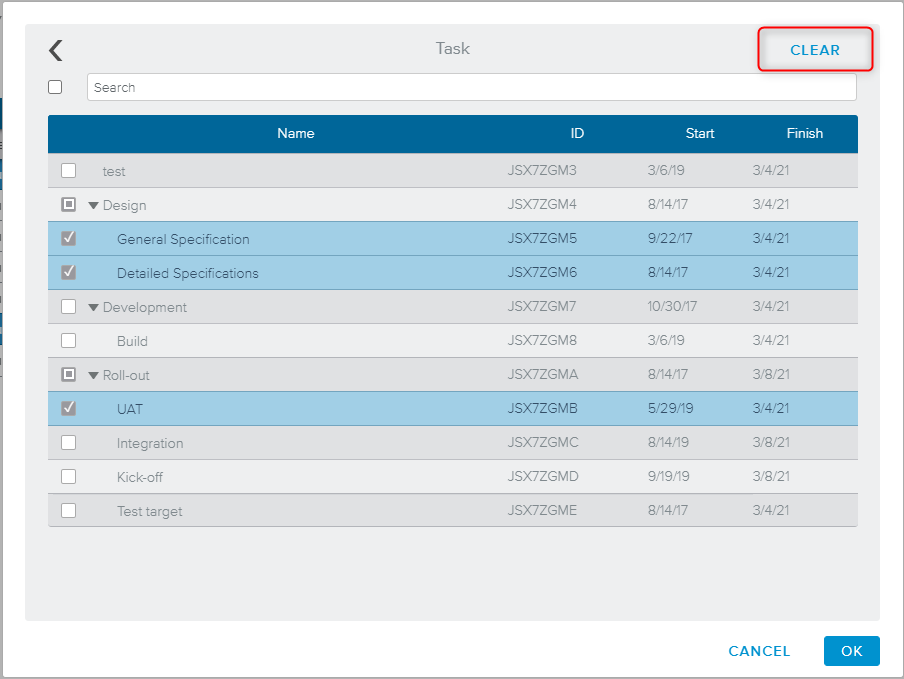
In a multi-select (with checkboxes) popup selector, the behavior when clicking on a row has been changed such that it will toggle the selection status of that row instead of selecting the item and closing the dialog. That previous behavior remains when the popup selector is single select. In addition, when on the last level (as in, a Project -> Task selector, the last level would be the task selector), instead of an OK button in the top right, there is now a CLEAR button.
For selectors defined in the Designer (as opposed to built-in selectors for fields of a category type like Task), there is now an option called "Add to selection on click" that allows the form designer to specify which behavior they would like when clicking on a row. If this option is enabled, then clicking the row will simply toggle selection status for that row like clicking on the checkbox would. This option is disabled by default.
Core Product Corrected Issues
Built-in HTML5 Client
#43744
If a new domain was added with a mixed case name and a login was attempted before the server was restarted, a NullPointerException would prevent login. This has been fixed.
Designer
#43729
Some collections created with some customer-specific builds could not be properly loaded with newer, official builds. This has been fixed.
Field Edits (Field Types)
#43717
When editing a rich text field, the alignment of an unordered list was different than an ordered list. This has been fixed.
Object Edits (Data Category)
#43813
Some users were encountering duplicate task IDs on projects where the "Use Maximum Task ID" field was set to yes. The "Use Maximum Task ID" and "Maximum Task ID" project fields have now been removed and during "create/update tables" processing the duplicate task iDs will be fixed for all projects in the database.
#43783
Under certain circumstances, when a field was overwritten with a formula,it behaved as if it was still editable, while it should not have. This has been fixed.
#43782
Several issues could be encountered with Date fields:
- Using the date picker to pick a date during daylight savings time would incorrectly set the time portion of that date to 01:00 AM.
- On "end of day" date fields (e.g. Transaction.Completed Date), a new date value was not being properly handled if the date was "entered" by using the date picker when the cell was displaying the time portion of the date.
- When picking a date with the date picker when the date field was blank, the resulting time portion was set to "now". For example, if it was 3:30 pm in the afternoon when the user selected Aug 3, 2020 in the date picker, the resulting date was Aug 3, 2020 3:30 pm.
- When bringing up the date picker on a cell that contained a date during daylight savings time with a time value that was within one hour of the end of the day, the date picker was highlighting the wrong day. Indeed, it highlighted the following day.
- Pressing the <Esc> key in the date picker did not cancel the edit, instead it processed the current data as if it was edited.
These issues have been fixed. From now on, Date fields will have the new following behavior:
If the date value is changed with the date picker, the time portion of the date will ALWAYS be set to 12:00 AM (regardless of the current value of the time portion and regardless of whether the date cell is being displayed "with time").
#43781
The Overwrite on the Transaction.Completed Date was not being honored during some internal calculations (e.g. calculation of Transaction.Actual Cost). This has been fixed.
Printing
#43736
In some situations, users did not have access to requested workspace when trying to click on a Print icon, within a popup. This issue has now been fixed.
UI Blocks
#43756
Opening a Popover with the built-in command "Open Popover" failed when it was called from a conditional cell in a Text block. This has now been fixed.
#43408
In some situations, there was no scrollbar in the Preset Filter popup accessible from the selectors. Therefore, it was impossible for users to see all filters. This happened, when too many filters were displayed. This issue has been fixed. The selector filter popup now scrolls when necessary.