



2021.01
This document describes the enhancements, corrected issues, and new features that have been implemented in ProjectAdvantage 2021.01 both in the Core product and in the ProjectAdvantage Default Configuration.
ProjectAdvantage 2021.01 is a maintenance release of ProjectAdvantage 2021.
In the Core product, 2 enhancements have been implemented and 18 issues have been fixed.
In the ProjectAdvantage Default Configuration, 62 enhancements have been provided and 143 issues have been fixed.
In order to access the different sections, please click on the following links:
- Important Reminders for upgrade
- Core Product Enhancements
- Core Product Corrected Issues
- Default Configuration Enhancements
- Default Configuration Corrected Issues
Important Reminders for upgrade
- Since 7.1q there is a new way of managing languages in ProjectAdvantage thanks to the Language Packs feature. As a result of this new feature there is a change in the classpath used to launch API programs: we no longer have PSClient_xx.jar files for our translated language strings and now have new Language Pack jar files. So all PSClient_xx.jar files will now need to be replaced by the appropriate Language Packs. Please read carefully #41025 included in the Release Notes for ProjectAdvantage S7.1q.
- Starting from 2020.11, the Default Configuration comes with a significantly redesigned set of workspaces for Project Managers and other similar roles manipulating Project data. These new workspaces require preparation and change management before making them available to the end-users. We strongly recommend that you check out the dedicated Change Management document before upgrading to 2020.11 (and later) of the Default Configuration.
Core Product Enhancements
Built-in HTML5 Client
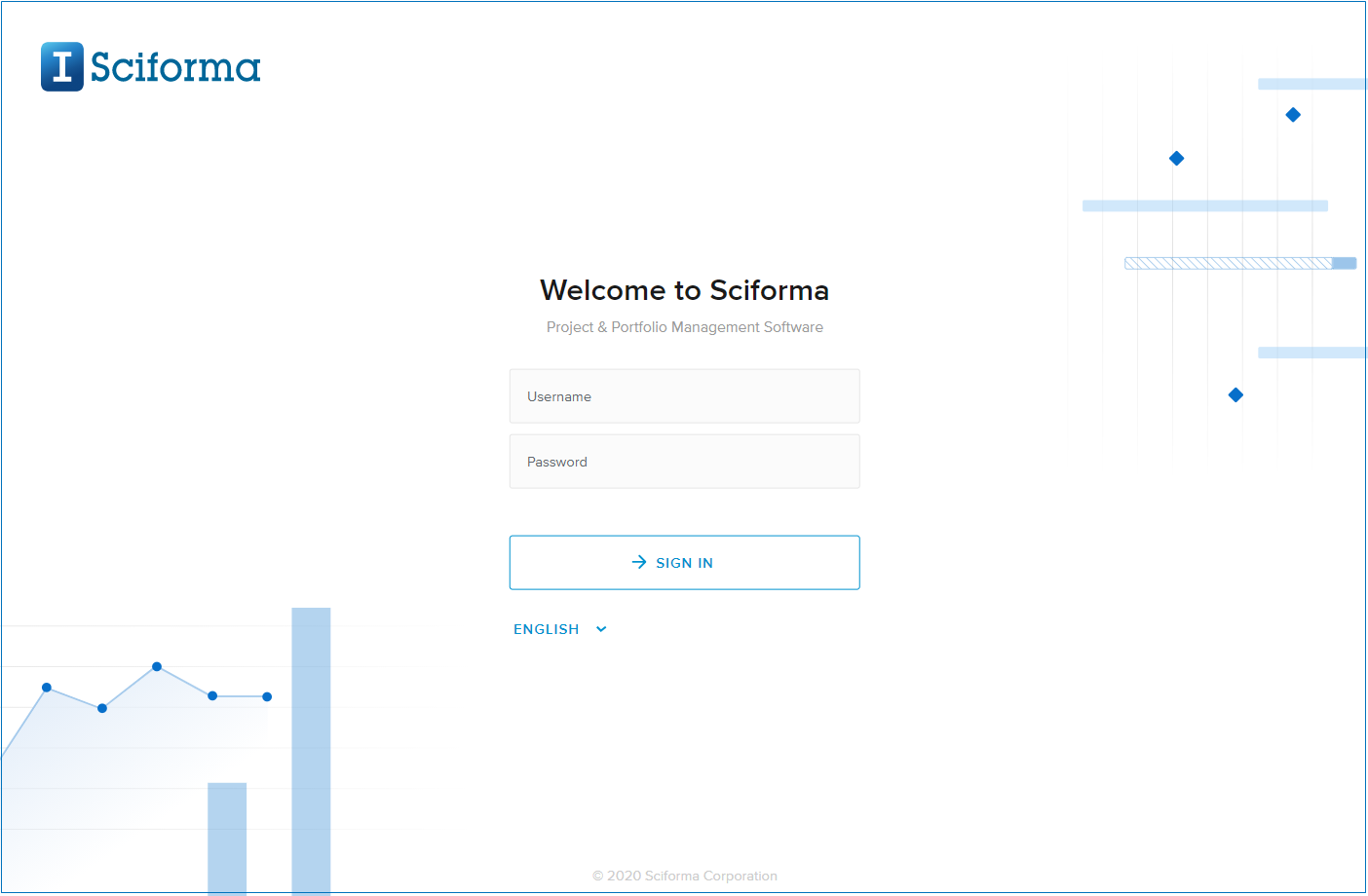
#43670
A new login page has been designed and is now available when users log in to the ProjectAdvantage HTML5 client.
Field Edits (Field Types)
#43586
In rich text field editors, the padding around the editor and the spacing between paragraphs have been decreased.
Core Product Corrected Issues
Built-in HTML5 Client
#43752
Two users who called views that referenced each other (typically Popovers) at the very same moment could cause the server to enter into a loop that would require a restart. This issue has been fixed.
Commands
#43630
When using the Timesheet Set Status command to set a user's timesheet to submitted, the error message stating that the timesheet has already been submitted was not being displayed as it is for the Timesheet Submit command. This issue has been fixed.
Config Utility / Installation
#43719
Some Daily Notes in timesheet records were corrupted due to a previous bug (see #43642). This issue has been fixed. The fix will get rid of those corrupt values while attempting to rescue as much valid data as possible.
Designer
#43476
While importing cfg files, selector filters were not included. This was due to user (ad hoc) filters not being remapped while remapping system filters. This issue has been fixed; selector filters are now included when importing cfg files.
#43322
Some scheduled jobs that generated a data view that wrote to an external database were not working due to a regression. In addition, commands to clear database tables within a scheduled job did not work. These issues have been fixed.
Important: A domain that specifies an external database is now identified as such by a new property, "ExternalView", or by the environment variable SCIFORMA_EXTERNAL_VIEW. Previously, such a domain was identified by naming the domain “extview”. This is no longer the case. Existing external dataview domains must have either the new property or the environment variable specified in order for the external dataview to work correctly.
#43290
Blocks added to a form became invisible (their width or height became zero) when the grid row or grid column they were in was deleted. The user might have expected the block to be deleted, but, instead, it just became invisible and this resulted in unexpected poor performance because the data in the invisible block was still generated whenever its workspace was refreshed. This issue has been fixed. Now, a zero-width or zero-height form will be removed from the form during validation (this will take care of all the existing forms out there that have invisible blocks).
Field Edits (Field Types)
#43659
Sometimes, when editing a rich text field in the editor popup, the editor popup was not aligned in the center of the screen. This issue has been fixed.
#43480
Editing the date in a row of the Organization History popup for a Resource resulted in an error message indicating that the Organization on that row didn't exist as of the new date. Also, cells in the right-hand column should have offered hamburger buttons that, when pressed, should have brought up an Organization Selector that represented the hierarchy as it existed on that date. It was not the case. These issues have been fixed.
Object Edits (Data Categories)
#43737
In very rare cases, after the Purge view (in the designer) was used to purge resources from the system, HTML client users noticed that some of the (hard) assignments of resources that have not been purged had become soft assignments. This has been fixed.
#43718
If a task changed its Work Package association, it was possible that timesheet records associated with that task "lost" data. In that case, the data was probably not lost, but instead, it was just associated with the wrong timesheet record. This issue has been fixed.
#43669
When multiple users were refreshing workspaces that needed information from the same data view (project-based, resource-based, or a global data view with a project or resource managed reference field), then the data displayed in those workspaces could be incorrect or incomplete. Additionally, it was likely that the server logs contained multiple ConcurrentModificationExceptions. This issue has been fixed.
#43618
When records from a Global data view with either Project managed reference fields or Resource managed reference fields were created/updated/deleted via an API program, those changes might not be reflected in the HTML5 client until the server was restarted. This has been fixed.
#43585
In the Labor Assignment popup, the Name and the ID fields became empty when clicking OK after editing the ID field. This issue has been fixed.
When clicking the Hamburger button for a Labor Assignment.ID field, we now show a special selector. The selector has columns for both ID and Name fields for resources, and a text search in the search bar will search the ID field by default.
Performance
#43643
User fields containing lists of User names were very slow to validate in some cases. This performance issue has been fixed.
Security
#43627
An error in Chrome occurred when using SSO (Single Sign On). Chrome has introduced a change that is now displaying a warning message: "The information you're about to submit is not secure", during SSO processing. This issue has now been fixed.
#43667
Under certain circumstances and due to the #43233 issue fixed in 2020.12, a NullPointerException could sometimes occur or the message “User does not have access to requested workspace” could be displayed in the HTML5 client just after having saved fields or forms in the Designer. This issue has been fixed.
#43653
The "Sign in using SSO" button of the login page was only partially displayed on Google Chrome and Microsoft Edge (version 87). This issue has been fixed with the redesign of the login page (#43670).
UI Blocks
#43554
When a grid which had a column header that used a quarterly date format was exported to excel, that header was not formatted properly in excel. This issue has been fixed.
Default Configuration Enhancements
Administration
#MIL-1418
In the System Settings workspace, Resource Settings folder, Global Options tab, the Administrator can define whether or not the Approve and Rework commands should be available to end-users in the Execution Calendar workspace with the dedicated settings.
#MIL-1414
In the System Settings workspace, Project Settings folder, Status Report Options tab, Global Options sub-tab, the new “Status Custom Info Stack” setting allows the Administrator to add a new Custom tile in the Status Reports and Gate Reports Info Stacks.
#MIL-1313
In the Resource Identification, User Identification, and Cost Item Identification dialog boxes, the design has been homogenized when there is now Custom sub-tab placeholder displayed.
Note: This enhancement has also been applied to the User Creation, Resource Creation, and Cost Item Creation dialog boxes.
#MIL-1109
In the System Settings workspace, Project Settings folder, Project Creation Options tab, Type Options section, the new “Enable Creation Project From Business Case” option allows the Administrator to restrict the Types of projects that can be created when creating a project through the Business Case Workflow.
#MIL-1074
The Administrator can now overwrite the “Portfolio Selector Condition_Overwritable” filter in order to narrow down the available Portfolio Folders available in the Portfolio selectors.
#MIL-984
In the System Settings workspace, Project Settings folder, Display Preferences tab, Project Brief section, the Administrator has now the ability to manage the display of the Overview, Definition, and Gantt folders of the Project Brief dialog box.
#MIL-983
In the System Settings workspace, Project Settings folder, Project Creation Options tab, the Administrator can now deactivate the project “Creation from blank” option with the dedicated setting. In addition, all the project creation options can now be enabled for specific project Natures.
#MIL-862
In the System Settings workspace, Work Management Settings folder, “Type Verification” settings have been added for each Work Item category as well as for the Risks, allowing the Administrator to define whether or not entering a Work Object Type should be required to create an object.
#MIL-662
In the Resource Identification dialog box, it is now possible to define the level of a Resource' Skills in the Advanced Skills section. This feature is conditioned by the “Enable Resource Advanced Skills Definition” setting.
Note: The aforementioned setting is available in the System Settings workspace, Administration Settings folder, Display Preferences tab.
#MW-1131
In the System Data workspace, the Idea & Business Cases tab has been split into two new tabs:
- The Ideas tab containing the Idea Folders and Idea Types sub-tabs
- Evaluation tab containing the Scoring Templates, Scoring Descriptions, Scoring Indicators, Scoring Sections, and Value Lists sub-tabs
Note: The corresponding settings have been updated as well.
#MW-557
In the System Data workspace, Ideas tab, Idea Folders and Idea Types sub-tabs, a new Workflow column is available, allowing the user to associate an Idea Workflow to a specific Folder and/or Type.
Upon creating an Idea in the Idea Center workspace, the Idea will inherit the Workflow associated to the Type. If no Type is defined, or if the Type has no Workflow associated to it, then the Idea will inherit the Workflow associated to the Idea Folder. If none of the previously stated cases apply, then the Idea will be associated with the Default Workflow.
Execution
#MIL-1417
In the Timesheet workspace, the Timesheet Summary Status is now indicated at the Project level for better readability when the rows are collapsed.
#MIL-1355
In the Timesheet workspace, the Total row is now fixed (and therefore is not scrollable) providing better visibility when a lot of content is displayed.
Note: The same behavior has been implemented in the Resource Validation workspace, Timesheets tab, Timesheet Details full screen view.
General
#MIL-1447 / MIL-1415 / MIL-1219
In the Time Navigation toolbar, a new Presets ( ) option has been added to set the displayed time frame to the current year.
Portals
#MIL-1408
In the Idea Center workspace, Details view mode, Idea Details view, all the commands are now available when clicking on the More ( ) button available in the upper right corner of the view.
Portfolio
#MIL-1387
In the Portfolio Simulation workspace, after playing a scenario, Simulation view mode, the Gantt spreadsheet now displays the Leveling Priority and the Total Score for each project.
#MIL-1191
In the Portfolio Dashboards workspace, the user can now click on a slice of a pie chart to review or filter data in the following views: Overview report, Pipeline report, Performance report, and Agile report, Epics view mode.
#MIL-962
In the Portfolio Center workspace, Budget tab, Portfolio Budget view mode, it is now possible to review and update the values assigned to Placeholders for specific Cost Centers, during a Budget Simulation.
Upon applying a scenario, the existing Placeholders will be transferred to the official Portfolio Cost Centers. They will only be displayed if their value is not null.
Upon creating a new scenario, if Placeholders exist, they will also be initiated in the scenario, exactly like the actual Portfolio Cost Centers Budget.
#MIL-901
In the Portfolio Center workspace, Budget tab, Budget Simulation full screen view, Simulation tab, Projects view, clicking on the colored indicators at the Portfolio Cost Center level displays the Portfolio Budget Details popup, allowing the user to review the Portfolio’s Budget as compared to the associated project’s Budget.
#MIL-621
In the Portfolio Dashboards workspace, Filters popup, a new Costs section has been added, allowing the user to only display projects whose Total Cost or Savings value is above or equal to the entered value.
#MIL-617
In the Work workspace, Gantt tab, Scheduler view mode, new symbols have been added to the Gantt chart's graphic pane to easily identify the following fields: Required Date, Must Start On, and Start No Earlier Than.
#MIL-593
In the Administration workspace, Team tab, Project Team sub-tab, the team member cards now feature a Details ( ) button, allowing the user to access the corresponding Resource Brief dialog box.
Note: The Project Administration dialog box has been updated as well.
Projects
#MIL-1588
In the Resources workspace, Project Allocations tab, the Edit ( ) button is now available for the user to access the Project Administration dialog box.
#MIL-1587
In the Resources workspace, Resources tab, the “All Assignments” view is now displayed by default.
#MIL-1586
In the Administration workspace, Setup tab, the Resources workspace default view is now the Resources tab by default.
#MIL-1530
In the Project Creation popup, the buttons have been renamed to make the behavior upon closing the popup clearer.
#MIL-1525
In the Work workspace, Phases & Gates tab, Deliverables view mode, upon selecting a Task, the “Reset From Template” ( ) command becomes available, allowing the user to recreate all the Deliverables attached to a specific Task by importing the Deliverables attached to a Template Task.
#MIL-1471
In the Work and Finance workspaces, in multiple project selection, the views are now filtered to hide the selected projects for which the corresponding feature has been deactivated.
For instance, if only four out of five of the selected projects use the Phases & Gates feature, only these four projects will be displayed in the Work workspace, Phases & Gates tab.
#MIL-1457
In the Administration workspace, Setup tab, the Billing Mode options previously available in the Activity Management section have been moved to the Billing Advanced Attributes popup.
#MIL-1444
In the Finance workspace, Cost Transactions dialog box, the “Breakdown Over Time” chart now honors the time period and intervals selected in the Time Navigation toolbar.
#MIL-1440
In the Administration workspace, Setup tab, the Leveling Priority and Schedule Method fields have been moved to the new Planning Options sub-section and the Activity Management Advanced Attributes popup has been removed.
#MIL-1433
In the Work workspace, Agile tab, Full Backlog full screen view, when filtering the view on a specific Iteration and/or Epic, clicking on the New ( ) command will prompt a Backlog Item dialog box with the Iteration and/or Epic fields already filled in with the elements selected in the Filters.
#MIL-1422
In the Work workspace, Gantt tab, Scheduler view mode, a new symbol has been added to the Gantt chart's graphic pane to easily identify the Project Deadline.
#MIL-1412
In the Home Page workspace, Connections tab, the Contract feature is now supported for Intra-Nature connections.
#MIL-1411
In the Finance workspace, Cost Transactions dialog box and Savings dialog box, Transactions sub-tab, the Group By ( ) display option has been added, allowing the users to group the transactions by Parent or Type.
#MIL-1393
In the Designer, the new “Project Creation - Update for Post-Processing Command_Overwritable” overwritable command list has been created for project creation post-processing.
#MIL-1389
In the Administration workspace, Setup tab, Agile Advanced Attributes dialog box, the new “Enable Acceptance popup upon completion” option allows the user to be prompted to update the “Acceptance” field upon completing a Backlog Item.
#MIL-1336
In the Resources workspace, the “Edit” ( ) button in the main toolbar now opens the Project Administration dialog box directly in the Team folder.
#MIL-1256
The Chat Notifications feature (which is defined from the Administration workspace, Setup tab) now supports pushing notifications to Slack.
As a reminder, the following elements can be pushed through Webhooks:
- Project: Workflow Update, New Note, and Work Package Workflow Update
- Phases & Gates: Workflow Update
- Agile: Iteration Workflow Update, Release Workflow Update, Backlog Item Creation, Backlog Item Workflow Update, Backlog Item Notes, and Backlog Item Accepted
- Work Items: Creation, Workflow Update, and New Notes (for each category)
- Risks: Creation, Workflow Update, and New Notes
#MIL-1250
In the Work workspace, Agile tab, it is now possible to directly attach an Epic to a Release. As a consequence, a new Release field is available in the Epic dialog box.
#MIL-1041
In the Iteration dialog box, a new “Attachments” section is now available, allowing the user to attach information to the Iteration in the form of URL links.
#MIL-1010
In the Work workspace, Phases & Gates tab, the Workflow column has been removed and the ability to turn a Task into a Phase or a Gate has been moved to the Gear ( ) button located in the left-most column of the spreadsheet.
Note: To turn a Phase or a Gate back into a Task, the user can click on the Task Details dialog box More () button located in the upper right corner.
#MIL-972
In the Work workspace, Tracking tab, it is now possible to apply Tasks for which the “0h” value has been entered to automatically push them out.
#MIL-971
In the Backlog Item dialog box, the header has been redesigned to offer better visibility on the Backlog Item's Name.
#MIL-970
In the Backlog Item dialog box, the order of the sections has been changed; the Description section is now located before the Custom section placeholder.
Note: This change has been implemented for Work Objects as well.
#MIL-859
The “Deactivate All Versions” command is now available in every location the “Deactivate” command was available. As a consequence, the “Deactivate” command has been renamed “Deactivate selected Version”.
Note: The Deactivate All Versions command only works for projects associated to a Portfolio Folder. If the system does not use the Portfolio feature, the command will not be available.
#MIL-672
In the Work workspace, Agile tab, it is now possible to directly attach a Backlog Item to a Release. This impacts the following views:
- The “Release” option is now available upon clicking on the “Attach to” (
 ) command of the Full Backlog full screen view
- The “Release” field is now available in the Backlog Item dialog box.
Important: If there is no Release defined for the Backlog Item, ProjectAdvantage will automatically fill in the field with the Release defined for the Iteration or the Epic associated to the Backlog Item. The Agile Advanced Attributes popup provides the new "Backlog Item Default Release Value" option, allowing the user to define which of the Iteration or Epic Release should prime when both fields are filled in.
#MIL-647
In the Work workspace, Agile tab, Iteration and Full Backlog full screen views, the left panel bottom section now provides a “Structure” button, allowing the user to access the Structure full screen view.
In addition, in the Backlog Item dialog box, when selecting an Epic or an Iteration in the corresponding field, the Epics list and Iterations list popups now provide an Add ( ) command in the bottom left corner, allowing the user to directly create a new Epic or Iteration.
#MIL-645
In the Work workspace, Agile tab, when completing an Iteration with open Backlog Items, the user is now prompted to move these Backlog Items to the Project Backlog or to another Iteration.
Note: It is no longer required to complete all the Iteration Backlog Items to Complete an Iteration.
#MIL-643
In the Work workspace, Gantt tab, Gantt Filters dialog box and Gantt Filters panel, the user has now the ability to display only tasks with Outbound or Inbound Dependencies with the “Dependency Source Task(s)” and “Dependency Target Task(s)” options.
#MIL-261
In the Agile Advanced Attributes popup, the new Gantt Synchronization Options section allows the user to define whether or not the Task % Completed can be updated with the progress of linked object (Iteration, Release, or Epic).
Note: The completion corresponds to the number of completed Backlog Items as opposed to the total number of Backlog Items assigned to an Iteration/Release/Epic.
#MIL-226
In the Project Brief and Project Information dialog boxes, the upper left corner of the dialog box now indicates whether the project is locked or not, and by whom.
Work Management
#MIL-1520
The Work Item and Risk dialog boxes headers have been redesigned for better readability.
#MIL-1512
In the Execution Work Items workspace, the Activity Stream design has been updated to be identical to the one available in the Work workspace, Work Items tab.
#MIL-1461
In the Work workspace, Work Items tab, Work Item full screen view, Inbox and Board tabs, the Search ( ) display option has been added, allowing the user to look for a specific Work Item.
Note: This enhancement has been provided for all Work Objects (including Risks), in all the Work Management views.
#MIL-1432
In the Work workspace, Work Items tab, when a Product or a Program is selected in the selector, two view modes are now displayed:
- Home Page – The content is identical to the regular Work Items tab.
- Sub-projects monitoring – Allows the user to review the Work Items of the connected sub-projects.
Note: A similar behavior has been implemented for the Risks tab as well.
#MIL-1045
In the Portfolio Work Management workspace, Portfolio Monitoring tab, Work Items view, when only one Work Item category is available in the system, the view has been reworked to only display information regarding the specific Work Item and to emphasize the various alerts encountered.
Note: All the Project Monitoring views (multi-project selection, Product and Programs sub-projects monitoring, and multiple Work Package selection) have been updated accordingly.
#MIL-477
In the Work Item dialog box, the new Other Attributes optional section provides the following fields: “Other Assignees” (which allows the user to add additional stakeholders for the Work Item) and “Link”.
Note: When a user is added in the “Other Assignees” field, he/she will see the corresponding Work Item as “Assigned to me” in the Execution Work Items workspace.
#MIL-368
In the Portfolio Work Management workspace, Project Monitoring tab, access to the project Focus Mode full screen view is now provided. This enhancement has been implemented for both Work Items and Risks views, as well as in the corresponding multi-project views available in the Work workspace.
Default Configuration Corrected Issues
Administration
#MIL-1632
In the Finance workspace, some Transactions-related information was still displayed when the “Activate Transactions” meta setting was deactivated. This issue has been fixed.
Note: The aforementioned setting is available in the System Settings workspace, Global Settings folder, Meta Settings tab.
#MIL-1600
Across the solution, some Risks and Work Items-related information was still displayed when the “Activate Work Management” meta setting was deactivated. This issue has been fixed.
Note: The aforementioned setting is available in the System Settings workspace, Global Settings folder, Meta Settings tab.
#MIL-1598
In the System Settings workspace, Project Settings folder, Display Preferences tab, the “Enable Resource Problems” setting was obsolete, since the Resource-related problems were no longer available in the Gantt. This issue has been fixed.
#MIL-1597
In the System Settings workspace, Finance/Budget Settings folder, Global Options tab, Budget section, the Enable Direct Budget setting was obsolete. This issue has been fixed.
Note: It has been replaced by the Enable Project Budget setting available in the Project Settings folder, Display Preferences tab, Project Finance section.
#MIL-1572
In the System Settings workspace, Project Settings folder, when deactivating the “Enable Project Budget” setting, the content of the Finance workspace could disappear. This issue has been fixed.
#MIL-1571
In the System Settings workspace, Project Settings folder, Display Preferences tab, when deactivating the “Enable Resources” and the “Enable Cost Items” settings, the Administration workspace, Team tab was still available. This issue has been fixed.
#MIL-1569
In the System Settings workspace, Work Management Settings folder, Work Items tab, the settings to restrict the Deliverable creation or deletion to some User Roles only did not have any impact on the Work workspace, Phases & Gates tab, Deliverables view mode. This issue has been fixed.
#MIL-1562
In the System Settings workspace, Project Settings folder, Project Creation Options tab, the “Enabled Natures” setting attached to the “Enable Project Creation Button Filter” setting was obsolete. This issue has been fixed.
#MIL-1462
In the Corporate Dashboards workspace, Session Statistics tab, the “Export to Excel” button did not generate an Excel file. This issue has been fixed.
#MIL-1386
In the System Data workspace, Custom Reports tab, Launch Options section, if a Custom Report only had the “Enable Launch New Tab” option activated, then it was not displayed in the list of reports available in its corresponding workspace. This issue has been fixed.
#MIL-1375
In the System Settings workspace, Project Settings folder, the “Enable Collaboration Integration” setting was wrongly named. This issue has been fixed; it is now named “Enable Chat Notification Integration”.
#MIL-1367
In the System Settings workspace, Resource Settings folder, Allocations & Commitments tab, Allocations Options section, when logged in French, the “Assignment Options upon Accepting Allocations” setting was displayed with a scrollbar. This issue has been fixed.
Execution
#MIL-1552
In the Timesheet workspace, Inactive Resources could still use the “Add Assignment” command and Submit their Timesheets. This issue has been fixed.
Note: This behavior has also been fixed for the Resource Validation workspace.
#MIL-1499
In the Timesheet workspace, an error occurred when clicking on the “Enable Filters” button. This issue has been fixed.
#MIL-1404
In the Rework Comments History popup (prompted when clicking on the “Details” button in the Timesheet workspace for example), nothing happened when clicking on the Link ( ) button. This issue has been fixed.
#MIL-1369
In the Calendar workspace, when submitting a calendar while the “Enable Calendar Submit Email Notification” setting is activated, the full name of the resource's organization was in the content of the Email instead of only its last branch. This issue has been fixed.
Note: The aforementioned setting is located in the System Settings workspace, Resource Settings folder, Global Options tab.
#MIL-1360
In the Timesheet workspace, Activity Logs panel, when trying to import some Activity Logs on a closed Task, the flash message indicated that Activity Logs were imported successfully. This issue has been fixed.
#MIL-1258
In the Timesheet workspace, it was possible to enter actuals on Tasks from deactivated projects. This issue has been fixed.
Portfolio
#MIL-1576
In the Portfolio Dashboards workspace, Controlling report, Overview view mode, when the “Cost Center” ( ) display option was activated, some incorrect values could be displayed. This issue has been fixed.
#MIL-1555
In the Portfolio Dashboards workspace, when not using the Report Launcher feature, the “Effort By Project and Job Classification” report’s tab name was incorrect. This issue has been fixed.
Note: The aforementioned tab can be disabled by deactivating the “Enable Portfolio Report Launcher” setting in the System Settings workspace, Portfolio Settings folder, Dashboards tab.
#MIL-1513
In the Portfolio Dashboards workspace, Overview report, the “Show Closed” ( ) display option was wrongly interpreted. It should have displayed completed projects when activated instead of closed projects. This issue has been fixed.
#MIL-1465
In the Portfolio Center workspace, Project Supervision tab, as well as in the Capacity Planning workspace, the Filters popup “Custom” section was sometimes not correctly displayed. This issue has been fixed.
#MIL-1454
In the Portfolio Dashboards workspace, Status Overview report, the Status Report date placeholder was not wide enough to fit long Date Formats. This issue has been fixed.
#MIL-1445
In the Portfolio Simulation workspace, after playing a scenario, Simulation view mode, when accessing the scenario information popup, the Included Natures section switches were not aligned. This issue has been fixed.
Note: The same issue occurred with the switches of the Included Natures when capturing a new Scenario.
#MIL-1401
In the Portfolio Dashboards workspace, Pipeline report, clicking on the Link ( ) icon led to the wrong view. This issue has been fixed.
#MIL-1371
In the Portfolio Dashboards workspace, Billing report, Projects for which the Billing feature setup option was not activated were still displayed. This issue has been fixed.
Note: The aforementioned option is located in the Administration workspace, Setup tab.
#MIL-1356
In the Portfolio Dashboards workspace, Pipeline report, Filters popup, using the “Workflow States” filter did not have any impact on the displayed projects. This issue has been fixed.
#MIL-1333
In the Portfolio Simulation workspace, after playing a scenario, Analytics view mode, Charts sub-tab, Workload chart, it was not possible to compare the simulated Total Effort to the Available Effort of only a selected Parent Organization, as all its descendants were always included in the selection. This issue has been fixed.
#MIL-1324
In the Portfolio Dashboards workspace, Project Effort Breakdown report, by Job Classification sub-tab, the “Totals” values were not correct if Actuals was selected as “Effort Values”. The Totals cell in the bottom row of the right-most column was also not correct for both sub-tabs. This issue has been fixed.
#MIL-1321
In the Portfolio Dashboards workspace, Project Effort Breakdown report, the “Effort Values” dropdown list contained Cost labels. This issue has been fixed.
#MIL-1315
In the Portfolio Center workspace, Budget tab, Project Budget view mode, when the “Budget Editing” option for a specific project was deactivated, the budget was still editable in the corresponding project Finance workspace, Budget dialog box. This issue has been fixed.
#MIL-1282
In the Portfolio Simulation workspace, capturing a new scenario could result in an error when some Date Default Formats were set. This issue has been fixed.
Note: The Date Default Format can be set in the Designer, Fields view, Default Formats tab.
#MIL-1262
In the Capacity Planning workspace, Resources tab, the effort values in the charts did not honor the Default Formats. This issue has been fixed.
Projects
#MIL-1618
Some elements of the Focus Mode full screen view were not properly conditioned by the corresponding options available in the Administration workspace, Setup tab. This issue has been fixed.
Note: This issue could also be linked to some settings available in the System Settings workspace, Project Settings folder, Display Preferences tab.
#MIL-1612
In the Finance workspace, when in multi-project selection, the Overview view mode could be empty. This issue has been fixed.
#MIL-1607
In the Focus Mode full screen view, Dashboards tab, it was not possible to launch custom reports. This issue has been fixed.
#MIL-1570
In the Work workspace, Task List tab, flagging a task could take some time. This issue has been fixed.
Note: Also, a new feature has been implemented to help bulk flagging multiple selected tasks at once. It is available in the Gantt toolbar, More button, “Flag Tasks” and “Remove Flags” options.
#MIL-1568
In the Work workspace, the Agile Tracking tab was not available when the “Activate Agile Legacy” and “Enable Agile Tracking” settings were activated. This issue has been fixed.
Note: The aforementioned settings are located in the System Settings workspace, General Settings folder, Meta Settings tab for the first one, and Project Settings folder, Display Preferences tab for the second one.
#MIL-1563
In the Administration workspace, Setup tab, when deactivating the “Billing” setup option, the Billing tab of the Work workspace, as well as the Billing tab of the Gantt Task panel, were still available. This issue has been fixed.
#MIL-1556
In the Work workspace, CCPM tab, switching view modes did not load the views. This issue has been fixed.
#MIL-1554
In the Administration workspace, Team tab, Resource Details dialog box (available when clicking on the resource's name), when turning a resource into a Dedicated resource, the resource card was not updated once the dialog box was closed. This issue has been fixed.
#MIL-1546
In the Home Page workspace, Home tab, the Note ( ) icon was not updated after creating a new note. This issue has been fixed.
#MIL-1545
In the Task Details dialog box, Scheduling & Tracking sub-tab, an unwanted scrollbar was displayed for the Calendar field if its name was too long. This issue has been fixed.
#MIL-1542
In the Home Page workspace, Connections view mode, Contract Details dialog box, when creating new Deliverables, the Deliverable dialog box was not editable. This issue has been fixed.
#MIL-1541
In the Status Report History dialog box, when the selected project did not have any Status Report yet, nothing happened when clicking on the “New Status Report” ( ) command. This issue has been fixed.
#MIL-1538
In the Home Page workspace, the Quality Score of the Health Score was wrong when a Status Report was submitted with all indicators set to green. This issue has been fixed.
#MIL-1537
In the Administration workspace, Setup tab, Tracking Advanced Attributes popup, the fields were not set in accordance with the Template Tracking Advanced Attributes values when creating a Project from a Template. This issue has been fixed.
#MIL-1536
In the Finance workspace, Cost Transactions dialog box, when the sorting option was set to “Default” or “Date”, the Transactions were not displayed in the expected order. This issue has been fixed.
#MIL-1532
In the Work workspace, the CCPM tab was no longer available for projects using this methodology. This issue has been fixed.
Note: This view is conditioned by the “Enable CCPM Tab” setting available in the System Settings workspace, Projects Settings folder, Display Preferences tab, Project Work section.
#MIL-1522
In the Work workspace, Gantt tab, Scheduler view mode, the order in which tasks were sorted in the side panel could be confusing. This issue has been fixed.
#MIL-1519
In the Work workspace, Gantt tab, Scheduler view mode, Assign Resources dialog box, the columns in the right panel were not aligned between the Summary and the New Assignments spreadsheets. This issue has been fixed.
#MIL-1517
In the Dashboards workspace, Consolidation Dashboards section, Controlling report, the connected projects displayed data from both Working and Published versions, while it should only have shown data from the Published versions. This issue has been fixed.
#MIL-1506
When creating a new project from a Template (or when inserting a Template into a project), in the Insert Template Options, when the “Import Setup” option was activated, the other insertion options did not honor the options set at the Template level. This issue has been fixed.
#MIL-1505
In the Dashboards workspace, Consolidation Dashboards section, Project Status Overview report, Last Status Report popup (available when clicking on the Status Report label), some sections were empty when they should not (including Budget and Macro Planning). This issue has been fixed.
#MIL-1504
In the Resources workspace, Resources tab, Soft Assignments full screen view, after selecting a Soft Assignment, the list of matching Resources could be incomplete if Skills had been assigned to some Resources. This issue has been fixed.
#MIL-1503
In the Administration workspace, Setup tab, Resource Management section, an error occurred when toggling the “Allocations”, “Project Requests”, or “Work Package Requests” options when logged in another language than English. This issue has been fixed.
#MIL-1497
In the Administration workspace, Team tab, Generic Resources sub-tab, when using the “Insert from Template” button, the popup to create recurring Transactions was wrongly prompted, and generic resources from the Template were not inserted. This issue has been fixed.
#MIL-1496
In the Project Brief dialog box, Connections folder, the Connections view was always displayed by default, instead of displaying the Parents view when the project was only connected to source objects. This issue has been fixed.
#MIL-1495
In the Work workspace, Gantt tab, the Theater view mode was still available when the “Enable Gantt Theater View Mode” setting was deactivated. This issue has been fixed.
Note: The aforementioned setting is located in the System Settings workspace, Project Settings folder, Display Preferences tab.
#MIL-1493
In the Home Page workspace, Home tab, Health Score was still displayed when the “Activate Health Score” setting was deactivated. This issue has been fixed.
Note: The aforementioned setting is located in the System Settings workspace, General Settings folder, Meta Settings tab.
#MIL-1489
In the Home Page workspace, Connections tab, when deleting a connection from a Project card, a blank view was displayed. This issue has been fixed.
#MIL-1488
In the Work workspace, the Agile and Task Lists tabs were not conditioned by the “Enable Agile Tab” and “Enable Task Lists Tab” settings as they should have been. This issue has been fixed.
Note: The aforementioned settings are located in the System Settings workspace, Project Settings folder, Display Preferences tab.
#MIL-1487
In the Focus Mode full screen view, Home Page tab, the Evaluation sub-tab was still available when the corresponding settings were deactivated. This issue has been fixed.
Note: The aforementioned settings are the Enable Project Evaluation setting (System Settings workspace, Project Settings folder, Display Preferences tab) and the Evaluation setup option (Administration workspace, Setup tab).
#MIL-1486
In the Project Administration dialog box, the Lessons Learned, Documents, and Attachments folders were available even if the corresponding settings were deactivated. This issue has been fixed.
Note: The aforementioned settings are located in the System Settings workspace, Work Management Settings folder, Display Preferences tab, Project/Work Package Work Management section.
#MIL-1478
In the Home Page workspace, Home tab, the Health Score value was wrong for newly created projects if the “Agile” option was activated. This issue has been fixed.
Note: The aforementioned option is located in the Administration workspace, Setup tab.
#MIL-1474
In the Finance workspace, Savings dialog box, Savings sub-tab, the chart only displayed the selected Saving if any, instead of the Total Savings. This issue has been fixed.
#MIL-1473
In the Dashboards workspace, the Allocations report was still available when the “Resource Acquisition” and “Allocations” options were deactivated for the selected project. This issue has been fixed.
Note: The aforementioned options are located in the Administration workspace, Setup tab.
#MIL-1472
In the Dashboards workspace, the Budget report was still available when the “Budget” option was deactivated for the selected project. This issue has been fixed.
Note: The aforementioned option is located in the Administration workspace, Setup tab.
#MIL-1464
In the Dashboards workspace, Finance report, Cost Breakdown view mode, when the “Cost Values” option was set to “Baseline”, the values were always the ones from the Current Baseline instead of the specific Baseline selected in the “Baseline” option. This issue has been fixed.
#MIL-1449
In the Work workspace, Gantt tab, Scheduler view mode, when assigning a Soft Assignment with a Job Classification on multiple selected tasks (available from the Gantt toolbar, Assign ( ) button, “Soft Assignment” option), only the assignment of the first task was properly created with the Job Classification. This issue has been fixed.
#MIL-1448
In the Work workspace, Tracking tab, the “Outstanding Timesheet in the past” alert could wrongly be available in some cases. This issue has been fixed.
#MIL-1446
In the Work workspace, Tracking tab, some timesheets could be displayed with a “None” status and wrongly appeared applied at 100%. This issue has been fixed.
#MIL-1400
In the Work workspace, Tracking tab, the Outstanding Timesheets in the past alert could take into account Timesheets that were not approved, even if the “Include Not Approved Timesheets in Outstanding Alert” setting was deactivated. This issue has been fixed.
Note: The aforementioned setting is available in the System Settings workspace, Project Settings folder, Time Tracking Options tab.
#MIL-1399
In the Work workspace, Agile tab, Iteration Details full screen view, Backlog tab, the Interactive Gear icon providing access to the Print options could be displayed in the left panel. This issue has been fixed.
#MIL-1392
In the Dashboards workspace, Finance report, Cost Breakdown view mode, Distributed Transactions Total Cost amount were not displayed (even though it was taken into account in the Subtotal row). This issue has been fixed; a new Transaction Cost row has been added to the spreadsheet.
#MIL-1388
In the Work workspace, Tracking tab, Timesheet Details full screen view, the Search ( ) field on the left panel did not work. This issue has been fixed.
#MIL-1380
In the Work workspace, Planner tab, Scheduler view mode, when selecting multiple projects, the Gantt displayed was always the one defined as the Gantt Preferences 1. This issue has been fixed.
Note: Custom Gantt Preferences can be defined by the Administrator in the System Settings workspace, Project Settings folder, Global Options tab, Gantt Preferences sub-tab.
#MIL-1379
In the Backlog Item dialog box, Checklist section, Checklist popup, an unnecessary Close button was available on the top right corner (when the popup was accessed by clicking on the Description ( ) icon). This issue has been fixed.
#MIL-1378
In the Resources workspace, Resources tab (multi-project selection), in the Assignment Details full screen view, Soft Assignments tab, the header display was wrong and the Task rows were not grouped by projects. This issue has been fixed.
#MIL-1377
In the Work workspace, Gantt tab, Scheduler view mode, Gantt Task panel, when multiple tasks were selected, Allocation Request cards could display a scrollbar if synchronization issues existed. This issue has been fixed.
#MIL-1376
In the Work workspace, Gantt tab, Scheduler view mode, Gantt Task panel, resources with a long name caused the Assignment card to have a scrollbar. This issue has been fixed.
#MIL-1374
In the Administration workspace, Lessons Learned tab, the view modes selection was missing. This issue has been fixed.
#MIL-1373
In the Home Page workspace, Status Reports tab, when accessing the full report popup through the Status Report History dialog box, the Descriptions sections could be empty as the printing preferences were wrongly taken into account when displaying the popup. This issue has been fixed.
#MIL-1366
In the Work Item dialog box, while creating a new item, if the user displayed a connected item dialog box, and then closed it, it resulted in the deletion of the connected item. This issue has been fixed.
#MIL-1365
In the Focus Mode full screen view, Administration tab, the Monitoring sub-tab was still displayed when the “Enable Milestone Monitoring” setting was deactivated. The same issue occurred with the Project Administration dialog box, Monitoring folder. This issue has been fixed.
Note: The aforementioned setting is available in the System Settings workspace, Project Settings folder, Global Options tab, Milestone Monitoring sub-tab.
#MIL-1364
In the Administration workspace, Lessons Learned tab, Lessons Learned Details view, the “Move” command was displayed twice. This issue has been fixed; the command remains only available when clicking on the More ( ) button in the upper right corner of the view.
#MIL-1353
In the Home Page workspace, Home tab, Health Score section of the project card, the Health Score details were displayed even if the selected project’s Type was not listed in the “Enabled Types” option of the “Enable Health Score Project Type Filter” setting. This issue has been fixed.
#MIL-1352
In the Resources workspace, Resources tab, Filters popup, when the pivot has been set to “Soft Assignment”, the wrong name was displayed for the field allowing the user to only display assignments with some Effort in the selected time period. This issue has been fixed.
#MIL-1351
In the Finance workspace, Overview mode (available in multi-project selection), the Forecast and Costs tiles indicator tooltips were missing. This issue has been fixed.
#MIL-1350
In the Finance workspace, Overview view mode (available in multi-project selection), the interactive Gear command was displayed when hovering the mouse over the Alerts icons. This issue has been fixed.
#MIL-1349
In the Administration workspace, Milestones Monitoring tab, Data Points sub-tab, the Type entries generated upon submitting a Status Report were not named correctly. This issue has been fixed.
#MIL-1348
In the Master Planning workspace, after accessing a project Focus Mode full screen view, and then closing it, the context was lost. This issue has been fixed.
#MIL-1347
In the Work workspace, Gantt tab, Scheduler view mode, Gantt Filters dialog box, activating both the “Agile” and “Dependencies” options did not result in displaying both Agile Tasks and Tasks with dependencies. This issue has been fixed.
#MIL-1346
In the Work workspace, Gantt tab, Scheduler view mode, it was possible to create “Copy” Mapping Type Dependencies even if the “Actuals from Tracking Source Only” option was activated in the Administration workspace, Setup tab, Tracking Advanced Attributes popup. This issue has been fixed.
#MIL-1338
In the Home Page workspace, Connections tab, Work Packages either Closed or Completed were always displayed, even if the “Show Closed or Completed” ( ) display option was not activated. This issue has been fixed.
#MIL-1335
In the Master Planning workspace, Gantt side panel, the “Jump to” button was obsolete. This issue has been fixed; it has been replaced by a Focus ( ) button located in the panel’s footer.
#MIL-1327
In the Administration workspace, Supervision tab (when multiple projects are selected), Filters dialog box, the “Workflow States” filter did not list the available Workflow States from the selected projects. This issue has been fixed.
#MIL-1326
In the Work workspace, Gantt tab, Scheduler view mode, when using the “Remove Resources” option from the Gantt toolbar (by clicking on the “Remove Resources” ( ) button), no message was displayed to inform that assignments with actuals could not be removed. This issue has been fixed.
#MIL-1323
In the Home Page workspace, Home tab, Project Feed card, the Custom section displayed an unwanted scrollbar. This issue has been fixed.
#MIL-1322
In the Work workspace, Agile tab, Full Backlog Full Screen view, moving multiple Backlog Items to another Project did not increment the Key number properly and created duplicates. This issue has been fixed.
#MIL-1312
In the Work workspace, Agile tab, Backlog Item dialog box, Tasks additional section, a scrollbar was displayed for the “Estimated” section when logged-in in German. This issue has been fixed.
#MIL-1305
In the Work workspace, Gantt tab, Scheduler view mode, Gantt Task panel, Assignments tab, Allocation Requests Details dialog box (accessible from a Project Allocation card), when selecting a suggested resource, the Organization field was not updated with the suggested resource's organization. This issue has been fixed.
Note: If the Suggested Resources contains more than one resource, the Organization field will be updated with the organization of the first resource in the list.
#MIL-1304
In the Dashboards workspace, Finance report, Cost Breakdown view mode, Transaction Cost did not include negative Amount from Transactions. This issue has been fixed.
#MIL-1240
In the Work workspace, Tracking tab, when a labor assignment had manual progress and the resource did not enter any Timesheet for the corresponding period, a Resource could still be displayed as not applied after applying the Timesheets. This issue has been fixed; a new “Reset Actuals” command is now available upon clicking on the More ( ) button, allowing the user to reset the Actual Effort for the selected time period before applying the resource’s Timesheet.
#MIL-1114
In the Home Page workspace, Evaluation tab, the “Update From Connected Idea” button was missing from the main toolbar. This issue has been fixed.
#MW-4148
In the Work workspace, Billing tab, Grid view mode, the “Billable Tasks Only” switch button was wrongly translated in French, which could be confusing regarding the filter behavior. This issue has been fixed.
Resources
#MIL-1550
In the Resource Validation workspace, Timesheets tab, Timesheet Details full screen view, the Search ( ) filter available in the right panel did not work. This issue has been fixed.
#MIL-1549
In the Resource Validation workspace, Timesheets tab, Timesheet Details full screen view, when submitting the week of 23rd of November 2020, the “Add Assignments” and “Add Non-Project Assignments” buttons were no longer available for all other time periods. This issue has been fixed.
#MIL-1528
In the Resource Dashboards workspace, Team Status report, it was not possible to review daily Utilization for a full month without activating the “Enable Zoom Selection for Monthly Timesheets” setting. This issue has been fixed.
Note: The aforementioned setting is located in the System Settings workspace, Project Settings folder, Time Tracking Options tab.
#MIL-1501
In the Resource Validation workspace, Calendars tab, Calendar Details full screen view, Overview sub-tab, the Chart, Pending Calendar, and Current Calendar sections were empty when the Date Format was set to European date format. This issue has been fixed.
Note: The Default Date Format can be set in the Designer, Fields view, Default Formats tab.
#MIL-1441
In the Resource Validation workspace, Timesheets tab, Timesheet Details full screen view, the Note ( ) icon was not highlighted in some cases, even if notes were entered by the resource on the Timesheet. This issue has been fixed.
#MIL-1390
In the Resource Validation workspace, Calendars tab, the Search ( ) field did not work. This issue has been fixed.
#MIL-1267
In the Work workspace, Gantt tab, Scheduler view mode, the selected Current Baseline was not displayed in the graphic pane for CCPM projects. This issue has been fixed.
#MIL-1264
In the Dashboards workspace, Finance report, Savings view mode, the Total Savings chart did not display value from the Cost data start when such data existed before the start of the Savings data. This issue has been fixed.
#MIL-1251
In the Work workspace, Agile tab, Iteration Details full screen view, the Backlog Item cards' slots did not honor the options set in the Agile Advanced Attributes popup. This issue has been fixed.
#MIL-1243
In the Resource Allocations workspace, Allocation Requests tab, Fulfill Allocation Requests dialog box, it was not possible to fulfill the Allocation with more than one resource. This issue has been fixed.
#MIL-1203
In the Resource Validation workspace, Calendars tab, Calendar Details full screen view, Overview tab, the details of the Requested Days were not displayed in the Summary spreadsheet. This issue has been fixed.
#MIL-1200
In the Resource Dashboards workspace, Team Status report, Resource Brief dialog box, Resource Calendar sub-tab, calendar work events were listed even if they were not approved yet. This issue has been fixed.
#MIL-1165
In the Resource Validation workspace, Timesheets tab, Timesheet Details full screen view, when two resources had the same ID (but with different font cases), the wrong resource's Timesheet could be displayed. This issue has been fixed.
#MIL-140
In the Resource Dashboards workspace, Resource Utilization report, when grouped by Job Classifications, the “No Job Classification” section was not filtered by the “Organizations” filter located in the “Filters” dialog box. This issue has been fixed.
Template
#MIL-1508
In the Template Center workspace, Setup tab, some options were not available if the corresponding feature “Enabled Natures” setting was filled in by at least one nature. This issue has been fixed.
Example: If the “Enabled Natures” field of the “Enable Project Work Items” setting was set to “Project”, the “Work Items” option was not available in the Template Center workspace, Setup tab.
Work Management
#MIL-1621
If specific permissions were set for Work Item objects, an error could occur when creating a new Work Item. This issue has been fixed.
#MIL-1583
In the Work Management views, when there were a lot of events in a given project’s Activity Stream, it could take a long time to display the screen for the first time. This issue has been fixed.
#MIL-1575
In the Work Items full screen views, Grid tab, the Date fields did not honor the Date Default Format set in the Designer, Fields view. This issue has been fixed.
#MIL-1564
In the Portfolio Work Management workspace, Project Monitoring tab, Dashboards full screen view, Assignees view mode (of any of the Work Item), the view showed an empty spreadsheet if no item was assigned. This issue has been fixed.
#MIL-1557
In the Template Work Management workspace, Actions tab, switching view modes did not load the views. This issue has been fixed.
#MIL-1544
In the Deliverable dialog box, the Connections additional section button was not available. This issue has been fixed.
#MIL-1521
In the Risk dialog box, Mitigation Plan popup, Mitigation Items sub-tab, multiple unwanted scrollbars could be displayed. This issue has been fixed.
#MIL-1482
In the Action dialog box, when closing the Action, users were prompted to select what to do next, even if the “Deliverables” feature was deactivated. This issue has been fixed.
Note: A similar issue has been fixed for the Change Requests.
#MIL-1467
In the Work workspace, Work Items tab, Deliverables full screen view, Grid tab, it was not possible to set the Related Gate field of several Deliverables at once. This issue has been fixed.
#MIL-1466
Throughout the solution, project Risks could be displayed even if the “Enable Project Risks” setting was deactivated. This issue has been fixed.
Note: The aforementioned setting is located in the System Settings workspace, Work Management Settings folder, Display Preferences tab.
#MIL-1450
In the Portfolio Work Management workspace, Project Monitoring tab, in some cases, opening a Work Item full screen view always showed an Empty State, even if the corresponding project had Work Items. This issue has been fixed.
#MIL-1363
In the Issue, Change Request, and Action dialog boxes, using the “Related Task” field did not set the context of the selector popup to the Project attached to the Work Item. This issue has been fixed.
#MIL-1343
In the Work Items workspace, Work Items full screen view, Work Item Details view, Connections section, the “Create & Connect” ( ) command did not work as expected. This issue has been fixed.
#MIL-1337
In the Work Item dialog box, when selecting a Related Task, completed Parent Tasks were still listed in the popup. This issue has been fixed.
#MIL-1318
In the Portfolio Work Management workspace, Work Items and Risks tabs, users could experience slowness in multi-Portfolio Folder selection. This issue has been fixed.
#MIL-1309
In a Work Item dialog box, when creating a new Work Item, Connections section, using the “Create & Connect Work Item” ( ) command multiple times in a row, and then canceling those connections caused the footer buttons to disappear. This issue has been fixed.
#MIL-1300
In the Client Portal workspace, Work Items from Template projects were displayed. This issue has been fixed.
Work Package
#MIL-1534
In the Work Package Scheduler workspace, Gantt tab, Scheduler view mode, no resource was available when attempting to create a Hard Assignment from the Gantt toolbar, even if the Project Team was created. This issue has been fixed.
#MIL-1385
In some cases, when trying to assign a resource on a task belonging to a Work Package, an error could occur. This was because the Resource was not part of the Performing Resources of the Work Package while still belonging to the corresponding Project Team at the project level. This issue has been fixed; from now on, when such a situation is encountered, ProjectAdvantage will automatically add the Resource to the Work Package Performing Resources.
#MIL-1276
In the Work Package Scheduler workspace, Status Reports tab, the Edit Preferences dialog box was not aligned with the Edit Preferences dialog box of the project Status Reports. This issue has been fixed.
#MIL-1269
In the Work Package Scheduler workspace, Gantt tab, Gantt Task panel, Assignments tab, it was not possible to create a Generic Assignment; the Soft Assignment dialog box was always prompted, even if the Work Package had Generic Resources. This issue has been fixed.
#MIL-1268
In the Work Package Scheduler workspace, Gantt tab, Scheduler view mode, attempting to assign a Generic Resource on children tasks by using the “Assign Resources” button of the Gantt toolbar and then selecting the “Soft Assignment” option did not work. This issue has been fixed.
#MW-4249
In the Work Package Center workspace, Contract tab, Contract History popup, the Deliverable icon was not up to date. This issue has been fixed.