



2024.01
This document describes the enhancements, corrected issues, and new features that have been implemented in Vantage, Deliver and ProjectAdvantage 2024.01 both in the Core product and in the ProjectAdvantage Default Configuration.
ProjectAdvantage 2024.01 is a maintenance release of ProjectAdvantage 2024.
In Vantage, 1 enhancement has been implemented and 7 issues have been fixed.
In Deliver, 3 enhancements have been implemented and 4 issues have been fixed.
In the Core product, 2 enhancements have been implemented and 12 issues have been fixed.
In the ProjectAdvantage Default Configuration, 2 enhancements have been provided and 8 issues have been fixed.
In order to access the different sections, please click on the following links:
- Important Reminders for upgrade
- Vantage Enhancements
- Vantage Corrected Issues
- Deliver Enhancements
- Deliver Corrected Issues
- Core Product Enhancements
- Core Product Corrected Issues
- Default Configuration Enhancements
- Default Configuration Corrected Issues
- System Requirements
Important Reminders for upgrade
- To improve the performance of views displaying the Health Score of multiple projects, we are now using a Health Score that is pre-calculated upon publishing a project as opposed to on the fly. Therefore, upon upgrading to 2021.03 (or higher), please make sure you run once the following Scheduled Job to initialize the project Health Score values: Initialize Project Static Health Score.
Important: For systems with an overwritten Publish command, please make sure to add the new dedicated Command List for the Health Score pre-calculation upon publishing a project: “Project - Publish Project - Continue - Capture Health Score”.
- From the 2023.01 version, to support the implementation of the new Vantage navigation and modules, the Project Dashboards workspace should be added again in the User Roles section of the Designer as the Dashboards workspace doesn't exist anymore.
Vantage Enhancements
Data Connector
#VAN-471
A new command has been created to initialize the Data Connector user and space (project) on Deliver.
Vantage Corrected Issues
Data Connector
#VAN-1291 (*Added on 01/27/2025)
In some scenarios, some projects were not synchronized between Deliver and Plan, and an error was displayed in the log about the Workflow State. This issue has been fixed.
#VAN-720
When users were synchronizing projects from Deliver to Plan using the Data Connector, all projects were sometimes not synchronized and some could be missing in Plan. This issue has been fixed.
#VAN-694
When users were deleting Organizations in Deliver, the deletion was not reflected in Plan in the System Data workspace, Organizations tab. This issue has been fixed.
#VAN-692
When users were creating projects in Deliver, the "Performing Resources" field was throwing a "Not editable" error since it was processed before the "Use Resources From" field. This issue has been fixed.
#VAN-686
In the Home Page workspace, Home tab, Project Brief dialog box, when users were adding/updating values related to Organizations, the changes were not reflected in Deliver. This issue has been fixed.
#VAN-608
When users were creating projects in Deliver, an error occurred in the Projects workspaces in Plan. This was due to the “Workflow” field being set before the “Project Type” field. This issue has been fixed.
Vantage SSO
#VAN-641
In Vantage, when users were clicking on “Sign in with SSO”, an error was occurring and the login page was not displayed. This issue has been fixed.
Deliver Enhancements
General
#DELIVER-372
In Deliver, the former One2Team application browser tabs have been rebranded as ProjectAdvantage (tab titles and icons). This applies to the APM, Cockpits, O3 Cards and Plannings components.
Hebrew language in Deliver
The Deliver modules are now available in Hebrew (right-to-left reading). The components and their behavior are reverted to fit in with the reading habits of right-to-left users .
Note: Since they are hardcoded, the blocks’ and fields’ system names are translated in Hebrew. The configured field labels, however, are not hardcoded and therefore not translated.
Deliver Homepage

Deliver Boards
Slideboard

Right-to-left reading is reflected on the toolbar, dropdown menus and reading direction of the Slideboard.
Gridboard
The columns’ order is reversed and the text is aligned to the right.

Cards
In cards, all the blocks, buttons and field labels are inverted and the text is aligned to the right.

Cockpit
Text is aligned to the right in tables and columns are inverted. Only charts are not reverted (x-axis and y-as are universal); chart captions are however reverted.

Planning
Gantt spreadsheets’ reading direction always is from left to right. The text is however aligned to the right and the toolbar is inverted.

PDF export for read-only Whiteboards
When read-only, whiteboards do not display the editing toolbar, preventing users from exporting them in PDF format. A button has been implemented in the Whiteboard block’s header, allowing users to export the Whiteboard in PDF format when read-only.

Note: When exporting the whiteboard, the page’s header and footer can be disabled in the options. Therefore, the mention ‘Whiteboard’ and the export date in the header and the mention ‘about:blank’ in the footer will disappear from the exported document.
Deliver Corrected Issues
APM
#DELIVER-450
In the APM component, tooltips were not disappearing after the user had navigated through a card. This issue has been fixed.
Gridboard
#DELIVER-142
In the Gridboard component, there was a bug preventing the proper use of the “Publish” button in the Social block. This issue has been fixed.
O3
#DELIVER-506
In the O3 component, when users were applying modifications in a Board, the “Save as” button’s border was red instead of showing as follows:

This issue has been fixed.
Slideboard
#DELIVER-488
In the Slideboards, there was an issue with the sublist blocks, where they were shifted to the right. This issue has been fixed.
Core Product Enhancements
Designer
#SCI-3216
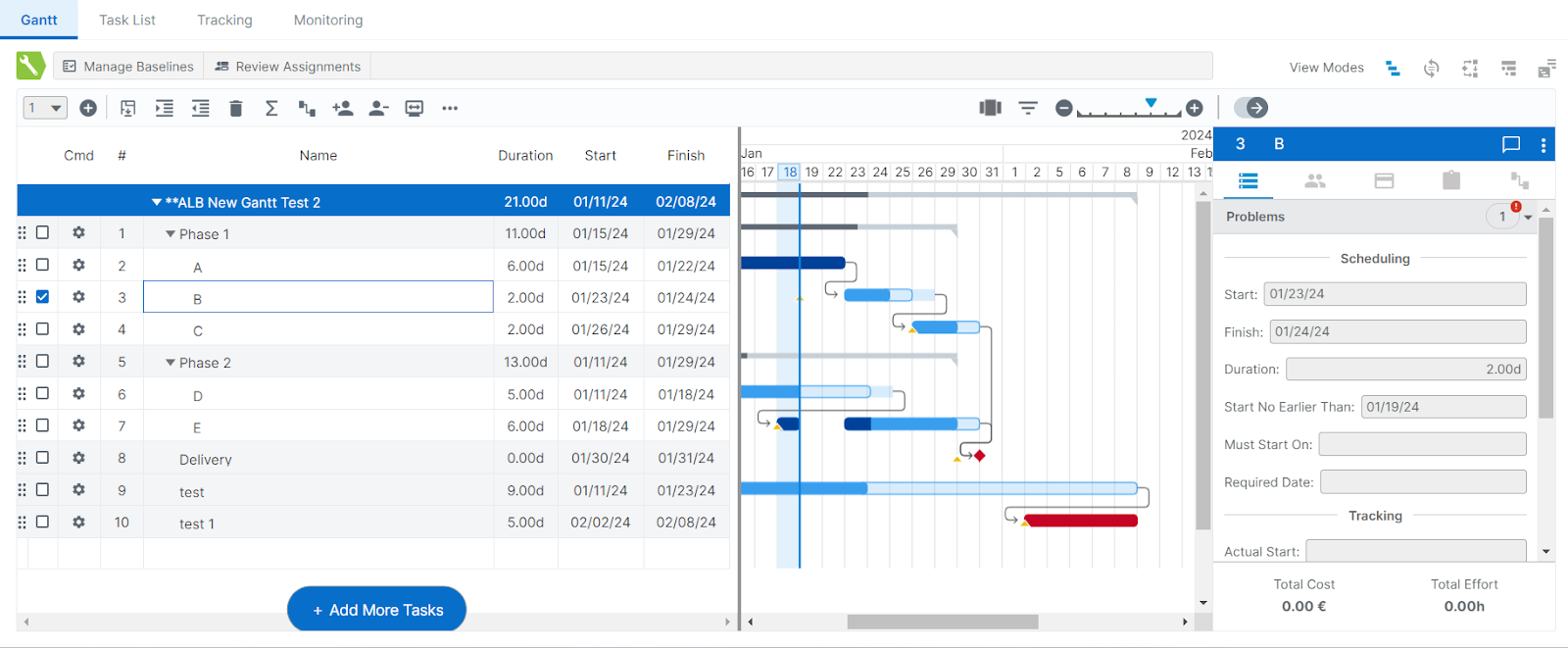
The behavior of the Gantt chart and spreadsheet available in the Work workspace, Gantt tab, has been changed so it is more intuitive and easier to use. In addition, the Gantt chart has been updated for a more modern look and feel. For more information, please refer to the New Gantt behavior & UI documentation available on the right handside of this view.
Object/Field Edits
#SCI-521
In the Resource Dashboards workspace, Team theme, Resource Capacity report, the Available Effort is now calculated based on the Resource’s Start Date and End Date defined in the Resource Brief dialog box.
Note: The End Date of a resource is now considered not worked, i.e. it corresponds to the day after the last date on which the resource currently is scheduled to be utilized for work.
Core Product Corrected Issues
Commands
#SCI-3155
In the Work workspace, Gantt tab, Manage Baselines dialog box, the baseline numbers available to save were still available although the corresponding baselines already existed. In addition, the corresponding baselines did not have a Saved Date. This issue has been fixed.
#SCI-2889
In the Corporate Data workspace, Resources tab, an error message was displayed when users were clicking on the “Create Resources from Users” ( ) button and the creation of resources from users was failing. This issue has been fixed.
Data Visualization
#SCI-3185
In certain scenarios, the Date fields popups were not correctly working. This issue has been fixed.
#SCI-3183
In the Corporate Data workspace, Resources tab, when users were clicking on the Hamburger ( ) button to edit the Resource’s Availability attributes, the “Date” and “Value” headers were not visible. This issue has been fixed.
#SCI-2464
In the Corporate Data workspace, Resources and Users tabs, when users were creating new resources/users, the “Organization” field was automatically and incoherently set in the New Resource/New User dialog box. This issue has been fixed; from now on, the selected Organization is the root Organization in the Organization tree.
#SCI-475
In the Portfolio Dashboards workspace, Project Monitoring theme, Status Overview report, when users were launching the report in a new browser tab, the context could be lost and the report be empty when the “Show Projects without Status Reports” option was activated. This issue has been fixed.
Legacy Timesheet
#SCI-3099
After upgrading to ProjectAdvantage version 2023.10, in the Timesheet workspace, the Actuals of Non-project tasks were reset to “8h”. This issue has been fixed.
#SCI-3091
In the Timesheet workspace, when users tried to modify the Actuals of any of the Non-project tasks, the values were reset to “8h”. This issue has been fixed.
Mobile Timesheets
#SCI-3083
When users were logging in on the ProjectAdvantage Mobile Application, the redirection to the app was sometimes not working (mostly on iOS). This issue has been fixed.
Object/Field Edits
#SCI-3158
In the Organization Center workspace, Capacity Forecasts tab, when the user was clicking on the “New” button, the last Organization in the Organization tree was automatically added. This issue has been fixed.
#SCI-2533
In the Work workspace, Gantt tab, Task Details dialog box, Cost Items folder, an error message was displayed when users were trying to modify any of the columns’ data while connected in Spanish. This issue has been fixed.
REST API
#SCI-2017
When the REST API was called, the response was incorrectly based on the “psnextadmin” user’s language settings. This issue has been fixed; from now on, English is set as the default language for all REST API calls.
Default Configuration Enhancements
Portfolio Dashboards
#MIL-4487
In the Portfolio Dashboards workspace, Analytics theme, Labor Assignments report, two new fields have been added: “Project Portfolio” and “Project Type”.

Project Scheduler
#MIL-4510
In the Work workspace, a new simplified view of the Gantt is now available from the Gantt Selection popup.

Default Configuration Corrected Issues
Connections
#MIL-4469
In the Home Page workspace, Connections tab, the "Delete Connection" option was not working if the selected project did not have any dependency to the source project. This issue has been fixed.
Dedicated Resources
#MIL-4506
In the Resources workspace, Dedicated Resources tab, when users were adding multiple dedicated resources at once, an error message was displayed and the dedicated resources could not be added. This issue has now been fixed.
Portfolio Center
#MIL-4499
In the Designer, Fields view, Portfolio Folder category, Formatting tab, when users were defining an alias for the “manager1”, “manager2” and “manager3” fields, the aliases were not taken into consideration in the Portfolio Center workspace, Home tab. This issue has been fixed.
Project Management
#MIL-4508
In the Work workspace, Gantt tab, when attempting to create a cost item assignment, the process could take a long time or even fail. This issue has been fixed.
#MIL-4490
In the Work workspace, Gantt tab, Task Details dialog box, Labor Assignments folder, when the user was creating a new soft assignment, the rate was not set according to the default rate defined in the Cost Item Assignment dialog box. This issue has been fixed.
Resource Allocations
#MIL-4358
In the Resource Allocations workspace, Resource Allocations full screen view, Hard Allocations tab, Resources Overview sub-tab, the “Display Projects” option was not working properly. This issue has been fixed.
#MIL-4325
In the Resources workspace, Project Allocations tab, Project Allocations full screen view, Allocations tab, Resource Details sub-tab, Resource Allocation Details view, when performing a quick assign on a hammock task, there was no indication that the allocated effort would not be respected (hammock tasks do not support non-uniform assignments). This issue has been fixed.
Resource Dashboards
#MIL-4440
In the Resource Dashboards workspace, Workload theme, Work Items report, Filters dialog box, Resource section, the “Job Classifications” filter had no impact on the report. This issue has been fixed.
System Requirements
There are frequent changes and additions to the set of specific versions of operating systems, application servers and database servers for which ProjectAdvantage has been tested and certified. Please contact our teams for the latest information in this area.
Servers
- Application Server: Apache Tomcat 9 with Oracle Java 8 or OpenJDK
- Data Server: PostgreSQL 12
HTML5 Clients
- Display resolution: 1366 x 768 (technical minimum), 1600 x 1050 (minimum recommended), 1920 x 1080 or higher (generally recommended).
- Minimum of 4GB RAM allocated (8GB recommended).
- Browser
- Microsoft Edge
- Microsoft Internet Explorer 10 or 11
- Google Chrome
- Mozilla Firefox
- Apple Safari
ProjectAdvantage Designer
- Display resolution: 1366 x 768
- Minimum of 4GB RAM allocated
- Disk space: 200MB minimum available for ProjectAdvantage.
- Oracle Java 8 or OpenJDK 8
- Operating Systems:
- Windows 7, 8.1, 10 or 11
- Mac OS X Lion or newer
- Alpine Linux 3.16.1
Timesheets Mobile Application
- Being hosted by ProjectAdvantage
- Product version: 2022.08 and upper versions
Vantage platform
For customers who subscribed only to Plan
- Installation:
- POD 11 is required if hosted by ProjectAdvantage
- An Hydra server is required if on premise
- Product version: 2023.01 and upper versions
For customers who subscribed to Plan and Deliver
- Installation:
- POD 11 is required if hosted by ProjectAdvantage
- An Hydra server is required if on premise
- HPV2 activated on Deliver modules (activated by default for all new Deliver Clients after 2021 Q3)
- Product version: 2023.01 and upper versions
- Users will need to allow third-party cookies in their browser
Limitations
The data connector does not work in load balanced environments.