



2023.11
This document describes the enhancements, corrected issues, and new features that have been implemented in Vantage, Deliver and in ProjectAdvantage 2023.11 both in the Core product and in the ProjectAdvantage Default Configuration.
ProjectAdvantage 2023.11 is a maintenance release of ProjectAdvantage 2023.
In Vantage, 4 issues have been fixed.
In Deliver, 6 enhancements have been implemented.
In the Core product, 5 enhancements have been implemented and 27 issues have been fixed.
In the ProjectAdvantage Default Configuration, 2 enhancements have been implemented and 5 issues have been fixed.
In order to access the different sections, please click on the following links:
- Important Reminders for upgrade
- Vantage Corrected Issues
- Deliver Enhancements
- Core Product Enhancements
- Core Product Corrected Issues
- Default Configuration Enhancements
- Default Configuration Corrected Issues
- System Requirements
Important Reminders for upgrade
- To improve the performance of views displaying the Health Score of multiple projects, we are now using a Health Score that is pre-calculated upon publishing a project as opposed to on the fly. Therefore, upon upgrading to 2021.03 (or higher), please make sure you run once the following Scheduled Job to initialize the project Health Score values: Initialize Project Static Health Score.
Important: For systems with an overwritten Publish command, please make sure to add the new dedicated Command List for the Health Score pre-calculation upon publishing a project: “Project - Publish Project - Continue - Capture Health Score”.
- From the 2023.01 version, to support the implementation of the new Vantage navigation and modules, the Project Dashboards workspace should be added again in the User Roles section of the Designer as the Dashboards workspace doesn't exist anymore.
Vantage Corrected Issues
Data Connector
#VAN-591
In the Work workspace, Project Administration dialog box, Team folder, when the user was adding new team members to the Project Team in Plan, the “Performing Resources” were not synchronized in Deliver. This issue has been fixed.
#VAN-551
In Deliver, users were not able to create activity logs for Deliverables and Change requests. This issue has been fixed.
Timesheet (built-in)
#VAN-529
In the Timesheet (built-in) workspace, Week view, users were not able to add their Actual Total Effort for the whole week. This issue has been fixed.
#VAN-153
An unexpected error message was displayed when the user was navigating to the Timesheet (built-in) workspace, after enabling certain options in the System Settings workspace, Resource Settings folder, Global Options tab. This issue has been fixed.
Deliver Enhancements
Deliver adopts ProjectAdvantage’s branding
The branding displayed by default in Deliver is now ProjectAdvantage’s branding. This change is visible through the logos displayed on the homepage, the module bar, as well as the browser favicon.

For users who have not yet personalized their instance’s homepage, banner, or module bar, this design will be displayed by default.
This brand image change is followed by several changes to the tool's user interface.
New module bar design
As shown in the screenshot above, the side navigation bar now benefits from a modernized design, in line with the design of other ProjectAdvantage tools.
Updated object model type icons
The colors of the object model type icons have changed to comply with the new ProjectAdvantage graphic chart, and two new object model types have been implemented to define the Boards and Cards:
- Deliverable
- Issue
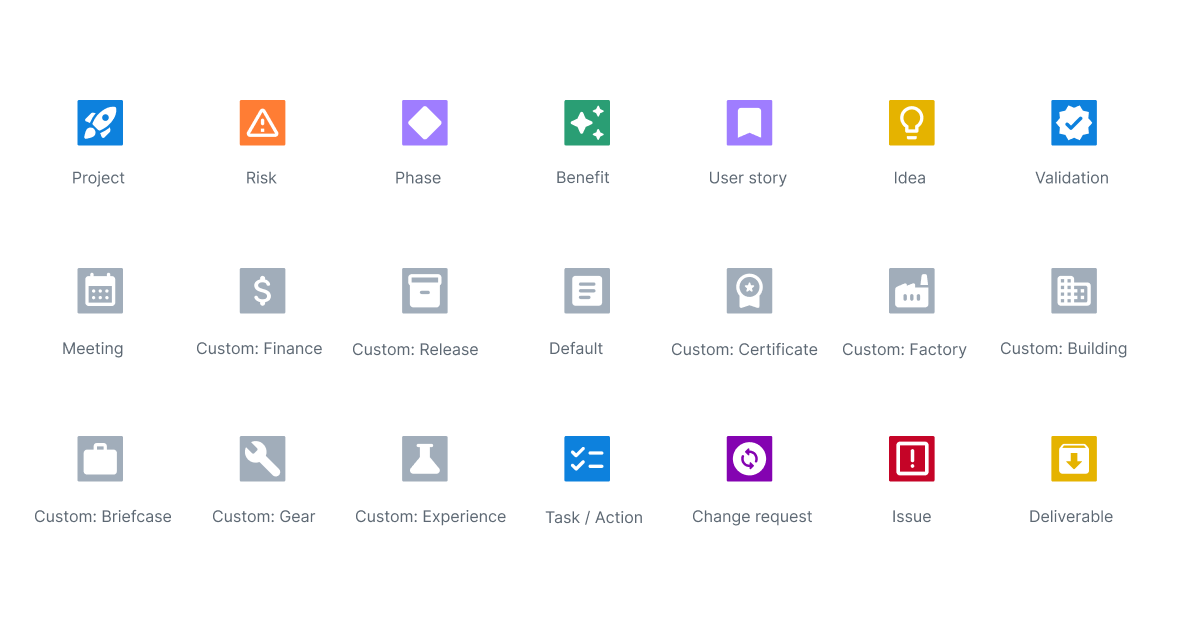
Previously, “Risk/Problem” was a single object model type, which is now split into two separate object model types, each with their own icon.
Minor interface updates
The drop-down menu arrow has a more uniform shape and the Slideboard columns’ background color is harmonized.

Tag colors update
In the context of graphic chart compliance, the tags’ colors have been updated. The 8 available colors are displayed below.

Tag management and creation remain identical; the only update refers to the colors.
Buttons update in cards
Cards header buttons now display a new look and feel, as shown below.

Core Product Enhancements
Authentication
#SCI-2963
On hosted environments, an automatic redirection to /projectadvantage will be performed when the base URL is called.
#SCI-2962
On hosted environments, all Tomcat stack traces have been removed.
Build
#SCI-3047
The Atomikos library, which manages the connections through the application, has now been upgraded to version 6.0.0.
Designer
#SCI-2976
In the Designer, Forms view, when users create a new General Object, the background color is now white and it has no border.

Performance
#SCI-3012
Several optimizations have been made when modifying built-in elements unrelated to projects. Consequently, updating a user, resource or persistent field (or setting) is now noticeably faster.
Core Product Corrected Issues
Build
#SCI-2845
Since ProjectAdvantage version 2023.07, users were not able to launch the Configuration Utility when no domains were available. This issue has been fixed.
Data Visualization
#SCI-3110
A cache issue could occur after receiving an error when creating a user. This issue has been fixed.
#SCI-2934
In the System Settings workspace, Project Settings folder, Time Tracking Options tab, when the user was connected in French or German, an unwanted scrollbar was displayed when the setting name was too long. This issue has been fixed.
#SCI-2903
In the Work Ranges REST API endpoint and Legacy API, it was possible to set a Finish Date earlier than the Start Date, which subsequently caused an error in the UI. This issue has been fixed; additional error messages have been added.
#SCI-2070
In the Resource Validation workspace, Timesheets tab, Timesheet Details full screen view, an error message was sometimes displayed when the user was performing random operations. This issue has been fixed.
Designer
#SCI-3053
A “NullPointerException” could occur when users were trying to open the Designer. This issue has been fixed.
#SCI-2958
In the Designer, User Roles view, an error could occur when a static report had the same name as a static report’s folder. This issue has been fixed.
#SCI-2949
In the System Settings workspace, Work Management Settings folder, Work Items tab, Actions section, the “Actions Closed Workflow States” field could not be edited after a new CFG file had been imported. This was due to the workflow state “Pick List” being empty in the Designer, Fields view, Fields tab, Global Category, User Defined sub-tab. This issue has been fixed.
#SCI-1709
In the Designer, Scheduled Jobs view, Execute Command Lists type, when users were executing the Scheduled Job “Send Email”, images were missing in the email received in Outlook. This issue has been fixed.
Execution
#SCI-2418
In the Calendar workspace, Day view, when users were clicking on any calendar cell to display the Edit Calendar dialog box then were leaving their screen inactive, the Session Timeout popup was displayed behind the dialog box. This issue has been fixed.
Import/Export CFG
#SCI-3018
An error message was sometimes displayed when users were trying to navigate to certain workspaces, even if they had the relevant access rights. This issue has been fixed.
#SCI-3017
Various errors were encountered when users were importing new CFG files. This issue has been fixed.
Object/Field Edits
#SCI-3088
In some cases, after receiving an error when creating a user, a dummy user was still present in the cache. This issue has been fixed.
#SCI-2955
In the Project Dashboards workspace, the “Launch” button was not working for custom reports. This issue has been fixed.
#SCI-2867
In some scenarios, the “Reorganize” functionality was not working properly. This issue has been fixed.
#SCI-2447
In the Timesheet workspace, when the user was using the arrow keys to move from one cell to another, the cursor was sometimes getting stuck, and several cells could concurrently be selected. This issue has been fixed.
REST API
#SCI-2981
In the Designer, Fields view, Fields tab, Project category, it was not possible to modify the “Performing Organizations” field. This issue has been fixed.
Scheduled Jobs
#SCI-3028
The “Update Project Permissions” Scheduled Job was regenerating the Exposed Fields at the Project level. This was not necessary as the regeneration was already part of the “Update Project Exposed Fields” Scheduled Job. This issue has been fixed, therefore allowing the “Update Project Permissions” Scheduled Job to be executed faster.
Security
#SCI-3016
The HighCharts version has been upgraded to version 11.2.0.
#SCI-2953
Several Dependencies libraries (gson, poi, hydra-client, log4j, jackson, jsoup, waffle, guava) have been updated within the application for security reasons. The Solr Search Server has also been removed as this deprecated feature was no longer used. Consequently, the “Documents” section and the Solr Server support have both been removed.
#SCI-2883
When users were trying to log in, different messages were displayed when the user did not exist and his credentials were invalid. This issue has been fixed; from now on, the same message will be displayed.
#SCI-2882
Whenever users’ passwords were changed, sessions were not expiring and no force logout was occurring. This issue has been fixed.
Timesheet (built-in)
#SCI-3013
In the Timesheet (built-in) workspace, projects that had previously been closed and published were still available for selection in the Add to Timesheet popup. This issue has been fixed.
#SCI-2982
In some specific dumps where the default configuration was not up to date, the Timesheet workspace was not loading. This issue has been fixed.
#SCI-2951
In the Timesheet (built-in) workspace, in some cases, when an assignment had already been created in the past, the “Add new tasks” functionality was not properly working. This issue has been fixed.
#SCI-2886
In the Timesheet (built-in) workspace, the project search was not working properly. This issue has been fixed.
#SCI-2576
In the HTML5 Client, an empty page was displayed when the user was navigating to the Timesheet (built-in) workspace, even though it was defined as “Default Workspace” in the Designer, User Roles view, Team Member user role, Workspaces tab. This issue has been fixed.
Default Configuration Enhancements
Resource Validation
#MIL-4314
The way timesheets are grouped by timesheet status now takes advantage of the new “Status Num” and “Summary Status Num” built-in fields to improve performance in the Resource Validation workspace, Timesheets tab.
Work Items
#MIL-4184
In the System Settings workspace, Work Management Settings folder, Work Items and Risks tabs, administrators can now define which Work Items’ or Risks’ Workflow States are considered as “Closed” when users activate the “Show Closed” option in the Work workspace, Work Items or Risks tabs, Work Items or Risks full screen view, as well as in the Work Items workspace, Work Items full screen view.


Default Configuration Corrected Issues
Execution
#MIL-4311
In the Work workspace, Tracking tab, some performance issues could occur when users were performing operations such as “Apply & Approve”. This issue has been fixed.
Note: The aforementioned behavior has been rolled out for all “Apply” mechanisms (“Apply Actuals”/”Apply Both”/”Apply Map”/”Apply Remaining”).
Portfolio Center
#MIL-4461
In the PMO Supervision workspace, Project Supervision tab, Filters dialog box, when the user was selecting one or several “Workflow State” filter(s), the selection was not correctly applied in the other reports under the same theme. This issue has been fixed.
Portfolio Dashboards
#MIL-4425
In the Project Dashboards workspace, Finance theme, Earned Value report, the “BCWP/EV” indicator’s value was different than in the Portfolio Dashboards workspace, Finance theme, Earned Value report. This issue has been fixed.
Resource Assignments
#MIL-4377
In the Work workspace, Gantt tab, Scheduler view mode, Task panel, Assignments tab, Assign Resources dialog box, the indicators displayed for each resource in the "Available Resources Remaining Capacity" section were incorrect when the resource had no remaining capacity. This issue has been fixed.
Work Items
#MIL-4439
In the Work workspace, Risks tab, Risk dialog box, when users were changing the Workflow State to “Closed”, the outcome popup displayed was still giving the option to “Create a Connected Issue” even if the “Enable Issues” setting had been deactivated in the System Settings workspace, Work Management Settings folder, Work Items tab, Issues section. This issue has been fixed.
System Requirements
There are frequent changes and additions to the set of specific versions of operating systems, application servers and database servers for which ProjectAdvantage has been tested and certified. Please contact our teams for the latest information in this area.
Servers
- Application Server: Apache Tomcat 9 with Oracle Java 8 or OpenJDK
- Data Server: PostgreSQL 12
HTML5 Clients
- Display resolution: 1366 x 768 (technical minimum), 1600 x 1050 (minimum recommended), 1920 x 1080 or higher (generally recommended).
- Minimum of 4GB RAM allocated (8GB recommended).
- Browser
- Microsoft Edge
- Microsoft Internet Explorer 10 or 11
- Google Chrome
- Mozilla Firefox
- Apple Safari
ProjectAdvantage Designer
- Display resolution: 1366 x 768
- Minimum of 4GB RAM allocated
- Disk space: 200MB minimum available for ProjectAdvantage.
- Oracle Java 8 or OpenJDK 8
- Operating Systems:
- Windows 7, 8.1, 10 or 11
- Mac OS X Lion or newer
- Alpine Linux 3.16.1
Timesheets Mobile Application
- Being hosted by ProjectAdvantage
- Product version: 2022.08 and upper versions
Vantage platform
For customers who subscribed only to Plan
- Installation:
- POD 11 is required if hosted by ProjectAdvantage
- An Hydra server is required if on premise
- Product version: 2023.01 and upper versions
For customers who subscribed to Plan and Deliver
- Installation:
- POD 11 is required if hosted by ProjectAdvantage
- An Hydra server is required if on premise
- HPV2 activated on Deliver modules (activated by default for all new Deliver Clients after 2021 Q3)
- Product version: 2023.01 and upper versions
- Users will need to allow third-party cookies in their browser
Limitations
The data connector does not work in load balanced environments.