Bulk Update Booking
Introduction
Bulk update Bookings to save time.
On bulk updating the Booking status or dates, Booking Requestors and the relevant Stakeholders will receive email notifications. This enables them to view the progress of their bookings.
Bookings can also be bulk updated from the Release. For more details, see Bulk Update Bookings.
Pre-requisite
You must have the View Release Bookings grid user permission to be able to access the Booking tab.
Navigation
Environment > Requests
Bulk Update Booking
To bulk update:
- Go to Environment > Requests.
- Click the Booking tab
- Search and select the booking requests you want to update using the filter options.
- Click
 .
. - Select Bulk Update.
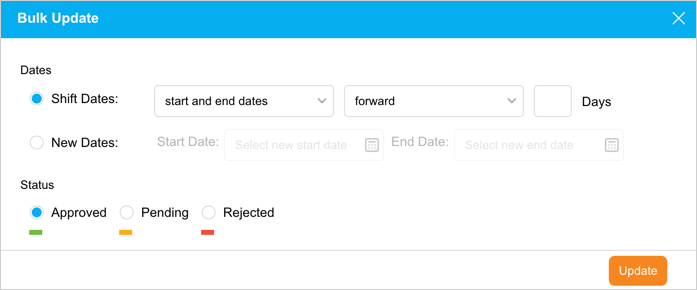
- The ‘Bulk Update’ pop-up opens. You can update the following details:
| Fields | Description |
|---|---|
| Dates | Choose one of the options:
|
| Status | Select an option. To approve My Environment Bookings you must have the ‘Approve Environment Allocation in Scheduler’ user permission. If the Environment’s System has an approver(s) selected (See Environment Booking Approvers), only that user can approve or reject the booking request. If no approver is selected, anyone with access to the Environment Requests page and above permission can approve or reject the request. |
- Click
 .
.
On bulk updating the Booking status or dates, Booking Requestors and the relevant Stakeholders will receive email notifications. This enables them to view the progress of their bookings.