Manage Deployment Plan Checkpoints
Introduction
The Checkpoints tab is available on Master Deployment plans and child Deployment Plans and is absent in independent Deployment Plans.
Early detection of critical problems allows for mitigation or timely rollback. A checkpoint is a point in time when users can answer multiple choice questions about dependent Deployment Plan statuses. Checkpoints allow users to define, schedule, and record leading questions that highlight risks to on-time completion.
Questions (which can only be answered in Execution mode) could relate to a particular milestone, such as ‘Are your databases ready for backup?’ or ‘Are you running on time?’. The Checkpoints tab is grayed out in new Master Deployment Plans until .png?revision=1) is clicked.
is clicked.
Pre-requisite
| Deployment Plan | User Permissions |
|---|---|
| Master Deployment Plan | Update Master Deployment Plan Add/Edit/Delete MDP Activities in Execution Mode Update MDP Activities Status |
| Child/Independent Deployment Plan | Update Deployment Plan Add/Edit/Delete DP Activities in Execution Mode Update DP Activities Status |
Navigation
Deployment > Manager
Access Checkpoints Tab
To access the ‘Checkpoints’ tab:
- Navigate to the ‘Deployment Plan Library’ page.
- Search for the plan. You can use the filter options available on this page.
- Open the plan by clicking on the Name.
- Click the Checkpoints tab.
The existing Checkpoints are displayed here. Click on a Checkpoint to view the information.
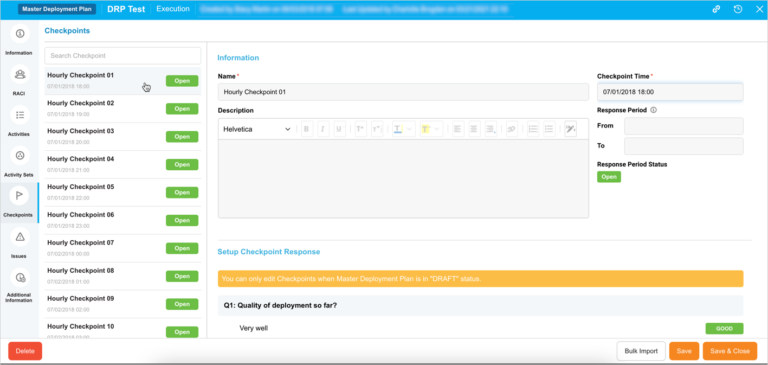
Add Checkpoint
You can add a Checkpoint only in the Draft status.
To add a Checkpoint click .png?revision=1) and fill in the following:
and fill in the following:
Information
| Fields | Description |
|---|---|
| Name | Mandatory; Enter the Checkpoint name. |
| Description | Provide Checkpoint description. |
| Checkpoint Time | Mandatory; This is the date and time to which the questions refer and is the most important part of the Checkpoint. |
| Response Period | Select a Response Period by selecting a date and time from From and To. The Response Period is the time when the multiple choice questions at the Checkpoint can be answered. If there is no Response Period, the questions can be answered until the Deployment Plan is marked as Complete. |
| Response Period Status | Shows whether the Response Period (as selected above) is in the future (Upcoming), current (Open), or in the past (Closed). |
Setup Checkpoint Response
- Click
 .
. - Add a question by clicking + New Question.
- Type the Question.
- Click Answers and type an answer to the question.
- Select the response type (N/A, good, bad, or issue).
- Click Enter Answer to add another answer.
Reorder answers by dragging them by the sort handle. Delete an answer by clicking the X.
Click .png?revision=1) .
.

Delete Checkpoint
You can delete Checkpoints only in the Draft status.
To delete, click the Checkpoint and then click  . The checkpoint will be deleted.
Edit Checkpoint
You can edit the Checkpoints Information and Questions only in the Draft status.
To edit, click the Checkpoint to display the Information and update the fields as required. For details, see the table above.
Duplicate Checkpoint
Save time by duplicating the Checkpoints. Select the Checkpoint and click  . The checkpoint will be duplicated along with its information and Questions. Update the duplicated Checkpoint as required.
Respond to Checkpoint Questions
You can respond to questions when both the Master Deployment Plan and its children are in Execution mode.
To respond, click on the Checkpoint and navigate to Questions and respond to it as the options available. Then click .
