Release System Deployment Status Customization
Release System Deployment Status customizes deployment statuses Pending, Completed and Rejected where they appear under the Systems tab in Project and Independent Releases.

Location of Release System Deployment Status
To locate Release System Deployment Status:
- Go to Release > Manager.
- Click the Releases toggle button (if present).

- Click to open a Release.
- Click the Systems tab.
- Click one of the Deployment Dates in the Code Implementation Dependency panel.
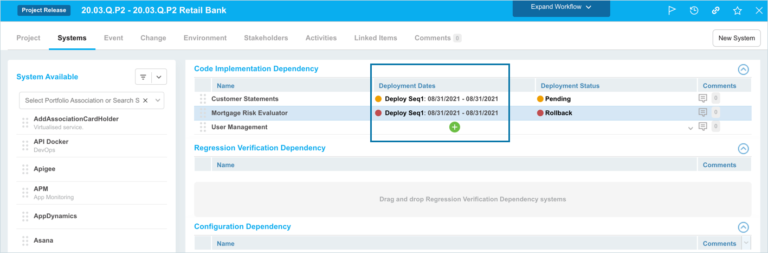
- Deployment Statuses are found under the Deployment Status column.

- Deployment Status Labels differ between the different kinds of Releases:
- Enterprise: This Release type is not affected by the customization.
- Endorsed.
- Pending.
- Project: This Release type is affected and you can customize the following:
- Pending.
- Completed.
- Independent: This Release type is affected and you can customize the following:
- Pending.
- Completed.
- Rejected.
- Enterprise: This Release type is not affected by the customization.
Customize the Release System Deployment Status
To customize a Release System Deployment Status:
- Go to Settings
 > Customization > Releases.
 - Click Release System Deployment Status.
- Click the radio button below the Deployment Status Label field.
- Type the new Deployment Status Label.
- Click Submit.
The yellow Your changes have been saved pop up opens and closes.
If you click away from the Customization page without clicking Submit, your changes will not save.
Use the Default Release System Deployment Status
To use a default Release System Deployment Status:
- Go to Settings> Customization > Releases.
- Click Release System Deployment Status.
- Click the radio button next to the default Deployment Status Label.
- Click Submit.
The yellow Your changes have been saved pop up opens and closes.
If you click away from the Customization page without clicking Submit, your changes will not save.