Manage Form Builder Permissions
TIP
See Quick Start Guide – Form Builder Customization for the context of this article. The previous article was 1f. Manage IM Form Builder Scripts and the next article is 1h. Manage Tabs, Sections, And Fields In IM Form Designer.
Administrators can use Form Builder permissions to manage the visibility of forms, tabs, and fields.
Permissions are User Role-based (as they are in the rest of Release & Verify). Forms and tabs can only be made visible or not visible. Fields can be made hidden, visible, or visible and editable.

1. Enable Form Builder Permissions
To enable permissions on an IM form:
- Go to Settings
 > Customization > Initiative Management (IM).
 - Click Form Builder.
- Click a blue-linked Form Title to edit a form in Form Designer.

- Click the Form Information menu button on the top-right corner of the form.

- Click to select the Allow Permission checkbox.

2. Manage Form Builder Permissions
TIP
Users will only see a form instance listed in the Form Instances grid if their User Role has form view permission for that form.
To manage Form Builder permissions:
- Click Set up permission.

- Set up User Role-based permissions:
- Click to select the User Roles tab (if it isn’t selected already).

- Click to select a User Role in the left-hand panel.

- Manage which User Roles have permission to view the Form:

- Click to select the eye
 checkbox to make the form visible to Users with the selected User Role.
 - The write
 permission checkbox cannot be selected.

- Click to select the eye
- Manage User Roles permissions for the form’s tabs:
- Click Tabs to open the tab list.

- Click to select the eye checkbox to make the tab visible to Users with the selected User Role.
- The write permission checkbox cannot be selected.
- Manage User Roles permissions for the form’s fields:
- Click Fields to open the fields list.

- Click to select the eye checkbox to make the tab visible to Users with the selected User Role.
- Click to select the write permission checkbox to make the field editable too.
TIP
If the write permission checkbox is selected but not the eye checkbox, the field will still be visible and editable.
Fields that are not visible or editable can be used by scripts.
- Click Fields to open the fields list.
- Click Tabs to open the tab list.
- Click to select the User Roles tab (if it isn’t selected already).
- Set up Field-Based Permissions:
TIP
Field-Based Permissions only manage the view and edit permissions for Select fields that have the Use existing Entity checkbox selected. For team-based select fields, the permissions extend to team members. For user-based select fields, the permissions extend to the users in the field, and so on.
- Click the Field-Based Permissions tab.
- Select the Select field name in the left-hand panel.
- Manage which field-based entities have permission to view the Form:

- Click to select the eye checkbox to make the form visible to Users with the selected field-based permission.
- The write permission checkbox cannot be selected.
- Click to select the eye
- Manage field-based permissions for the form’s tabs:
- Click Tabs to open the tab list.

- Click to select the eye checkbox to make the tab visible to the selected field-based entities.
- The write permission checkbox cannot be selected.
- Click Tabs to open the tab list.
- Manage field-based permissions for the form’s fields:
- Click Fields to open the fields list.
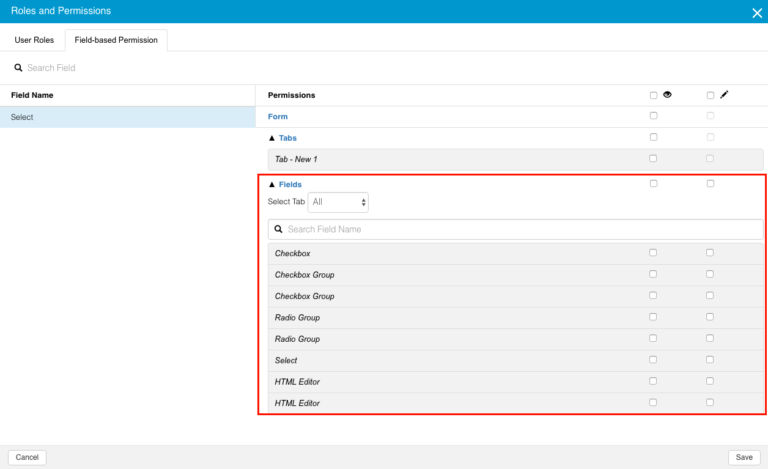
- Click to select the eye checkbox to make the tab visible to the selected field-based entities.
- Click to select the write permission checkbox to make the field editable too.
TIP
If the write permission checkbox is selected but not the eye checkbox, the field will still be visible and editable.
- Fields that are not visible or editable can be used by scripts.
- Click Fields to open the fields list.