Environment Stack Layer Customization
Introduction
Environment Stack Layers are selected when adding a new Layer while adding or editing an Environment.
Pre-requisite
To be able to add and customize Environment Stack Layer, you must have ‘Access Customizations’ User Permission.
Navigation
Settings .png?revision=1) > Customization > Environments > Environment Stack Layer
> Customization > Environments > Environment Stack Layer
Add/Edit an Environment Stack Layer
To add/edit an Environment Stack Layer:
- Navigate to ‘Customization’ page and click Environments.
- Click Environment Stack Layer.
- Click
.png?revision=1) . The system adds a line on the grid for the new field. To edit an existing value, search and click on the value from the grid and then click
. The system adds a line on the grid for the new field. To edit an existing value, search and click on the value from the grid and then click .png?revision=1) .
. - Enter/update the Environment Stack Layer item into the Value field.
- Click
.png?revision=1) .
.

Your changes will be saved and a confirmation message will display.
Sort Environment Stack Layers
Sort Manually
Sorting ‘Environment Stack Layers’ manually changes their order in the drop down menus
To sort manually:
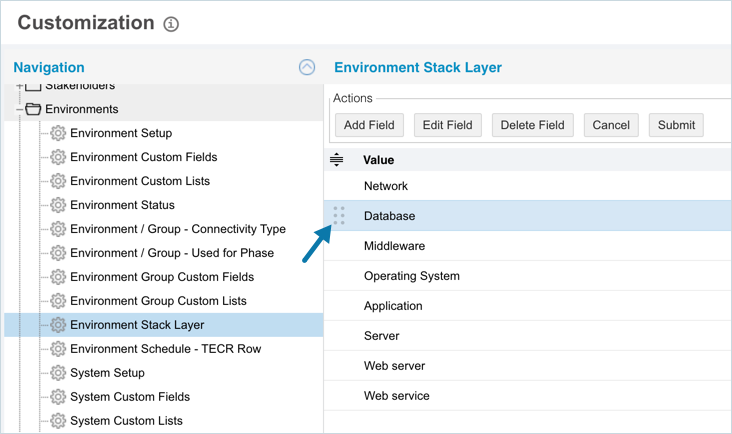
- On the ‘Customization’ page, navigate to Environments > Environment Stack Layer.
- Hover your mouse cursor over the sort column of the Value that you want to sort.
.png?revision=1) appears.
appears. - Drag and drop the Value as you require.
- Click .
NOTE
Refresh your browser to sort manually after sorting alphabetically.
Sort by Column Header
Sorting by column header only changes their order on the ‘Customization’ page.
To sort alphabetically on the ‘Customization’ page by column header, click on the column header. ↑ or ↓ displays indicating the ascending or descending column sort.

Delete/Replace Environment Stack Layer
Deleting an Environment Stack Layers will not delete it from Environment records. But it will no longer be available when adding or editing an Environment.
While deleting, you can either select another item that will replace the item to be deleted or simply delete the item from the list. Replacing an item will replace it in existing records.
To delete or replace an Environment Stack Layer:
- Navigate to the ‘Customization’ page and double click Environments.
- Click Environment Stack Layer.
- Select the stack layer that you want to delete or replace.
- Click
.png?revision=1) .
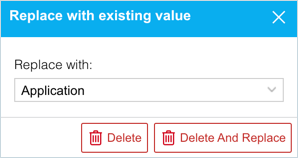
. - The ‘Replace with existing value’ dialog displays.
- To replace: select the item that will replace the item to be deleted from Replace with. Then click
.png?revision=1) .
. - To simply delete the item, click
.png?revision=1) .
.
- To replace: select the item that will replace the item to be deleted from Replace with. Then click
The item is now deleted and the page navigates back to the ‘Customization’ page.
More Information
Location of Environment Stack Layer
- Go to Environment > Manager then open an Environment.
- Select a Stack Layer when adding a Layer to a Host.
