Resource Planning Mode (project vs task)
PPM Pro supports Project-based (formerly "top-down") and Task-based (formerly bottom-up) resource planning modes. You set the mode when you create a project. Once the project is created, the current setting is displayed in the Settings section of the project view. If you need to change the mode after project creation, you do so from the Re-Plan wizard in the Staffing screen.
Implications of switching resource planning modes
When you switch from project-based to task-based planning, any allocations you have made on the Staffing screen will be removed. New resource allocations will be automatically created based on the underlying resource assignments to tasks; these allocations will be read only.
When you switch from task-based to project-based planning, you can manage resource allocations from the staffing screen. Once in project mode, you must allocate resources before you can assign task schedules.
To change planning mode for the current project
- Navigate to the Staffing screen for the project you wish to re-configure.
- Click the Re-plan button.
The Re-plan dialog appears.
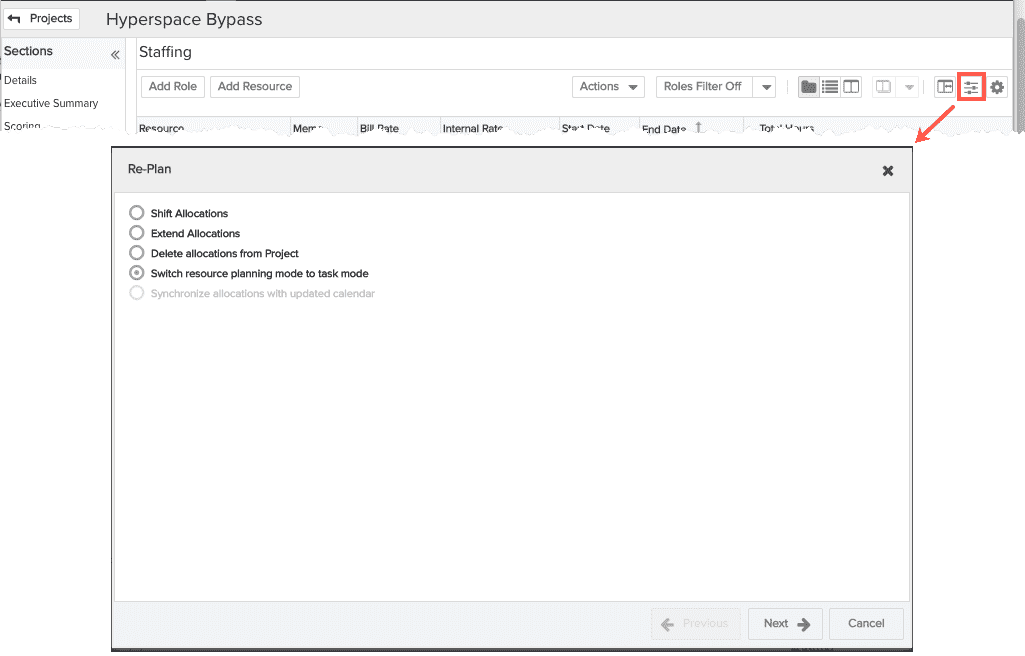
- Click the appropriate radio button. If you are currently in Task mode, then you will see "Switch resource planning mode to project mode". If you are currently in Project mode, you will see "Switch resource planning mode to task mode".
- Click Next.
An informational screen describes what happens as a result of the switch.

- Click Next (or Cancel to abort the switch).
You will be prompted to create a baseline before executing the planning mode switch. Click the appropriate radio button, then click Re-Plan.
There will be a couple of status messages, then you will see "Project planning switch complete. Click Close".