Idea Team Members Feature Administration
Introduction
The Idea Team Member feature can be enabled on the Idea Home Page, promoting a collaborative environment and adding additional functionality and graduation abilities. Idea Team members are automatically set up to follow the idea and receive email notifications when comments, votes, and other idea-related activities occur.
How it Works
Having others on your Idea Team reviewing your idea increases its potential value, as more people can collaborate, help develop, and promote your idea. In some cases, the community administrator might require that an idea has team members before graduating to the next stage. Additionally, Idea Team Members added through the widget can gain additional permissions, such as idea editing.
As an idea owner, you can choose to invite users to be team members for your idea. Moreover, other users can request to become a team member for your idea. Additionally, if you created the idea, you can decide how to structure your stock offering.
How to Create Idea Teams
Users can leverage the Team Member widget to recruit a team or request to be a team member. Notifications are sent to the IdeaPlace Inbox and the user's email address.
- Navigate to Administration > Display & Branding > Site Editor.
- Find the ViewIdea page on the left side of the page, select it.
- Add the ideahome_teammembers widget (Team Members widget) to the right column of the Content/Widgets tab.
- Navigate to the Idea Home page and the widget will appear.
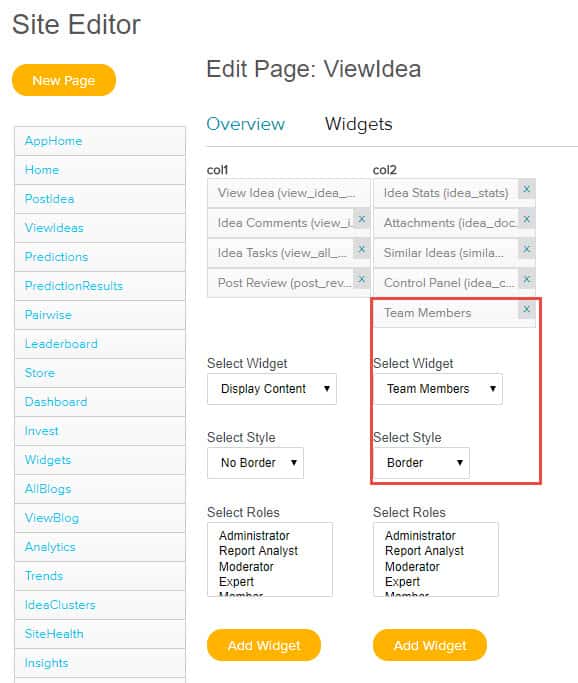
Fig 1: Site Editor Configuration
By selecting the checkbox for Display Join the Team on the Aministration > Idea Management > Idea Settings page, the feature is enabled.

Fig 2: Display Join the Team checkbox must be selected to enable this feature
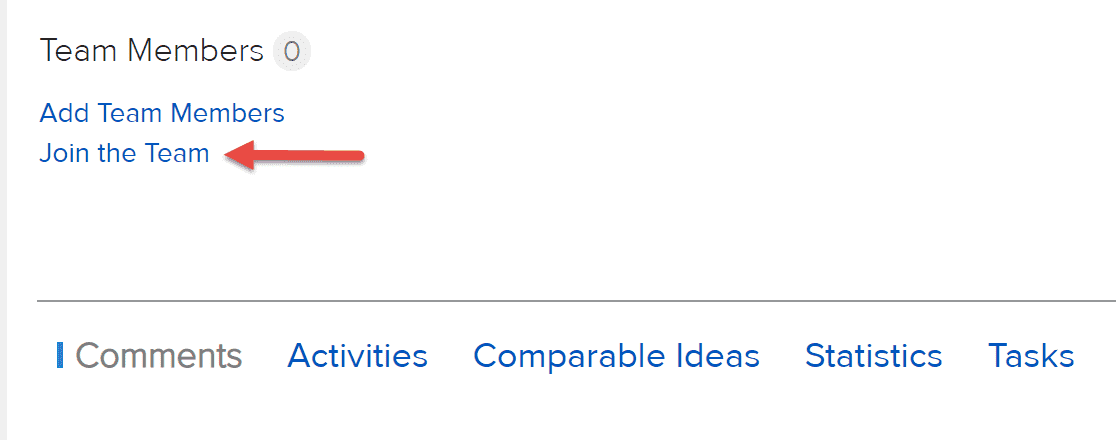
Fig 3: Join the Team feature has been added to the View Idea page
NOTE
The Idea Team Member dropdown on the old challenge home page (AppHome) has a 10-person limit.