Searching the Changepoint documentation
You can search either the help or the guide PDFs. There are different reasons why you might use one type of search over the other.
Searching the online help
Changepoint help is available the Help link. Changepoint Administration help is available only if you have at least one administration security feature.
Searching the help provides results that are similar to searching for information on the Internet in that the searches are based on the individual words in your search criteria. The help searches the roots of words so therefore if you search for “invoicing”, the help search results include matches for “invoice”, “invoices” and “invoicing”.
To search for an exact phrase, you can enclose your search text in quotation marks. For example, you can search for “creating invoices”. Note that searching like this provides only the exact matches, which reduces the number of matches. Also keep in mind that this type of search works most effectively if you know the exact phrase that exists in the documentation.
Searching the guide PDFs
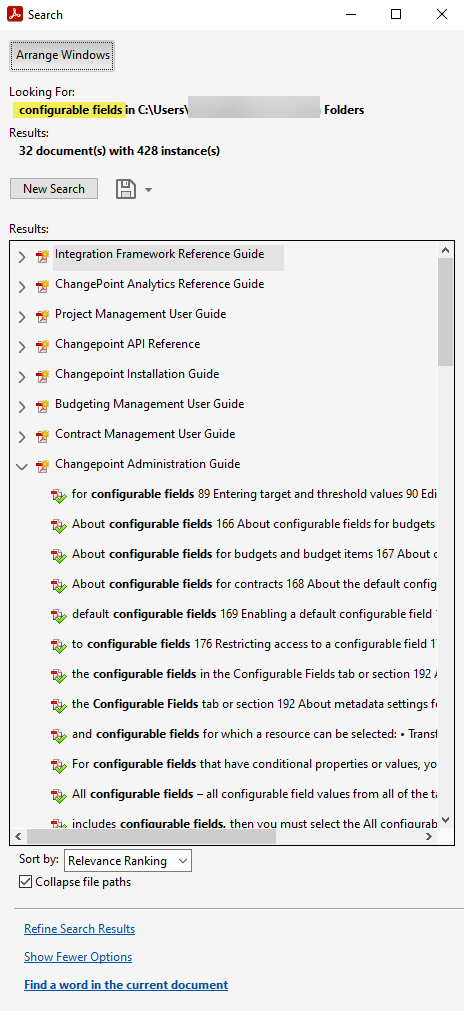
Using Adobe Acrobat Reader, you can search in an individual PDF, or you can search all of the PDFs that are in the same folder at once.
We recommend that you put all of the Changepoint guide PDFs for a given release into the same folder.
Searching multiple PDFs works best for when you do not know which guide the information is in, and/or when the information is distributed over multiple guides. The trick is figuring out the search text that is specific enough to provide results, but not too specific to rule out potential results.
To search one or more PDFs
- To search multiple PDFs, put all of the PDFs into the same folder.
- Using Acrobat Reader, open the PDF.
- Press Ctrl + Shift + F to open the search pane.
- To search PDFs in a folder, select All PDF Documents in and then click the My Documents drop-down to browse for the folder.
- Enter the search word or phrase.
- Select the other search options.
- Click Search. The search results include the guide that the match is found in and a short excerpt of the matching text.