Concept and Financial Data fields
Concepts and Data Fields Used in Financial Planning
Explore financial concepts and their application to Financial Planning in AdaptiveWork.
The Fundamental Four fields (Budgeted Cost, Expected Revenue, Actual Cost, and Actual Revenue) serve as the foundation of Financial Plans for your projects in AdaptiveWork. Balancing these fields allows you to plan for profitability and effectively manage performance against your plans.
Note: If you’re not running billable projects, use Expected Revenue to track monetary benefits. You can also rename the fields to align with your organization's terminology.
The Fundamental Four fields (highlighted) can be set manually but are otherwise calculated automatically based on hourly rates. Additionally, Labor and Non-Labor Resources include an Expense Type field (Capex and Opex), which works in conjunction with the following fields:
|
PLAN |
ACTUAL |
|
Budget Cost Opex |
Actual Cost Opex |
|
Budget Cost Capex |
Actual Cost Capex |
|
Budget Cost Labor |
Actual Cost Labor |
|
Budget Cost Non-Labor |
Actual Cost Non-Labor |
Top Down and Bottom Up Planning
Depending on how you work, the methods below will define how you work with Financial Planning.
Top-Down
- Budgeted Amount - A top-down currency amount, not time-phased. Use this to record the total contract amount or funding amount of a Project.
- Budgeted Work - A top-down duration amount, not time-phased. Use this to record total sold hours. Does not drive any calculations.
Bottom-Up
- Work - A roll-up duration amount reflecting planned effort. Can be time-phased with Resource Planning.
- Budgeted Cost - A roll-up duration amount reflecting the planned effort * hourly rates. Can be time-phased with Financial Planning.
Track the Amount between what was budgeted (sold) vs your work plan costs with:
Budget Variance = Budgeted Amount – Budgeted Cost (“Contingency” or “Buffer”)
Fixed Cost and Fixed Price Items
All Work Items in AdaptiveWork can have a Fixed Cost or Fixed Price that overrides Budgeted Cost and Expected Revenue respectively.

Limitations
- Fixed Cost, Manually-Set: Budgeted Cost, Expected Revenue, Actual Cost & Actual Revenue amounts set on work items can not be time-phased and are not displayed in the Financial Planning view. Amounts cannot be divided into Labor/Non-Labor and Capex/Opex.
- Work Item Direct Planned Expenses & Direct Planned Billed Expenses are not time-phased and are not displayed in the Financial Planning view. Amounts cannot be divided into Labor/Non-Labor and Capex/Opex.
Best Practices
- Fixed Price and Fixed Price Milestone projects and can be managed using the Billing Type field - read more about Billing Types
- Unless you are setting the Fixed Costs & Direct Planned Expenses via an integration (for example, Salesforce), plan to retire these fields, remove them from profiles and layouts and migrate users to the more accurate Financial Planning.
- Use Non-Labor to capture time-phased budget (plan) and actual amounts.
- Use Validation rules to prevent manually-set Budgeted & Actual cost values that block time-phasing.
Labor Budget: Standard Rates and Labor Calculation
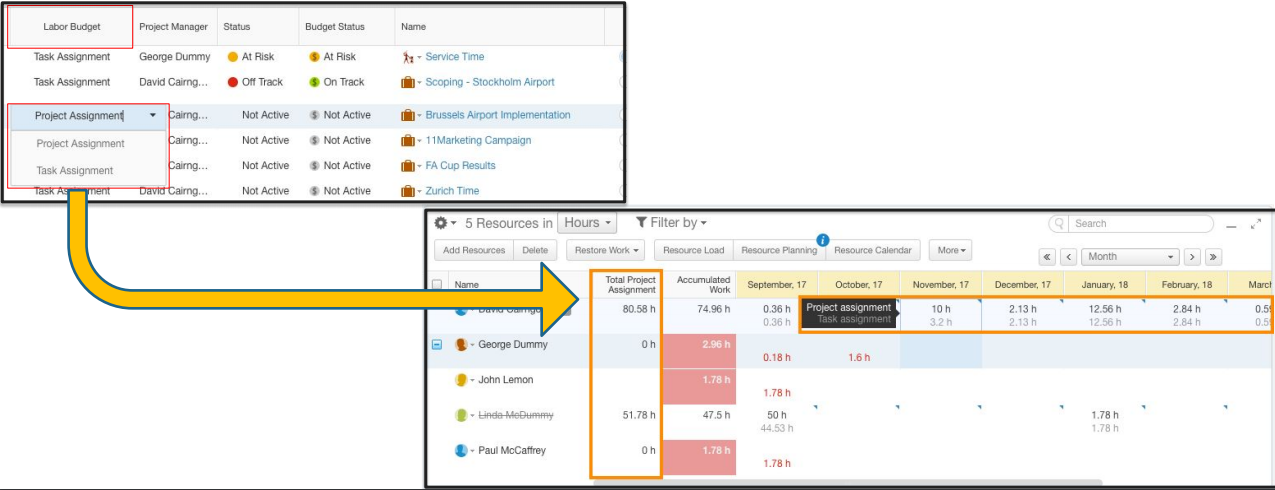
A Project’s Labor Budget setting offers an additional option for Labor Budget Costing:
- Task Assignment will calculate Labor Budget based on Work * User Hourly Rates
- Project Assignment will calculate Labor Budget based on Total Project Assignment * User Rates
Non-Labor Resources (NLRs)
Non-Labor Resources lets you maintain consistency of common project non-labor resources across the organization. At this point, NLRs do not contain cost or pricing information, though these can be easily added with custom fields, as needed.
Categorization of project costs as Capital Expense (Capex) varies by industry and jurisdiction.
Generally, only internal projects can be capitalized. Consult your Finance team to verify.
Default Categories
- Hardware
- Software
- External Consultant
- Materials
- Travel
- Other
NLRs can be defined on the organization level and managed in Work Item lists as well as from within the Financial Planning view.
Getting Started
Administrators
As an administrator, you must enable and set up some system settings in AdaptiveWork. See Setting Up Financial Planning.
Project Managers and Project Controllers
Plan and track your financials. See Working with Financial Planning.
What happens if I change the Billing Type?
When generating a budget and price for a project proposal, you might not yet have finalized the commercial framework for billing, so you can change Billing Type after project creation.
When you change Billing Type, make sure to refresh Financial time-phase data from a Financial Planning view, which will trigger immediate regeneration of the revenue forecast.
What happens if I reschedule Fixed Price work items?
If you reschedule a Fixed Price work item, when you refresh the financial data, the fixed price amount will automatically shift as Budget Revenue & Forecast Revenue into the month of the Work Item’s Due Date.
What happens if I set Budget Revenue in Financial Planning?
If you set Budget Revenues in Financial Planning for Fixed Price or Fixed Price Milestone projects, we will not include the entered amounts in project revenue calculations, but they will not be deleted.
Configuration
You cannot create Fixed Price Items time-phase data using configuration, as it is generated automatically by the system for Work Items with Fixed Prices.
You cannot reschedule Fixed Price Item time-phase data with configuration, it will reschedule automatically with its Work Item’s Due Date (work items can be rescheduled with configuration).