API Keys Support
API keys can be used to authenticate the users behind the applications making API calls to AdaptiveWork. Access keys simplify the management of these users and their applications, which include custom integrations and cloud-based services, such as SCIM-based user provisioning.
Using API keys instead of username and password credentials provides the following advantages:
-
Improved user authentication and management, so less maintenance and effort for admins:
-
More visibility and control for admins with dedicated system settings.
-
API keys have later expiration dates (1 year).
-
Secondary key for easy refreshing and continuous service.
-
-
Enhanced security - User credentials are not saved locally
Administrator Setup
To begin generating API keys, an administrator must designate a user as an integration user.
To designate an integration user:
- Designate an integration user by enabling the Integration User setting in that user's Global Settings.
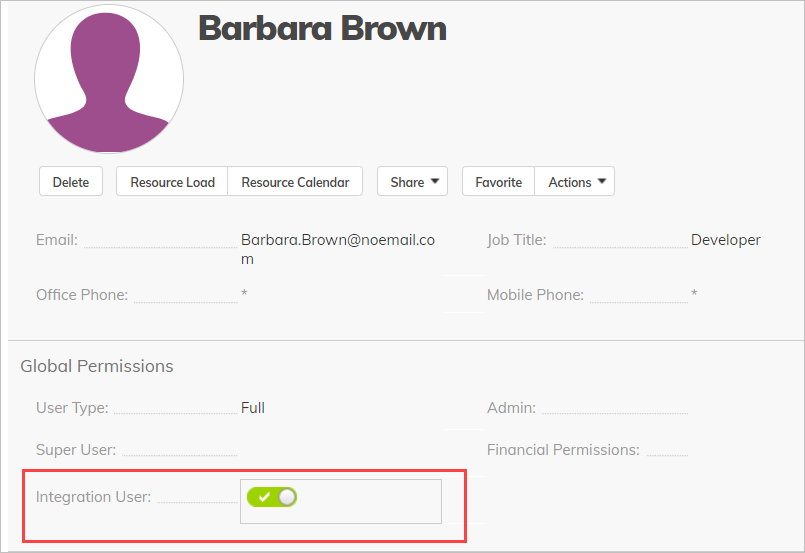
NOTE
We recommend that you create a unique integration user for each third-party integration. Integration users should not be administrators but should have at least Lite Admin permissions.
Managing API Keys
Once you have an integration user, that user can begin generating API keys.
To generate API keys:
- If you are the integration user, go to Personal Settings > Integration Settings and click Manage API Keys.
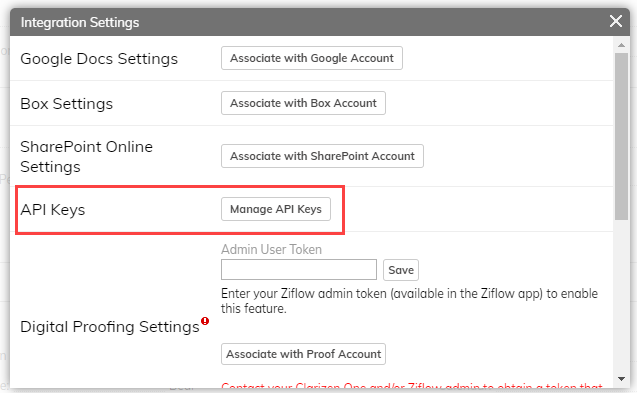
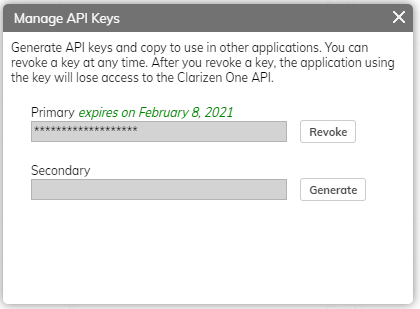
- Click Generate next to Primary. This creates a key and copies it to your clipboard, and you can paste the key in your third-party integration app. You can optionally generate a secondary key.
TIP
You can create a key rotation cycle by staggering the creation of primary and secondary keys. By generating an initial primary key and then creating a secondary key at a later time, the secondary key will still be valid and immediately usable when the primary key expires. You can then regenerate the primary key.
This key rotation strategy is considered a best practice to minimize potential downtime and ensure continuity in case a key becomes compromised.
NOTE
Once the window is closed, you cannot copy the keys you generated.
Once the keys are generated, you can click Manage API Keys to view when a key is going to expire or when a key expired.
Terminating API Access
There are mulitple methods to revoke API Keys. The methods you can use will depend on your user role.
To revoke an API key as an integration user:
- Go to Personal Settings > Integration Settings and click Manage API Keys.
- Click Revoke next to the key you want to revoke.
To revoke API keys as an administrator:
- Navigate to the integration user's Global Settings.
- Disable Integration User.
This revokes that user's API keys. You can also suspend or delete the Integration user. This will delete any API Keys used by that user.
Using the API keys
You can use API keys by:
- Using a dedicated interface to store the API keys in your third-party app or by modifying the authorization header of API calls
- In all cases, for an API Key to work properly, a third-party application must pass a new “ApiKey” (case insensitive) attribute in the authorization header with the actual generated JWT key appended to it:
ApiKey [key]